AI Overviews took my clicks? What to check and what to do
Clicks down but impressions steady? Here is how to tell whether AI Overviews are the cause, using Search Console, and what to change if they are.

On this page (10 sections)
- 1Do AI Overviews really reduce clicks?
- 2How to see AI Overview and AI Mode impressions in Search Console
- 3Step one: rule out the usual causes of a drop
- 4What we found when we compared Google's guidance with the click studies
- 5A 15-minute checklist to diagnose the drop
- 6What to do if AI Overviews are the cause
- 7How to tell whether your changes are working
- 8Should you opt out of AI features?
- 9Where to go from here
- 10Sources
If your organic clicks have dropped while your rankings look fine, Google's AI Overviews are a likely suspect, but not the only one. This post shows how to confirm an AI Overviews traffic drop in Search Console, how to rule out the usual alternatives, and what to change if AI summaries really are taking your clicks.
Do AI Overviews really reduce clicks?
Yes, on the evidence available. The clearest independent data comes from Pew Research Center, which tracked the browsing of 900 US adults in March 2025.
When a Google results page showed an AI summary, users clicked a traditional search result on 8% of visits. When no summary appeared, they clicked on 15% of visits. Links inside the summary itself were clicked on only about 1% of visits, and pages with a summary ended the browsing session 26% of the time, against 16% without one. About 18% of the searches in the study produced an AI summary.
Ahrefs' updated study, using Search Console data from December 2025, found the presence of an AI Overview correlated with a 58% lower average click-through rate for the top-ranking page. That is a correlation across a large keyword set, not proof for your site, and Google has disputed such findings. Treat both studies as a reason to check, not as your own numbers.
AI assistant answer with citations
How to see AI Overview and AI Mode impressions in Search Console
Use the generative AI performance report. Google announced it in June 2026 for a subset of sites, and the Search Console Help page says it reached all websites worldwide on 31 August 2026.
The report shows impressions your pages earned inside generative AI features on Google Search, including AI Overviews and AI Mode. You can break the data down by page, country, device and date. If the report is missing for your property, Google says that usually means your site has not had enough impressions in these features yet. Our guide to the Search Console generative AI report explains what it counts, what it leaves out and how to set a page-level baseline.
Two other points matter when you read your numbers:
- According to Google's AI features documentation, traffic from AI Overviews and AI Mode is also included in the main Performance report under the "Web" search type. So your overall totals already contain it.
- The same report family now has a separate Discover version, so do not mix Discover AI impressions into a Search analysis.
Step one: rule out the usual causes of a drop
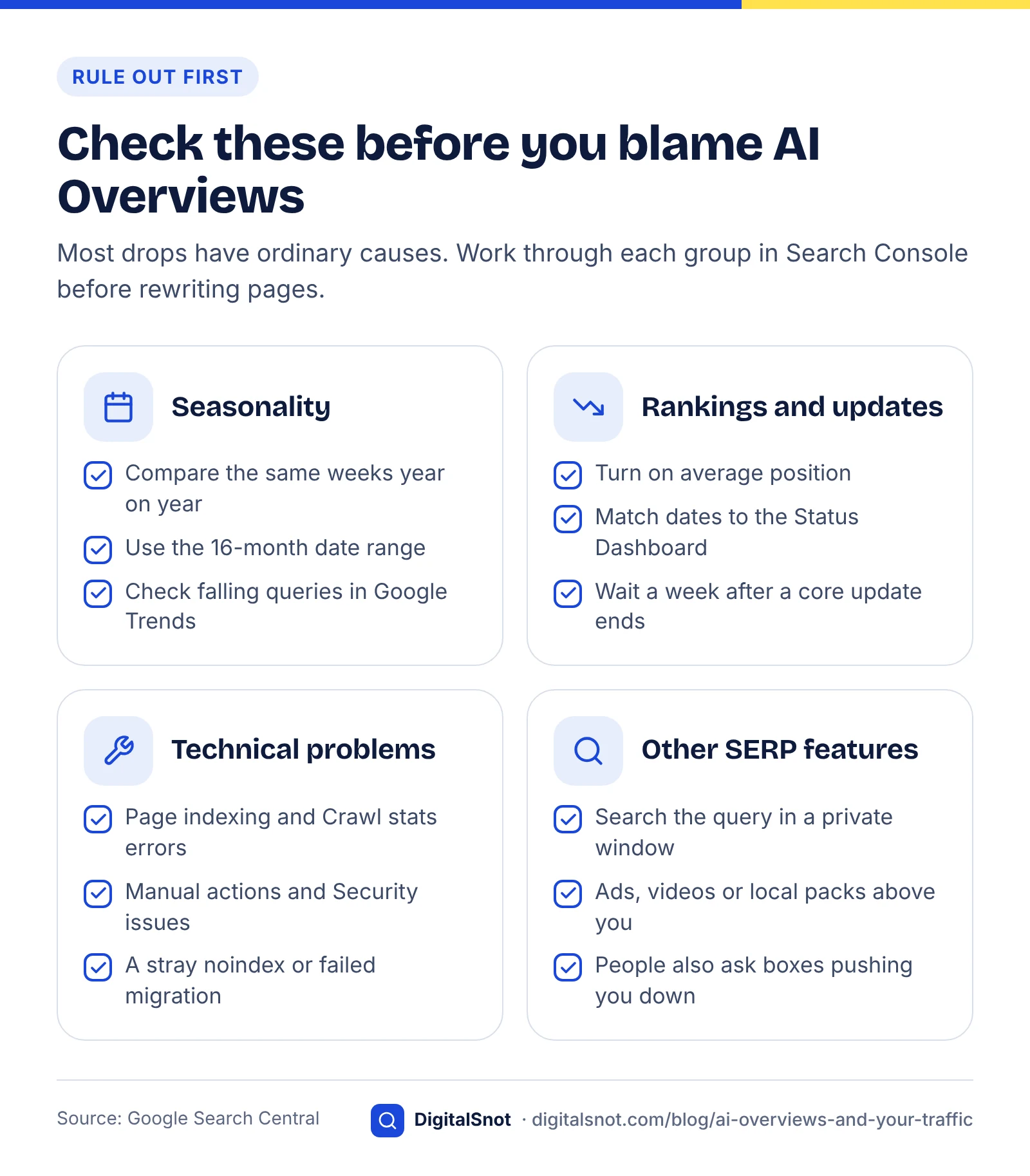
Most traffic drops have ordinary explanations, so check those first. Google's own guide to debugging Search traffic drops groups causes into technical issues, algorithmic updates, security or spam problems, seasonality and wider changes in search interest.
Seasonality
Set the Performance report date range to the last 16 months and compare the same weeks year on year. Then take your top falling queries one at a time into Google Trends. If interest fell everywhere, the problem is demand, not AI.
Ranking changes and updates
Turn on average position alongside clicks and impressions. If position fell, you have a ranking problem. Check the dates against the Google Search Status Dashboard, which lists core and spam updates. Google advises waiting at least a full week after a core update finishes before comparing the week after with the week before. If the drop lines up with a core update, our core update recovery guide shows how to measure it and which pages to fix.
Technical problems
Look at the Page indexing and Crawl stats reports for spikes in errors, and check Manual actions and Security issues. A stray noindex tag or a failed migration can look exactly like an "AI" drop. Our technical SEO audit checklist covers these checks in order.
Other SERP features
Search the affected queries yourself in a private window. Ads, video carousels, local packs and "People also ask" boxes can push you down the page without your position number changing much.
Monthly results report
What we found when we compared Google's guidance with the click studies
We read Google's traffic-drop guide, its AI features page and the Search Console help for the generative AI report side by side with the Pew and Ahrefs findings, and turned them into one diagnosis table. The idea is simple: the combination of impressions, clicks and position tells you which cause is most likely. You can repeat this in ten minutes with a 28-day comparison against the same period last year.
| Impressions | Clicks | Average position | Most likely cause | Check next |
|---|---|---|---|---|
| Steady or up | Down | Steady | AI summaries or other SERP features answering the query | Generative AI report; search the query yourself |
| Down | Down | Down | Ranking loss, often after an update | Status Dashboard dates; competing pages |
| Down | Down | Steady | Lower demand or seasonality | 16-month view; Google Trends |
| Sharp fall on many pages at once | Sharp fall | Missing data | Technical or indexing problem | Page indexing, Crawl stats, Manual actions |
| Steady | Down | Steady, one page only | Weak title or snippet | Rewrite the title and meta description |
The first row is the AI pattern. Google's own guide notes that steady impressions with falling clicks can also mean a weak title and snippet, which is why the last row exists. Confirm with the generative AI report: if the pages losing clicks are the same pages gaining AI impressions, you have your answer.
A 15-minute checklist to diagnose the drop
Work through these steps in order and write down what you find at each one.
- Compare the last 28 days with the same 28 days last year in the Performance report, with clicks, impressions, CTR and position all switched on.
- Rule out seasonality with the 16-month view and Google Trends.
- Match any drop dates against core or spam updates on the Status Dashboard.
- Check Page indexing, Crawl stats, Manual actions and Security issues for errors.
- Open the generative AI performance report and list the pages with the most AI impressions.
- Cross-check those pages against the pages that lost clicks, then search their main queries yourself.
Diagnose a traffic drop in six checks
What to do if AI Overviews are the cause
Content plan and article outline
You cannot switch AI summaries off for other people's searches, but you can change what your pages offer. The aim is to be the page a summary cites and the page people still need to visit.
Write answer-first content
Open each section with a direct, one or two sentence answer, then add the detail. Clear, self-contained answers are easier for AI systems to quote with a link. Our guide on how to get cited in AI search explains the structure in more depth. Our free AI Extractability Checker scores how easily AI answers can lift passages from a page.
Publish data only you have
A summary can restate a definition, but it cannot replace your pricing calculator, your survey results or your step-by-step tool. Pages built on original information give readers a reason to click through.
Build brand demand
People who search for you by name are less exposed to generic AI answers. Consistent mentions across reviews, directories and industry sites also help AI tools recognise your business, as covered in how ChatGPT recommends businesses.
Spread your channels
Email lists, YouTube, LinkedIn and your Google Business Profile all bring visitors who never meet an AI Overview. Do not rely on one source of traffic.
How to tell whether your changes are working
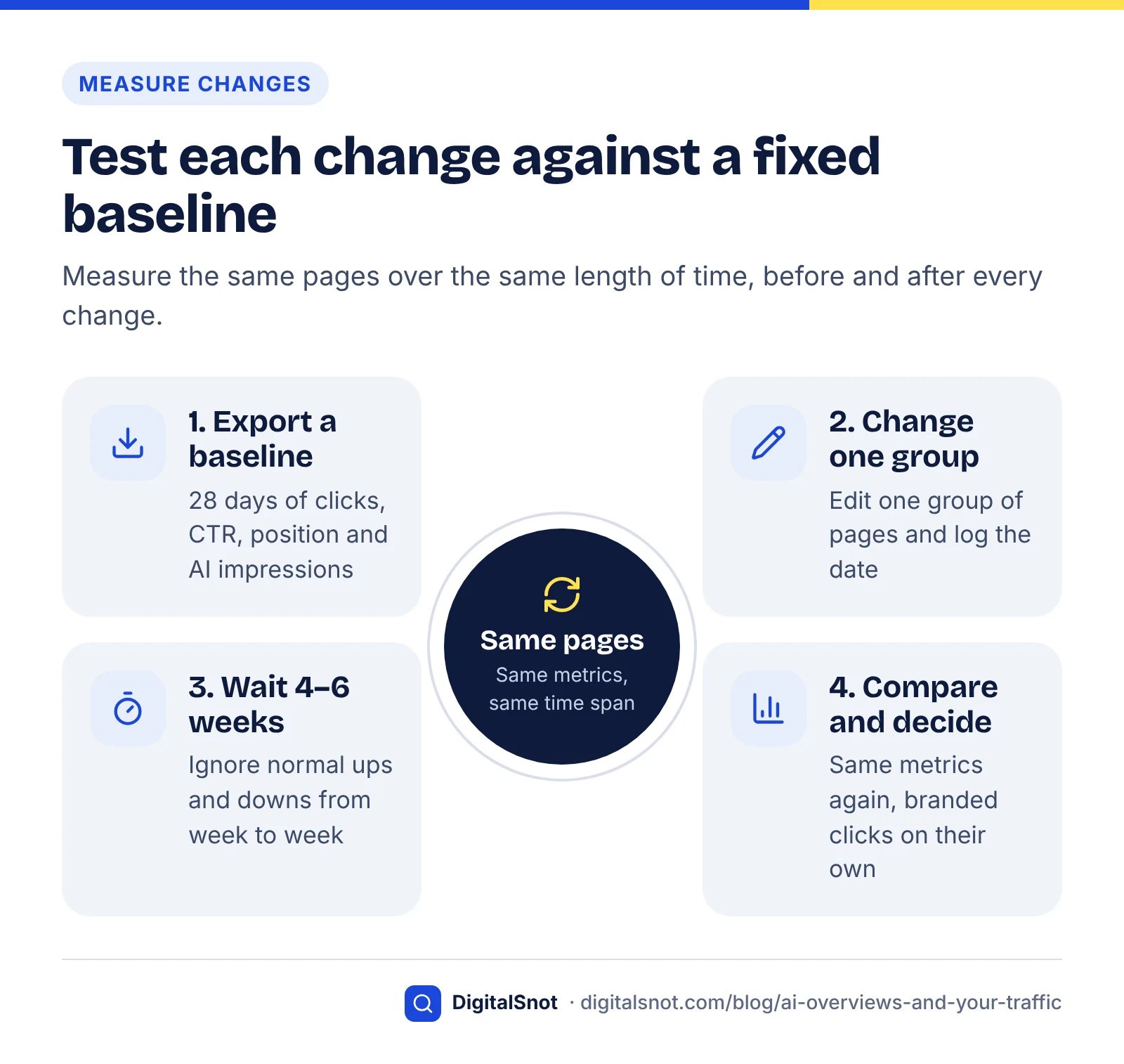
Measure the same pages, over the same length of time, before and after each change. Without a fixed baseline it is easy to mistake normal week-to-week movement for progress or failure.
- Before you edit, export 28 days of clicks, impressions, CTR and position for each page you plan to change, plus its AI impressions from the generative AI report.
- Change one group of pages at a time, and note the date in a simple log.
- Wait four to six weeks, then export the same metrics for the same pages and compare.
- Look at branded search clicks separately. Rising brand demand is a sign that your other channels are working, even if generic clicks stay flat.
Expect mixed results. Some pages will win citations in AI Overviews and recover clicks; others will keep losing clicks because the query is fully answered on the results page. For those, judge the page by leads and enquiries rather than raw visits, and decide whether it is still worth the effort to maintain.
Should you opt out of AI features?
Usually not. Search Console now has a Search generative AI control that lets a site choose whether it appears in these features. Inclusion is the default, and Google states that sites which opt out will not receive traffic or impressions from them. Given that links inside summaries still earn some clicks and brand visibility, opting out mainly removes you from the conversation.
A better first step is to fix weak pages and measure again after four to six weeks.
Where to go from here
Start with the diagnosis table, because the right fix depends entirely on the cause. If rankings fell, work on the pages and links; if AI summaries are answering the query, rework the content and widen your channels. If you want help, our AI search optimisation service covers this work, and you can contact us to talk through your data.
Free tools in this article
By the numbers
- of Google visits led to a click on a traditional result with an AI summary vs without one (Pew, March 2025 data, US)
- 8% vs 15%
- Source: Pew Research Center
- of visits to pages with an AI summary included a click on a link inside the summary itself (Pew, 2025)
- 1%
- Source: Pew Research Center
- lower average CTR for the top-ranking page when an AI Overview is present (Ahrefs, December 2025 data)
- 58%
- Source: Ahrefs
Frequently asked questions
Do AI Overviews reduce website traffic?
On average, yes. Pew Research Center found that in March 2025, US Google users clicked a traditional search result on 8% of visits when an AI summary appeared, compared with 15% when it did not. The effect on your own site depends on how many of your queries trigger a summary, so check Search Console before assuming it applies to you.
How can I see AI Overview impressions in Search Console?
Open the generative AI performance report for Search. It shows impressions your pages earned in generative AI features such as AI Overviews and AI Mode, broken down by page, country, device and date. Google rolled it out to all websites worldwide on 31 August 2026. If you cannot see it, your site may not yet have enough AI impressions.
Are AI Overview clicks counted in the normal Performance report?
Yes. Google says traffic from AI features such as AI Overviews and AI Mode is included in the Search Console Performance report under the Web search type. That means your overall click and impression totals already contain it, and the separate generative AI report helps you see how much of your visibility comes from those features.
How do I know if a traffic drop is caused by AI or by a Google update?
Look at average position alongside clicks and impressions. If impressions and position hold steady while clicks fall, AI summaries or other SERP features are the likely cause. If position falls too, check the dates against the Google Search Status Dashboard for core or spam updates, and wait a week after an update finishes before comparing.
Can I stop Google from showing my content in AI Overviews?
Search Console offers a generative AI control that lets a site choose whether it appears in generative AI features. Google says sites that opt out will not receive traffic or impressions from those features. For most businesses, staying eligible and improving content is a better option than giving up that visibility completely.
What content is most likely to keep earning clicks?
Pages that offer something a summary cannot fully replace tend to hold up best: original data, tools and calculators, detailed comparisons, local information and step-by-step help. Opening each section with a clear answer also makes it easier for AI systems to cite your page with a link, which can bring back some of the lost visits.
Sources
Every figure and claim in this article comes from the sources below. We checked each one when writing and link to the original so you can read it yourself. Credit belongs to the authors and publishers listed. How we write and check our articles.
-
1
Google users are less likely to click on links when an AI summary appears in the results
Pew Research Center · Click rates with and without AI summaries, March 2025 browsing data from 900 US adults
-
2
Update: AI Overviews Reduce Clicks by 58%
Ahrefs · Correlation between AI Overviews and top-result CTR, December 2025 data
-
3
Introducing Search Generative AI performance reports in Search Console
Google Search Central · Launch of the generative AI performance report, June 2026
-
4
Generative AI performance report (Search)
Search Console Help · What the report shows, dimensions and worldwide rollout date
-
5
AI Features and Your Website
Google Search Central · AI Overviews and AI Mode traffic counted in the Web search type
-
6
Debug Google Search Traffic Drops
Google Search Central · Causes of traffic drops and the diagnosis steps in Search Console
-
7
Google Search Status Dashboard: History
Google · Dates of core and spam ranking updates
-
8
Search generative AI control
Search Console Help · Opt-out control for AI features and its effect on traffic and impressions