Guide · Technical SEO
Technical SEO audit: a step-by-step checklist
A practical technical SEO audit in the order Google processes your site: crawl, index, architecture, Core Web Vitals, rendering, then a scoring model to prioritise fixes.

On this page (12 sections)
- 1Set up your audit: three tools and a baseline
- 2Crawlability: can Google reach your pages?
- 3Indexability: will Google choose to index them?
- 4Site architecture and internal links
- 5Page experience: Core Web Vitals, mobile and HTTPS
- 6Structured data and JavaScript rendering
- 7International sites and log files
- 8Audit warnings Google's documentation says you can ignore
- 9How to prioritise fixes: an impact × effort scoring model
- 10The full technical SEO checklist
- 11Fix, re-crawl and keep watching
- 12Sources
A technical SEO audit answers three questions in a fixed order. Can Google crawl the pages that matter? Does it choose to index them? And once indexed, do they load, render and behave well for real visitors? Everything else in a site audit hangs off those three questions.
This guide walks through each stage the way we would run it: what to check, which tool shows it, what Google's own documentation says, and how to decide which fixes come first. Every rule below is taken from Google Search Central or web.dev rather than from audit-tool defaults, because the two do not always agree. Near the end you will find a full checklist table, a scoring model for prioritising fixes, and a comparison of common crawler warnings against what Google actually says.
Technical audit scorecard
Set up your audit: three tools and a baseline
You need three things before you start: Google Search Console, a site crawler, and PageSpeed Insights. Together they show what Google sees, what your site actually contains, and how pages perform for real users.
Google Search Console
Search Console is the only place you see Google's own view of your site: which URLs are indexed, why others are not, crawl activity, Core Web Vitals from real users and structured data errors. Verify a Domain property if you can, so every subdomain and protocol is covered. Google's guide to using Search Console covers verification and the core reports.
A crawler
A desktop or cloud crawler (Screaming Frog, Sitebulb, or the site audit tools in Ahrefs and Semrush are common choices) requests every URL it can find by following links, the same basic way Googlebot discovers pages. Configure it to use a smartphone user agent, to render JavaScript, and to respect robots.txt, so the crawl resembles what Google does. Connect it to Search Console and your analytics if the tool allows, so you can see which crawled URLs actually get impressions.
PageSpeed Insights
PageSpeed Insights shows two kinds of data side by side. According to Google's About PageSpeed Insights page, field data comes from the Chrome UX Report and covers real users over a trailing 28-day period, while lab data is a single Lighthouse simulation on one device and network profile. Base decisions on field data where it exists, and use lab data to diagnose causes.
Record a baseline
Before changing anything, export the numbers you will compare against later: indexed and not-indexed counts from the Page indexing report, the Core Web Vitals report status for mobile and desktop, total crawlable URLs and status code counts from your crawl, and organic clicks for the last three months. Without a baseline you cannot tell whether a fix worked. If AI Overviews and AI Mode matter for your site, our guide to the Search Console generative AI report shows how to set a baseline for those appearances too.
Audit in this order
The order matters because each stage depends on the one before it. A page blocked from crawling cannot be indexed, and a page that is not indexed cannot benefit from faster loading.
- Crawlability: robots.txt, sitemaps, status codes, redirects.
- Indexability: noindex, canonicals, duplicates, the Page indexing report.
- Site architecture and internal links.
- Page experience: Core Web Vitals, mobile, HTTPS.
- Structured data and JavaScript rendering.
- Specialist checks: hreflang and log files, where relevant.
- Prioritise, fix, re-crawl.
The technical SEO audit, in order
Crawlability: can Google reach your pages?
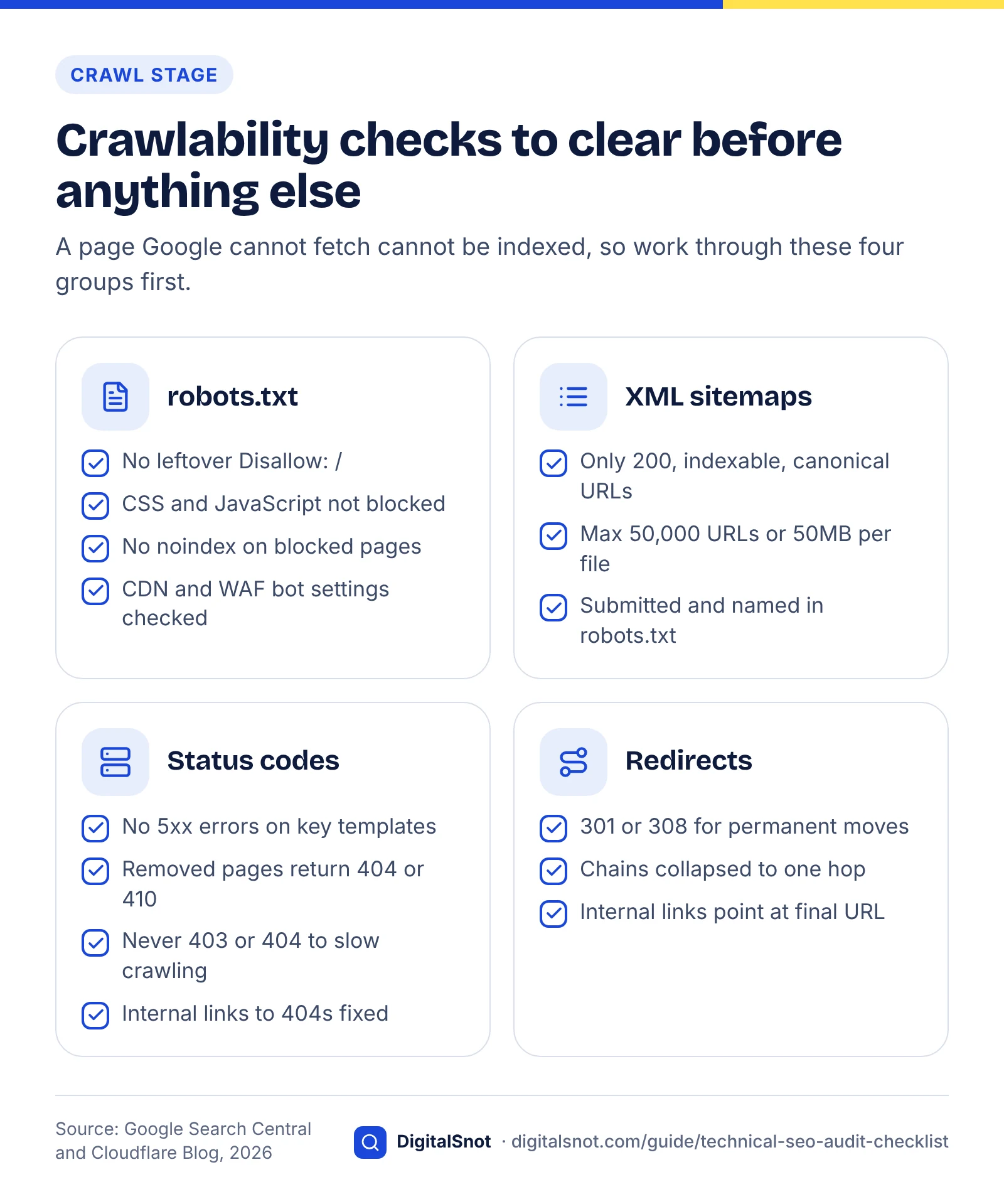
Crawlability means Googlebot can discover a URL and fetch it successfully. Check four things: robots.txt rules, XML sitemaps, HTTP status codes and redirects. Only check crawl budget if your site is genuinely large.
Step 1: Read robots.txt line by line
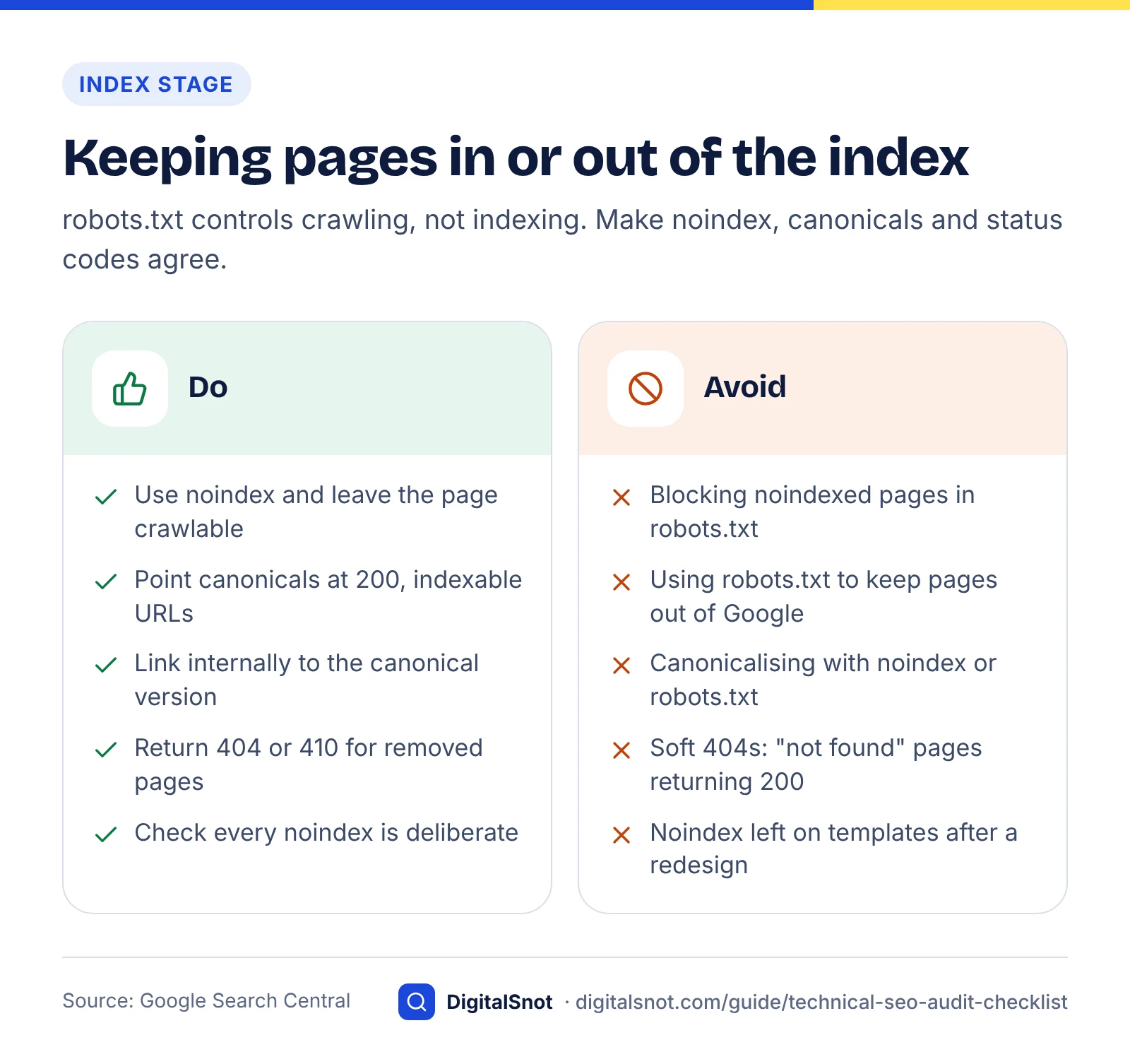
Open yourdomain.com/robots.txt and read every rule. Google's robots.txt introduction is explicit that the file manages crawler traffic and is not a way to keep a page out of Google. A disallowed URL can still be indexed, without its content, if other pages link to it.
Look for three common mistakes:
- A leftover
Disallow: /from a staging site, which blocks everything. - Blocked CSS or JavaScript folders. Google needs those files to render pages, and if rendering-critical resources are blocked it may struggle to understand the page.
- Pages blocked in robots.txt that also carry a noindex tag. Google's noindex documentation notes that if robots.txt blocks a page, the crawler never sees the noindex rule, so the page can still appear in results.
robots.txt is not the only thing that can turn Googlebot away: CDN and firewall bot settings can too. Since 15 September 2026, Cloudflare's Block options for AI training also stop Googlebot, Bingbot and Applebot, while the Disallow AI Training option keeps search crawling (checked October 2026), as Cloudflare's announcement explains. If Googlebot cannot fetch pages that robots.txt allows, check the CDN and WAF bot settings as well, and use our guide to blocking AI crawlers without disappearing from search for the full walkthrough.
Step 2: Check your XML sitemaps
A sitemap lists the canonical URLs you want indexed. Google's sitemap documentation sets a limit of 50,000 URLs or 50MB uncompressed per file, with larger sites splitting into several sitemaps grouped by an index file. Google ignores the priority and changefreq values, and uses lastmod only when it is consistently and verifiably accurate.
In your crawler, import the sitemap and compare it with the crawl. Every sitemap URL should return 200, be indexable and be its own canonical. Redirected, noindexed or 404 URLs in a sitemap send mixed signals. Then check the reverse: important pages found in the crawl but missing from the sitemap. Submit the sitemap in Search Console and reference it in robots.txt.
Step 3: Review status codes
Sort the crawl by status code. Google's page on how HTTP status codes affect its crawlers explains the rules that matter most in an audit:
- All 4xx codes except 429 tell Google the content does not exist, and those URLs drop out of the index. Never use 403 or 404 to throttle crawling.
- 5xx errors and 429 responses signal an overloaded server, and Google slows crawling in response.
- Soft 404s are pages that say "not found" but return 200. Return a real 404 or 410 for removed pages instead.
Prioritise 5xx errors on important templates, then internal links pointing at 404s. A handful of 404s for genuinely removed pages is normal and not a problem in itself.
Step 4: Map redirects
Use 301 or 308 for permanent moves and 302 or 307 for temporary ones. Google's crawlers follow up to 10 redirect hops by default, according to the same status code documentation, and a chain that runs past that without reaching content is reported as a redirect error. Short chains still waste time and crawl requests, so update internal links to point straight at the final URL and collapse chains to one hop when you migrate. To trace a single URL, the free Redirect Checker lists every hop with its status code and tests the http, https and www versions.
Step 5: Crawl budget, only if it applies
Most sites can skip this. Google's crawl budget guide is written for sites with roughly 1 million or more unique pages that change weekly, or 10,000 or more pages that change daily, and Google describes those figures as rough estimates. If you fit, the levers are eliminating duplicate URLs, blocking genuinely useless URL spaces such as endless faceted filters in robots.txt, returning 404 or 410 for removed pages, keeping lastmod accurate and keeping the server fast. A large count of "Discovered – currently not indexed" URLs in Search Console is the usual sign that crawl capacity is a constraint.
Indexability: will Google choose to index them?
Indexability is about whether a crawlable page is eligible for the index and whether Google picks it as the canonical version. Check noindex directives, canonical tags, duplicate content and, above all, the Page indexing report.
Step 1: Find every noindex
Filter the crawl for pages with a noindex robots meta tag or an X-Robots-Tag: noindex HTTP header. Each one should be deliberate: internal search results, thank-you pages, thin tag archives. Accidental noindex on a key template, often left behind after a redesign or set by a CMS toggle, is one of the most damaging and cheapest fixes in any technical SEO audit.
Step 2: Audit canonical tags
Google's canonicalisation documentation ranks the signals: redirects are a strong signal, rel="canonical" is a strong signal, and sitemap inclusion is a weak one. Google may still pick a different canonical than you declare, so the job is to make your signals agree.
Check that each indexable page either self-canonicalises or points to a near-duplicate, that every canonical target returns 200 and is indexable, that canonicals use absolute URLs, and that internal links, sitemaps and hreflang all reference the same canonical version. Do not use robots.txt or noindex as a canonicalisation method; the same Google page warns against both.
Step 3: Handle duplicate content calmly
Duplicate URLs are an efficiency problem, not a penalty. Google's SEO Starter Guide says that having the same content reachable at different URLs is not ideal but does not trigger a penalty. Typical sources are HTTP and HTTPS versions, trailing slashes, uppercase paths, tracking parameters and print views. Pick one version, redirect or canonicalise the rest, and link internally only to the version you chose.
Step 4: Work through the Page indexing report
Search Console's Page indexing report shows the index status of every URL Google knows about, grouped by reason. Google notes that "not indexed" is not necessarily bad, since redirects and deliberate noindex pages belong there. Focus on reasons that affect pages you want to rank:
- Excluded by noindex tag: confirm each URL is meant to be excluded.
- Duplicate, Google chose different canonical than user: your signals disagree; check internal links and sitemap entries.
- Crawled – currently not indexed: Google fetched the page and decided not to index it. This is usually a quality or duplication question rather than a technical fault.
- Discovered – currently not indexed: Google knows the URL but has not crawled it yet. On large sites this can point to crawl capacity; on small sites it often means weak internal linking.
- Soft 404 and Server error (5xx): fix as described in the crawlability section.
Use the URL Inspection tool to test individual pages and request indexing once fixed.
Site architecture and internal links
Good architecture means every important page is reachable through plain HTML links, sits a few clicks from the home page, and receives links with descriptive anchor text. Internal links are how Google discovers pages and understands which ones matter.
Google's link best practices say Google can generally only follow links that are an <a> element with an href attribute. Links built from JavaScript click handlers on buttons or spans may never be crawled. The same page asks for anchor text that is descriptive, reasonably concise and relevant to the target page.
Check these in your crawl:
- Orphan pages. Compare sitemap and analytics URLs with crawled URLs. Any page that receives traffic or should rank but has no internal links needs one.
- Click depth. Sort by crawl depth. Key commercial pages buried five or more clicks deep usually deserve links from navigation, hubs or related content.
- Links to redirects and 404s. Update them to point at the final 200 URL.
- Anchor text. Replace "read more" and "click here" with words that describe the destination.
- Faceted navigation. On ecommerce sites, check that filter combinations do not create millions of crawlable, near-identical URLs.
Internal linking overlaps with on-page work, so if you are fixing anchor text and topic hubs, our on-page SEO checklist covers titles, headings and content structure in detail. Planning which pages deserve the most internal links starts with demand, which the keyword research guide explains.
Page experience: Core Web Vitals, mobile and HTTPS
Core Web Vitals are three field metrics for loading, responsiveness and visual stability, and a page passes when at least 75% of real visits meet the "good" threshold for each. Alongside them, check that the mobile version matches desktop and that every page is served over HTTPS.
Core Web Vitals and page speed
The current thresholds
The table below uses the thresholds published on web.dev's Web Vitals page. Each is assessed at the 75th percentile of page loads, split by mobile and desktop.
| Metric | Measures | Good | Needs improvement | Poor |
|---|---|---|---|---|
| Largest Contentful Paint (LCP) | Loading: when the main content appears | 2.5 s or less | 2.5 s to 4.0 s | Over 4.0 s |
| Interaction to Next Paint (INP) | Responsiveness to clicks, taps and key presses | 200 ms or less | 200 ms to 500 ms | Over 500 ms |
| Cumulative Layout Shift (CLS) | Visual stability: unexpected movement | 0.1 or less | 0.1 to 0.25 | Over 0.25 |
INP replaced First Input Delay as a Core Web Vital on 12 March 2024, as announced on the web.dev blog. Any audit report that still grades FID is out of date.
How much it matters for ranking
Google's page on Core Web Vitals and Google search results says its ranking systems use Core Web Vitals, but that good scores in the report do not guarantee good rankings, and relevance still comes first. Treat Core Web Vitals as a real but modest factor and a strong user-experience one: fix poor templates, but do not spend weeks chasing a perfect lab score.
Most sites still have work to do. The HTTP Archive Web Almanac 2025 found that 48% of mobile websites had good Core Web Vitals across all three metrics, and that LCP was the hardest to pass, with 62% of mobile sites in the good range compared with 77% for INP.
Step by step
- Open the Core Web Vitals report in Search Console. It groups URLs by template-like clusters, which tells you which templates to fix rather than which single pages.
- Take an example URL from each failing group into PageSpeed Insights and note which metric fails in the field data.
- For LCP, identify the LCP element in the lab report. Common fixes are a faster server response, serving the hero image in a modern format at the right size, not lazy-loading it, and removing render-blocking CSS and scripts.
- For INP, look for long JavaScript tasks. Break them up, defer non-essential third-party scripts, and reduce work done in event handlers.
- For CLS, reserve space for images, embeds and ads with width and height attributes or CSS aspect ratios, and avoid inserting banners above existing content.
- Wait for the 28-day field window to refresh before judging the result.
Core Web Vitals: thresholds and fix order
Mobile-first indexing: check parity
Google indexes the mobile version of your pages, so it must contain the same content, metadata and directives as desktop. Google's mobile-first indexing best practices set out what to compare:
- Primary content is equivalent on mobile and desktop. Tabs and accordions are fine as long as the content is there.
- Robots meta tags are the same. A noindex on mobile alone can stop the page being indexed.
- Titles, meta descriptions, headings, image alt text and structured data match.
- Content does not depend on swiping, clicking or typing to load, because Google will not perform those interactions.
If you run a responsive site, most of this is automatic. Separate mobile URLs (m-dot sites) need far more checking, and Google suggests not using them. Crawl once with a smartphone user agent and once with desktop, then compare word counts, link counts and directives per URL to spot gaps.
HTTPS checks
Google's page experience guidance lists serving pages over HTTPS as part of a good page experience, and Search Console's HTTPS report shows which indexed URLs are not served securely. In your crawl, confirm that every HTTP URL 301-redirects to its HTTPS equivalent in one hop, that there is no mixed content (HTTP images or scripts on HTTPS pages), that canonical tags and sitemaps use HTTPS, and that the certificate covers every subdomain you use.
Structured data and JavaScript rendering
Structured data should be valid, match visible content and use types Google still supports. JavaScript-heavy pages must produce their content and links in the rendered HTML, because that is what Google indexes.
Structured data (JSON-LD) code
Validate structured data
Google's general structured data guidelines recommend JSON-LD and point to the Rich Results Test and URL Inspection tool for catching technical errors. Use the Rich Results Test for Google rich result eligibility, and the Schema Markup Validator for general schema.org validity. Errors stop a page being eligible; warnings may only limit how it appears. Passing validation does not guarantee a rich result.
Also check you are not maintaining markup for features that no longer exist. Google restricted FAQ rich results and cut back HowTo rich results in August 2023, and HowTo was fully deprecated shortly afterwards. Google's documentation update log records that FAQ rich results stopped appearing in Google Search from 7 May 2026. That markup can still describe your content to other systems, but it should not be on your fix list as a Google rich result opportunity. Our schema markup guide for 2026 lists which types still earn a Google feature and how to decide what to keep, fix or remove. For how structured data and clear page structure help with AI answers, see our guide on how to get cited in AI search.
Check JavaScript rendering
Google's JavaScript SEO basics describe three phases: crawling, rendering and indexing. Pages that return 200 go into a render queue, a headless Chromium executes the JavaScript, and Google indexes what appears in the rendered HTML. Content or links that only appear after a user interaction, or that fail to render, are invisible.
- Run your crawler twice, once with JavaScript rendering off and once on, and compare word counts, links and canonical tags per URL. Large differences show what depends on rendering.
- For key templates, use the URL Inspection tool's live test and view the rendered HTML. Confirm the main content, internal links, title, canonical and robots meta are all present.
- Make sure the JavaScript and API endpoints needed to render are not blocked in robots.txt.
- For single-page apps, use real URLs with the History API rather than
#fragments, so each view is a crawlable link.
Server-side rendering or static generation remains the safest choice for content you need indexed quickly, since not every crawler runs JavaScript.
International sites and log files
Two checks only apply to some sites. Audit hreflang if you serve different languages or regions, and analyse server logs if you are large enough that crawl behaviour is a real constraint.
hreflang in brief
Google's guide to localised versions of your pages sets the rules most audits check. Each language version lists every alternate including itself; annotations must be reciprocal, or Google may ignore them; codes use ISO 639-1 for language and ISO 3166-1 Alpha 2 for region; and an x-default can name the fallback page. Every hreflang URL should also be a 200, indexable, self-canonical page. Use one method (HTML head, HTTP header or sitemap) consistently rather than mixing them.
Log files in brief
Server logs show every request Googlebot actually made, which your crawler can only approximate. Search Console's Crawl Stats report, introduced in its current form in 2020, breaks Google's requests down by response code, file type, purpose and Googlebot type, and is enough for most sites. Go to raw logs when you need to know which sections Googlebot ignores, how much crawl activity goes to parameter URLs, or how quickly new pages get fetched. Verify Googlebot by reverse DNS lookup, because many scrapers fake the user agent.
Audit warnings Google's documentation says you can ignore
Many site audit tools flag issues that Google's own documentation says it does not use. Our method: we listed warnings that commonly appear in crawler reports, then checked each one against Google Search Central pages, and recorded what Google says and what we would do about it.
| Common audit warning | What Google's documentation says | Our verdict |
|---|---|---|
| Low word count / thin content by word count | The SEO Starter Guide says content length alone does not matter for ranking. Google's helpful content guidance says it has no preferred word count. | Ignore the number. Judge whether the page answers its query. |
| Missing meta keywords | Google does not use the keywords meta tag in web ranking. | Ignore. |
| Title tag too long | Google's title link documentation says there is no limit on title length; long titles are truncated to fit the device. | Low priority. Fix only if key words are cut off. |
| Meta description missing or too long | Google's snippet documentation says snippets come primarily from page content; the meta description is used when it describes the page more accurately. | Write them for key pages; do not mass-fix. |
| Multiple H1s or headings out of order | The SEO Starter Guide says heading order helps screen readers but does not matter for Search. | Fix for accessibility, not rankings. |
| Duplicate content | Not a penalty, per the SEO Starter Guide, but duplicates split signals and waste crawling. | Consolidate with canonicals or redirects where it affects important pages. |
| 404 errors found | Google's post on 404s says 404 URLs do not affect how your other pages perform. | Fix internal links to them and any page that should exist. |
| Sitemap lacks priority or changefreq | Google ignores both values. | Ignore. Keep lastmod accurate instead. |
| Lighthouse performance score below 90 | Search Console's Core Web Vitals report uses field data; PageSpeed Insights notes lab and field data can differ. | Decide on field data. Use the lab score to diagnose. |
| No keywords in URL or domain | The SEO Starter Guide says keywords in domain names or URL paths alone have hardly any effect. | Do not change URLs for this reason. |
This does not mean these items never matter. A meta description still affects how your result reads, and headings still help users. The point is that they should not outrank a noindexed template or a broken canonical on your fix list.
How to prioritise fixes: an impact × effort scoring model
Score each issue by impact, reach and effort, then fix the highest scores first. This turns a 300-row audit export into a short, ordered plan.
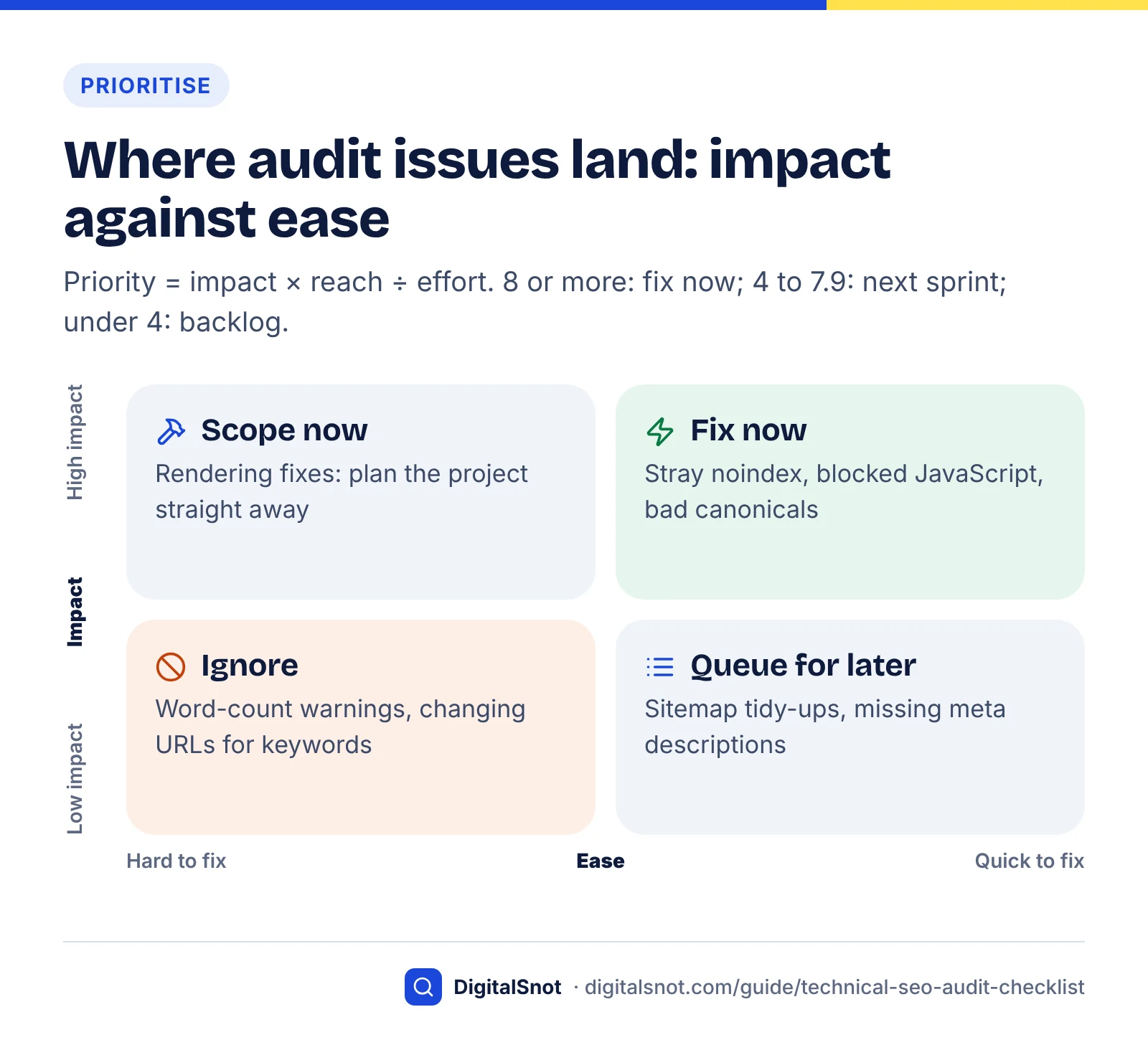
We designed the model below to keep scoring simple enough to agree on in a meeting. The formula is priority = impact × reach ÷ effort.
- Impact (0–5): how directly the issue stops pages being crawled, indexed or ranked. 5 means pages are excluded from Google; 0 means Google's documentation says it is not used.
- Reach (1–3): 1 for a handful of URLs, 2 for one section or template, 3 for sitewide or your main revenue templates.
- Effort (1–3): 1 for a setting or content change done in hours, 2 for a template change taking days, 3 for a development project taking weeks.
Scores of 8 or more go into the current sprint, 4 to 7.9 into the next one, and anything under 4 into the backlog. High-impact, high-effort items that land in the middle band should be scoped straight away even if delivery takes longer.
| Example issue | Impact | Reach | Effort | Score | Band |
|---|---|---|---|---|---|
| Noindex left on a key template after redesign | 5 | 3 | 1 | 15 | Fix now |
| robots.txt blocks JavaScript needed to render | 5 | 3 | 1 | 15 | Fix now |
| Canonicals pointing at redirected or 404 URLs | 4 | 2 | 1 | 8 | Fix now |
| Orphaned pages that should rank | 4 | 2 | 1 | 8 | Fix now |
| Main content only appears after client-side rendering fails | 5 | 3 | 3 | 5 | Next sprint, scope now |
| Poor LCP on product template (field data) | 3 | 3 | 2 | 4.5 | Next sprint |
| Sitemap lists redirected and noindexed URLs | 2 | 2 | 1 | 4 | Next sprint |
| hreflang missing return links | 3 | 2 | 2 | 3 | Backlog |
| Internal links pointing through redirects | 2 | 3 | 2 | 3 | Backlog |
| Missing meta descriptions | 1 | 3 | 2 | 1.5 | Backlog |
| Low word count warnings | 0 | 3 | 2 | 0 | Ignore |
The example scores are illustrative; adjust them to your site. A 404 on your best-selling product page scores very differently from a 404 on an old press release, even though a crawler labels both the same way.
The full technical SEO checklist
Use this table as a working checklist. Each row names the check, where to find it and what "good" looks like.
Answer-ready page checklist
| Area | Check | Where | Pass condition |
|---|---|---|---|
| Setup | Search Console Domain property verified | Search Console | All subdomains and protocols covered |
| Setup | Baseline recorded | Search Console, crawler, analytics | Index counts, CWV status, clicks saved |
| Crawl | robots.txt rules reviewed | /robots.txt | No key pages, CSS or JS blocked |
| Crawl | XML sitemap valid and submitted | Crawler, Search Console | Only 200, indexable, canonical URLs; under 50,000 URLs per file |
| Crawl | No 5xx errors on key templates | Crawler, Crawl Stats | Zero server errors |
| Crawl | Soft 404s resolved | Page indexing report | Removed pages return 404 or 410 |
| Crawl | Redirect chains collapsed | Crawler | One hop; internal links point at final URL |
| Crawl | Crawl budget (large sites only) | Crawl Stats, logs | No large crawlable duplicate URL spaces |
| Index | Noindex audit | Crawler | Every noindex is deliberate |
| Index | Canonical tags | Crawler | Absolute, self-referencing or pointing to a 200 indexable page |
| Index | Duplicate URL variants | Crawler | One version per page; others redirect or canonicalise |
| Index | Page indexing reasons | Search Console | No important URLs excluded unintentionally |
| Architecture | Crawlable links | Crawler (rendered) | Navigation uses <a href> links |
| Architecture | Orphan pages | Crawler plus sitemap and analytics | Every important page has internal links |
| Architecture | Click depth | Crawler | Key pages within about three clicks |
| Experience | LCP | CWV report, PageSpeed Insights | 2.5 s or less at p75 |
| Experience | INP | CWV report, PageSpeed Insights | 200 ms or less at p75 |
| Experience | CLS | CWV report, PageSpeed Insights | 0.1 or less at p75 |
| Mobile | Mobile and desktop parity | Two crawls, URL Inspection | Same content, metadata and robots tags |
| Security | HTTPS everywhere | HTTPS report, crawler | HTTP 301s to HTTPS; no mixed content |
| Structured data | Valid markup for supported types | Rich Results Test, Search Console | No errors; matches visible content |
| JavaScript | Rendered HTML complete | URL Inspection, rendered crawl | Content, links, canonical and robots present |
| International | hreflang (if used) | Crawler | Reciprocal, valid codes, self-canonical targets |
| Logs | Googlebot activity (if large) | Server logs, Crawl Stats | Crawl spent on pages you want indexed |
Fix, re-crawl and keep watching
An audit is finished only when the fixes are live and verified. Re-crawl after each batch of changes, compare against your baseline, and set up light ongoing monitoring so regressions are caught early.
- Ship fixes in batches by band, starting with "fix now". Note the date each batch goes live.
- Re-crawl the affected sections with the same crawler settings as the original audit, and confirm the issue count has dropped.
- Validate in Search Console. Use "Validate fix" on Page indexing and Core Web Vitals issues, and URL Inspection to request indexing for important pages.
- Compare against the baseline after enough time for Google to recrawl, typically a few weeks, and after a full 28-day field window for Core Web Vitals.
- Schedule a lighter monthly check of the Page indexing report, Core Web Vitals report and a crawl of key templates, plus a full audit after any redesign, migration or CMS change.
If organic traffic falls and the audit finds nothing broken, the cause may be a ranking change rather than a technical fault. Our guide to diagnosing a traffic drop after a core update shows how to tell the two apart before you change anything.
Technical fixes make content eligible to perform; they do not replace it. Once crawling and indexing are clean, the next gains usually come from content SEO and on-page optimisation, and increasingly from making pages easy for AI systems to quote, which our AI search optimisation work focuses on. If you would rather have specialists run the audit and the fixes, our technical SEO service covers every stage in this guide, and you can see how it fits with the rest of our SEO services or get in touch about your site.
Free tools in this guide
By the numbers
- of mobile websites had good Core Web Vitals on all three metrics in 2025, up from 44% in 2024
- 48%
- Source: HTTP Archive Web Almanac 2025
- of mobile websites had a good Largest Contentful Paint in 2025, making LCP the hardest Core Web Vital to pass
- 62%
- Source: HTTP Archive Web Almanac 2025
- URLs (or 50MB uncompressed) is the maximum size of a single XML sitemap file Google accepts
- 50,000
- Source: Google Search Central
- unique pages is the rough size at which Google says its crawl budget guidance applies (or 10,000+ pages changing daily)
- 1 million+
- Source: Google Search Central
Frequently asked questions
What is a technical SEO audit?
A technical SEO audit is a structured review of whether search engines can crawl, index and render your website, and whether pages perform well for real users. It covers robots.txt, sitemaps, status codes, redirects, canonical tags, internal linking, Core Web Vitals, mobile parity, HTTPS, structured data and JavaScript rendering. The output is a prioritised list of fixes rather than a raw list of warnings.
How often should I run a technical SEO audit?
Run a full technical SEO audit at least once a year and after any redesign, migration, CMS change or large batch of new templates. Between full audits, a monthly check of the Search Console Page indexing and Core Web Vitals reports plus a crawl of key templates catches most regressions, such as an accidental noindex or a new redirect chain, before they cost traffic.
What tools do I need for a technical SEO audit?
Three tools cover most of the work. Google Search Console shows how Google sees your site, including indexing reasons and real-user Core Web Vitals. A crawler such as Screaming Frog or Sitebulb lists every URL, status code, canonical and link. PageSpeed Insights shows field and lab performance data for individual URLs. Server log analysis is useful extra only for large sites.
Does robots.txt stop a page from being indexed?
No. Google says robots.txt manages crawling, not indexing. A disallowed URL can still appear in results, usually without a description, if other pages link to it. To keep a page out of Google, use a noindex meta tag or X-Robots-Tag header and leave the page crawlable, because Google must fetch the page to see the noindex rule.
What are the current Core Web Vitals thresholds?
According to web.dev, a good Largest Contentful Paint is 2.5 seconds or less, a good Interaction to Next Paint is 200 milliseconds or less, and a good Cumulative Layout Shift is 0.1 or less. Each is judged at the 75th percentile of real page loads, separately for mobile and desktop. INP replaced First Input Delay as a Core Web Vital in March 2024.
Do I need to worry about crawl budget?
Most sites do not. Google says its crawl budget guidance is aimed at sites with roughly a million or more unique pages that change weekly, or ten thousand or more that change daily. Smaller sites usually get crawled fully. If you do qualify, focus on removing duplicate URL spaces, returning proper 404s, keeping lastmod accurate and keeping server responses fast.
Is duplicate content a Google penalty?
No. Google's SEO Starter Guide says having the same content reachable at several URLs is not ideal but is not a penalty. The real cost is that signals get split and crawling is wasted on copies. Choose one preferred URL for each page, redirect or canonicalise the variants to it, and link internally only to that version.
Should I fix every warning my audit tool reports?
No. Many tools flag items Google says it does not use, such as low word count, missing meta keywords, long titles or headings out of order. Score each issue by how directly it affects crawling, indexing or ranking, how many pages it touches and how hard it is to fix. Fix noindex, canonical and rendering problems long before cosmetic warnings.
How do I check if Google can render my JavaScript?
Use the URL Inspection tool in Search Console and run a live test, then view the rendered HTML and screenshot. Confirm the main content, internal links, title, canonical and robots meta tag are present. Comparing a crawl with JavaScript rendering on and off also shows which content depends on scripts. Server-side rendering is the safest option for important content.
Sources
Every figure and claim in this guide comes from the sources below. We checked each one when writing and link to the original so you can read it yourself. Credit belongs to the authors and publishers listed. How we write and check our articles.
-
1
How To Use Search Console
Google Search Central · Setting up Search Console and its core reports
-
2
About PageSpeed Insights
Google for Developers · Field data (CrUX, trailing 28 days) versus lab data (Lighthouse)
-
3
Robots.txt Introduction and Guide
Google Search Central · robots.txt manages crawling and is not a way to keep pages out of Google
-
4
Block Search Indexing with noindex
Google Search Central · noindex is not seen if robots.txt blocks the page
-
5
Build and Submit a Sitemap
Google Search Central · 50,000 URL / 50MB limit; priority and changefreq ignored; lastmod rules
-
6
How HTTP Status Codes Affect Google's Crawlers
Google Search Central · 4xx, 5xx, 429, soft 404 handling and the 10-hop redirect limit
-
7
Crawl Budget Management
Google Search Central · Which sites need crawl budget work and the main levers
-
8
How to Specify a Canonical with rel="canonical" and Other Methods
Google Search Central · Relative strength of canonical signals and methods to avoid
-
9
SEO Starter Guide: The Basics
Google Search Central · Duplicate content, content length, headings and URL keyword myths
-
10
Page indexing report
Search Console Help · How to read indexing reasons; not indexed is not necessarily bad
-
11
SEO Link Best Practices for Google
Google Search Central · Crawlable <a href> links and descriptive anchor text
-
12
Web Vitals
web.dev · LCP, INP and CLS thresholds and the 75th percentile rule
-
13
Interaction to Next Paint becomes a Core Web Vital on March 12
web.dev · INP replaced FID as a Core Web Vital in March 2024
-
14
Understanding Core Web Vitals and Google search results
Google Search Central · How Core Web Vitals relate to ranking; good scores do not guarantee rankings
-
15
Performance | The 2025 Web Almanac
HTTP Archive · 2025 share of mobile sites passing Core Web Vitals, LCP and INP
-
16
Mobile-first Indexing Best Practices
Google Search Central · Mobile and desktop parity requirements
-
17
Understanding Google Page Experience
Google Search Central · HTTPS as part of page experience
-
18
HTTPS report
Search Console Help · Finding indexed URLs not served over HTTPS
-
19
General Structured Data Guidelines
Google Search Central · JSON-LD recommendation and validation tools
-
20
Changes to HowTo and FAQ rich results
Google Search Central Blog · August 2023 restriction of FAQ and HowTo rich results
-
21
Latest Google Search Documentation Updates
Google Search Central · FAQ rich results no longer shown from 7 May 2026
-
22
Understand JavaScript SEO Basics
Google Search Central · Crawl, render and index phases for JavaScript pages
-
23
Localized Versions of your Pages
Google Search Central · hreflang rules: reciprocal links, codes, x-default
-
24
New and improved crawl stats for your site
Google Search Central Blog · What the Crawl Stats report breaks down
-
25
Creating Helpful, Reliable, People-First Content
Google Search Central · Google has no preferred word count
-
26
Google does not use the keywords meta tag in web ranking
Google Search Central Blog · Meta keywords are not used for ranking
-
27
Influencing Title Links in Google Search
Google Search Central · No title length limit; titles truncated to device width
-
28
How to Write Meta Descriptions
Google Search Central · Snippets come primarily from page content
-
29
Do 404 errors hurt my site?
Google Search Central Blog · 404 URLs do not affect how other pages perform
-
30
Have it both ways: stay discoverable in search while disallowing AI training
Cloudflare Blog · From 15 Sep 2026, Block options for AI training also stop Googlebot, Bingbot and Applebot; Disallow AI Training keeps search crawling