Link preview broken on WhatsApp or LinkedIn? How to fix link previews
Find out why a shared link shows no image or the wrong title on WhatsApp, LinkedIn or Facebook, fix the Open Graph tags and the share image, then refresh the preview.
On this page (8 sections)
You share your new offer page on WhatsApp and get a bare blue link. Or LinkedIn shows last year's picture, or a title that says "Home". The page is fine; the link preview is not showing it properly, and you can fix link previews like this.
This post explains how apps build a link preview, the image rules Facebook, LinkedIn and WhatsApp publish, the mistakes that break previews most often, and how to make each app read your page again. A worked example with a made-up sweet shop shows the whole fix.
How an app builds a link preview
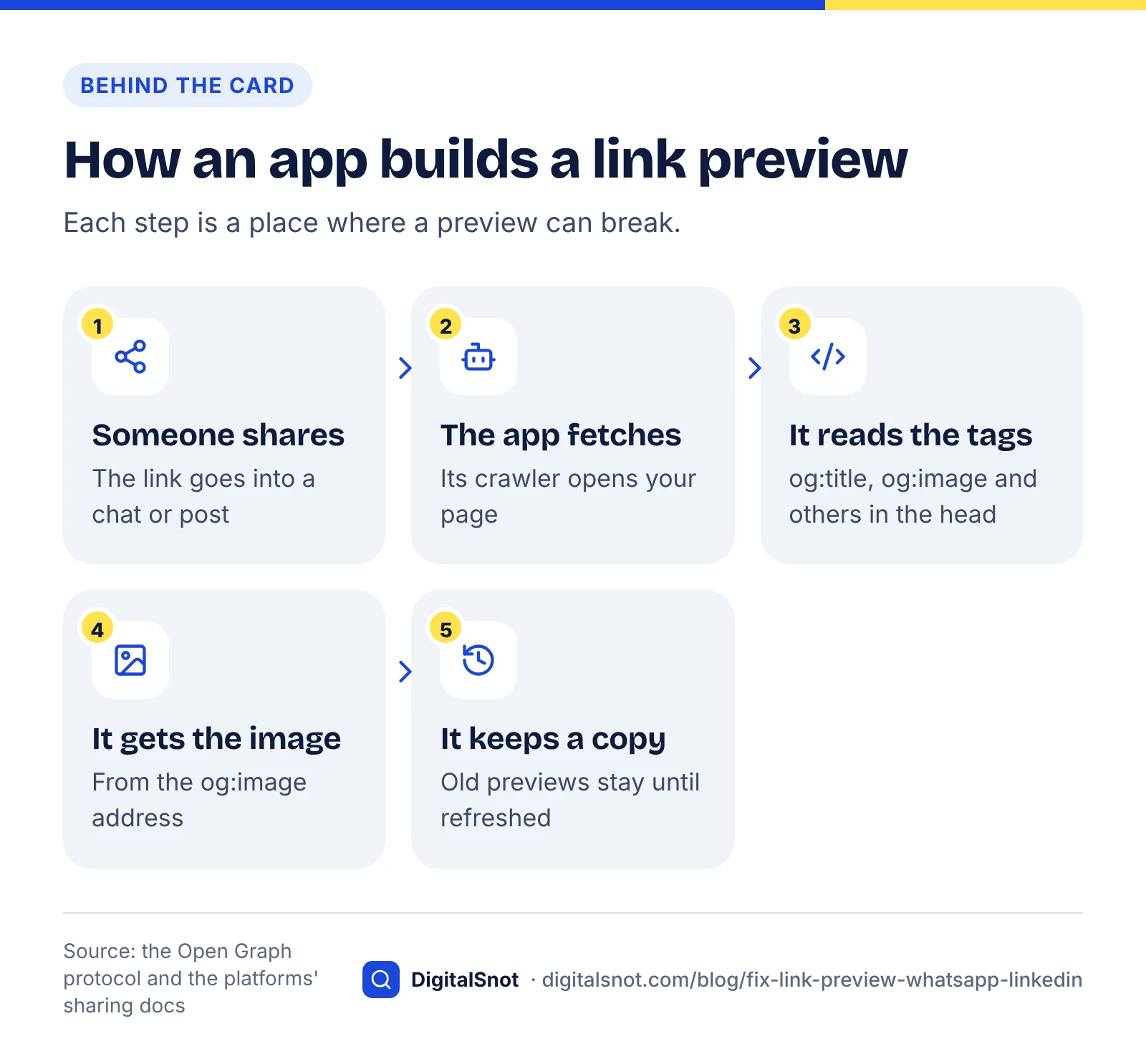
When someone shares a link, the app fetches the page, reads a few tags in its head, downloads the image those tags point to, and draws the card. It then keeps a copy of that card for a while, which is why fixes do not show up at once.
The tags come from the Open Graph protocol. It lists four as required for every page: og:title, og:type, og:image and og:url. It adds og:description as optional, and asks pages with an og:image to describe it in og:image:alt.
| Tag | What it holds | Tip |
|---|---|---|
| og:title | The headline of the card | Short and specific, not your site name alone |
| og:description | A line under the title | WhatsApp asks for it |
| og:image | The picture | A full https address |
| og:url | The page's main address | The same as your canonical link |
| og:type | The kind of page | "website", or "article" for a blog post |
| og:image:alt | A description of the picture | For people who cannot see it |
Without these tags, each app picks a title, some text and a picture by itself, which is often not the picture or the words you would choose. Setting them yourself is the only way to decide what the card says.
X reads its own twitter:card tag to choose a card and falls back to the og: tags for the rest, so a twitter:card tag with the value summary_large_image is usually all you add for it.
Each platform's rules for the share image
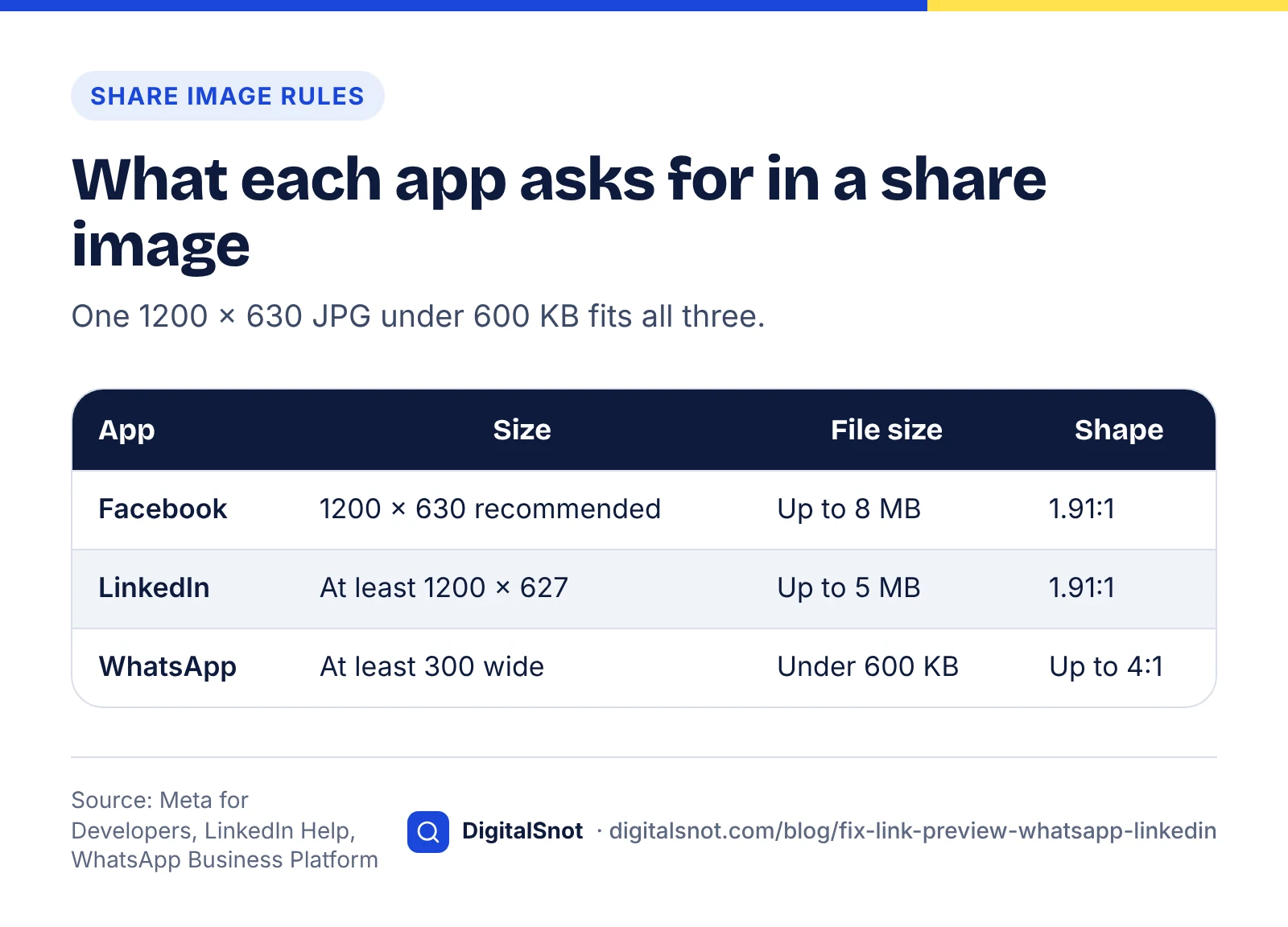
- Facebook: Meta's page on images in link shares recommends at least 1200 × 630 pixels for high-resolution screens and a shape close to 1.91:1. Images under 600 × 315 show as a small square, and the minimum is 200 × 200. Adding og:image:width and og:image:height lets Facebook show the image straight away.
- LinkedIn: LinkedIn Help on making your website shareable asks for an image of at least 1200 × 627 pixels, up to 5 MB, in the same 1.91:1 shape.
- WhatsApp: the WhatsApp Business Platform page on link previews asks for og:title, og:description and og:url in the page's head, with the head ending within the first 300 KB of the HTML. The image needs an absolute address, a file under 600 KB, a width of at least 300 pixels and a shape no wider than 4:1. WhatsApp says it makes previews on a best-effort basis, so even a perfect page may sometimes show none.
One image covers all of them: a 1200 × 630 JPG under 600 KB. Keep text and faces away from the edges in case an app crops it. Our Social Image Cropper has a 1200 × 630 link share size; move and zoom your photo into the frame, download it as a JPG and check the file size it shows before you upload it.
Find the problem with the Link Preview Checker
Guessing wastes time. Enter the page's address in our Link Preview Checker. It reads the page's og: and twitter: tags, downloads the share image, and checks that it loads, its format, its size in pixels, its shape and its file size against the rules above. You get a rough sketch of the card on Facebook, LinkedIn, X and WhatsApp, a platform-by-platform verdict, and tags built from what your page already has, ready to paste into the head.
Two limits to know: it reads the HTML your server sends without running JavaScript, and it does not download images over 2 MB, so it can only tell you that such an image is too heavy for WhatsApp. Each app also draws and changes its own layout, so the sketches are a guide, not a copy.
The mistakes that break previews
- A relative image address. og:image says /images/share.jpg instead of https://yoursite.example/images/share.jpg. The app fetches the image on its own, and WhatsApp asks for an absolute address.
- An image that is too heavy or the wrong shape. A 3 MB photo straight from a phone is over WhatsApp's 600 KB. A square logo gets cropped into a 1.91:1 card, or shown small.
- Missing og:description or og:url. Facebook and LinkedIn may still show a card, but WhatsApp asks for both.
- Tags in the wrong place. Tags outside the head, or a head so long that it ends after the first 300 KB, are missed by WhatsApp.
- Tags added by a script. If a plugin writes the tags with JavaScript after the page loads, a crawler that reads only the HTML never sees them. Put them in the HTML the server sends. Our guide to JavaScript and crawlers explains the same problem for search.
- A blocked crawler. A login page, a password on a staging site, or a firewall that blocks unknown bots means the app's crawler sees an error instead of your tags. Meta lists the crawlers it uses on its web crawlers page, so you can let them through.
- Two sets of tags. A theme and an SEO plugin both print og:image. The Open Graph protocol gives the first one preference, which may not be the one you chose. Keep one set.
Make each app read the page again
Apps keep a copy of each preview, so after a fix you have to ask them to look again:
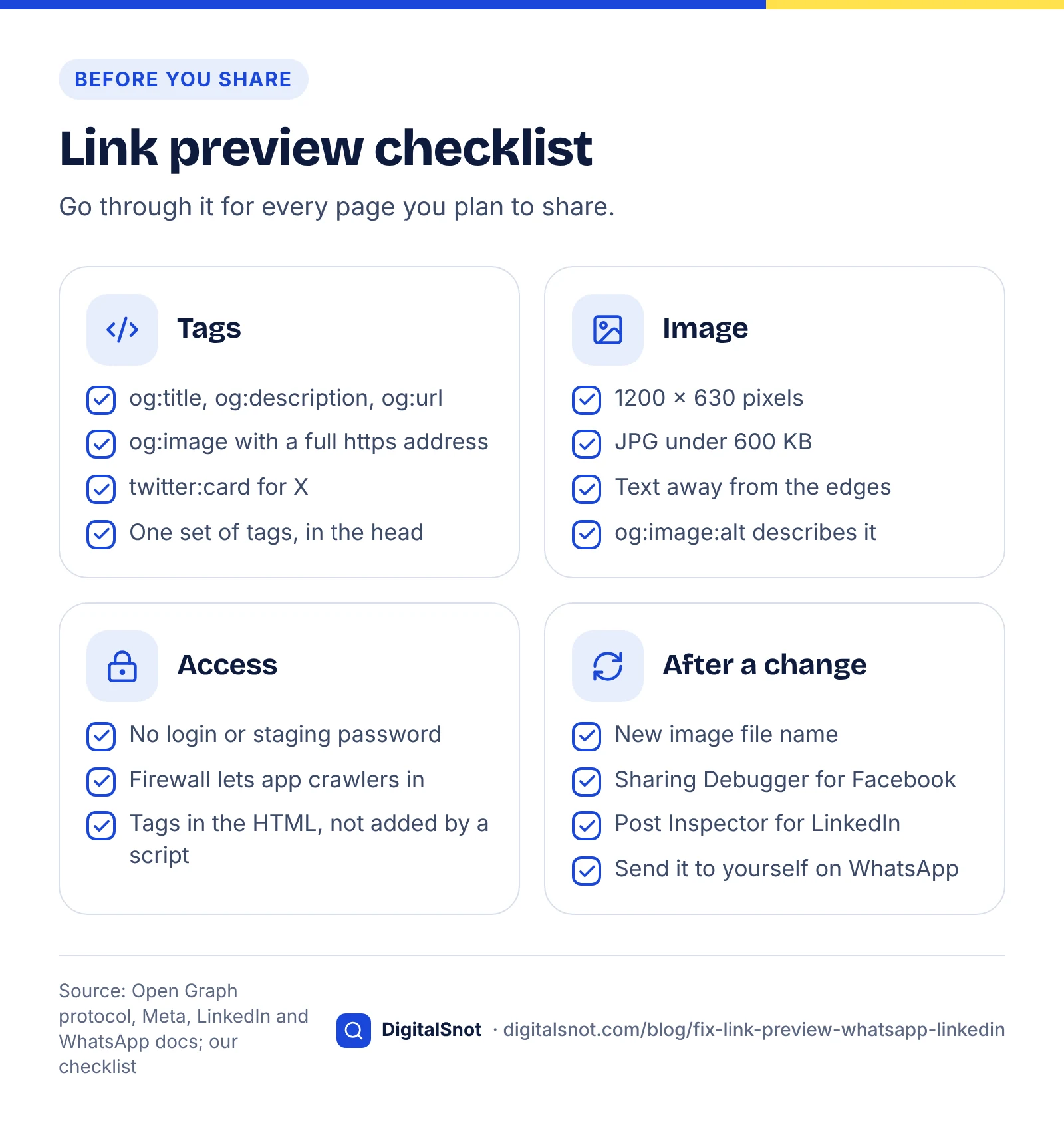
- Facebook: paste the address into the Sharing Debugger and ask it to scrape again. Facebook caches images by their address, so if you changed the picture, upload it under a new file name and update og:image.
- LinkedIn: paste the address into the Post Inspector to refresh it.
- WhatsApp: send the link in a chat to yourself to see the preview.
On Facebook and LinkedIn, posts already shared keep the old preview; only new shares show the change. So fix the tags before a campaign goes out, not after.
If you need to write the tags from scratch, our Meta Tag and Open Graph Generator builds the title, description, canonical, Open Graph and X card tags from a short form, previews them for Google, WhatsApp, Facebook and X, and checks them as you type. On WordPress, Shopify or Wix, put the same values into the SEO or social sharing fields instead of pasting code, or the page may end up with two sets of tags.
Worked example: Kesar Sweets, Lal Darwaja, Ahmedabad
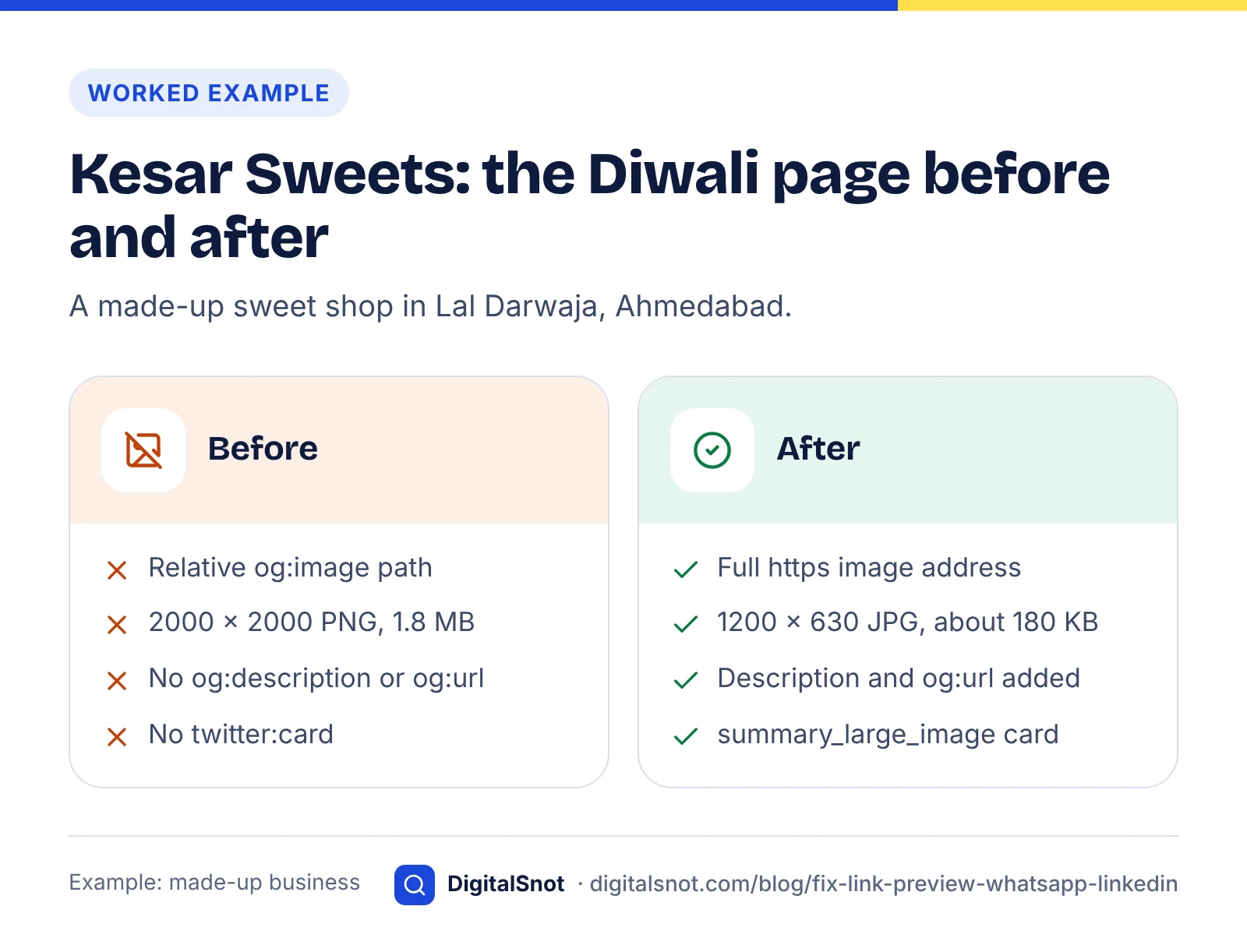
Kesar Sweets is a made-up shop with a Diwali gift box page. Shared on WhatsApp, it showed only the link; on LinkedIn, it showed an old banner. The Link Preview Checker found four problems:
- og:image was the relative path /images/diwali-box.png.
- The image was a 2000 × 2000 PNG of 1.8 MB: square, and three times WhatsApp's 600 KB.
- og:description and og:url were missing.
- There was no twitter:card tag.
The owner cropped the box photo to 1200 × 630 in the cropper and saved it as a JPG of about 180 KB under a new name, diwali-box-1200x630.jpg. The SEO plugin's social fields got the full https address of the image, a one-line description ("Kaju katli, mohanthal and dry fruit boxes, delivered across Ahmedabad until Diwali"), the page address as og:url, and the image's width, height and description. A twitter:card tag with summary_large_image went in too.
On the second run, all four platform cards in the checker said "Looks right". The owner then refreshed the page in the Sharing Debugger and the Post Inspector, and sent it to himself on WhatsApp to see the new card before sharing it with customers.
Next step
Run your most shared pages through the checker today: your home page, your main offer and your contact page. A preview is often the first thing people see in a WhatsApp group, so it is worth checking the pages you send most. If you add UTM tags to the links you share, so Google Analytics can show the visits, keep og:url as the clean page address and put the tags only on the shared link (our suggestion); our Social UTM Link Builder makes those links. Our post on WhatsApp Business for shops covers the chat side, and our website launch checklist includes these tags among the checks for a new site. For the title and description Google shows, see our on-page SEO checklist. If your theme or plugins make the tags hard to fix, talk to us.
Free tools in this article
- Social Image Cropper Crop an image to each platform's recommended size, with safe-area guides, and save it as JPG or PNG.
- Link Preview Checker See the tags and share image apps use for link previews, judged against each platform's rules.
- Meta Tag and Open Graph Generator Build title, description, canonical, robots, Open Graph and X card tags, with previews and checks.
- Social UTM Link Builder Tag links for each platform so Google Analytics shows them as Organic or Paid Social, one by one or in bulk.
By the numbers
- the most WhatsApp asks for in a link preview image, which must also be at least 300 pixels wide
- 600 KB
- Source: WhatsApp Business Platform
- pixels, the smallest image LinkedIn asks for in a link preview, up to 5 MB
- 1200 × 627
- Source: LinkedIn Help
Frequently asked questions
Why does my link show no image on WhatsApp?
The usual causes are a missing og:image tag, a relative image address such as /images/share.jpg, an image over the 600 KB WhatsApp asks for, or tags outside the page's head. WhatsApp also asks for og:title, og:description and og:url, and says it makes previews on a best-effort basis.
What size should a link preview image be?
Use 1200 × 630 pixels, saved as a JPG under 600 KB. That meets Facebook's recommended size, LinkedIn's minimum of 1200 × 627 and WhatsApp's file size limit, and its shape is close to the 1.91:1 Facebook and LinkedIn use.
How do I refresh a LinkedIn link preview?
Fix the tags on your page, then paste the address into LinkedIn's Post Inspector. Posts already shared keep the old preview; only new shares show the change.
How do I update the image Facebook shows for my link?
Upload the new image under a new file name, because Facebook caches images by their address, update og:image, then run the page through the Sharing Debugger and scrape it again.
Do I need twitter: tags as well as Open Graph tags?
Usually only twitter:card. X needs it to choose a card, and falls back to og:title, og:description and og:image when its own tags are missing. Add other twitter: tags only if you want X to show something different.
Why does LinkedIn still show an old picture after I changed it?
LinkedIn keeps a copy of the preview. Check that og:image now points to the new picture, then refresh the page in the Post Inspector and share it again; earlier posts keep the old picture.
Sources
Every figure and claim in this article comes from the sources below. We checked each one when writing and link to the original so you can read it yourself. Credit belongs to the authors and publishers listed. How we write and check our articles.
-
1
The Open Graph protocol
ogp.me · og:title, og:type, og:image and og:url are required; og:description is optional; og:image:alt; the first tag is given preference.
-
2
Images in link shares
Meta for Developers · 1200 × 630 recommended, 600 × 315 for a large image, 200 × 200 minimum, 1.91:1, image width and height tags.
-
3
Making your website shareable on LinkedIn
LinkedIn Help · Open Graph tags LinkedIn reads; image at least 1200 × 627, up to 5 MB, 1.91:1.
-
4
Link previews
WhatsApp Business Platform · og:title, og:description and og:url in the head within the first 300 KB; absolute image address; under 600 KB, 300 pixels wide, up to 4:1; best effort.
-
5
Sharing Debugger
Meta for Developers · Shows what Facebook reads from a page and scrapes it again.
-
6
Post Inspector
LinkedIn · Shows what LinkedIn reads from a page and refreshes its preview.
-
7
Meta web crawlers
Meta for Developers · The crawlers Meta uses to fetch shared links and other content.