Website launch SEO checklist: what to check when a new site goes live
What to check before, on and after the day a new website goes live: a private test site, redirects, robots.txt, sitemap, canonicals, HTTPS and Search Console.

On this page (8 sections)
- 1Before launch: keep the test site private
- 2Replacing an old site? Build the redirect map first
- 3Launch day, step 1: remove the blocks
- 4Launch day, step 2: one address, over HTTPS
- 5Launch day, step 3: tell Google
- 6The first week: indexing, 404s and speed
- 7Mistakes to avoid, and your next step
- 8Sources
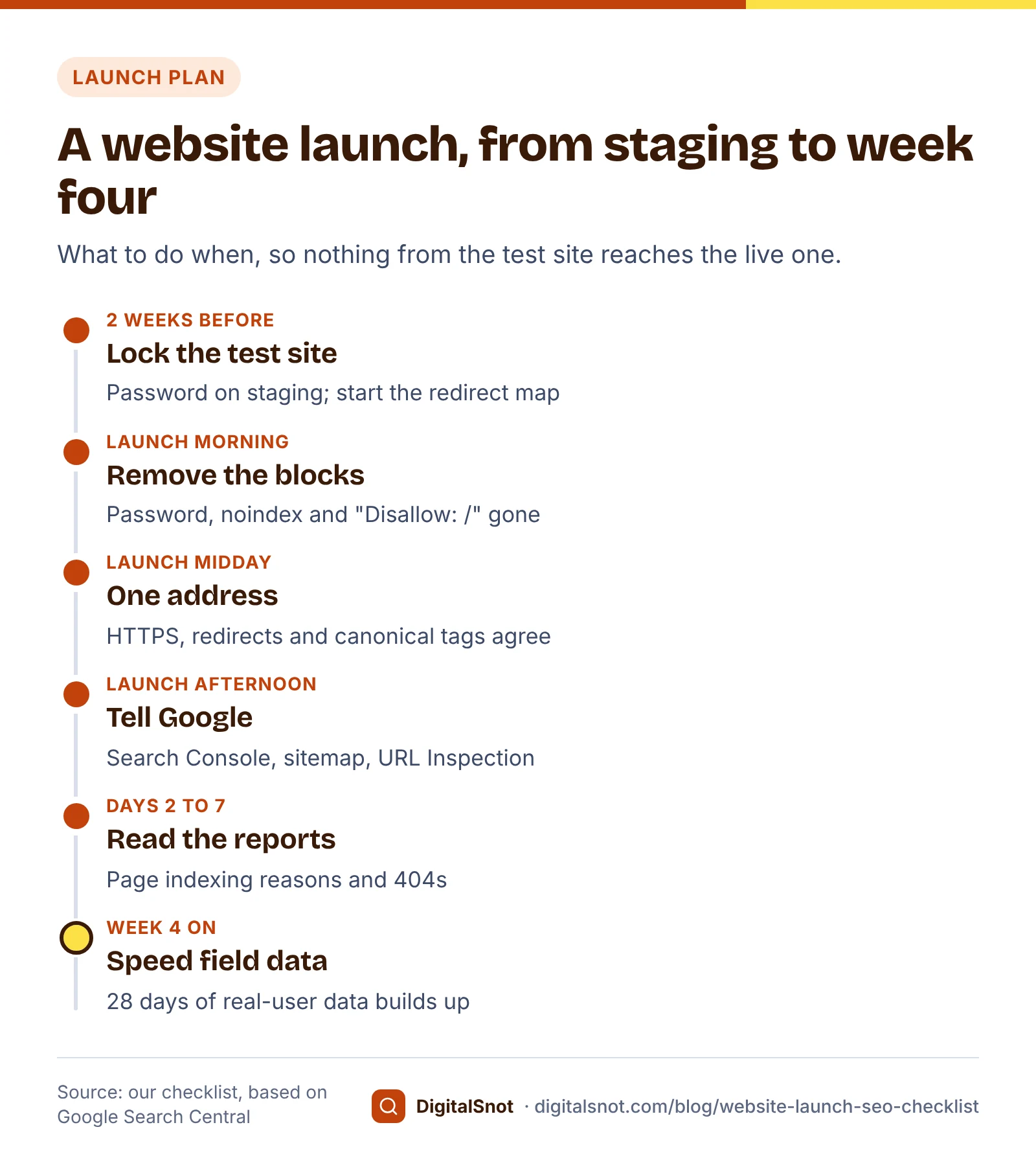
A new website can lose its first weeks in Google to one leftover line of code: a noindex tag, or a robots.txt file that still says "Disallow: /". This website launch SEO checklist takes you through the jobs in order, from two weeks before launch to the first week after, each with the Google Search Central page behind it and a free tool that checks it.
The example is a made-up business, Greenleaf Interiors in Gachibowli, Hyderabad, which is replacing its old website with a new one on the same domain.
Before launch: keep the test site private
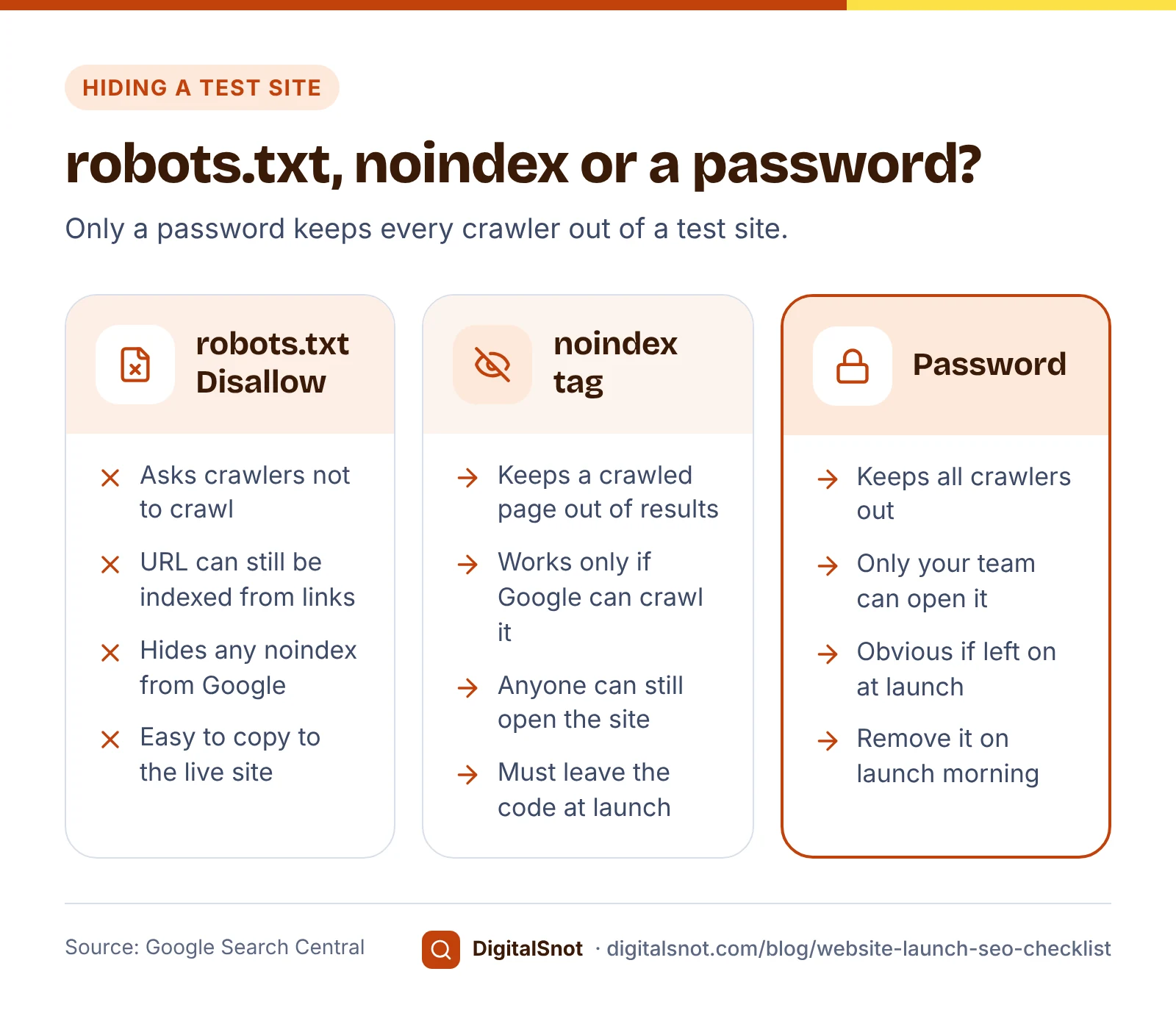
Your developer builds the new site on a test address, such as staging.greenleaf.example. Keep it out of Google with a password, not with robots.txt alone. Google's page on controlling what you share says Googlebot and other crawlers cannot reach content in password-protected directories. Its robots.txt introduction is just as clear the other way: robots.txt is not a mechanism for keeping a page out of Google, and a blocked URL can still appear in results if other pages link to it.
A noindex tag is not enough on its own either. Google's guide to blocking indexing with noindex says the rule works only when the crawler can reach the page; if robots.txt blocks it, Google never sees the noindex.
There is a second reason to prefer a password. Google's robots.txt specification says the file must sit in the top-level directory, and its rules apply only to the host, protocol and port where it is hosted. The test site's robots.txt protects only the test site, and when the files are copied across at launch, the "Disallow: /" line can travel with them. A forgotten password, by contrast, is obvious the moment anyone tries to open the live site.
Replacing an old site? Build the redirect map first
If the new site replaces an old one, every old address that changes needs a redirect. Build the map before launch, not after the complaints start.
- List every old URL: the old XML sitemap, the pages in Search Console's Performance report, your most visited pages in analytics, and the pages other sites link to.
- Match each old URL to its closest new page. Greenleaf's old /services.php?id=3 becomes /services/modular-kitchens, and /gallery.html becomes /projects.
- Decide what to do with pages that have no new equivalent, rather than sending them all to the home page.
Google's guide to site moves with URL changes asks for server-side permanent redirects from each old URL to its new one, pointing straight at the final address rather than through a chain. It warns that redirecting many old URLs to one unrelated page, such as the home page, can confuse users and may be treated as a soft 404. Keep the redirects as long as possible, generally at least one year, so Google can pass the old pages' signals to the new ones. Google's page on redirects lists 301 and 308 as the permanent status codes.
Our guide to website migration SEO covers the full move, including a change of domain.
Launch day, step 1: remove the blocks
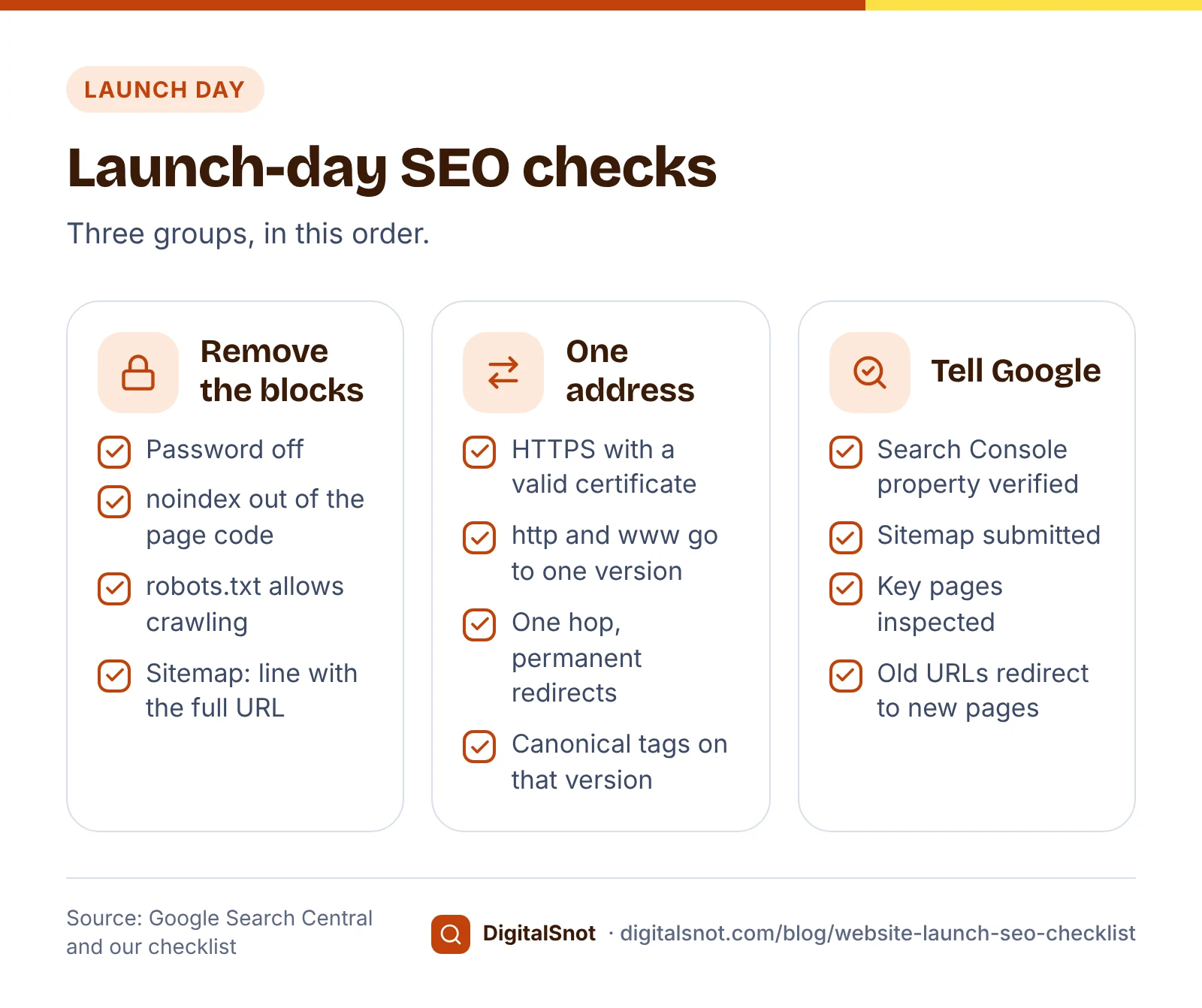
Start the morning by taking down everything that kept the test site private:
- The password. Remove it from the live server.
- Every noindex rule. Take it out of the page code itself. Google's JavaScript SEO basics say that when Google finds noindex, it may skip rendering and running JavaScript, so a script that removes the tag later may never run for Google.
- robots.txt. Replace the test file with one that allows crawling, and add a Sitemap: line with the full address of your sitemap.
Then check a handful of pages: the home page, two service pages, a blog post and the contact page. Our Indexability Checker follows a page's redirects, then checks the status code, robots.txt for Googlebot, noindex in the robots meta tag and the X-Robots-Tag header, and the canonical link. Our Robots.txt Tester fetches the live robots.txt, tests any path for Googlebot or another crawler, shows which line decides, and warns if the whole site, CSS or JavaScript is blocked. Both are our own tools, not Googlebot, so treat them as a first check and confirm with URL Inspection in Search Console.
Launch day, step 2: one address, over HTTPS
Most sites can be reached at four addresses: http and https, with and without www. Choose one, for example https://www.greenleaf.example, and send the other three to it with a single permanent redirect each.
Google's page on URL canonicalisation says Google prefers the HTTPS version of a page as the main one, unless something conflicts, such as an invalid certificate or a redirect from HTTPS back to HTTP. Its guide to consolidating duplicate URLs calls redirects and rel="canonical" tags strong signals of the main address, and listing a URL in a sitemap a weak one. So make all three agree: every page's canonical tag and every sitemap entry should use the same version you redirect to. A canonical tag is a hint, not a rule, which is one more reason to keep the signals consistent.
Put the four versions of your home page, and a sample of old URLs from your redirect map, into our Redirect Checker. It shows each hop with its status code and the final address, tests all four versions of the domain, and flags chains, temporary redirects, loops and a missing HTTPS redirect. You can check up to 10 URLs at once.
Launch day, step 3: tell Google
With the blocks gone and the addresses settled, introduce the site to Google.
Search Console. Search Console Help on adding a property describes two kinds. A Domain property covers every subdomain and both http and https, and is verified with a DNS record. A URL-prefix property covers one exact address, including the protocol, and offers other ways to verify, such as an HTML file or tag.
The sitemap. List the final, canonical address of every page you want in Google. Google's guide to building a sitemap limits one file to 50,000 URLs or 50 MB uncompressed, and lets you submit it in the Sitemaps report in Search Console or list it in robots.txt. Run it through our Sitemap Validator first. It checks the XML, the URL limit, that every URL is a full address on your own site, the lastmod dates and repeats, then opens up to 15 listed pages to find any that redirect, fail, carry noindex or point their canonical elsewhere.
Key pages. In Search Console's URL Inspection tool, test the live home page and your main service pages, then request indexing. Google's page on asking Google to recrawl says there is a quota, that requesting the same URL again does not make it faster, and that crawling can take from a few days to a few weeks. Nothing guarantees that a page will be indexed.
Here is how launch day went for Greenleaf, in this made-up example:
| Time | Job | Checked with | What turned up |
|---|---|---|---|
| 10:00 | Password and noindex removed | Indexability Checker | The blog template still had noindex; fixed in the theme |
| 10:30 | New robots.txt published | Robots.txt Tester | The test file's "Disallow: /" had been copied; replaced |
| 11:00 | Redirects switched on | Redirect Checker | http without www took two hops; rule changed to one |
| 12:00 | Sitemap published | Sitemap Validator | Six URLs still pointed at the test site; sitemap rebuilt |
| 13:00 | Search Console set up | URL Inspection | Home page and five service pages requested |
The first week: indexing, 404s and speed
Launch day is not the end. In the first week, open the Page indexing report in Search Console every couple of days and read the reasons pages are not indexed. Some are expected, such as old URLs that now redirect. Others point to a leftover from launch.
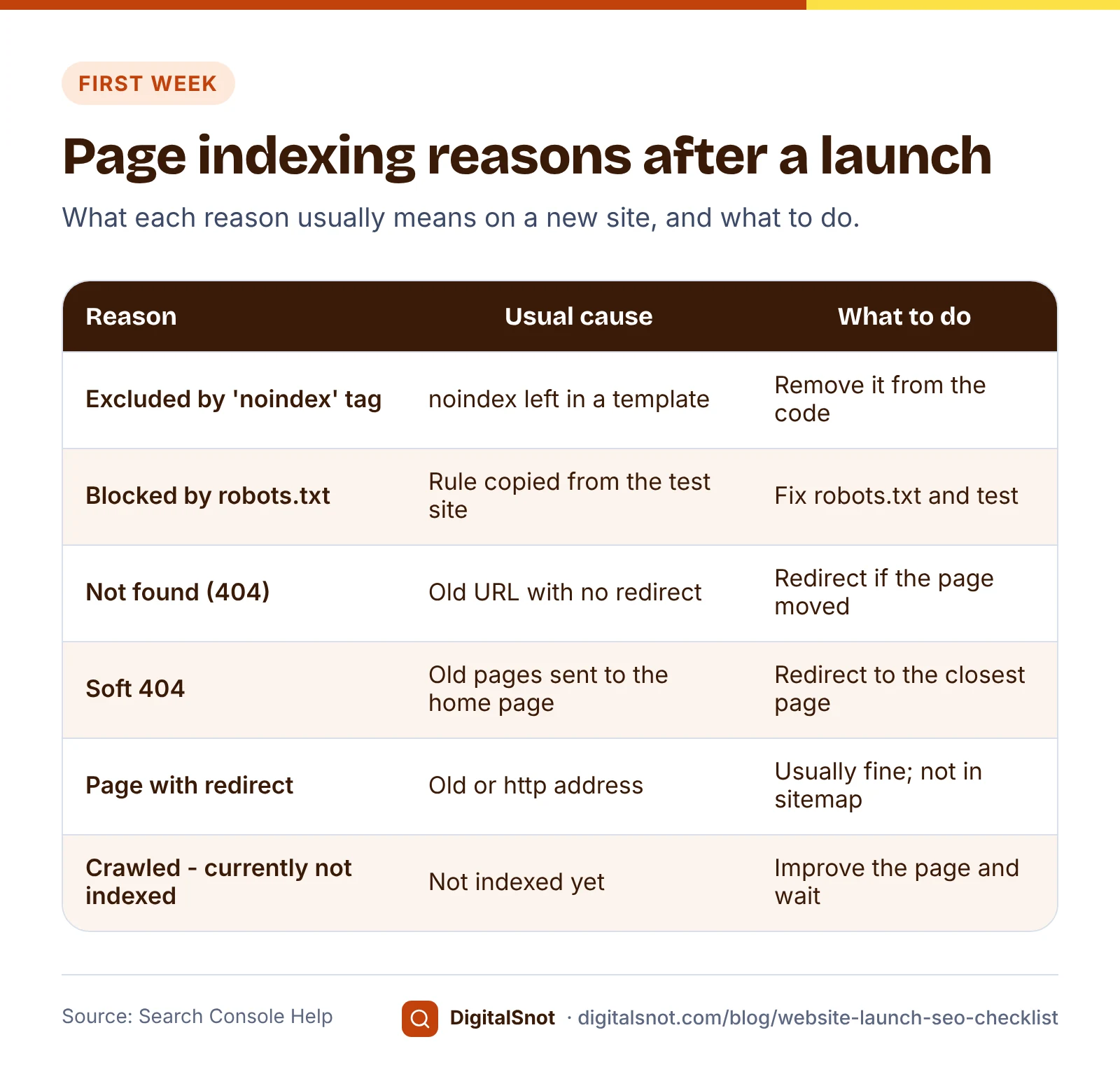
For 404 errors, Search Console Help recommends fixing only the ones for URLs you link to yourself or list in a sitemap, and returning a redirect when a page has moved. A 404 for a page you removed on purpose, with no replacement, is not necessarily a problem. Our guide to why Google is not indexing your pages goes through every reason in the report.
Speed needs patience. Search Console's Core Web Vitals report uses data from real Chrome users over the last 28 days, so a new or quiet site may show no data for weeks. Use the lab test in PageSpeed Insights meanwhile, and judge the field data against web.dev's Core Web Vitals thresholds once it appears: a Largest Contentful Paint of 2.5 seconds or less, an Interaction to Next Paint of 200 milliseconds or less and a Cumulative Layout Shift of 0.1 or less, for at least 75% of visits. Our post on five speed checks you can do yourself shows how to read both.
Mistakes to avoid, and your next step
- Relying on robots.txt to hide the test site. Use a password, and remove it on launch morning.
- Removing noindex with a script or plugin setting you have not checked. Confirm in the page source and with URL Inspection that the tag has gone.
- Sending every old page to the home page. Redirect each one to its closest new page.
- Listing redirected, noindex or test URLs in the sitemap. List only the final addresses you want in Google.
- Requesting indexing over and over. It does not speed anything up. Fix what is blocking the page, request once and wait.
- Forgetting the links you control. If addresses changed, update your Business Profile, social profiles and ads so they point straight to the new pages.
Your next step: open our Website Launch SEO Checklist before your launch date. It lists every job in three groups, before, at and after launch, marks each one as coming from Google's documentation or from our checklist, and links to the tool that checks it. Your ticks stay in your browser, and you can copy the list as a to-do list for your developer. For a wider review after launch, use our technical SEO audit checklist, run a free SEO audit, or ask our technical SEO team to check the launch with you.
Free tools in this article
- Indexability Checker See what stops Google indexing a page: status, redirects, robots.txt, noindex, canonical and HTML size.
- Robots.txt Tester Test a URL against robots.txt and see which rule blocks or allows it.
- Redirect Checker Trace 301/302 redirects, chains and loops to the final URL.
- Sitemap Validator Check your XML sitemap: limits, URLs, lastmod dates, and listed pages that redirect, fail or are noindex.
- Website Launch SEO Checklist Tick off the SEO jobs before, at and after a website launch, each with its Google source or our reason.
Frequently asked questions
Should I block my test site with robots.txt?
Not on its own. Google says robots.txt is not a way to keep a page out of Google: a blocked URL can still be indexed if other pages link to it, and Google cannot see a noindex on a page it may not crawl. Password protection keeps Googlebot and other crawlers out.
What should I check on the day a new website goes live?
Remove the password and every noindex rule, publish a robots.txt that allows crawling, redirect the http and www versions to one HTTPS address, check canonical tags, add the site to Search Console, submit the sitemap and inspect your key pages. Then read the Page indexing report during the first week.
When should I submit my sitemap to Google?
On launch day, once the password, noindex and robots.txt blocks are gone. Submit it in the Sitemaps report in Search Console, or add a Sitemap: line with its full address to robots.txt. One sitemap file can list up to 50,000 URLs or 50 MB uncompressed.
Which Search Console property should I add?
A Domain property covers every subdomain and both http and https, and is verified with a DNS record. A URL-prefix property covers one exact address, including the protocol, and can also be verified in other ways, such as an HTML file or tag.
How long should I keep redirects from my old website?
Google's site move guide says as long as possible, generally at least one year, so Google can pass the old pages' signals to the new ones. Redirect each old page to its closest new page with a permanent redirect, not everything to the home page.
How soon will my new website show in Google?
Google gives no date and does not guarantee indexing. You can request indexing for key pages with the URL Inspection tool, but crawling can take from a few days to a few weeks, and asking again for the same URL does not make it faster.
Sources
Every figure and claim in this article comes from the sources below. We checked each one when writing and link to the original so you can read it yourself. Credit belongs to the authors and publishers listed. How we write and check our articles.
-
1
Control what you share with Google
Google Search Central · Password-protected directories keep Googlebot and other crawlers out
-
2
Introduction to robots.txt
Google Search Central · robots.txt is not a mechanism for keeping a page out of Google; blocked URLs can still be indexed
-
3
Block Search indexing with noindex
Google Search Central · noindex works only if the page is not blocked by robots.txt
-
4
How Google interprets the robots.txt specification
Google for Developers · File in the top-level directory; rules apply only to its host, protocol and port; sitemap field with a full URL
-
5
Understand JavaScript SEO basics
Google Search Central · Google may skip rendering on a page with noindex, so removing it with JavaScript may not work
-
6
Site moves with URL changes
Google Search Central · Server-side permanent redirects, no chains, soft 404 risk of home page redirects, keep redirects at least a year
-
7
Redirects and Google Search
Google Search Central · 301 and 308 are permanent redirects
-
8
What is URL canonicalization
Google Search Central · Google prefers HTTPS pages as canonical unless signals conflict
-
9
How to specify a canonical URL with rel="canonical" and other methods
Google Search Central · Redirects and rel="canonical" are strong signals; sitemap inclusion is a weak one
-
10
Build and submit a sitemap
Google Search Central · 50,000 URLs or 50 MB uncompressed per file; submit in Search Console or robots.txt
-
11
Add a website property to Search Console
Search Console Help · Domain properties (DNS, all subdomains and protocols) and URL-prefix properties
-
12
URL Inspection tool
Search Console Help · Testing a live URL and requesting indexing
-
13
Ask Google to recrawl your URLs
Google Search Central · Quota, repeat requests do not speed crawling, a few days to a few weeks, no guarantee
-
14
Page indexing report
Search Console Help · Reasons pages are not indexed; fix 404s you link to or list in a sitemap
-
15
Core Web Vitals report
Search Console Help · Real-user data over the last 28 days; small sites may have no data
-
16
Web Vitals
web.dev · LCP 2.5 s, INP 200 ms and CLS 0.1 thresholds at the 75th percentile
