Is your site slow? 5 website speed checks to do yourself in 15 minutes
Five free checks, using PageSpeed Insights and Search Console, that tell you whether your site is slow for real visitors and what is causing it.

On this page (11 sections)
- 1Why speed matters for search and for sales
- 2The thresholds you are checking against
- 3Check 1: read the field data in PageSpeed Insights (3 minutes)
- 4Check 2: open the Core Web Vitals report in Search Console (3 minutes)
- 5Check 3: find oversized images (3 minutes)
- 6Check 4: count your third-party scripts (3 minutes)
- 7Check 5: test your server response time (3 minutes)
- 8What we found when we compared Google's speed sources
- 9Turn your results into a fix list
- 10When to call in help
- 11Sources
A slow website costs you visitors before they read a word. The good news is that you can find out whether your site is slow, and roughly why, in about 15 minutes with free Google tools. Here are five website speed checks, in the order to run them, and what each result means.
Why speed matters for search and for sales
Speed affects both the people on your site and, to a degree, how Google ranks it. Google says its ranking systems use Core Web Vitals, but also that good scores do not guarantee top rankings and do not override relevance. Treat speed as a tie-breaker in search and a direct factor in whether visitors stay.
A failing score is common. The 2025 Web Almanac performance chapter found that 48% of mobile websites had good Core Web Vitals, up from 44% in 2024, with desktop at 56%. Loading speed was the weak point: only 62% of mobile sites had a good Largest Contentful Paint.
The thresholds you are checking against
Core Web Vitals are three measurements of real visits, each with a "good" limit published on web.dev. A page passes when at least 75% of visits meet all three.
| Metric | What it measures | Good | Poor |
|---|---|---|---|
| Largest Contentful Paint (LCP) | How fast the main content appears | 2.5 s or less | Over 4.0 s |
| Interaction to Next Paint (INP) | How fast the page responds to taps and clicks | 200 ms or less | Over 500 ms |
| Cumulative Layout Shift (CLS) | How much the layout jumps while loading | 0.1 or less | Over 0.25 |
If you read older advice about First Input Delay (FID), it is out of date. INP replaced FID as a Core Web Vital on 12 March 2024.
Core Web Vitals and page speed
Check 1: read the field data in PageSpeed Insights (3 minutes)
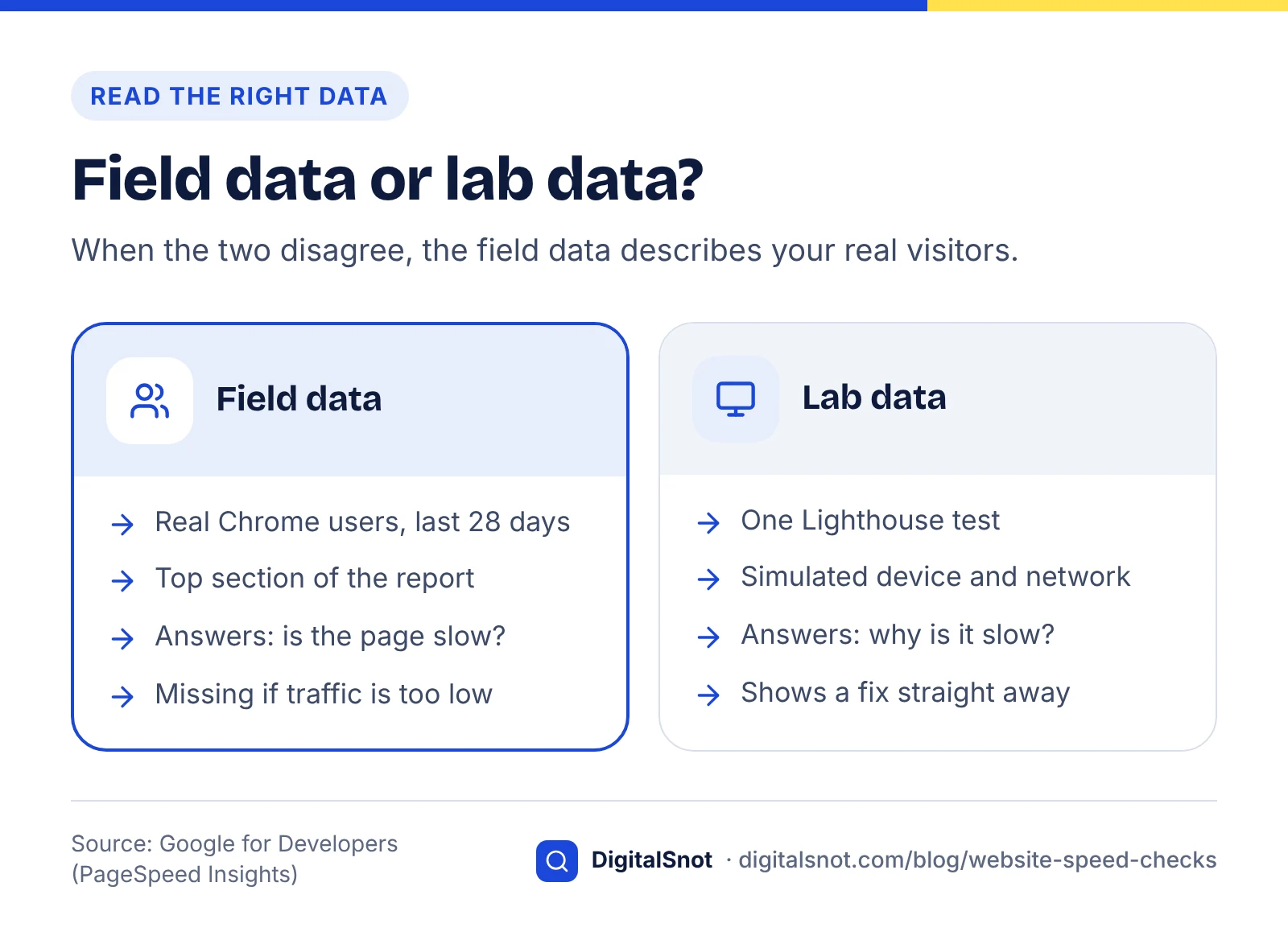
Run your homepage and one key landing page through PageSpeed Insights, and read the top section before the score. That top section is field data: what real Chrome users experienced.
According to Google's PageSpeed Insights documentation, field data comes from the Chrome User Experience Report and covers the previous 28 days. The lab data below it comes from a single Lighthouse test on one simulated device with fixed network conditions. The two often disagree, and when they do, the field data describes your real visitors.
- If the field section says "passed" for Core Web Vitals, your speed is acceptable for most users, whatever the lab score says.
- If it says "failed", note which metric is red or amber.
- If there is no field data, your page has too little Chrome traffic to report. Use the lab data as a rough guide instead.
Check 2: open the Core Web Vitals report in Search Console (3 minutes)
PageSpeed Insights tests one URL; Search Console shows your whole site. The Core Web Vitals report groups similar URLs and labels each group Good, Need improvement or Poor, separately for mobile and desktop.
Two details help you read it. First, a group takes the status of its worst metric, so a group with good LCP but poor CLS shows as Poor. Second, the data comes from real users over the last 28 days, so a fix takes weeks to show. Google suggests fixing Poor groups before those that Need improvement.
Open a Poor group and note the example URLs. They usually share a template, such as product pages or blog posts, which means one fix can improve hundreds of pages.
Check 3: find oversized images (3 minutes)
On most business sites, the largest element on the page is an image, and it is often far bigger than it needs to be. In the Lighthouse section of PageSpeed Insights, look for the "properly size images" and image format suggestions, and note the largest file.
web.dev's image performance guide recommends sizing images to the space they fill multiplied by the screen's pixel density: a 500 by 500 pixel slot on a high-density phone needs about a 1000 pixel image, not a 4000 pixel camera original. It also recommends modern formats such as AVIF and WebP, with JPEG as a fallback, and setting width and height so the layout does not jump.
One warning from web.dev's guide to optimising LCP: do not lazy-load the main image at the top of the page. Put it in the HTML directly and consider fetchpriority="high" on that one image, so the browser fetches it first.
Check 4: count your third-party scripts (3 minutes)
Chat widgets, tracking tags, review badges and embedded videos all load code from other companies' servers, and each one competes with your own content. They are a common cause of poor INP, because scripts keep the browser busy when a visitor taps.
In PageSpeed Insights, look for the diagnostics on third-party code and main-thread work. Then list every tool you have added through your CMS or tag manager, and ask whether each one still earns its place.
web.dev's advice on loading third-party JavaScript efficiently is to load these scripts with async or defer unless they must run first, lazy-load embeds that sit below the fold, and remove scripts that add little value.
Five speed checks in 15 minutes
Check 5: test your server response time (3 minutes)
If the server is slow to send the first byte, everything else waits. Time to First Byte (TTFB) is shown in the field section of PageSpeed Insights.
web.dev's TTFB article gives 0.8 seconds or less as a rough guide for "good" and above 1.8 seconds as poor. TTFB is not a Core Web Vital itself, but a slow server makes a good LCP very hard to reach. Note that Lighthouse uses a stricter 600 ms limit for its own server response audit, because it measures a narrower slice of time.
If TTFB is consistently high, the usual causes are cheap shared hosting, no page caching, a server far from your visitors, or heavy plugins running on every request. For a site serving India, check where your server and CDN are located. If you put the site behind Cloudflare, review its bot settings too: our guide to blocking AI crawlers safely explains the Cloudflare setting that can block Googlebot by accident.
What we found when we compared Google's speed sources
We set the threshold and method details from web.dev, the Search Console help page, Google Search Central and the PageSpeed Insights documentation side by side, to check whether a site owner gets the same answer from each tool. To repeat this, open each page and note the thresholds, the data source and the time window.
| Detail | web.dev | Search Console report | PageSpeed Insights |
|---|---|---|---|
| LCP / INP / CLS "good" | 2.5 s / 200 ms / 0.1 | Same | Same |
| Data source | Defines the metrics | Chrome UX Report, real users | Chrome UX Report plus a Lighthouse lab test |
| Time window | Not applicable | Last 28 days | Previous 28 days (field) |
| Scope | Any page | Groups of similar URLs | One URL, or the whole origin |
| Server response | TTFB good at 0.8 s or less | Not reported | TTFB in field data; Lighthouse audit uses 600 ms |
The thresholds agree everywhere. The differences are in scope and data source, which is why the lab score alone can mislead. Our working rule: trust field data for "is it slow?", and use the lab test for "why is it slow?".
Turn your results into a fix list
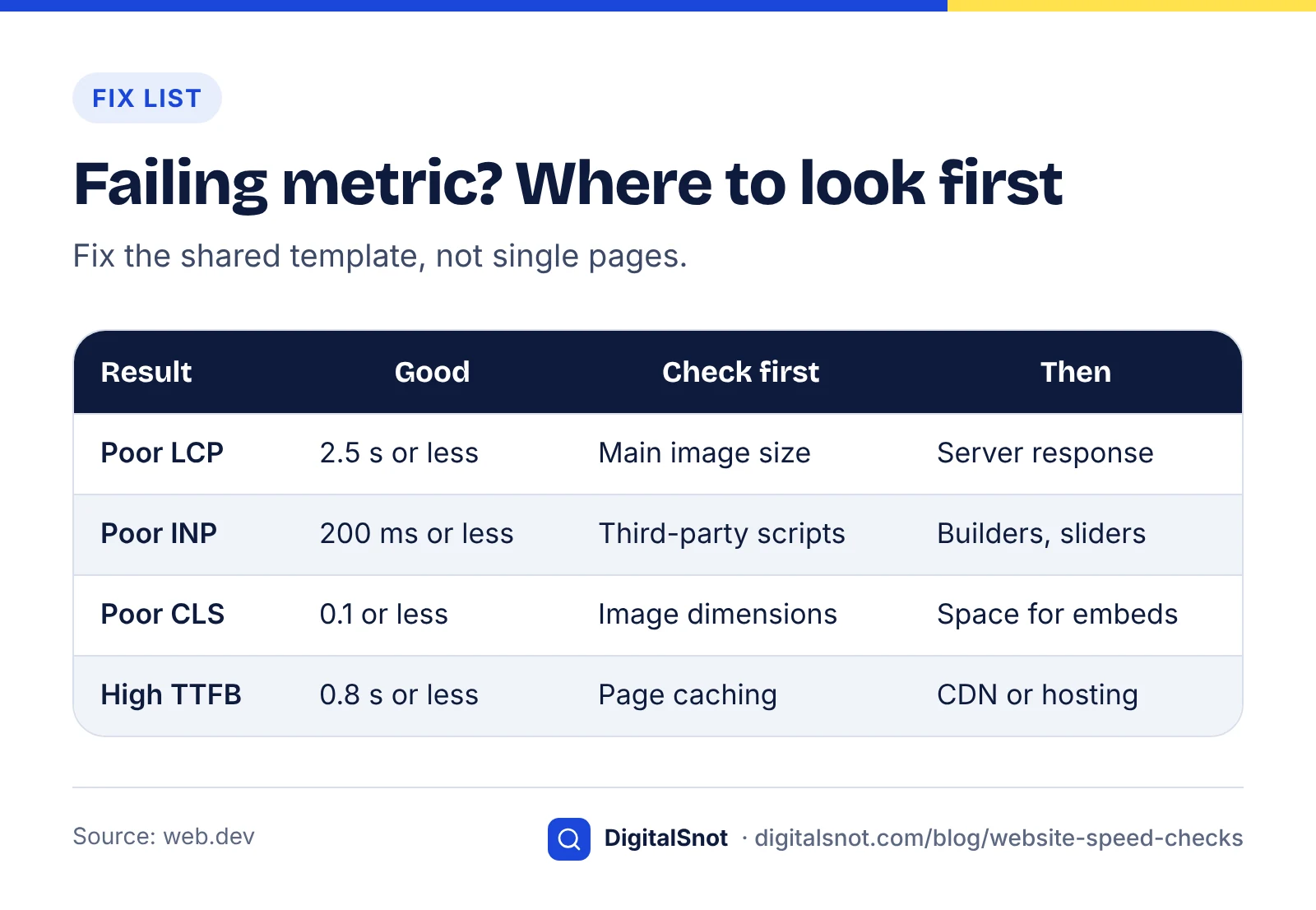
Match the failing metric to its most likely cause, then fix the template rather than one page at a time.
- Poor LCP: check the main image size and loading first, then server response time.
- Poor INP: review third-party scripts and heavy page builders or sliders.
- Poor CLS: add width and height to images and reserve space for banners, ads and embeds.
- High TTFB: turn on caching, consider a CDN, or move to better hosting.
Speed is one part of a wider technical review. Our technical SEO audit checklist puts it alongside crawling and indexing, and the on-page SEO checklist covers image alt text and page structure.
Technical audit scorecard
When to call in help
If the five checks point to hosting, theme or plugin problems you cannot change yourself, that is the point to involve a developer or specialist. Our technical SEO service covers Core Web Vitals work. If you are budgeting for it, what SEO services cost in India explains the cost drivers, and you can get in touch with your PageSpeed Insights results.
By the numbers
- of mobile websites had good Core Web Vitals in 2025, up from 44% in 2024 (desktop: 56%)
- 48%
- Source: HTTP Archive Web Almanac
- of mobile websites had a good LCP in 2025, the weakest of the three Core Web Vitals
- 62%
- Source: HTTP Archive Web Almanac
Frequently asked questions
What is a good PageSpeed Insights score?
The 0 to 100 performance score comes from a single lab test, so it is a rough guide. What matters more is the field data at the top of the report. If it shows your page passing Core Web Vitals, with LCP of 2.5 seconds or less, INP of 200 milliseconds or less and CLS of 0.1 or less, your real visitors are getting a good experience.
Why are my lab and field results different?
Lab data comes from one simulated device and network in a single Lighthouse test. Field data comes from real Chrome users over the previous 28 days, on many devices and connections. Real visitors may have slower phones or faster networks than the test assumes, so the numbers often differ. Use field data to judge speed and lab data to find causes.
Do Core Web Vitals affect Google rankings?
Google says its ranking systems use Core Web Vitals, but there is no single page experience signal, and good scores do not guarantee top rankings. Relevance and content quality still matter more. Think of speed as something that helps when pages are otherwise similar, and as a direct factor in whether visitors stay on your site.
Why does Search Console show no Core Web Vitals data?
The report relies on Chrome User Experience Report data from real visitors. If your site or a group of pages has too few visits from Chrome users, there is not enough data to report, and pages may be grouped at a higher level or left out. Use PageSpeed Insights lab data in the meantime.
How long does it take for speed fixes to show in Search Console?
The Core Web Vitals report uses real-user data collected over the last 28 days, so improvements appear gradually. Expect to wait around four weeks after a fix before the report fully reflects it. A lab test in PageSpeed Insights will show the change immediately, which is useful for checking that the fix worked.
Is FID still a Core Web Vital?
No. Interaction to Next Paint (INP) replaced First Input Delay (FID) as a Core Web Vital on 12 March 2024. INP looks at the responsiveness of all interactions during a visit rather than only the first one. A good INP is 200 milliseconds or less. Any advice that still lists FID is out of date.
Sources
Every figure and claim in this article comes from the sources below. We checked each one when writing and link to the original so you can read it yourself. Credit belongs to the authors and publishers listed. How we write and check our articles.
-
1
Understanding Core Web Vitals and Google search results
Google Search Central · Role of Core Web Vitals in ranking and its limits
-
2
Performance (Web Almanac 2025)
HTTP Archive · Share of mobile and desktop sites with good Core Web Vitals and LCP in 2025
-
3
Web Vitals
web.dev · Core Web Vitals thresholds and the 75th percentile rule
-
4
Interaction to Next Paint becomes a Core Web Vital on March 12
web.dev · INP replacing FID on 12 March 2024
-
5
About PageSpeed Insights
Google for Developers · Field data from CrUX over 28 days versus Lighthouse lab data
-
6
Core Web Vitals report
Search Console Help · URL groups, worst-metric status, 28-day data and fix order
-
7
Image performance
web.dev · Sizing images by pixel density, modern formats and explicit dimensions
-
8
Optimize Largest Contentful Paint
web.dev · Avoid lazy-loading the LCP image; fetchpriority
-
9
Efficiently load third-party JavaScript
web.dev · async, defer, lazy-loading embeds and removing low-value scripts
-
10
Time to First Byte (TTFB)
web.dev · TTFB thresholds of 0.8 s and 1.8 s; Lighthouse 600 ms audit