Guide · On-page SEO
On-page SEO checklist: optimise every page step by step
A step-by-step on-page SEO checklist built on Google’s own documentation: titles, meta descriptions, headings, content, links, images, schema and freshness.
On this page (12 sections)
- 1Step 1: Match search intent before you touch the HTML
- 2Step 2: Write a title element Google will keep
- 3Step 3: Write meta descriptions that earn the click
- 4Step 4: Clean up the URL and heading structure
- 5Step 5: Make the content helpful and place keywords without stuffing
- 6Step 6: Add internal links with descriptive anchor text
- 7Step 7: Optimise images: alt text, file names, size and format
- 8Step 8: Add structured data Google still supports
- 9Step 9: Check page experience and keep dates honest
- 10Our analysis: a worked rewrite and what Google says it uses
- 11The full per-page on-page SEO checklist
- 12Sources
An on-page SEO checklist is the set of checks you run on a single page so that it answers the searcher’s question, tells Google clearly what it is about and earns the click in the results. It covers everything you control inside the page: the title element, meta description, URL, headings, body copy, internal links, images, structured data and the dates you show.
This guide walks through each element in the order we recommend working on them, explains what Google’s own documentation says about it, and ends with a per-page checklist table you can copy. Where Google says an element does not matter, we say so too, because cutting wasted effort is half the value of a checklist.
On-page work sits between two other disciplines. Crawling, indexing and speed belong to technical SEO, which our technical SEO audit checklist covers. Choosing which queries a page should target belongs to keyword research, covered in our keyword research guide. This checklist assumes the page can be crawled and that you already know its primary query.
Step 1: Match search intent before you touch the HTML
Search intent is the job the searcher wants done, and matching it is the first on-page check because every later element depends on it. If people searching your query want a comparison table and your page is a sales pitch, perfect title tags will not save it.
Google’s guidance on creating helpful, reliable, people-first content asks whether someone who lands on your page will “leave feeling they’ve learned enough about a topic to help achieve their goal”. That is an intent question. Answer it before you edit anything else.
How to check intent in practice
- Search the primary query yourself in a private window and note what format dominates the first page: guides, product pages, category pages, local results, videos or tools.
- Classify the intent as informational (learn), commercial (compare), transactional (buy or book) or navigational (find a specific site).
- Note the angle the top results share, such as “for beginners”, “2026”, “near me” or “free”. A shared angle signals what searchers reward.
- Decide whether your page type fits. If it does not, change the page type or target a different query. Do not try to force a product page to rank for a “how to” query.
For queries with a local element, intent often favours the map pack rather than any single page, which is why local businesses should also work through our Google Business Profile optimisation guide.
Search result citing the client
Step 2: Write a title element Google will keep
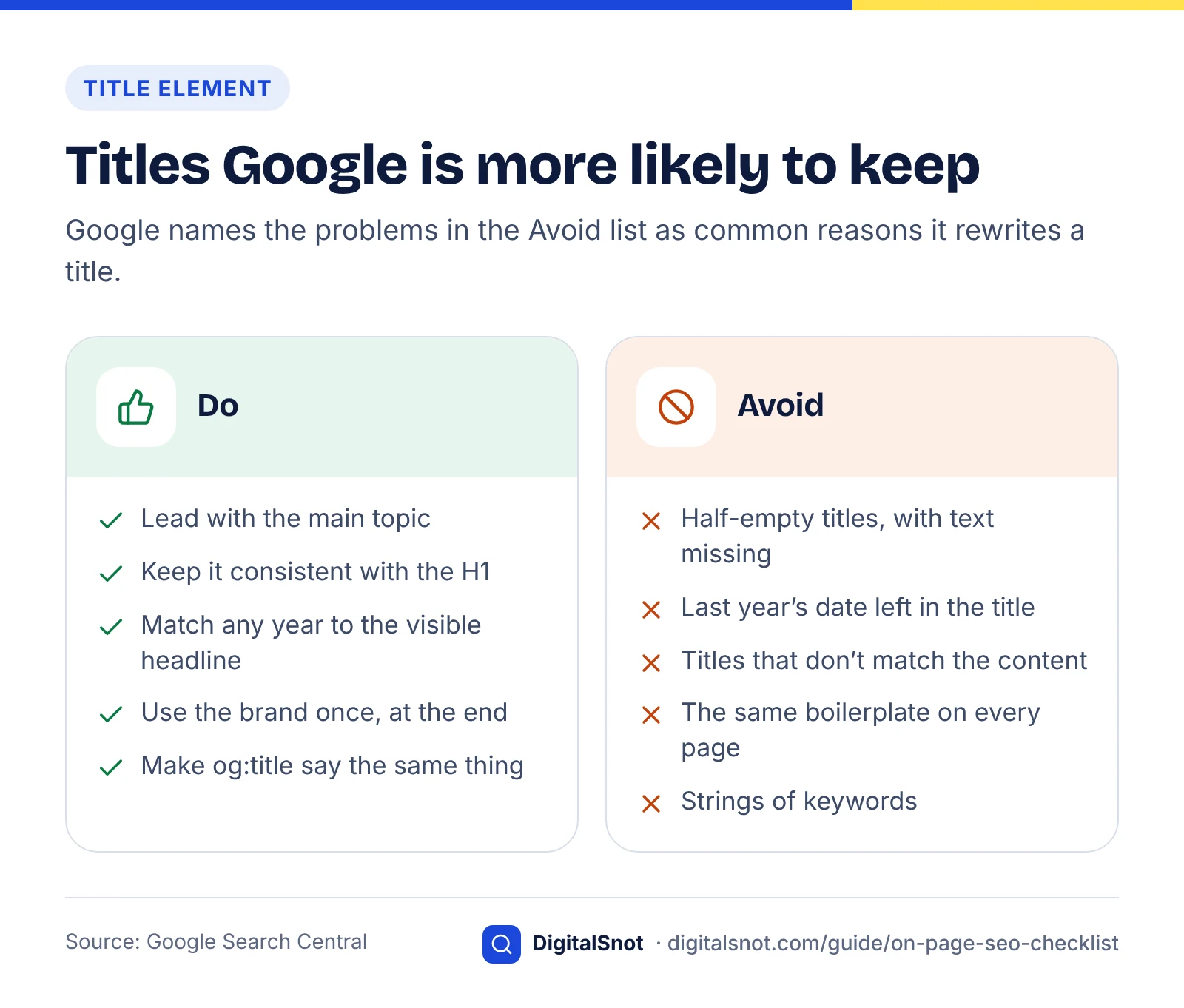
Write a unique, descriptive, concise title element for every page, lead with the main topic and keep it consistent with the visible H1. Google uses the title element as the main source for the clickable headline in results, which it calls a title link.
Google’s Influencing your title links in search results documentation says title links are generated automatically. Alongside the title element, Google lists other sources it may draw on: the main visual title on the page, heading elements such as H1, content in og:title meta tags, other large and prominent text, other text on the page, anchor text on the page, text in links pointing to the page, and WebSite structured data.
Why Google rewrites titles
The same documentation names the common problems that make Google replace a title:
- Half-empty titles, where part of the text is missing, such as a title that is only “| Site Name”.
- Obsolete titles, such as a yearly guide whose visible headline says one year while the title element still shows the previous year.
- Inaccurate titles that do not reflect what the page is actually about.
- Micro-boilerplate, where the same repeated text appears across the titles of a set of pages, so the titles stop distinguishing one page from another.
Google also notes that it may change a title written in a different language or writing system from the page content. There is no fixed character limit in the documentation, but titles can be truncated to fit the device width, so put the important words first. The free Google SERP Preview shows where a title and description would be cut off on desktop and mobile.
Rewrites are common. In Zyppy’s study of 80,959 title tags across 2,370 sites in early 2022, Google rewrote 61% of them at least partially. That figure is a few years old, so treat it as a benchmark rather than today’s rate, but the lesson holds: a title that is accurate, specific and consistent with the H1 gives Google less reason to substitute its own.
Title element checklist
- One title per page, unique across the site.
- Primary topic near the start, written for people rather than as a keyword list.
- Brand name once, briefly, usually at the end, if at all.
- Dates and numbers in the title match the visible headline.
- og:title says the same thing, so social shares and Google’s fallback sources agree.
Anatomy of an optimised page
Step 3: Write meta descriptions that earn the click
Write a unique meta description for every important page that summarises what the page offers and why it is worth clicking. It will not raise rankings, but it can shape the snippet that sits under your title link.
Google’s snippet documentation says snippets are created primarily from the page content itself, and that Google sometimes uses the meta description when it might give users a more accurate description of the page than content taken directly from the page. The same page explains the nosnippet and max-snippet controls if you need to limit snippets.
On rankings, Google’s position has been stable since a 2007 Search Central blog post, which said accurate meta descriptions can improve clickthrough but won’t affect your ranking within search results. Treat a meta description as advertising copy, not as a ranking lever.
Expect rewrites, write anyway
An Ahrefs study published in 2020 compared hand-written descriptions with Google’s desktop snippets for 20,000 keywords and found Google replaced them 62.78% of the time. The rate was 59.65% for high-volume head terms and 65.62% for long-tail queries. The same study found that 25.02% of top-ranking pages had no meta description at all, and that descriptions which ran too long were rewritten at about the same rate as normal-length ones.
So length limits matter less than relevance. A description gets used when it matches the query better than any passage on the page, which means it should describe the specific answer, not repeat the title.
Meta description checklist
- Unique per page; never copy the same description across a template.
- Describes the page’s main answer or offer in plain language.
- Includes the primary topic naturally, because matching terms can be highlighted in results.
- Reads well if cut short: put the most useful information in the first sentence.
- No strings of keywords, which read as spam and are unlikely to be shown.
Step 4: Clean up the URL and heading structure
Use short, readable URLs with words separated by hyphens, and give each page one clear H1 that states the topic, followed by H2 and H3 headings that outline the content. Both help people first; Google says their ranking effect is small.
URLs
Google’s URL structure best practices recommend keeping URLs as simple as possible and say: “We recommend that you use hyphens (-) instead of underscores (_) in your URLs.” Readable words in the path help users understand where a link goes before they click.
Keep expectations realistic. Google’s SEO Starter Guide says keywords in the domain name or URL path alone have hardly any effect beyond appearing in breadcrumbs. Do not change the URLs of established pages just to add a keyword; if you must change one, redirect the old URL permanently.
- Lowercase, hyphen-separated words:
/guide/on-page-seo-checklist, not/p?id=4821. - No dates in evergreen URLs, so the page can be refreshed without a URL change.
- One URL per piece of content, with a canonical tag where duplicates exist.
Headings
The same Starter Guide lists the number and order of headings under things Google believes you shouldn’t focus on: semantic heading order helps screen readers, but from Google Search’s perspective it doesn’t matter if headings are used out of order. That does not make headings pointless. Heading elements are one of the sources Google can use for title links, and a clear outline helps readers scan.
- One visible H1 that matches the topic of the title element (they need not be identical).
- H2s that answer the main sub-questions, in a logical order; H3s for steps inside them.
- Headings that describe the section, not decorative phrases like “Let’s dive in”.
- Logical nesting for accessibility, even though Google does not require it.
Step 5: Make the content helpful and place keywords without stuffing
The body copy should answer the query better than the alternatives, show who wrote it and why they can be trusted, and use the words searchers use without repeating them unnaturally. This is the most important on-page element and the hardest to fake.
What Google means by helpful, people-first content
Google’s helpful content guidance gives self-assessment questions about content quality, expertise and page experience, and asks site owners to consider “Who, How, and Why” for every page: who created it, how it was produced, and why it exists. Content created mainly to attract search visits, rather than to help people, is what the guidance warns against. If a page lost traffic after a Google core update, our core update recovery guide shows how to confirm the cause before you rewrite anything.
The guidance also explains E-E-A-T: experience, expertise, authoritativeness and trust. It states that E-E-A-T itself isn’t a specific ranking factor, that trust is the most important of the four, and that Google’s systems give extra weight to strong E-E-A-T on “Your Money or Your Life” topics affecting health, finances or safety.
E-E-A-T comes from Google’s Search Quality Rater Guidelines. Google’s overview of the rater guidelines explains that raters’ scores don’t directly impact how a page appears in Search; they help Google measure whether its systems are working. So you cannot “add E-E-A-T” with a plugin. You show it with real authorship, sources and accuracy.
Practical content checks
- Answer first. Put the direct answer in the opening paragraph, then the detail.
- Byline and author page. Name a real author with relevant experience and link to a page about them.
- Cite primary sources. Link to the documentation, study or dataset behind each claim.
- Add something original: a worked example, a comparison, a decision framework or data you collected.
- Cover the sub-questions that the top results and “People also ask” box raise, but only where they serve the reader.
Keyword placement without stuffing
Use the primary query, or a close variant, in the title element, the H1, the opening paragraph and at least one subheading where it reads naturally. Use related terms and synonyms through the body. That is enough for Google to understand the topic.
Repetition beyond that is a risk. Google’s spam policies define keyword stuffing as filling a page with keywords or numbers in an attempt to manipulate rankings, with examples such as blocks of text listing cities a page wants to rank for and words repeated so often that they sound unnatural. The SEO Starter Guide puts it more plainly: keyword stuffing is against Google’s spam policies, and repeated words become tiresome for readers. Read the page aloud; if a sentence sounds written for a machine, rewrite it.
If your team needs help building content that meets this bar, our content SEO service focuses on exactly this layer.
Content plan and article outline
Step 6: Add internal links with descriptive anchor text
Link to the page from relevant pages on your site, and link out from it to related pages, using anchor text that describes the destination. Internal links help Google discover pages and understand what they are about, and they move readers to the next useful step.
Google’s link best practices say Google can generally only crawl links that are HTML <a> elements with an href attribute. Links built on other elements, or that rely on script events without an href, may not be followed. The same page asks for anchor text that is descriptive, reasonably concise and relevant to both the page it is on and the page it links to, and it gives generic text such as “click here” as an example to avoid.
Internal linking checklist
- Find linking opportunities. Search your own site for pages that mention the topic and add a contextual link from each relevant one.
- Write descriptive anchors. “our technical SEO audit checklist” tells readers and Google more than “read more”.
- Vary anchors naturally. Use different wording across pages instead of one exact-match phrase everywhere.
- Link out from the page to the next logical step: a service, a deeper guide or a related comparison.
- Check that links are crawlable: real
<a href>elements, no broken URLs, no long redirect chains.
A page with no internal links pointing to it is hard for both Google and visitors to find. Pages that matter commercially, such as service pages like our on-page SEO service, should be linked from relevant guides and from the main navigation.
Internal links between pages
Step 7: Optimise images: alt text, file names, size and format
Give every meaningful image descriptive alt text and a descriptive file name, serve it in a modern format at a sensible size, and place it near the text it illustrates. Images help readers, can rank in Google Images and affect page speed.
Google’s image SEO best practices call alt text the most important attribute when it comes to providing more metadata for an image. Google uses it, together with computer vision and the page content, to understand the image. Alt text should be useful and information-rich, use keywords appropriately and fit the context of the page. The same page says file names give Google light clues about the subject, so my-new-black-kitten.jpg is better than IMG00023.JPG.
Google Search supports images referenced in the src attribute of an img element in BMP, GIF, JPEG, PNG, WebP, SVG and AVIF formats. AVIF was added in 2024, as Google announced in Supporting AVIF in Google Search. WebP and AVIF usually give smaller files at similar quality, which helps loading speed.
Image checklist
- Alt text that describes the image in context; empty alt (
alt="") only for purely decorative images. - Descriptive, hyphenated file names.
- Width and height attributes set, so the layout does not shift as images load.
- Images resized to their display size and compressed; WebP or AVIF where your stack supports them.
- Lazy loading for images below the fold, but not for the main hero image.
- Images placed close to the relevant text, with captions where they add meaning.
Step 8: Add structured data Google still supports
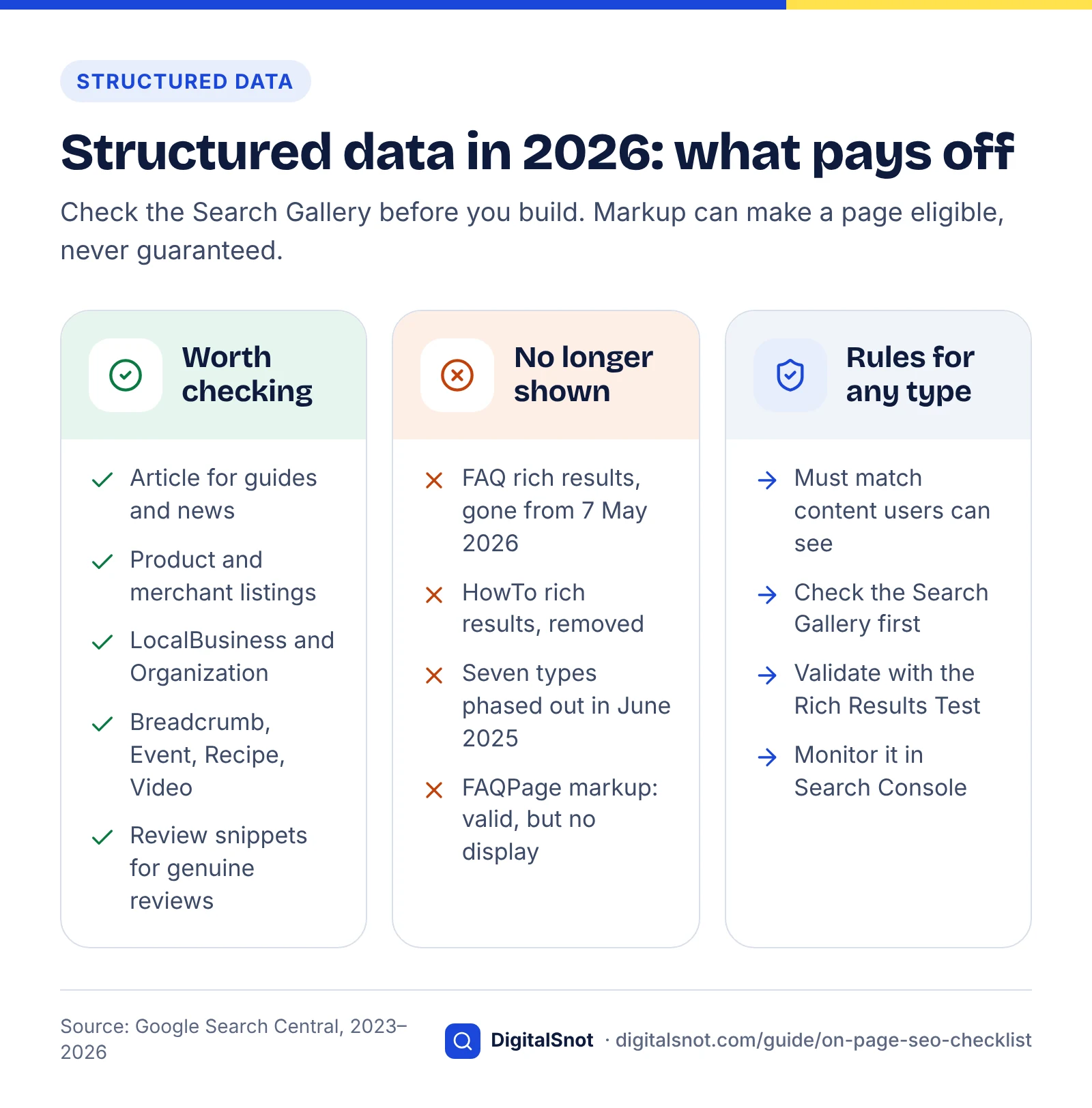
Add structured data that accurately describes the visible content, and choose types that are still eligible for rich results. Structured data helps Google understand a page and can make it eligible for richer displays, but it never guarantees them.
Google’s general structured data guidelines say markup must represent content users can see on the page, and that violating the guidelines can stop otherwise valid markup from producing a rich result or cause it to be treated as spam. The Search Gallery lists the features Google currently supports.
What changed recently
- HowTo rich results are gone. In August 2023 Google limited HowTo rich results to desktop, and Google’s documentation updates log later recorded removing the HowTo documentation because the rich result is no longer shown on desktop or mobile.
- FAQ rich results are gone for everyone. The same August 2023 post restricted FAQ rich results to well-known, authoritative government and health websites. Then, as of 7 May 2026, Google stopped showing FAQ rich results in Search for all sites, as Search Engine Roundtable reported from Google’s FAQ documentation notice. FAQPage markup is still valid Schema.org and is harmless to leave in place, but it will not produce a visible result in Google.
- Seven more types were phased out. In June 2025 Google announced it was phasing out Book Actions, Course Info, Claim Review, Estimated Salary, Learning Video, Special Announcement and Vehicle Listing displays to simplify the results page.
Types worth checking for typical business pages
Check the Search Gallery for current eligibility before you build anything, but common candidates include Article for guides and news, Product and merchant listings for e-commerce, LocalBusiness for physical locations, Organization for your brand details, Breadcrumb for site hierarchy, Review snippets where you have genuine, eligible reviews, Event, Recipe and Video. Validate markup with the Rich Results Test and monitor it in Search Console. Our guide to schema markup after FAQ rich results has a status table for each type and a keep, fix or remove audit for markup you already have.
Structured data is also one way AI-driven search features can read your page reliably. For that side of the work, see our guide on how to get cited in AI search.
Structured data (JSON-LD) code
Step 9: Check page experience and keep dates honest
Make sure the page loads quickly, responds to input and does not jump around, then show an accurate published or updated date that matches your structured data. Both are quick checks at page level, with deeper fixes handled in a technical audit.
Core Web Vitals in brief
Google’s Core Web Vitals documentation sets three “good” targets: Largest Contentful Paint (loading) within 2.5 seconds, Interaction to Next Paint (responsiveness) under 200 milliseconds and Cumulative Layout Shift (visual stability) below 0.1. INP replaced First Input Delay as a Core Web Vital in March 2024. The page experience guidance places these alongside HTTPS, mobile usability and avoiding intrusive interstitials.
On a single page, the usual on-page culprits are oversized hero images, images without width and height, late-loading banners and heavy embeds. Template-wide problems, such as slow servers or render-blocking scripts, belong in the full technical audit, and our technical SEO service handles those fixes.
Content freshness and dates
Google’s guide to byline dates recommends showing a clear, visible date on the page, labelled for example “Published” or “Last updated”, and adding datePublished and dateModified in Article structured data that match what readers see. Include a time zone where you can.
Update the date only when you make a meaningful change to the content. Changing the date without changing the substance does not make a page more useful, and an obsolete year left in the title is one of the issues Google cites as a reason for rewriting title links. Set a review cycle for pages on fast-moving topics, such as every six or twelve months, and record what changed.
Our analysis: a worked rewrite and what Google says it uses
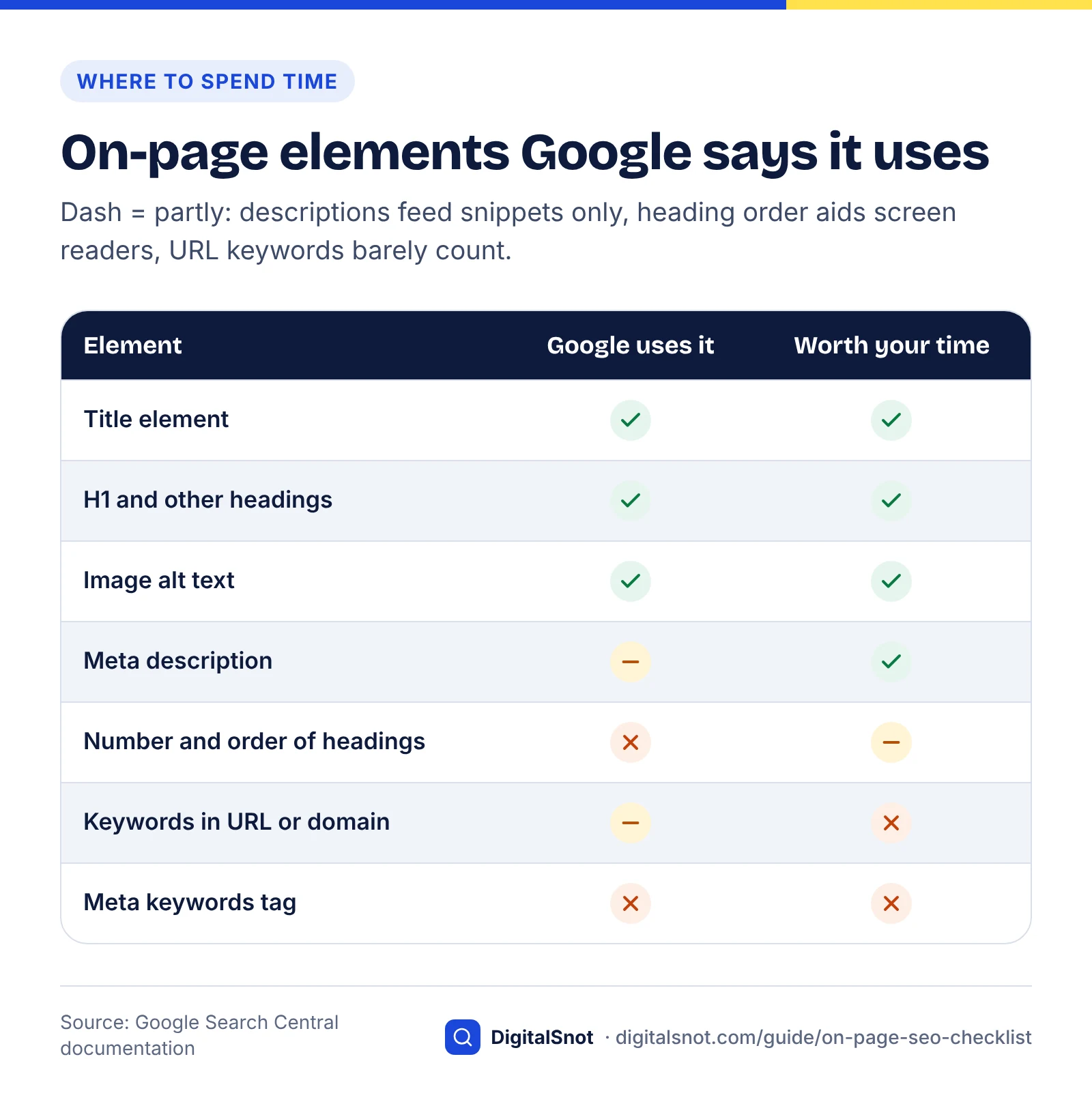
This section contains two pieces of original analysis. The first is an illustrative before-and-after rewrite of a hypothetical page. The second is a table we built by reading Google’s documentation and recording, element by element, whether Google says it uses each on-page element and for what.
Worked example: rewriting a hypothetical service page
This is an illustrative example, not a real client page. Imagine a heating engineer in Leeds whose boiler servicing page targets the query “boiler service Leeds”. The intent is transactional and local: people want to know what is included, whether the business covers their area and how to book.
| Element | Before (illustrative) | After (illustrative) | Why it changed |
|---|---|---|---|
| Title element | Home | Services | Boilers | Boiler Service | Boiler Service Leeds | ABC Heating | Boiler service in Leeds: what’s checked and how to book | ABC Heating | Removes repeated keywords and section labels; leads with the topic and the searcher’s questions. |
| Meta description | Boiler service Leeds, cheap boiler service, best boiler service Leeds, boiler servicing near me. Call now! | Annual boiler service across Leeds by Gas Safe registered engineers. See the full checklist, how long a visit takes and book an appointment online. | Replaces a keyword string with a specific summary that answers what, who and how. |
| H1 | Welcome to our website | Boiler servicing in Leeds | States the topic and matches the title element, a source Google can use for title links. |
| Intro | ABC Heating has been passionate about heating for many years. We pride ourselves on quality and customer service, and we offer a wide range of services. | We service gas boilers across Leeds. A standard annual service takes about an hour and covers the checks listed below, and you get a written record at the end. Book online or check whether we cover your postcode. | Answers intent in the first two sentences and points to the next action. (Facts in the rewrite would need to be true for the real business.) |
The pattern generalises: remove repetition, state the topic plainly, answer the searcher’s first question immediately and keep title, H1 and intro consistent so Google has no reason to look elsewhere for a headline. For a business like this, location signals matter as much as the page itself, which is where local SEO comes in.
What Google’s documentation says it uses and ignores
Method: we read the Google Search Central pages cited in this guide, including the SEO Starter Guide, the title link, snippet, image, link, structured data and byline date documentation, the helpful content guidance and Google’s list of meta tags Google supports. For each common on-page element we recorded what Google explicitly says. Anyone can repeat this by checking the same pages.
| On-page element | Google’s documented position | Verdict |
|---|---|---|
| Title element | Primary source for generating title links | Used |
| H1 and other headings | One of the sources for title links | Used |
| Number and order of headings | Starter Guide: doesn’t matter for Google Search; helps screen readers | Not a ranking concern |
| og:title meta tag | Listed as a possible source for title links | Used |
| Meta description | Sometimes used for snippets; 2007 post says it won’t affect ranking | Used for snippets only |
| Meta keywords tag | Not used by Google Search; no effect on indexing or ranking | Not used |
| HTML lang attribute | Listed as unsupported; Google detects language from the page text | Not used |
| Keywords in domain or URL path | Hardly any effect beyond appearing in breadcrumbs | Minimal |
| Image alt text | The most important attribute for image metadata | Used |
| Image file name | Gives Google light clues about the subject | Used, lightly |
| Anchor text | Should be descriptive and relevant; helps Google understand the linked page | Used |
| Structured data | Can enable rich results if guidelines are met; no FAQ or HowTo displays now | Used, by type |
| E-E-A-T | Not a specific ranking factor; systems use a mix of signals that reflect it | Indirect |
| Visible and structured dates | Used to determine the date shown in results | Used |
| Keyword repetition | Keyword stuffing breaches the spam policies | Harmful |
Two practical conclusions follow. First, time spent on meta keywords, heading-order debates or keyword-rich domains is time not spent on the elements Google does document as used: titles, headings as title sources, alt text, anchor text and content quality. Second, the elements marked “used” are mostly about clarity. Google wants consistent signals about what the page is, so contradictions between title, H1, og:title and dates are worth fixing first.
The full per-page on-page SEO checklist
Run this checklist on every new page before publishing and on existing pages when you refresh them. Work top to bottom: the order reflects dependency, so intent comes first and freshness last. To speed up the mechanical rows, the free On-Page SEO Checker runs 30+ checks on a page and target keyword, including titles, headings, images, canonical and social tags.
| # | Element | Check | Done when |
|---|---|---|---|
| 1 | Search intent | Page type matches the dominant result format for the primary query | You can name the intent and the format, and your page fits both |
| 2 | Title element | Unique, descriptive, topic first, consistent with H1 | No boilerplate, no outdated year, no keyword list |
| 3 | og:title | Matches the meaning of the title element | Social and search headlines agree |
| 4 | Meta description | Unique summary of the page’s answer or offer | First sentence works on its own if truncated |
| 5 | URL | Short, lowercase, hyphen-separated words | Readable at a glance; old URLs redirected if changed |
| 6 | H1 | One visible H1 stating the topic | Matches the title’s topic |
| 7 | Subheadings | H2s for main questions, H3s for steps | The outline alone explains the page |
| 8 | Opening paragraph | Direct answer in the first one or two sentences | A reader could stop there and have the gist |
| 9 | Content quality | Who, how and why are clear; sources cited; something original added | Byline, author page and primary-source links present |
| 10 | Keywords | Primary query in title, H1, intro and one subheading; variants in body | Reads naturally aloud; no stuffing |
| 11 | Internal links in | Relevant pages link to this one | At least a few contextual links with descriptive anchors |
| 12 | Internal links out | Links to the next logical pages | Crawlable <a href> links, no broken URLs |
| 13 | Images | Alt text, descriptive file names, sized and compressed, modern format | Width and height set; hero image not lazy-loaded |
| 14 | Structured data | Supported type that matches visible content | Passes the Rich Results Test; no FAQ or HowTo expectations |
| 15 | Page experience | LCP, INP and CLS in the “good” range | No page-specific speed or layout issues |
| 16 | Dates | Visible date matches datePublished and dateModified | Date changed only after meaningful updates |
Run the on-page checklist
How to use the checklist at scale
- Prioritise by value. Start with pages that already get impressions in Search Console but have a low click-through rate; title and description fixes pay off fastest there.
- Fix templates once. If every product page repeats the same title pattern, change the template rather than editing pages one by one.
- Record changes. Note the date and what you changed for each page so you can compare clicks and impressions after Google recrawls it.
- Re-check after recrawl. Search for the page and see whether Google kept your title and description. If it rewrote them, compare its version with yours: it is often pointing at a mismatch.
If you would rather have specialists run this across your site, see our full list of SEO services or get in touch to discuss your pages.
Free tools in this guide
By the numbers
- of 80,959 title tags across 2,370 sites were rewritten by Google in Zyppy’s early-2022 study
- 61%
- Source: Zyppy
- of hand-written meta descriptions were replaced in Google’s desktop snippets across 20,000 keywords (2020)
- 62.78%
- Source: Ahrefs
- or less is Google’s “good” threshold for Largest Contentful Paint, one of the three Core Web Vitals
- 2.5 s
- Source: Google Search Central
Frequently asked questions
What is an on-page SEO checklist?
An on-page SEO checklist is a repeatable list of checks you run on each page so it matches search intent and describes itself clearly to Google. It covers elements inside the page you control: the title element, meta description, URL, headings, body content, internal links, images, structured data, page experience and dates. Technical crawling issues and off-site links are handled separately.
How long should a title tag be?
There is no fixed limit, but titles longer than roughly 60 characters are often cut off in results. We keep the important words at the start.
Why does Google rewrite my title tags?
Google’s documentation lists common reasons: half-empty titles, obsolete titles such as an old year, titles that do not reflect the page content, and repeated boilerplate across many pages. Titles in a different language from the page can also be changed. Google may then use your H1, og:title, other prominent text or anchor text instead. Fix the mismatch and Google is more likely to keep your title.
Are meta descriptions a ranking factor?
No. Google said in a 2007 Search Central blog post that accurate meta descriptions can improve clickthrough but won’t affect ranking. Google builds snippets mainly from page content and sometimes uses the meta description when it describes the page better. A 2020 Ahrefs study found Google replaced hand-written descriptions 62.78% of the time, but writing a unique one is still worthwhile for click-through.
Does Google still use the meta keywords tag?
No. Google’s list of supported meta tags states that the meta keywords tag is not used by Google Search and has no effect on indexing or ranking. Google has said this publicly since 2009. You can remove it or leave it; either way, spend the time on the title element, content and internal links instead.
How many H1 tags should a page have?
Use one visible H1 that states the page’s topic. That is a sensible convention for readers and accessibility rather than a strict Google rule. Google’s SEO Starter Guide says the number and order of headings does not matter for Search, but heading elements are one of the sources Google can use to generate title links, so a clear H1 that matches your title helps.
How many times should I use my keyword on a page?
There is no target number. Use the primary query or a close variant in the title element, H1, opening paragraph and a subheading where it reads naturally, then use related terms through the body. Google’s spam policies treat keyword stuffing, repeating words so often they sound unnatural, as spam. If a sentence reads as though it was written for a machine, rewrite it.
Is FAQ schema still worth adding?
Not for Google rich results. Google restricted FAQ rich results to authoritative government and health sites in August 2023, and as of 7 May 2026 stopped showing them for all sites. FAQPage markup remains valid Schema.org and is harmless to keep, but it will not produce a visible FAQ result in Google. HowTo rich results have also been removed, so choose types listed in the Search Gallery.
What alt text should I write for images?
Describe what the image shows in the context of the page, in a short, useful phrase. Google’s image SEO documentation calls alt text the most important attribute for image metadata and asks for informative text that uses keywords appropriately. Use an empty alt attribute only for purely decorative images, and pair alt text with a descriptive file name such as black-kitten.jpg.
How often should I update on-page SEO?
Run the checklist when you publish a page and whenever you make a meaningful content update. Review pages on fast-moving topics every six to twelve months and pages with high impressions but low click-through rates sooner. Only change the visible date and dateModified when the content has actually changed, and keep any year in the title consistent with the page.
Sources
Every figure and claim in this guide comes from the sources below. We checked each one when writing and link to the original so you can read it yourself. Credit belongs to the authors and publishers listed. How we write and check our articles.
-
1
Creating helpful, reliable, people-first content
Google Search Central · Intent, Who/How/Why questions, E-E-A-T not a specific ranking factor, trust most important
-
2
Influencing your title links in search results
Google Search Central · Title link sources and the common title issues that lead Google to rewrite titles
-
3
Google Rewrites 61% of Page Title Tags [SEO Study]
Zyppy · 61% of 80,959 titles across 2,370 sites rewritten (early 2022)
-
4
Control your snippets in search results
Google Search Central · How snippets are built and when meta descriptions are used
-
5
Improve snippets with a meta description makeover
Google Search Central Blog · Meta descriptions can improve clickthrough but do not affect ranking (2007)
-
6
How Often Does Google Rewrite Meta Descriptions? (New Data Study)
Ahrefs · 62.78% rewrite rate and 25.02% of top pages without a description (2020)
-
7
URL structure best practices for Google
Google Search Central · Simple URLs and hyphens instead of underscores
-
8
SEO Starter Guide: The Basics
Google Search Central · Keywords in URLs, heading order and keyword stuffing positions
-
9
An overview of our rater guidelines for Search
Google · Rater scores do not directly affect how pages appear in Search
-
10
Spam policies for Google web search
Google Search Central · Definition and examples of keyword stuffing
-
11
Link best practices for Google
Google Search Central · Crawlable a href links and descriptive anchor text
-
12
Image SEO best practices
Google Search Central · Alt text, file names and supported image formats
-
13
Supporting AVIF in Google Search
Google Search Central Blog · AVIF added as a supported image format (August 2024)
-
14
General structured data guidelines
Google Search Central · Markup must match visible content; violations can block rich results
-
15
Structured data markup that Google Search supports (Search Gallery)
Google Search Central · Current list of supported rich result types
-
16
Changes to HowTo and FAQ rich results
Google Search Central Blog · August 2023 limits on FAQ (gov/health only) and HowTo (desktop only)
-
17
Latest Google Search documentation updates
Google Search Central · Log recording the removal of HowTo and FAQ documentation
-
18
Google Search Drops FAQ Rich Results In Search & Search Console
Search Engine Roundtable · FAQ rich results no longer shown for any site from 7 May 2026
-
19
Simplifying the search results page
Google Search Central Blog · Seven structured data features phased out (June 2025)
-
20
Understanding Core Web Vitals and Google search results
Google Search Central · Good thresholds for LCP, INP and CLS
-
21
Understanding page experience in Google Search results
Google Search Central · Page experience aspects alongside Core Web Vitals
-
22
Add a byline date to Google Search results
Google Search Central · Visible dates and matching datePublished/dateModified
-
23
Meta tags and attributes that Google supports
Google Search Central · Meta keywords and lang attribute listed as unsupported