Guide · On-page SEO
Keyword cannibalisation: how to find it and when to fix it
A Search Console method to tell real keyword cannibalisation from harmless overlap, with thresholds you set and a merge, differentiate, canonical or leave decision table.

On this page (11 sections)
- 1What keyword cannibalisation is, and what it isn't
- 2When overlap costs you, and when it helps
- 3Find candidates in Search Console
- 4Confirm it is a problem: four tests
- 5Fix options: merge, differentiate, re-link, canonicalise or leave
- 6Worked example: a physiotherapy clinic's overlapping pages
- 7Merge pages without losing traffic
- 8Cannibalisation and AI answers
- 9Prevent it with a keyword-to-page map
- 10Track the fix
- 11Sources
Keyword cannibalisation is when two or more pages on your site serve the same search intent for the same query, so Google keeps switching between them and neither ranks as well as one stronger page would. The fix is usually simple. The hard part is knowing whether you have the problem at all, because most overlap between your pages is harmless and some of it works in your favour.
Many SEO tools flag every query where more than one of your URLs appears. Act on every warning and you may merge pages that were earning traffic side by side. Google's John Mueller made this point in September 2025, in an answer reported by Search Engine Journal: three pages from one site appearing in the same results did not seem problematic to him "just because it's 'more than 1'".
Who this is for: small-business owners and in-house marketers who have seen two of their pages taking turns for a query, or whose audit tool reports cannibalisation. What you will be able to do: test in Search Console whether the overlap costs you anything, using thresholds you set, then choose the right fix and measure it. Our post on choosing between a service page and a blog post covers the basic definition and a quick merge; this guide goes further on diagnosis and decisions.
What keyword cannibalisation is, and what it isn't
Keyword cannibalisation is a conflict between your own pages: they answer the same question for the same searcher, so Google has to choose, and its choice keeps changing. Keyword overlap is different. It is two pages that share some queries but serve different needs, such as a guide and a service page, and it usually needs no fix.
Ahrefs draws the same line in its keyword diversification study, first published in 2024. It describes cannibalisation as a search engine constantly exchanging rankings between pages, or pages ranking together that are similar enough to combine. Diversification is two or more pages ranking at once where consolidating them would likely bring no benefit. When the author reviewed a sample of 80 keywords for which Ahrefs' own site had multiple rankings, only one needed action.
What Google has said about multiple pages ranking for one query: our comparison
Google has no documentation page about "keyword cannibalisation" as such, so its position has to be pieced together. Method: in October 2026 we read the sources below and recorded what each says about several URLs from one site appearing for one query, and what that implies for a site owner. Documentation changes, so check the links yourself.
| Source | What it says | What it means for you |
|---|---|---|
| A guide to Google Search ranking systems: site diversity | Google generally won't show more than two web page listings from the same site in its top results, unless more are especially relevant. Subdomains are generally treated as part of the root domain. | Two of your pages ranking together is normal, not an error. |
| Same guide: deduplication systems | When many matching pages are very similar, Google shows only the most relevant ones to avoid unhelpful duplication. | Near-identical pages earn no extra listings, and Google may pick the one you don't want. |
| SEO Starter Guide | Duplicate content is not a violation of Google's spam policies, but it can be a bad user experience and waste crawling. Redirect non-preferred URLs; use rel="canonical" if you cannot redirect. | No penalty, but duplicates still cost you. The preferred fix is a redirect. |
| Spam policies for Google web search | Doorway abuse covers pages created to rank for specific, similar queries, including multiple pages aimed at regions or cities that funnel users to one page. | Mass-produced near-duplicates are a policy risk, not just a ranking inefficiency. |
| John Mueller, September 2025 (via Search Engine Journal) | Several pages appearing for the same query is not a problem just because it is more than one. Look at the details of your site and your users, and remove duplication you don't need. | Diagnose the specific fault instead of merging by reflex. |
Read together, the sources agree on three points. Overlap is not penalised. Near-duplicates are filtered rather than rewarded. And the fix should match the actual fault, whether that is duplication, a weak page or poor internal linking.
When overlap costs you, and when it helps
Overlap costs you when it splits clicks, links and Google's attention between pages that do the same job, or when the wrong page ranks for a valuable query. It helps when two different pages give the searcher two useful options and take up more of the results page.
Signs it is costing you
- Unstable rankings. The URL that ranks for a query changes every few days, and neither version holds a position.
- A ceiling. Both pages sit somewhere between positions 6 and 15 for months, while competitors with one focused page rank above them.
- The wrong page ranks. An old blog post ranks for a buying query such as "back pain physio near me", while the service page that converts sits lower.
- Split links. Other sites link to both versions, so neither page gets the full benefit of those links.
- A drop after publishing. Clicks to an established page fell soon after you published a newer page on the same subject.
Signs it is helping, or harmless
- Both pages hold stable positions, often one high and one lower, and the leading URL rarely changes.
- The pages are different types that match different needs, such as a guide and a tool page that rank for the same keyword without swapping places. Ahrefs' study calls this diversification.
- The second page only picks up a sliver of impressions for queries it was never written for.
Cannibalisation or diversification?
A short list of real faults makes a useful checklist before you merge anything. If a page is unfocused, wanders off-topic, is thin or is poorly linked internally, fixing that may solve the problem without touching the other page. Our on-page SEO checklist covers focus, headings and internal links page by page.
Find candidates in Search Console
Search Console is the best free source for this job because it shows which of your URLs Google actually displayed for each query, rather than a third-party estimate. On a small site, use the Queries and Pages tabs; on a larger one, export query-and-page pairs through the API.
First, get the date range right
Google's data anomalies page records that a logging error affected Search Console impressions from 13 May 2025 until 27 April 2026. Impressions, CTR and average position were affected; clicks were not. For this exercise, use a date range that starts after 27 April 2026, and compare any older period on clicks only (checked October 2026).
Know how Search Console counts pages
Search Console counts the same searches in two ways. Google's help page on Performance report data explains that table data grouped by query is aggregated by property, while data grouped by page is aggregated by page. Position is the topmost position held: at property level, that is the best position of any of your URLs; at page level, the best position of that one URL.
Two consequences matter here. When you filter by one query and open the Pages tab, the page impressions can add up to more than the query's total, because both URLs can appear on the same results page. And a query's average position on the Queries tab can look better than either page's position on the Pages tab, because only your best-placed URL counts at property level.
Method A: the interface, query by query
- Open Performance, then Search results. Show clicks, impressions and average position for a 3-month range starting after 27 April 2026.
- On the Queries tab, add a "Queries not containing" filter for your brand name, sort by impressions and note your top 30 to 50 non-brand queries.
- Click the first query to filter the report by it, then open the Pages tab. Record every URL with impressions, along with its clicks, impressions and position.
- Repeat for each query. Any query where a second URL has a meaningful share of impressions goes on your candidate list.
- Work the other way too: filter by a suspect page, open the Queries tab and compare that list with the queries of the page you think it competes with.
Method B: export query-and-page pairs
For larger sites, pull both dimensions into one table. The Search Analytics API accepts query and page together as dimensions and returns up to 25,000 rows per request, with startRow for paging through more. Google notes that it returns the top rows rather than guaranteeing every row. A request body looks like this:
{"startDate": "2026-07-01", "endDate": "2026-09-28", "dimensions": ["query", "page"], "rowLimit": 25000, "startRow": 0}
A developer or any reporting tool that connects to the Search Console API can run this. Paste the rows into a spreadsheet with query in column A, page in B, clicks in C, impressions in D and position in E, then add two formula columns:
- URLs per query:
=COUNTIFS(A:A, A2, D:D, ">="&$H$1)counts how many of your URLs reached your impression threshold, typed into cell H1, for that query. - Share of impressions:
=D2/SUMIF(A:A, A2, D:D)gives each URL's share of the query's page-level impressions.
Filter to queries with two or more URLs where the second URL's share passes your threshold. That is your candidate list, not yet your problem list.
Set your own thresholds
No universal cut-off separates noise from a real conflict: a query with 40 impressions a month behaves differently from one with 40,000. Set thresholds before you look at individual pages, so every query is judged the same way. The starting values below are our suggestions for a small business site.
| Setting | What it filters out | Suggested start | Change it when |
|---|---|---|---|
| Minimum query impressions (90 days) | Queries too small to matter or to measure | 100 | Raise to 1,000 or more on larger sites |
| Second URL's share of impressions | Stray appearances of an unrelated page | 20% | Lower to 10% for your most valuable queries |
| Leading URL swaps (test 2 below) | Normal day-to-day noise | 3 or more in 28 days | Raise it if daily impressions are very low |
| Position band | Pairs that already rank well together | Neither URL better than position 3 | Leave pairs holding positions 1 and 2 alone |
| Business value | Queries that will never bring enquiries | The query maps to something you sell | Include informational queries that feed key pages |
Confirm it is a problem: four tests
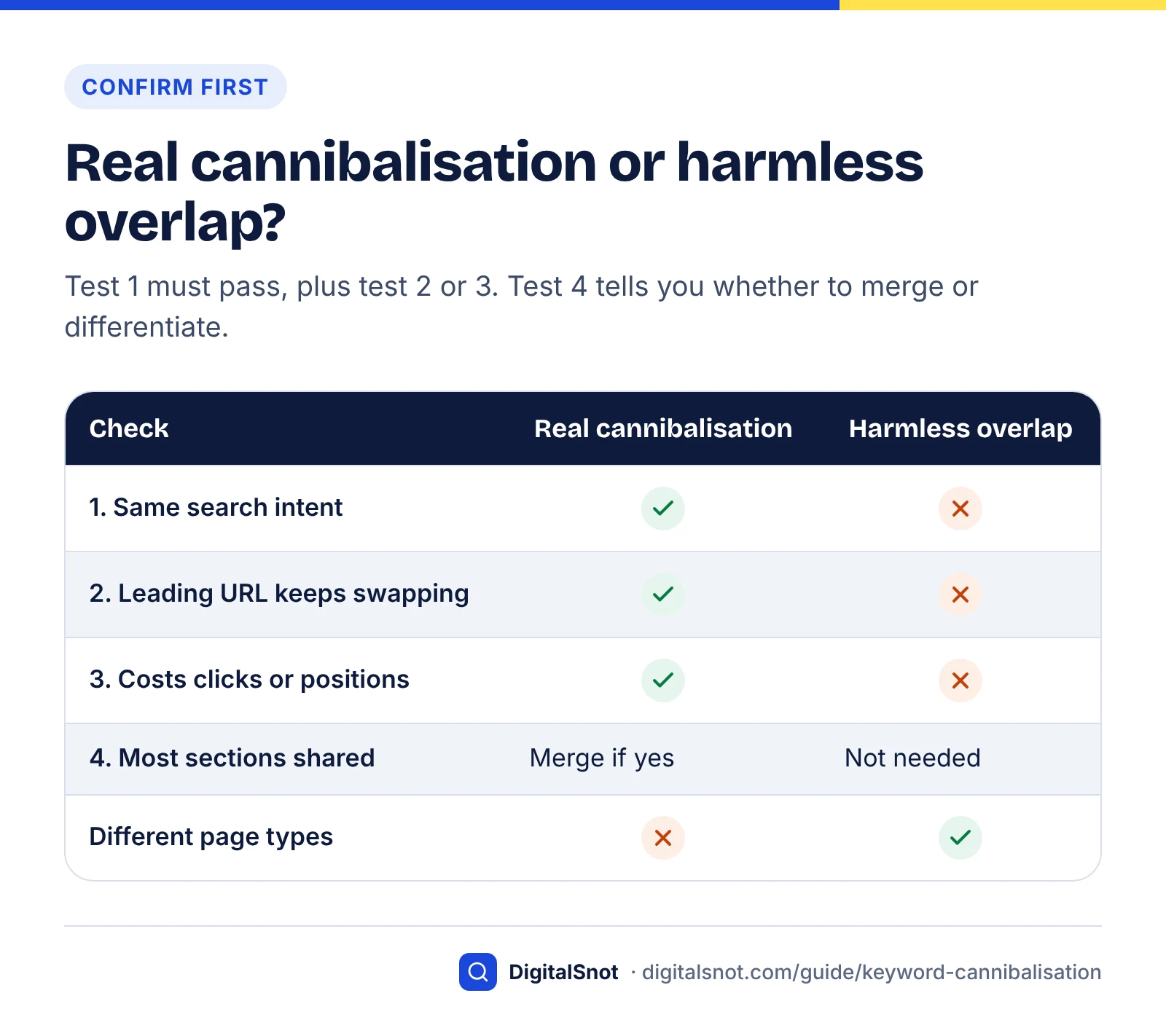
A candidate is real cannibalisation when the pages share an intent and the overlap is measurably costing you. Run four tests on each candidate pair: intent, flipping, cost and content overlap. Test 1 must pass, plus at least one of tests 2 and 3, before you change anything.
Test 1: do the pages serve the same intent?
Ask whether someone who landed on page B would be fully satisfied by page A, and the other way round. Then search the query in a private window and note what kind of page ranks: guides, service pages, tools or local results. If both your URLs are that type and answer the same question, they share an intent. A guide and a service page usually do not.
Test 2: does the leading URL keep swapping?
Flipping is the clearest sign that Google cannot decide between your pages. Ahrefs' study describes exactly this with "seo case studies" and "seo case study", where a newer post kept displacing an older one until Ahrefs fixed it with a pillar page, which then ranked in the top 3 most of the time.
To measure it, you need daily data per URL. In the interface, filter by the query and one URL, open the Dates tab and export; repeat for the second URL and line the two exports up by date. With the API, add date to the dimensions and filter to the one query. For each day, the leading URL is the one with the better average position. Count how often the leader changes over 28 days, skipping days with very few impressions (for example, under 10), because they are noisy.
Check device and country before you conclude. Mobile and desktop results can differ, and a business serving two cities may see a different URL lead in each. Swaps that disappear when you filter by device or country are not flipping.
Test 3: is it costing clicks or positions?
Look for a cost you can actually see. The usual signs are neither URL reaching your position threshold, the pair stuck in the same band for months, or clicks to the older page falling after the newer one was published. Use clicks for any comparison that reaches back before 27 April 2026.
Test 4: how much content do the pages share?
List the H2 and H3 headings of both pages side by side and mark the sections that answer the same question. If more than about half are shared, the pages are close to duplicates and a merge is usually right. If less, each page may have a distinct core worth keeping, which points to differentiating them instead. Test 4 does not decide whether there is a problem; it decides which fix suits it.
Rule out look-alikes
Some problems look like cannibalisation but are not. A sitewide drop in the same weeks as a confirmed Google update is a ranking change to diagnose with our core update recovery guide. A URL that vanished entirely may have an indexing or canonical fault, which a technical SEO audit will catch. And a dip that repeats at the same time every year is seasonal.
Fix options: merge, differentiate, re-link, canonicalise or leave
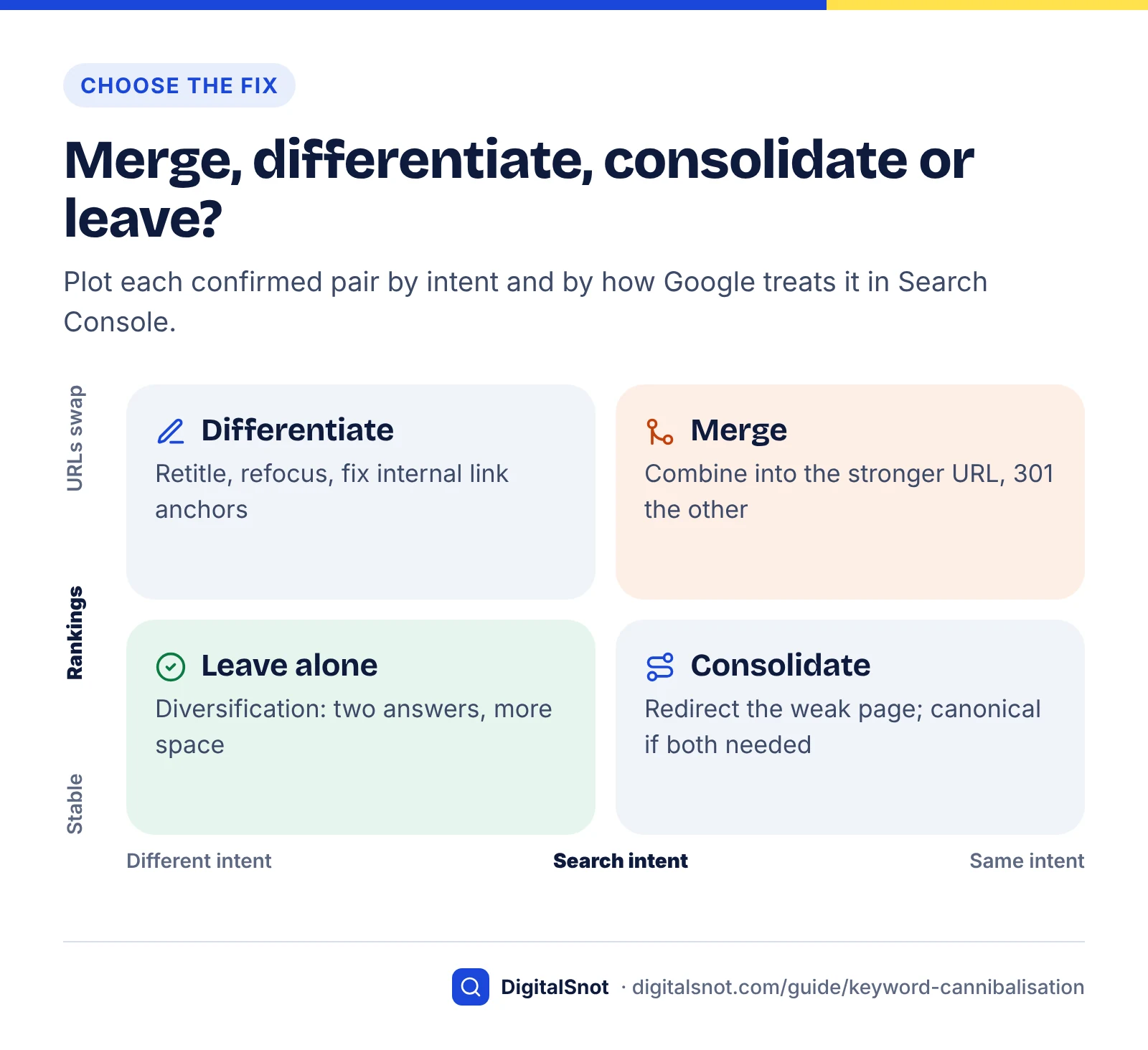
Once a pair passes the tests, the fix depends on two questions: does each page deserve to exist, and do users need both URLs? The table turns those answers into an action.
Decision table
| If you find this | Do this | Why |
|---|---|---|
| Same intent, most sections shared, both pages have some value | Merge into the stronger URL and 301 redirect the other | One page collects the links, clicks and best content; Google treats redirects as the strongest consolidation signal |
| Same intent, one page thin or out of date, nothing unique on it | Redirect it to the stronger page without moving content | Nothing worth keeping; the redirect passes visitors and links on |
| Different intents, but titles, H1s or intros overlap so Google mixes them up | Differentiate: retitle, refocus and cross-link | Both pages have a job; make each job obvious |
| Intent is clear, but internal links use the main keyword to point at the wrong page | Re-link: change anchors and menu links to point at the target | Internal links are a signal you fully control |
| Near-identical versions users need, such as print, filtered or colour variants | Canonicalise with rel="canonical" to the main version | Both URLs stay usable while signals gather on one |
| Different intents, stable positions, leader rarely changes | Leave both, and add a helpful link between them | This is diversification: two answers and more space |
| Fails test 1, or the query is below your value threshold | Leave and recheck next quarter | The fix would cost more than the overlap |
How to differentiate two pages
- Write one sentence for each page: who it is for and what question it answers. If you cannot make the two sentences different, merge instead.
- Rewrite each title and H1 around its own question. Check the new titles in our free Google SERP Preview to make sure they are not cut off on mobile, and avoid the patterns in our post on common title tag mistakes.
- Cut or move sections that belong on the other page, and link to that page at the point where you removed them.
- Run each page with its own target query through the On-Page SEO Checker. Look for the target term in the title, H1 and opening paragraph, and a self-referencing canonical. If both pages score well for the same term, they are still too alike.
- Give each page different long-tail queries to own, and check in Search Console or Keyword Planner that those queries have real demand before you rework a page around them.
When a canonical tag is the right tool
Use rel="canonical" only when both URLs must stay live for users and their content is the same or nearly so. Google's documentation on specifying a canonical ranks redirects as the strongest signal, rel="canonical" next and sitemap inclusion as weak, and says Google may still choose a different canonical. Pointing one distinct article's canonical at another asks Google to treat different pages as duplicates, so do not rely on it.
What not to do
- Do not noindex one page as the fix. Google says it does not recommend noindex to prevent selection of a canonical page within a single site, because noindex blocks the page from Search completely.
- Do not hide a page with robots.txt. Google has to crawl a page to see its redirect or canonical tag.
- Do not redirect to the home page. Google's site move guidance warns that redirecting many old URLs to one irrelevant destination, such as the home page, might be treated as a soft 404. Redirect to the page that now covers the topic.
- Do not mix signals. Google advises against specifying different canonical URLs for the same page through different methods, such as one URL in your sitemap and another in rel="canonical".
Worked example: a physiotherapy clinic's overlapping pages
A worked example shows how the thresholds and tests combine into a decision. Example (hypothetical): a physiotherapy clinic in Bengaluru has three pages that appear for back-pain searches. Page A is a 2023 blog post at /blog/lower-back-pain-exercises, page B a 2026 post at /blog/best-exercises-for-back-pain, and page C the service page at /back-pain-physiotherapy. All figures are invented to show the method, using 90 days of data from July to September 2026 and the suggested thresholds above.
| Query | URLs (impressions, clicks, position) | Second URL's share | Leader swaps, last 28 days | Same intent? | Verdict |
|---|---|---|---|---|---|
| lower back pain exercises | A: 4,100, 96, 9.4 B: 3,300, 41, 11.2 | 45% | 5 | Yes: both are exercise guides | Real cannibalisation: merge |
| back pain physiotherapy bengaluru | C: 1,900, 88, 3.1 A: 700, 6, 7.8 | 27% | 0 | No: service page vs guide | Harmless overlap: leave, link A to C |
| is walking good for back pain | B: 820, 52, 2.4 A: 260, 3, 8.9 | 24% | 1 | Partly: B has a walking section | Protect this query during the merge |
Reading the example
- Query 1 passes every threshold. It has 7,400 page-level impressions, B's share is 3,300 ÷ 7,400 = 45%, the leader changed 5 times in 28 days and neither page is better than position 3. Both pages are exercise guides, so test 1 passes, and 6 of their 8 H2 sections answer the same questions, so test 4 points to a merge.
- Query 2 is diversification. A's 27% share passes the share threshold, but the service page leads every day at position 3.1 and the intents differ. The only action is a contextual link from A to C for readers who need treatment rather than exercises.
- Query 3 changes the merge plan. B ranks at 2.4 for a question A barely touches. Choosing the survivor on query 1 alone would put that at risk.
- Choose the survivor on whole-page value. Suppose that across all queries A earned 1,240 clicks in the 90 days and has links from 14 other sites, while B earned 610 clicks and has links from 3. A survives. B's walking section moves across intact, B's URL is 301 redirected to A, and query 3 goes on the tracking list.
Merge pages without losing traffic
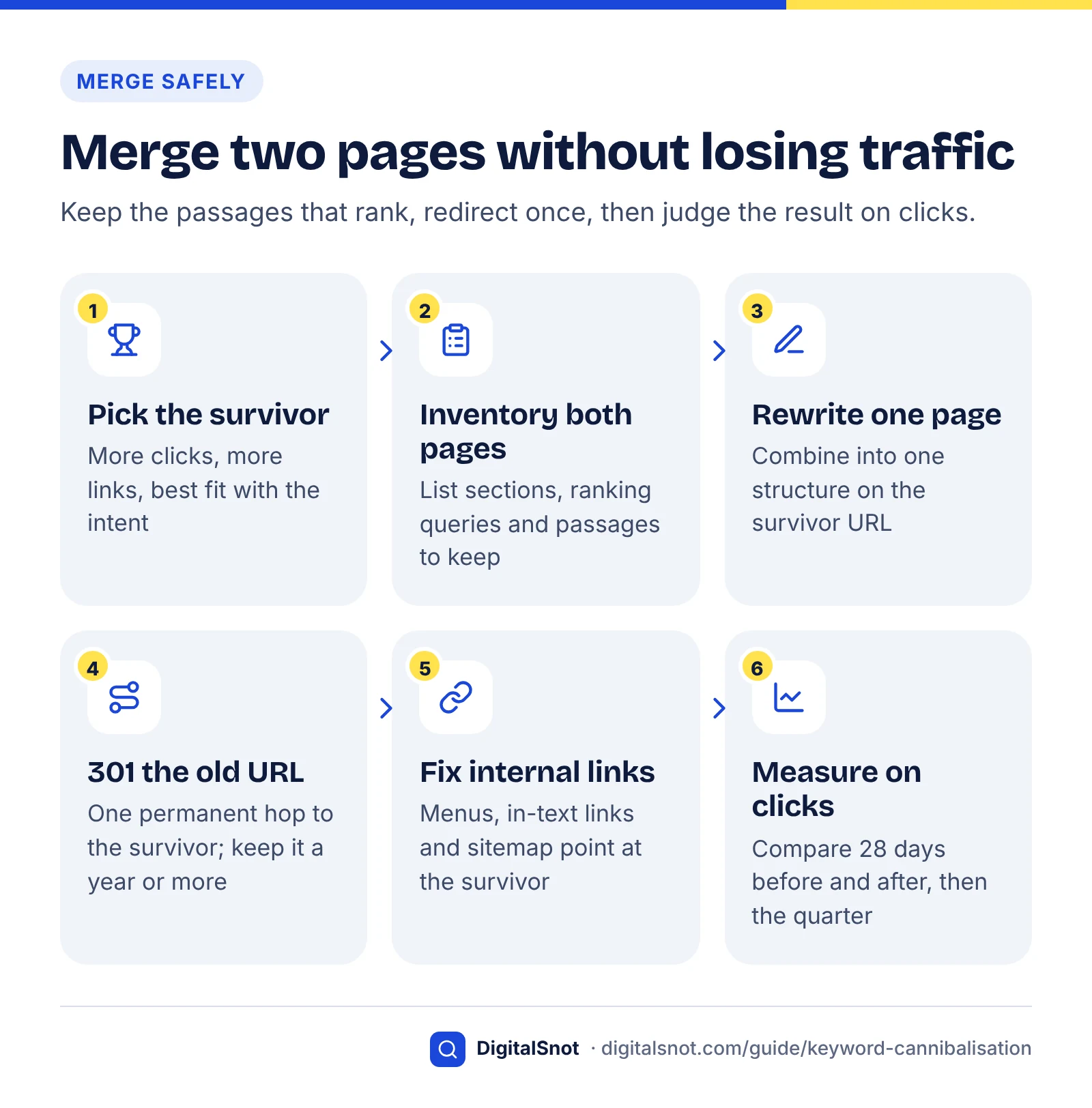
A merge combines the useful content of two pages on one URL and permanently redirects the other. Done carefully, the surviving page keeps the links, bookmarks and rankings of both; done carelessly, it loses the very passages that were ranking.
Step by step
- Pick the survivor. Choose the URL with more clicks across all its queries, more links from other sites and the better fit with the intent. If the weaker page is better written, keep the stronger URL and move the writing.
- Inventory both pages. List each section, the queries it ranks for and the links pointing at it. Run both pages through the free AI Answer Snippet Extractor, which scores every paragraph out of 100 as a quotable snippet, and carry the strongest passages across rather than rewriting them from scratch.
- Rewrite the survivor. Combine the sections into one structure that answers the intent better than either page did. Remove repetition, update facts and keep the survivor's URL unchanged.
- Redirect the old URL. Use a permanent, server-side 301 or 308 redirect. Google's redirects documentation says Google Search uses permanent redirects as a signal that the target should be canonical.
- Update internal links and the sitemap. Point every menu, footer and in-text link at the survivor and remove the old URL from your XML sitemap. Avoid redirect chains: Googlebot can follow up to 10 hops, but Google recommends redirecting straight to the final destination.
- Check the redirect. Enter the old URL in our Redirect Checker, which tests the http, https, www and non-www versions. You want one 301 hop from the old URL to the survivor, no chains or loops on the variants, and a 200 status at the end.
- Ask Google to recrawl. Inspect the survivor with Search Console's URL Inspection tool and request indexing.
Keep the redirect in place
Google's site move guidance says to keep redirects for as long as possible, generally at least a year, so signals can transfer, and to consider keeping them indefinitely for users. For a merge on your own site, there is rarely a reason to remove one, and Google's redirects documentation says permanent redirects are for changes you are sure won't be reverted.
What can go wrong
- A moved section loses its query. If the passage that ranked was rewritten or buried, the survivor may not inherit that query. Keep winning passages close to their original wording and heading.
- The survivor becomes unfocused. Pasting two pages together produces a long, wandering page. Edit until each section earns its place.
Merge two pages in three steps
Cannibalisation and AI answers
AI answers make duplication harder to justify. Google's page on AI features and your website says AI Overviews and AI Mode may use a query fan-out technique, issuing multiple related searches across subtopics, and that this lets them show a wider and more diverse set of helpful links than classic search.
Our reading of that design: two pages saying the same thing are substitutes competing for one place in that diverse set, while two pages answering different sub-questions can each match a different fan-out search. We found no published study of how often AI Overviews, AI Mode or ChatGPT search cite two pages from one site in the same answer, so treat this as reasoning, not measured fact.
What Search Console can and cannot tell you
- AI Overview positions are shared. Google's help page on impressions, position and clicks says an AI Overview occupies a single position and every link inside it is assigned that position. Two of your URLs in one AI Overview look like one appearance at property level.
- AI Mode follow-ups count as new queries. The same page says each follow-up question in AI Mode is treated as a new query, so a page can appear for a follow-up without appearing for the first question.
- The generative AI report works by page. Google's help page for the Generative AI performance report describes impressions for links shown in AI features, broken down by page, country, device and date, with pages grouped by the final URL after any redirects. It offers no query breakdown, so you cannot see AI cannibalisation for one query directly.
A quick check before you merge
- If your property has the Generative AI performance report, filter it to each URL in the pair and compare impressions over the same dates.
- If the page that is weaker in organic results earns more AI impressions, find out why before merging. It may have a cleaner, more direct passage, and that passage should move into the survivor intact.
- After the merge, expect the old URL's AI impressions to appear under the survivor, and track them alongside its clicks.
Our guide to the Search Console generative AI report covers its other limits, and our guide to getting cited in AI search explains why clear, answer-first passages tend to be the ones quoted.
Prevent it with a keyword-to-page map
A keyword-to-page map is a list that assigns each search intent on your site to exactly one target URL. Checking it before anyone writes a new page prevents most cannibalisation, because the question "do we already have a page for this?" gets asked every time.
Keyword research table
A template you can copy
| Intent cluster (main query) | Intent | Target URL | Supporting pages | Last checked |
|---|---|---|---|---|
| lower back pain exercises | Learn: how-to | /blog/lower-back-pain-exercises | /blog/sciatica-stretches | Oct 2026 |
| back pain physiotherapy bengaluru | Buy: local service | /back-pain-physiotherapy | /blog/lower-back-pain-exercises | Oct 2026 |
| physiotherapy fees bengaluru | Compare: price | /fees | /back-pain-physiotherapy | Oct 2026 |
The rows continue the hypothetical clinic above. Add a column for the page owner if several people publish.
Rules that keep the map useful
- One intent, one target URL. Group close variants, such as "back pain exercises" and "exercises for lower back pain", into one cluster rather than one row each. Our keyword research guide shows how to group keywords by intent.
- Check the map before every new page. If the cluster already has a target, improve that page instead of writing another.
- Record supporting pages. Supporting pages target narrower questions and link to the target with descriptive anchor text, which also stops internal links pointing the wrong way.
- Review it quarterly against Search Console. Rerun method A or B and add any new pairs that pass your thresholds.
- Be careful with location pages. A page per city is legitimate when each has genuinely local content, such as the team, address and services available there. Swapping only the town name creates near-duplicates and, at scale, the doorway pattern Google's spam policies describe.
Track the fix
Judge a fix on clicks for the queries you targeted, compared with the same length of time before the change. Give Google time to recrawl; ranking changes after a merge are rarely instant.
What to record
| Metric | Where to find it | What good looks like |
|---|---|---|
| Clicks for the target queries | Performance report, filtered by query, Pages tab | The survivor's clicks match or beat the old combined total |
| Leading URL swaps | Daily export by query, page and date | Below your threshold, ideally zero |
| Survivor's position for the target queries | Performance report, filtered by page and query | Better than either page managed alone |
| Old URL's impressions | Performance report, filtered by the old URL | Fading towards zero as Google processes the redirect |
| AI impressions | Generative AI performance report, by page | The survivor holds or gains what both pages had |
| Enquiries or sales | Your analytics or CRM | Unchanged or higher; this is the number that pays |
A simple timeline
- Note the date of the change in your SEO log or report annotations.
- After 2 weeks, confirm the redirect still works and the old URL is fading from the Pages tab.
- After 4 weeks, compare the 28 days after the change with the 28 days before it. Avoid comparing across a confirmed Google update if you can.
- After 3 months, compare the full quarter. If the survivor sits below the old combined clicks, check whether a moved section lost a query it used to win, and restore what is missing.
Put these numbers in your regular reporting so the fix is judged on outcomes, not on a tool's warning count. Our post on what to look for in a monthly SEO report shows where they fit.
Diagnosing and fixing overlapping pages is part of our on-page SEO service, alongside keyword mapping and internal linking. If you would like a second opinion on a pair of pages before you merge them, get in touch.
Free tools in this guide
- Google SERP Preview Preview titles and descriptions as they may appear in Google.
- On-Page SEO Checker Check titles, headings, images, links, schema and indexing for any page.
- AI Answer Snippet Extractor Score every paragraph as an AI answer snippet and fix the near misses.
- Redirect Checker Trace 301/302 redirects, chains and loops to the final URL.
By the numbers
- web page listings from one site is the most Google generally shows in its top results, under its site diversity system
- 2
- Source: Google Search Central
- keywords with multiple rankings that Ahrefs reviewed on its own site needed action; the rest were harmless (study first published 2024)
- 1 of 80
- Source: Ahrefs
- is how long Google generally suggests keeping redirects in place, at minimum, so signals can transfer to the new URL
- 1 year
- Source: Google Search Central
- end of a Search Console logging error (from 13 May 2025) that affected impressions, CTR and position; clicks were not affected
- 27 Apr 2026
- Source: Search Console Help
Frequently asked questions
What is keyword cannibalisation?
It happens when several pages on your site target the same search term. They compete with each other and none ranks as well as one strong page would. We fix it by giving each page a clear focus and merging or redirecting where needed.
Is it bad if two of my pages rank for the same keyword?
Not necessarily. Google generally shows up to two listings from the same site in its top results, and John Mueller said in 2025 that several pages ranking for one query is not a problem in itself. It becomes a problem when both pages serve the same intent and Google keeps swapping between them, or when neither page can reach a strong position.
How do I check for keyword cannibalisation in Google Search Console?
Open the Performance report, click a query to filter by it, then open the Pages tab to see every URL that appeared for it. Note each URL's impressions, clicks and position. For larger sites, export query and page together through the Search Analytics API. Treat what you find as candidates, then confirm with intent, flipping and cost tests before changing anything.
Should I merge or delete cannibalising pages?
Merge in most cases. Move the useful content into the stronger page, then permanently redirect the weaker URL to it, so links and visitors pass to the survivor. Deleting a page without a redirect throws away its links and leaves visitors at a dead end, and a cannibalising page always has a relevant page to redirect to: the one it competes with.
Can I use a canonical tag to fix keyword cannibalisation?
Only when both URLs must stay live and their content is the same or nearly so, such as print or filtered versions of one page. Google treats rel="canonical" as a strong signal but may choose a different canonical, and it ranks redirects as stronger. For two distinct articles competing for one query, merge and redirect, or differentiate the pages instead.
Should I noindex one of the competing pages?
No. Google says it does not recommend using noindex to prevent selection of a canonical page within a single site, because noindex blocks the page from Search completely. You lose any links and rankings the page had. Merge and redirect the page if it duplicates another, or differentiate it if it has its own job to do.
How long does it take to see results after merging pages?
It depends on how quickly Google recrawls both URLs and processes the redirect, so there is no fixed timeline. Request indexing for the survivor, then compare 28 days after the change with 28 days before, and review the full quarter after 3 months. Judge the result on clicks for the target queries, and keep the redirect in place for at least a year.
Does keyword cannibalisation affect AI Overviews and ChatGPT?
Probably, though we found no published study that measures it directly. Google says AI Overviews and AI Mode fan out into related searches and show a diverse set of links, so two near-identical pages are unlikely to earn two places. Pages that answer different sub-questions give AI systems more than one useful match. Check which URL earns AI impressions before merging.
Is keyword cannibalisation a Google penalty?
No. There is no cannibalisation penalty, and Google's SEO Starter Guide says duplicate content is not a violation of its spam policies. The cost is practical: split clicks and links, unstable rankings and wasted crawling. The exception is mass-produced near-identical pages built to rank for similar queries, which Google's spam policies class as doorway abuse.
Do location pages cause keyword cannibalisation?
They can if they are near-identical. A page per city works when each one has genuinely local content, such as the address, team, services and reviews for that area, because each then serves a different local search. Pages that only swap the town name compete with each other and, at scale, match the doorway pattern described in Google's spam policies.
Sources
Every figure and claim in this guide comes from the sources below. We checked each one when writing and link to the original so you can read it yourself. Credit belongs to the authors and publishers listed. How we write and check our articles.
-
1
Google Answers SEO Question About Keyword Cannibalization
Search Engine Journal · Mueller (Sept 2025): several pages ranking for one query is not a problem in itself; look at the details.
-
2
Keyword Diversification: Cannibalization's Good Twin (SEO Study)
Ahrefs · Cannibalisation vs diversification; 1 of 80 keywords needed action; the "seo case studies" flipping example.
-
3
A Guide to Google Search Ranking Systems
Google Search Central · Site diversity (generally no more than two listings per site) and deduplication systems.
-
4
SEO Starter Guide: The Basics
Google Search Central · Duplicate content is not a spam violation; redirect non-preferred URLs or use rel="canonical".
-
5
Spam Policies for Google Web Search
Google Search Central · Doorway abuse: pages made to rank for similar queries, including region or city pages.
-
6
Data anomalies in Search Console
Search Console Help · Logging error affecting impressions, CTR and position, 13 May 2025 to 27 Apr 2026; clicks unaffected.
-
7
Performance report (Search results): About the data
Search Console Help · Property vs page aggregation and how topmost position is recorded.
-
8
Search Analytics: query
Google for Developers · Query and page dimensions, 25,000-row requests, startRow paging, top rows only.
-
9
How to Specify a Canonical with rel="canonical" and Other Methods
Google Search Central · Signal strength of redirects, canonicals and sitemaps; no noindex for canonical choice.
-
10
Site Moves and Migrations
Google Search Central · Soft 404 risk of redirecting to an irrelevant page, avoiding redirect chains, keeping redirects at least 1 year.
-
11
Redirects and Google Search
Google Search Central · 301 and 308 as permanent redirects and a canonical signal; use when not reverting.
-
12
AI Features and Your Website
Google Search Central · Query fan-out and a wider, more diverse set of links in AI Overviews and AI Mode.
-
13
What are impressions, position, and clicks?
Search Console Help · AI Overview links share one position; AI Mode follow-ups count as new queries.
-
14
Generative AI performance report (Search)
Search Console Help · AI feature impressions by page, country, device and date; pages grouped by final URL.