Guide · On-page SEO
Product page SEO for small online shops (and AI shopping)
How to optimise product pages for Google Search, Shopping and AI shopping answers: titles, descriptions, merchant listing markup, shipping, returns, feeds and a scored checklist.

On this page (12 sections)
- 1What a product page needs to rank, sell and be quoted
- 2Product page anatomy, scored by impact (our analysis)
- 3Titles, descriptions and unique product content
- 4Images, video and reviews
- 5Merchant listing vs product snippet markup
- 6Shipping, returns and Merchant Center free listings
- 7Variants, out-of-stock and discontinued products
- 8Getting products into AI shopping answers
- 9Which setup fits your shop: a decision table
- 10Worked example: scoring a small shop's product page
- 11A product page checklist
- 12Sources
For product page SEO, each page now has three kinds of reader: the shopper, who wants to know exactly what they are buying, what delivery costs and whether they can send it back; Google, which reads the page and its structured data to build search results and shopping listings; and AI assistants such as AI Mode and ChatGPT, which turn product data into shortlists. All three reward specific, accurate facts that agree everywhere they appear.
Who this is for: owners and marketers of small online shops on Shopify, WooCommerce or a similar platform, selling physical products. What you'll be able to do: write product titles and descriptions that rank and sell, choose between merchant listing and product snippet markup, set shipping and returns once for the whole shop, get products into Google's free listings and ChatGPT's product results, handle variants and sold-out stock, and decide what to fix first using a checklist scored by impact.
Everything below is based on Google's and OpenAI's own documentation, linked where it is used and checked in October 2026. Where a programme is limited to certain countries or invited merchants, we say so.
What a product page needs to rank, sell and be quoted
A product page needs four things: a clear statement of exactly what the product is, enough original detail to answer a buyer's questions, proof such as photos and reviews, and machine-readable facts (price, stock, shipping, returns) that match what the page shows. Rankings, sales and AI visibility all depend on those same facts being right.
Product page SEO is the work of making each product page easy to find, easy to understand and persuasive, both for shoppers and for the systems that show products to them. For a small shop in 2026 that means three surfaces:
- Google's shopping experiences. Merchant listings and free listings, which can show your price, stock and delivery details across Search, the Shopping tab, Google Images and Lens.
- Organic results. The ordinary blue link with its title and snippet, sometimes enriched with product details such as price and rating.
- AI shopping answers. Google's AI Mode, which draws on its Shopping Graph, and ChatGPT, whose product results and shopping research build shortlists from merchant feeds and public product information.
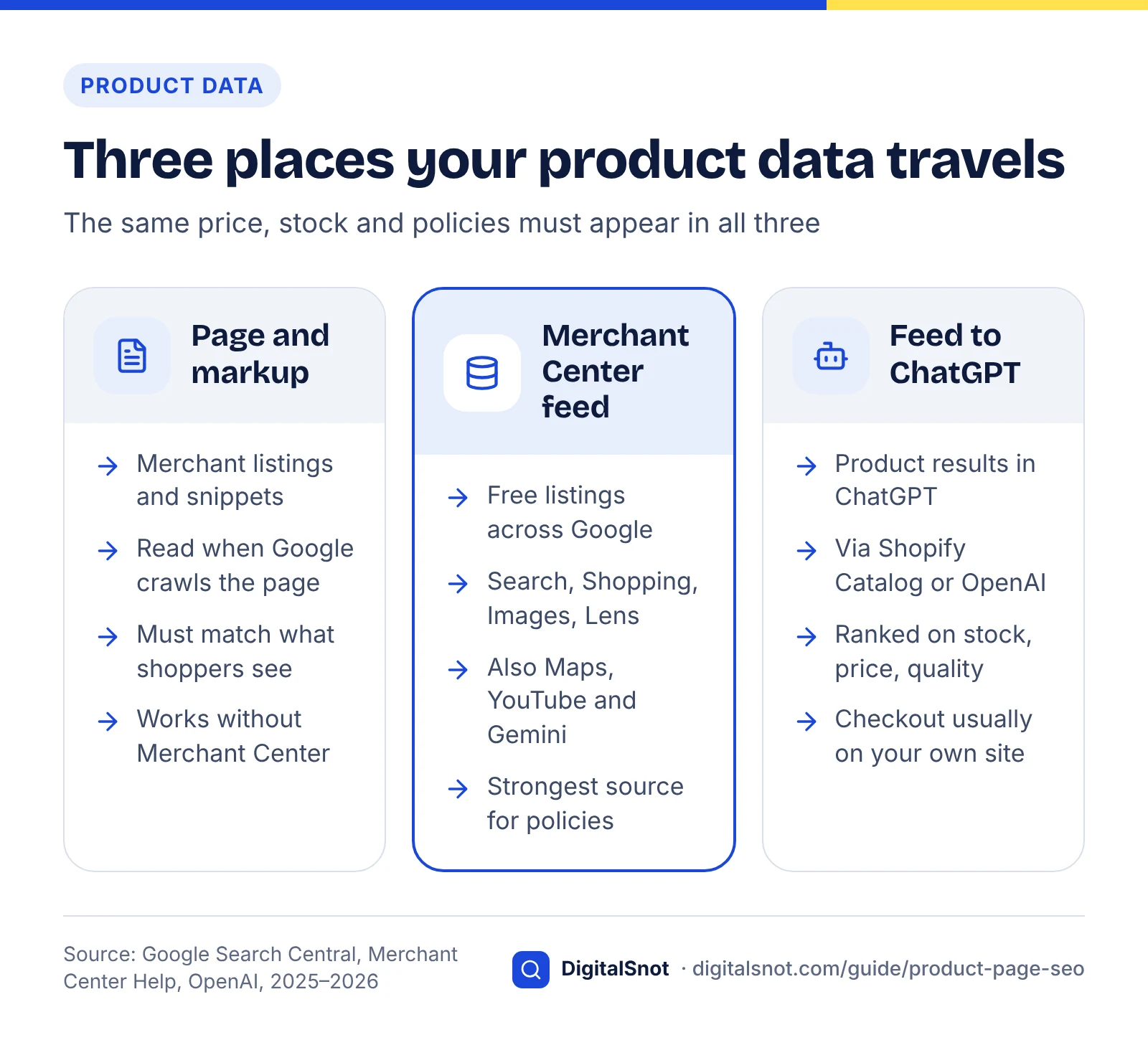
Google reads your page, its structured data and your Merchant Center feed; ChatGPT reads merchant feeds and public product information. If the page says ₹2,450, the markup ₹2,200 and the feed ₹2,600, each surface may show a different price, and a shopper who sees one number in a result and another at checkout is unlikely to stay. So the principle running through this guide is one set of facts, published in three places: the visible page, its structured data and your feeds. The general on-page fundamentals still apply, and our on-page SEO checklist covers headings, internal links and the rest.
Product page anatomy, scored by impact (our analysis)
Not every part of a product page matters equally. Price, stock status, the title and an original description carry the most weight across Google Shopping, organic results and AI shopping answers, while identifiers, variant markup and on-page FAQs matter less.
Method: in October 2026 we read Google's product, merchant listing, shipping, returns and variant documentation, Merchant Center's free listings, product data and structured data help pages, and OpenAI's two help pages on shopping in ChatGPT. For each element and each surface we scored 3 if a document makes it required or names it as a selection or ranking input, 2 if it is recommended or displayed, 1 if it helps only indirectly (through understanding or conversions), and 0 if no document gives it a role. The scores are our reading of the documents, not measured ranking weights, and you can repeat the exercise with the sources listed at the end.
| Element | Google Shopping | Organic results | AI shopping answers | Total (of 9) | What the documents say |
|---|---|---|---|---|---|
| Price and currency, visible and in an Offer | 3 | 2 | 3 | 8 | Required for merchant listings and free listings; OpenAI ranks merchants partly on price |
| Specific, descriptive title | 3 | 3 | 2 | 8 | Required feed attribute (up to 150 characters); the basis of your search result's title |
| Original description with specifications | 2 | 3 | 3 | 8 | Required feed attribute; OpenAI names product descriptions as an input; the text AI answers can quote |
| Stock status kept current | 3 | 1 | 3 | 7 | Required feed attribute; OpenAI ranks merchants on availability |
| Several high-resolution images | 3 | 2 | 2 | 7 | Required feed attribute; Google recommends several images of at least 50K pixels |
| Product feeds that match the page | 3 | 0 | 3 | 6 | Needed for free listings; feed data tops Google's order of precedence; ChatGPT uses merchant feeds |
| Genuine customer reviews and ratings | 2 | 2 | 2 | 6 | Ratings can show in product results; Shopping Graph listings carry review details |
| Shipping and returns policy | 2 | 1 | 2 | 5 | Supported in merchant listings; part of the Merchant Center setup Google's UCP checkout requires |
| Price and stock in the initial HTML | 3 | 1 | 1 | 5 | Merchant Center's automatic updates need markup in the server's HTML, not added by JavaScript |
| Variant markup and variant URLs | 2 | 1 | 1 | 4 | ProductGroup markup is supported for merchant listings |
| Identifiers (GTIN, brand, MPN) | 2 | 0 | 1 | 3 | Defined in the Merchant Center specification with strict GTIN formats |
| Answers to buyer questions on the page | 0 | 1 | 1 | 2 | No rich result since FAQ results were removed in 2026; useful copy for shoppers and AI answers |
What the scores tell you
- Accuracy comes first. Price and stock are required by Google and named as ranking inputs by OpenAI. A beautiful page with a stale price loses everywhere.
- Content is next. The title, description and images score highly on every surface, because each needs to know what the product is before it can show it.
- Then trust and policy. Reviews, shipping and returns matter to shopping surfaces as well as shoppers, and Google lets you set the policies once for the whole shop.
- Identifiers, variants and FAQs last, unless you resell branded goods with GTINs, where identifiers carry more weight than this generic score suggests.
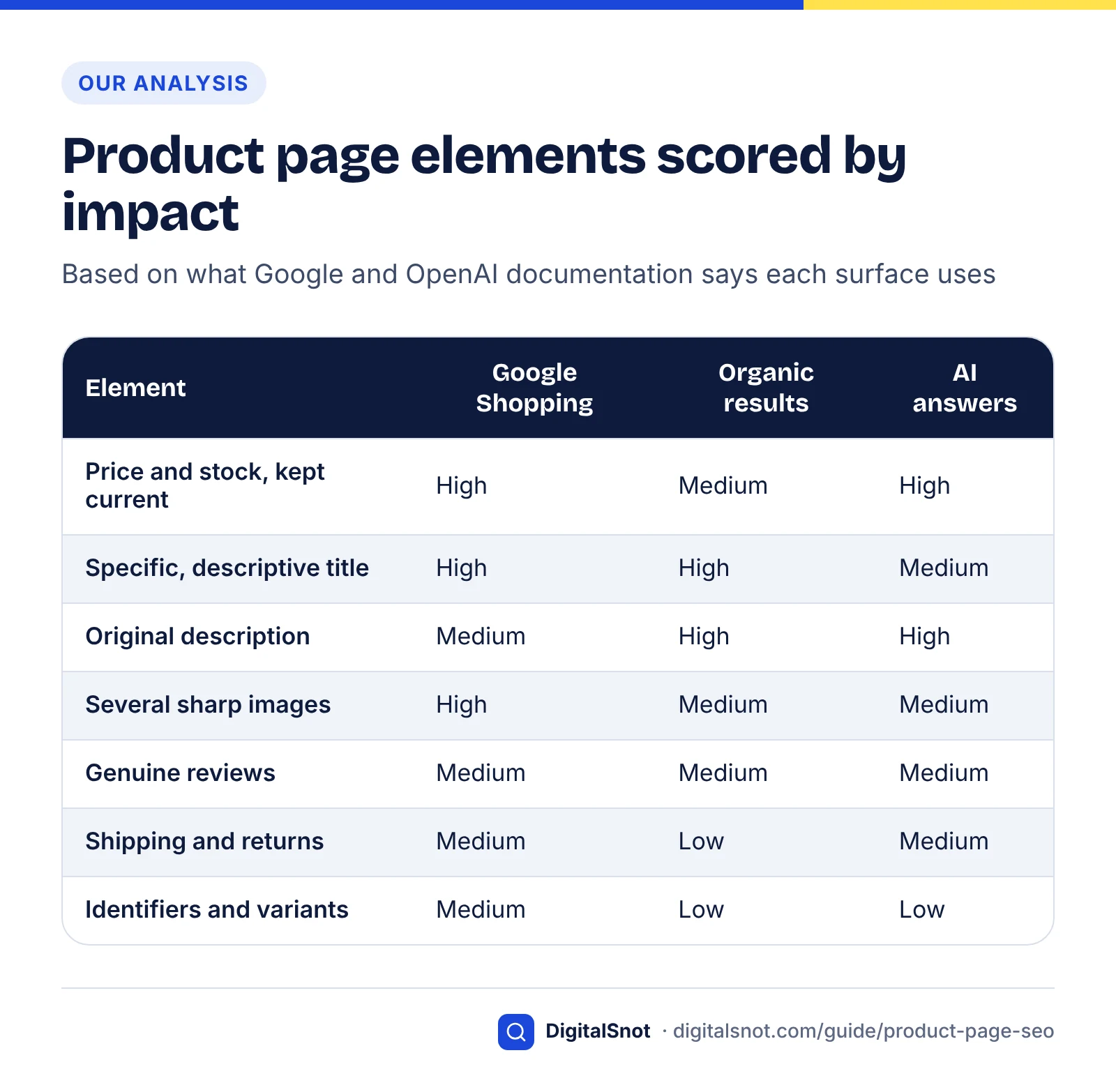
Treat the ranking as a starting point and adjust for your category: a furniture shop lives on images and dimensions, an electronics reseller on identifiers and price.
Titles, descriptions and unique product content
Write a title that names the product the way a shopper would search for it, with the attributes that matter in your category, and a description that only your shop could have written. Copy shared by every other retailer of the same item gives Google and AI answers no reason to choose your page.
Product titles
Most shops have three titles for each product: the product name in the page heading, the title element that search results usually draw on, and the title in the product feed. They should agree, but each has its own job.
- Lead with what it is. Brand (if people search for it), product type, then the attributes buyers filter by: material, size, colour, capacity or compatibility. "Dabu hand-block-printed cotton double bedsheet with 2 pillow covers, indigo" tells everyone more than "Indigo Dream".
- Use the full length in the feed. Merchant Center's product data specification allows up to 150 characters for a product title, which leaves room for the attributes that matter.
- Keep the title element tighter. Search results cut titles by pixel width, so put the product type and key attribute first. Preview the result in the free Google SERP Preview, which shows where your title and description get truncated on desktop and mobile.
- Skip the shouting. No capitals throughout, no "Best price!!", no strings of keywords. Our post on title tag mistakes covers the patterns to avoid.
Descriptions that earn their place
A good product description answers the questions a shopper would otherwise email you about:
- Open with a one or two sentence summary of what the product is, who it suits and what sets it apart. This is the passage an AI answer is most likely to lift.
- List the specifications: dimensions with units, materials, weight, compatibility, care and what is in the box.
- Add what only you know: how it fits, how it compares with others in your range, what customers ask before buying and why things get returned.
- State delivery time and the returns window near the buy button, matching your policy.
The Merchant Center specification allows descriptions of up to 5,000 characters and asks that the feed description match your landing page, so write the page copy first and reuse it in the feed. For items with a manufacturer's description, keep the factual specification but rewrite the selling copy around your own photos, measurements and customer questions.
Search snippet being optimised
Then run the page and its main keyword through the free On-Page SEO Checker (30+ checks on titles, headings, images, canonical and social tags), and paste the description into the AI Answer Snippet Extractor, which scores each paragraph out of 100 as a quotable snippet. A low score on your opening summary usually means it leans on the heading or photos to make sense.
Images, video and reviews
Use several sharp, original images in the shapes Google recommends, add a short video where it shows something photos can't, and display genuine customer reviews on the product page. These persuade shoppers, and they are also data that Google's shopping surfaces display.
Images
Google's merchant listing documentation recommends providing multiple high-resolution images, each at least 50K pixels when you multiply width by height, in 16x9, 4x3 and 1x1 aspect ratios. The minimum is small: 250 by 200 pixels already makes 50,000. Aim far higher so shoppers can zoom; a 1,200 by 1,200 pixel square is 1.44 million pixels.
- Shoot a set: the product on a plain background first, then in use, at scale, close-ups of texture or finish, and the packaging.
- Name and describe the files. A file called
indigo-dabu-double-bedsheet-folded.jpgwith alt text saying what the image shows helps image search and screen-reader users alike. - Keep the main image fast. Compress, serve modern formats and lazy-load only images below the fold, never the main photo. Our post on website speed checks explains what to measure.
An image is also a required attribute for Merchant Center free listings, which can appear in Google Lens, so clear product photos help people find you by camera as well as by text.
Video
A 20 to 60 second clip showing scale, texture, fit or setup answers questions a photo can't. Put it on the product page near the images, with a short text summary for people who don't press play.
Reviews
Show genuine customer reviews on each product page, with the average rating and review count, and mark them up only when they are visible on that page. Google's Shopping Graph stores reviews alongside prices and availability, so reviews are product data, not decoration.
Collect them honestly. The US Federal Trade Commission's final rule banning fake reviews and testimonials, announced in August 2024, prohibits buying or selling fake reviews, including AI-generated ones, bars incentives conditioned on a review being positive or negative, and covers suppressing negative reviews. Even if you never sell to the US, those are sound rules. Ask every buyer for a review a few days after delivery, reply to critical reviews and fix the cause, and never copy marketplace or social reviews onto your pages without permission. Our post on getting more Google reviews is written for business profiles, but its advice on when and how to ask carries over to products.
Merchant listing vs product snippet markup
If shoppers can buy the product on your page, use merchant listing markup: a Product with an Offer, a price above zero and a currency. Product snippet markup is for pages where people can't buy directly, such as product reviews and comparison pages.
Google's introduction to product structured data draws the line by what the page does: merchant listings for pages where customers can purchase from you, product snippets for pages where they can't. It also describes three ways to share product data (markup on your pages, a Merchant Center feed, or both) and says doing both maximises your eligibility.
| Question | Merchant listing | Product snippet |
|---|---|---|
| Which pages | Pages where a shopper buys from you | Pages where people can't buy directly: reviews, comparisons, aggregators |
| Offer type | Offer only, because you must be the seller | Offer or AggregateOffer |
| Price | Required, and must be above zero | Required |
| Currency (priceCurrency) | Required | Recommended |
| Extra details supported | Shipping, returns, sale and strikethrough prices, variants | Ratings, reviews and price details |
| Search Console report | Merchant listings | Product snippets |
Product snippet or merchant listing?
A minimal merchant listing block
This is the smallest useful pattern for a product page, shown for a hypothetical shop. Replace every value with the facts your page actually shows:
{"@context": "https://schema.org", "@type": "Product", "name": "Dabu hand-block-printed cotton double bedsheet, indigo", "image": ["https://example.com/img/dabu-1x1.jpg", "https://example.com/img/dabu-4x3.jpg", "https://example.com/img/dabu-16x9.jpg"], "description": "Hand-block-printed cotton double bedsheet with two pillow covers.", "sku": "IL-DABU-DB-01", "brand": {"@type": "Brand", "name": "Indigo & Loom"}, "offers": {"@type": "Offer", "url": "https://example.com/products/dabu-double-indigo", "price": "2450.00", "priceCurrency": "INR", "availability": "https://schema.org/InStock", "itemCondition": "https://schema.org/NewCondition"}}
- price and priceCurrency are required, with the price above zero and a three-letter currency code such as INR, GBP or USD.
- availability takes schema.org values such as InStock, OutOfStock and Discontinued, plus others for pre-orders and back orders. Change it whenever stock changes.
- image as a list carries the 1x1, 4x3 and 16x9 versions Google recommends. During a sale, the original price is shown as a strikethrough price, marked with the priceType property in a priceSpecification.
Keep one source of truth
Themes, SEO plugins and review apps can each print their own Product block, and two blocks with different prices are worse than none. View the page source, search for application/ld+json and keep one block per product. Merchant Center's help page on setting up structured data also asks that the marked-up price is the one the customer pays, including during a sale.
The free Schema Markup Generator builds Product markup from a form, so you can compare its output with what your theme prints. Then test the live URL in Google's Rich Results Test and watch the Merchant listings report in Search Console. Our schema markup guide covers which other types are still worth adding in 2026.
Shipping, returns and Merchant Center free listings
Set your shipping and returns policy once for the whole shop, in Search Console or with Organization markup, and add a Merchant Center feed so your products can appear in Google's free listings. Since November 2025 you can set both without a Merchant Center account.
In More ways to share your shipping and returns policies with Google, published in November 2025, Google added organisation-level shipping markup alongside the organisation-level return policy markup it introduced the year before. The post says shipping policies set on individual products still take priority for those items, and that settings made in Search Console win over markup on your site.
Three ways to give Google your policies
- Search Console settings. The simplest route for a small shop: enter shipping and returns once, with no code.
- Organization markup. Google's shipping policy documentation puts a standard policy for most or all products in a ShippingService nested under Organization through
hasShippingService, with product-level markup only for exceptions. Returns sit in the same block ashasMerchantReturnPolicy. - Merchant Center. If you run a product feed, set the policies there and make sure your site markup doesn't contradict them.
Which source wins
The merchant listing documentation gives the order Google uses when a policy is defined in several places, strongest first:
- Product-level data in Merchant Center feeds.
- Settings sent through Google's shopping API (the Merchant API, which replaces the Content API for Shopping).
- Settings in Merchant Center or Search Console.
- Product-level merchant listing markup.
- Organization-level markup.
Pick one primary place for each policy and note where it lives, so an old returns window left in a forgotten setting can't quietly override the new one.
A return policy block
The merchant listing documentation recommends one global return policy at Organization level rather than one per Offer, and Google's return policy documentation lists its properties. A minimal version for a hypothetical shop offering free returns within seven days in India:
{"@context": "https://schema.org", "@type": "Organization", "name": "Indigo & Loom", "url": "https://example.com", "hasMerchantReturnPolicy": {"@type": "MerchantReturnPolicy", "applicableCountry": "IN", "returnPolicyCategory": "https://schema.org/MerchantReturnFiniteReturnWindow", "merchantReturnDays": 7, "returnFees": "https://schema.org/FreeReturn"}}
- returnPolicyCategory is a finite return window, returns not permitted, or an unlimited window. merchantReturnDays is required only with a finite window.
- applicableCountry takes two-letter ISO 3166-1 codes, up to 50 per policy.
- returnFees can be FreeReturn, ReturnFeesCustomerResponsibility or ReturnShippingFees.
Say the same thing in plain words near the buy button: "Free returns within 7 days of delivery" is a reason to buy as well as a data point.
Free listings in Merchant Center
Free listings let eligible products appear at no cost across Google. Merchant Center's free listings help page names Search, Maps, Gemini, YouTube, the Shopping tab, Google Images and Google Lens (checked October 2026). Free listings are usually switched on by default, and Google does not guarantee any product will be shown. Every product needs the core attributes: ID, title, link, image, price, description and availability. Shopify and WooCommerce both have apps or plugins that build the feed from your catalogue, and shopping features vary by country, so check what Merchant Center offers in yours.
With automatic item updates, Merchant Center can correct price and availability from your site's structured data when the feed is out of date. The structured data help page says this relies on price, priceCurrency, availability and condition in your markup, and that the markup must be in the HTML your server sends, not added later by JavaScript. If your theme loads prices with a script, fix that first.
Variants, out-of-stock and discontinued products
Group sizes and colours with ProductGroup markup, keep temporarily out-of-stock pages live and marked as out of stock, and only remove or redirect pages for products that are gone for good.
Variants
Google's product variant documentation uses a ProductGroup that holds the shared details, with hasVariant listing each Product, variesBy naming what changes (size, colour) and productGroupID carrying the parent ID. It supports two layouts:
- Single page: all variants live on one URL and the shopper picks an option. The variants are nested inside the ProductGroup.
- Multi-page: each variant has its own URL. Each page repeats the ProductGroup definition, fully describes the variants it shows and links to the others, and the ProductGroup itself has no canonical URL.
Choose separate URLs when people search for variants separately, such as "king size" versus "double" bedsheets, and one page when variants differ only in options nobody searches for. Either way, give each variant its own SKU, price and availability in its Offer, so a sold-out size doesn't mark the whole product as unavailable.
Out of stock or discontinued: a decision table
Google's guidance on pausing an online business advises against removing out-of-stock product pages, because shoppers would lose your first-hand information and may find incorrect third-party details instead. Leave the page up, mark it out of stock and update your structured data and Merchant Center feed. The rest of the table is our recommended approach for cases Google's page doesn't cover:
| If the product is… | Do this | Why |
|---|---|---|
| Temporarily out of stock | Keep the page live, set availability to OutOfStock in markup and feed, show a restock date or "notify me" option and link to alternatives | Google advises keeping the page; the page keeps its rankings and links |
| Sold out in one size or colour | Keep the product page; mark only that variant's Offer as out of stock | The other variants are still for sale |
| Coming soon or on pre-order | Publish the page with the matching availability value and a clear dispatch date | Early pages get crawled before launch |
| Discontinued, with a close replacement | Permanently redirect (301) the old URL to the replacement | Passes visitors and links to the most useful page |
| Discontinued, no replacement, still searched or linked | Keep the page with Discontinued availability, the specifications, and links to similar products | Owners still search for manuals, parts and specs |
| Discontinued, no replacement, no traffic or links | Return a 404 or 410, and remove it from the feed, sitemap and internal links | Avoids thin pages and soft-404s |
Don't redirect every discontinued product to the home page; that sends shoppers somewhere they didn't ask for. Redirect chains, soft-404s and sitemap leftovers are covered in our technical SEO audit checklist.
Getting products into AI shopping answers
AI shopping answers are built from product data. For Google's AI Mode and Gemini, that means Merchant Center and your page markup feeding the Shopping Graph; for ChatGPT, it means a product feed connected through Shopify or OpenAI's merchant programme, plus public pages it can read.
Google AI Mode and Gemini
When Google introduced shopping in AI Mode at I/O in May 2025, it said the feature brings Gemini together with its Shopping Graph, which holds more than 50 billion product listings with details such as reviews, prices, colour options and availability, and refreshes more than 2 billion of them every hour. Your Merchant Center feed and page data are how your products reach that graph, and Gemini is one of the free listings surfaces.
Google is also building checkout into these surfaces. Its Universal Commerce Protocol (UCP) guide says a UCP integration powers buying in AI Mode in Google Search and in the Gemini app, with the merchant remaining the merchant of record. Merchants prepare their Merchant Center account (shipping, returns and product feed), and Google must approve the integration before it goes live. Merchant Center's help page on UCP-powered checkout limits it to products eligible in the US, Canada and Australia, for participating merchants who complete the technical work and submit an interest form (checked October 2026). It is not offered in India yet. For most small shops the useful step today is that preparation, because it is the same clean setup free listings need.
ChatGPT product results and shopping research
OpenAI's help page on shopping with ChatGPT search says product results are selected independently and are not ads. ChatGPT uses structured metadata from first- and third-party providers, such as price and product description, and not every available product will be shown. When several merchants sell the same product, they are ranked by availability, price, quality and whether the merchant is the maker or primary seller.
The same page says Shopify merchants are already connected through Shopify Catalog, and other merchants can request direct feed access through OpenAI's developer documentation and an application form. In March 2026 OpenAI changed course on checkout: in Powering Product Discovery in ChatGPT it said merchants can use their own checkout while it concentrates on product discovery, and that it is extending its Agentic Commerce Protocol so merchants can send product feeds and promotions.
For bigger purchases, ChatGPT's shopping research mode builds a buyer's guide: what to consider, a few top picks with links to merchants and side-by-side comparisons. OpenAI warns that it can make mistakes about product details such as price and availability, so shoppers who use it need to confirm those on the retailer's site. Keep price, stock and your returns policy current and easy to find on the page.
Getting products into AI shopping answers
What to do this month
- Connect your catalogue: check Shopify Catalog on Shopify, or apply for OpenAI's direct feed access on other platforms. Then keep the feed as fresh as the page, since availability and price drive merchant ranking.
- Make the page readable: price, stock, delivery time, returns window and specifications in the page text, not only in images or scripts.
- Let the search crawlers in: the free AI Crawler Checker reads your robots.txt and shows, crawler by crawler, whether ChatGPT search, Perplexity, Google and Bing may fetch a product URL. Our guide to controlling AI crawlers explains which bots to allow.
The limits
No one can promise placement in an AI answer. Answers vary between runs and users, so judge progress over many checks rather than one screenshot; our post on how ChatGPT recommends businesses explains why. We have not covered Microsoft Copilot's shopping features because we could not confirm its current merchant requirements from Microsoft's own documentation at the time of writing.
Which setup fits your shop: a decision table
Most small shops need the same three things, merchant listing markup, shop-wide shipping and returns, and a Merchant Center feed, but the order and the extras depend on your platform and what you sell. Find your situation below and start with the first column.
| If your situation is… | Do this first | Then | Skip for now |
|---|---|---|---|
| You sell on your own site and have no Merchant Center account | Merchant listing markup on every product page; shipping and returns in Search Console | Open Merchant Center and submit a feed for free listings | Agent checkout integrations |
| You run a Shopify store | Check the theme prints one valid Product block per page; connect Merchant Center through a Google app | Confirm your products are in Shopify Catalog for ChatGPT | Building a custom feed by hand |
| You run WooCommerce or a custom site | Make sure price and stock are in the server-rendered HTML; set up a feed through a plugin or file | Apply for OpenAI's direct feed access | Rebuilding the site to add features |
| You review or compare products but don't sell them | Product snippet markup with Offer or AggregateOffer | Original testing, measurements and photos | Merchant listing markup and Merchant Center |
| Your prices or stock change daily | Server-render price and stock; turn on automatic item updates | Update the feed several times a day if your platform allows | Hand-edited prices in Merchant Center |
| You sell handmade or own-brand goods without GTINs | Use your brand and a unique SKU for each product | Write distinctive titles, since there is no barcode to match on | Inventing or buying GTINs |
| You sell in the US, Canada or Australia and want checkout inside AI Mode and Gemini | Get Merchant Center shipping, returns and feed in order | Submit Google's UCP interest form | Anything before the basics are clean |
The figure below sums up where your product data travels. The page and its markup feed Google's merchant listings, the Merchant Center feed feeds free listings across Google, and a product feed reaches ChatGPT. The facts have to agree in all three.
Worked example: scoring a small shop's product page
Scoring a real page with the table above turns a vague to-do list into an ordered plan. Here is the method applied to a hypothetical shop.
Example (hypothetical): Indigo & Loom is a two-person Shopify shop in Jaipur selling hand-block-printed cotton bedsheets. We scored its best-selling product page against the 12 elements, giving each element its full total if done well, half (rounded down) if partly done and zero if missing. The maximum is 69 points.
- Already strong: the theme prints a valid Product block with price, INR and stock (8 + 7), and Shopify renders prices in the HTML (5).
- Partly done: the title is just "Indigo Bedsheet" (4 of 8); the description is two lines from the supplier (4 of 8); there are two square phone photos (3 of 7); the returns policy is on a separate page but not in Search Console or markup (2 of 5); double and king sizes share one page without variant markup (2 of 4); a brand is set but the products have no GTINs (1 of 3).
- Missing: no Merchant Center or ChatGPT feed (0 of 6), no reviews on the page because customers leave them on Instagram (0 of 6), and no buyer questions answered (0 of 2).
That gives 36 of 69, or 52%. Now rank the fixes by points gained per hour of work. The hours below are rough estimates for this one page and shop, not benchmarks:
| Fix | Points gained | Rough effort | Points per hour |
|---|---|---|---|
| Enter shipping and returns in Search Console | 3 | 0.5 hours | 6.0 |
| Rewrite the title and description | 8 | 2 hours | 4.0 |
| Connect Merchant Center and check Shopify Catalog | 6 | 4 hours | 1.5 |
| Add a reviews app and a post-delivery review email | 6 | 4 hours | 1.5 |
| Add a buyer questions section from customer messages | 2 | 1.5 hours | 1.3 |
| Shoot a full photo set in three ratios, plus a short video | 4 | 8 hours | 0.5 |
| Add ProductGroup markup for the two sizes | 2 | 4 hours | 0.5 |
After all seven fixes the page scores 67 of 69, or 97%. The identifiers row stays at half marks, which is correct: handmade products have no GTIN, and inventing one would be worse than leaving it out.
The example shows a pattern worth checking in your own shop. The markup, which most guides start with, was already handled by the theme. The biggest gains came from policies, copy, feeds and reviews. Work through your top 20 products in this order, and the title and description rewrites become a repeatable template for the rest of the catalogue.
A product page checklist
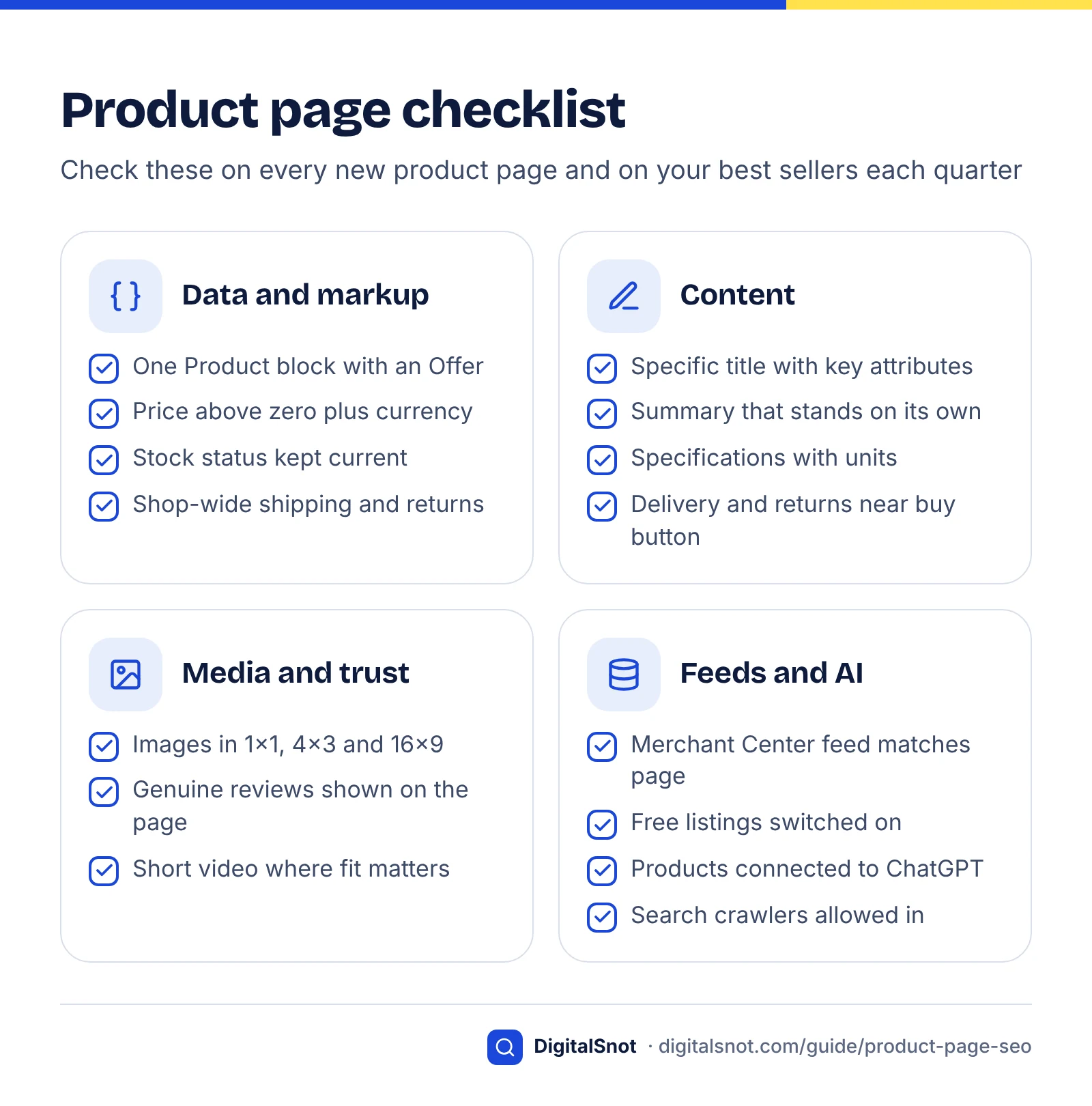
Use this checklist on every new product page and on your 20 best-selling pages once a quarter. It follows the impact scores above, so if time runs out you will still have done the most valuable work first.
- Data: one Product block with an Offer, a price above zero, a currency and current availability, all in the server-rendered HTML and matching the visible page.
- Title: product type plus the attributes buyers filter by, agreeing with the feed title (up to 150 characters).
- Description: a summary that stands on its own, then specifications with units and the answers to common buyer questions.
- Images: at least four originals, including 1x1, 4x3 and 16x9 versions, well above 50K pixels, plus a short video where fit or setup matters.
- Feeds: a Merchant Center feed with every core attribute and free listings on; products connected to ChatGPT through Shopify Catalog or OpenAI's application.
- Reviews: genuine reviews on the page with average rating and count; none bought, filtered or conditioned on sentiment.
- Policies: shipping and returns set once, in Search Console or Organization markup, stated near the buy button, with nothing contradicting them elsewhere.
- Variants and access: ProductGroup with a SKU, price and availability per variant; search crawlers allowed in robots.txt and your CDN or firewall.
Keep it working
Check Merchant Center diagnostics weekly, and Search Console's Merchant listings and Product snippets reports monthly and after every theme or app change. Once a month, ask AI Mode and ChatGPT the questions your buyers ask and note which products and shops appear, repeating each question a few times because answers vary. To see how often your pages appear in Google's AI features, use the report described in our Search Console AI performance guide.
If you would rather have product pages, markup and feeds reviewed for you, that is part of our on-page SEO service.
Free tools in this guide
- Google SERP Preview Preview titles and descriptions as they may appear in Google.
- On-Page SEO Checker Check titles, headings, images, links, schema and indexing for any page.
- AI Answer Snippet Extractor Score every paragraph as an AI answer snippet and fix the near misses.
- Schema Markup Generator Create JSON-LD for 10 schema types, with live checks for missing fields.
- AI Crawler Checker See which AI crawlers can read your page, and what they see without JavaScript.
By the numbers
- product listings in Google's Shopping Graph, the product data behind shopping in AI Mode (Google, May 2025)
- 50bn+
- Source: Google
- Shopping Graph product listings refreshed on Google every hour (Google, May 2025)
- 2bn+
- Source: Google
- Google added shop-wide shipping markup; with returns markup (2024), shops can set both without Merchant Center
- Nov 2025
- Source: Google Search Central Blog
- maximum characters allowed in a Merchant Center product title (descriptions allow up to 5,000)
- 150
- Source: Google Merchant Center Help
Frequently asked questions
What is product page SEO?
Product page SEO is the work of making each product page easy to find, understand and buy from, for shoppers and for the systems that show products. It covers a specific title, an original description, good images, genuine reviews, and accurate price, stock, shipping and returns data that matches across the page, its structured data and your product feeds. In 2026 that same data also feeds Google's shopping listings and AI shopping answers.
Do I need a Google Merchant Center account to appear in Google Shopping?
You need Merchant Center for free listings, which can show products on Search, the Shopping tab, Images, Lens, Maps, YouTube and Gemini. Pages can also qualify for merchant listing experiences through structured data alone, and Google says using markup and a Merchant Center feed together maximises eligibility. Since November 2025 you can also set shipping and returns policies in Search Console without a Merchant Center account.
What is the difference between merchant listing and product snippet markup?
Merchant listing markup is for pages where shoppers can buy the product from you, and it needs an Offer with a price above zero and a currency. Product snippet markup is for pages where people can't buy directly, such as reviews and comparison pages, and it accepts an Offer or an AggregateOffer. Search Console reports them separately as Merchant listings and Product snippets.
Should I delete out-of-stock product pages?
No, not if the product is coming back. Google advises keeping out-of-stock pages live and marking them out of stock in your structured data and Merchant Center feed, because removing them takes away your first-hand product information. Delete or redirect only discontinued products: redirect to a close replacement if one exists, and return a 404 or 410 if the page has no replacement, traffic or links.
How do I get my products into ChatGPT shopping results?
Connect a product feed. OpenAI says Shopify merchants are already connected through Shopify Catalog, and other merchants can request direct feed access through its developer documentation and an application form. ChatGPT also uses publicly available product information, so keep price, stock, delivery and returns readable on your pages and make sure your robots.txt does not block the search crawlers.
Can I pay to appear in ChatGPT product results?
No. OpenAI's help page says product results in ChatGPT are selected independently and are not ads. When several merchants sell the same product, ChatGPT ranks them by availability, price, quality and whether the merchant is the maker or primary seller. The practical levers are an accurate, fresh product feed and clear product pages, not payment.
How long should a product title be?
In a Merchant Center feed a product title can be up to 150 characters, so use that space for the product type and the attributes buyers filter by, such as size, colour and material. The title element on your page should be shorter, because search results truncate titles by pixel width. Put the product type and main attribute first and preview the result before publishing.
Can I use the manufacturer's product description?
You can keep the manufacturer's factual specifications, but rewrite the selling copy. A description shared word for word by every retailer of the same item gives Google and AI answers no reason to prefer your page. Add what only your shop knows: your own photos and measurements, how the item compares with others in your range, and the questions customers ask before buying.
Where should I put shipping and returns information?
Set it once for the whole shop, either in Search Console or with Organization markup using hasShippingService and hasMerchantReturnPolicy, or in Merchant Center if you run a feed. Google says Search Console settings win over site markup, and product-level policies apply only to exceptions. Also state delivery time and the returns window in plain words near the buy button.
Should each product variant have its own URL?
It depends on how people search. Google's variant markup supports both a single page with selectable options and separate URLs for each variant. Use separate URLs when shoppers search for variants separately, such as different sizes of bedsheet, and one page when variants differ only in options nobody searches for. Either way, give each variant its own SKU, price and availability.
Sources
Every figure and claim in this guide comes from the sources below. We checked each one when writing and link to the original so you can read it yourself. Credit belongs to the authors and publishers listed. How we write and check our articles.
-
1
Product data specification
Google Merchant Center Help · Title up to 150 characters; description up to 5,000 and matching the landing page; GTIN formats.
-
2
How To Add Merchant Listing Structured Data
Google Search Central · Offer only, price above zero, currency required, image guidance, priceType, policy precedence order.
-
3
Federal Trade Commission Announces Final Rule Banning Fake Reviews and Testimonials
US Federal Trade Commission · August 2024 rule on fake and AI-generated reviews, sentiment-based incentives and review suppression.
-
4
Intro to Product Structured Data on Google
Google Search Central · Merchant listings vs product snippets; markup, feed or both, with both maximising eligibility.
-
5
Set up structured data for Merchant Center
Google Merchant Center Help · Automatic item updates: price, currency, availability, condition in server HTML; sale price shown.
-
6
More ways to share your shipping and returns policies with Google
Google Search Central Blog · November 2025: organisation-level shipping markup; Search Console settings win over markup.
-
7
Merchant Shipping Policy Structured Data (ShippingService)
Google Search Central · Standard policy via hasShippingService under Organization; Offer-level only for exceptions.
-
8
Merchant Return Policy Structured Data (MerchantReturnPolicy)
Google Search Central · Return policy categories, merchantReturnDays, applicableCountry codes and returnFees values.
-
9
Free listings for products
Google Merchant Center Help · Free listing surfaces including Gemini, usually on by default, no guarantee, required core attributes.
-
10
Product Variant Structured Data (ProductGroup, Product)
Google Search Central · ProductGroup, hasVariant, variesBy, productGroupID; single-page and multi-page layouts.
-
11
Temporarily Pause Or Disable Website
Google Search Central · Keep out-of-stock product pages live and mark them out of stock rather than removing them.
-
12
Shopping on Google: AI Mode and virtual try-on updates from I/O 2025
Google · AI Mode shopping uses the Shopping Graph: 50bn+ listings, 2bn+ refreshed every hour (May 2025).
-
13
Google Universal Commerce Protocol (UCP) Guide
Google for Developers · UCP checkout in AI Mode and Gemini; merchant of record; Merchant Center preparation and approval.
-
14
About the Universal Commerce Protocol (UCP) and UCP-powered checkout feature on Google
Google Merchant Center Help · Eligibility (US, Canada, Australia), participating merchants, interest form and early access.
-
15
Shopping with ChatGPT Search
OpenAI Help Center · Results not ads; metadata inputs; merchant ranking factors; Shopify Catalog and feed application.
-
16
Powering Product Discovery in ChatGPT
OpenAI · March 2026 shift: merchants use own checkout; ACP extended to product feeds and promotions.
-
17
Using shopping research in ChatGPT
OpenAI Help Center · Buyer's guides with top picks and comparisons; may make mistakes about price and availability.