Guide · Technical SEO
Page indexing issues: why Google isn't indexing your pages and how to fix it
What every Search Console Page indexing status means, which ones to fix first, how to fix them and how long to wait, and why indexing now decides AI visibility.

On this page (11 sections)
- 1How Google indexing works, and why not every page gets in
- 2Reading the Page indexing report: the statuses that matter
- 3Every status at a glance: cause, fix and how long to wait
- 4Crawled - currently not indexed: quality and duplication
- 5Discovered - currently not indexed: discovery and crawl capacity
- 6Canonical, redirect, noindex and soft 404 statuses
- 7Use URL Inspection to test fixes before you request indexing
- 8Internal links and sitemaps that help discovery
- 9Indexing and AI features: why it matters more now
- 10A triage checklist: what to fix first
- 11Sources
A page that is not indexed cannot appear in Google Search, in AI Overviews or in AI Mode, however good it is. Search Console's Page indexing report tells you which of your URLs are in Google's index and gives a reason for each one that is not. It lists more than a dozen page indexing issues, many of them harmless, and most advice online answers all of them with "request indexing".
This guide explains what each status means in Google's own words, which ones deserve your time, what usually causes them and how long to wait after a fix. Status names are written exactly as Search Console Help writes them, so you can match them to your report.
Who this is for: small-business owners, in-house marketers and developers who see "Crawled - currently not indexed", "Discovered - currently not indexed" or canonical warnings in Search Console. What you will be able to do: separate real problems from normal exclusions, fix them in the right order, test each fix before asking Google to recrawl, and know when to wait. If you are reviewing a whole site, our technical SEO audit checklist puts indexing alongside crawling, speed and structured data.
How Google indexing works, and why not every page gets in
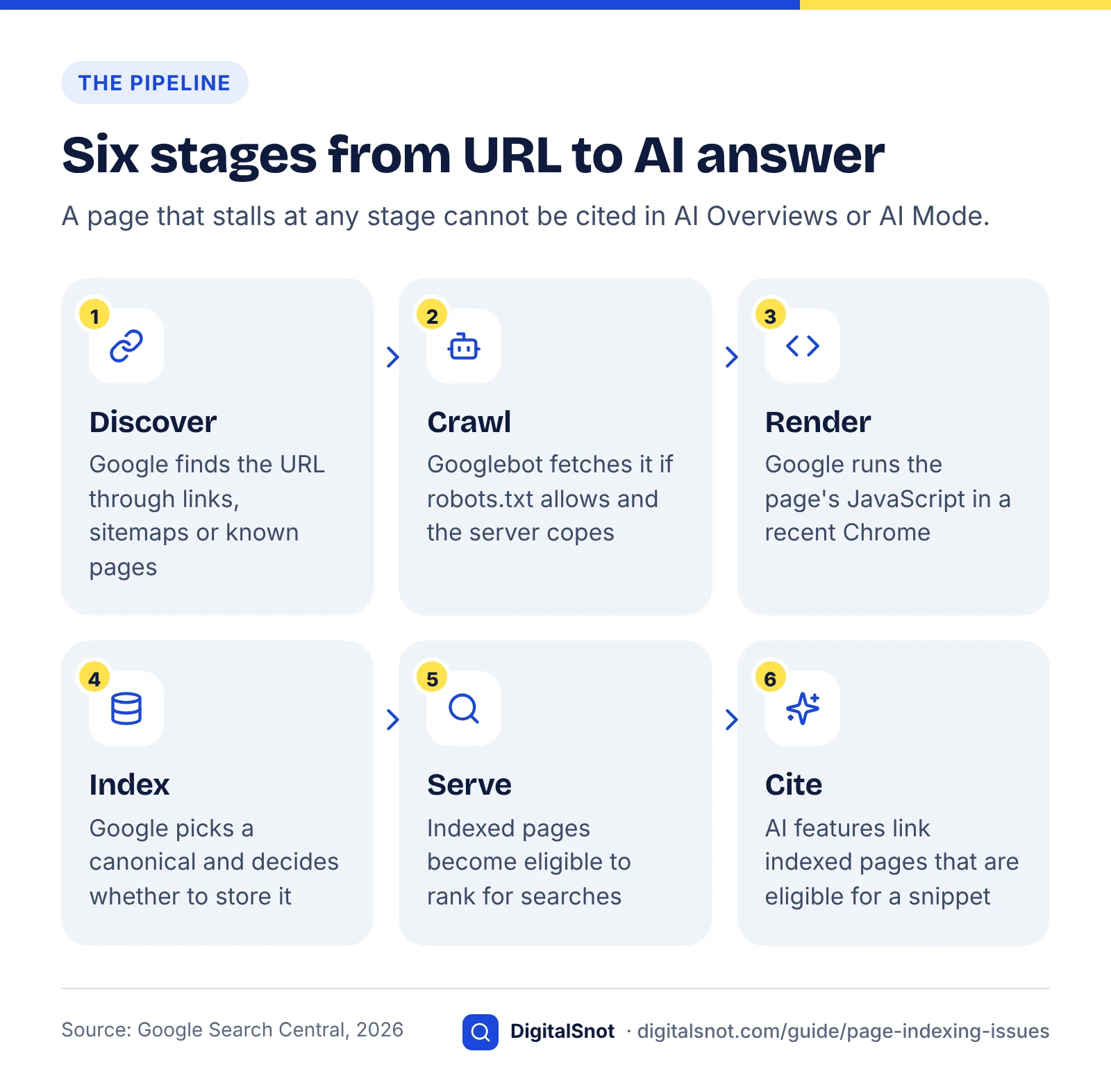
Google gets a page into its index in stages: it discovers the URL, crawls it, renders it, decides whether to store it, and only then can it show the page in results. A page can stall at any stage, and Google says it does not guarantee it will crawl, index or serve any page, even one that follows its rules.
Google's in-depth guide to how Search works describes three stages: crawling, indexing and serving. Googlebot finds URLs through links, sitemaps and pages it already knows, fetches them, and renders them by running their JavaScript in a recent version of Chrome. Google also says Googlebot does not crawl every page it discovers: some are disallowed by the site owner and others sit behind a login.
During indexing, Google groups pages with the same or very similar content into a cluster and picks the most representative one as the canonical: the version it treats as the main one. That step alone explains many of the "not indexed" URLs on a typical site.
Not every URL should be indexed
The goal is not a report with zero exclusions. Search Console Help's article Has Google found all your pages? says you should not expect every URL on a large site to be indexed, and that your goal is to get your critical pages indexed, along with the canonical versions of your pages. Redirected URLs, filtered category views, tracking-parameter duplicates, login pages and expired campaign pages are all better left out.
Search Console Help also says that if your site has fewer than about 500 pages, you probably do not need the Page indexing report at all; check your most important pages one by one instead, by searching Google for them or with the URL Inspection tool.
What indexing does and does not give you
Being indexed makes a page eligible to appear. It does not decide where it ranks, whether it earns clicks or whether an AI answer cites it. If your pages are indexed but traffic fell, look elsewhere: our core update recovery guide explains how to diagnose a drop.
Reading the Page indexing report: the statuses that matter
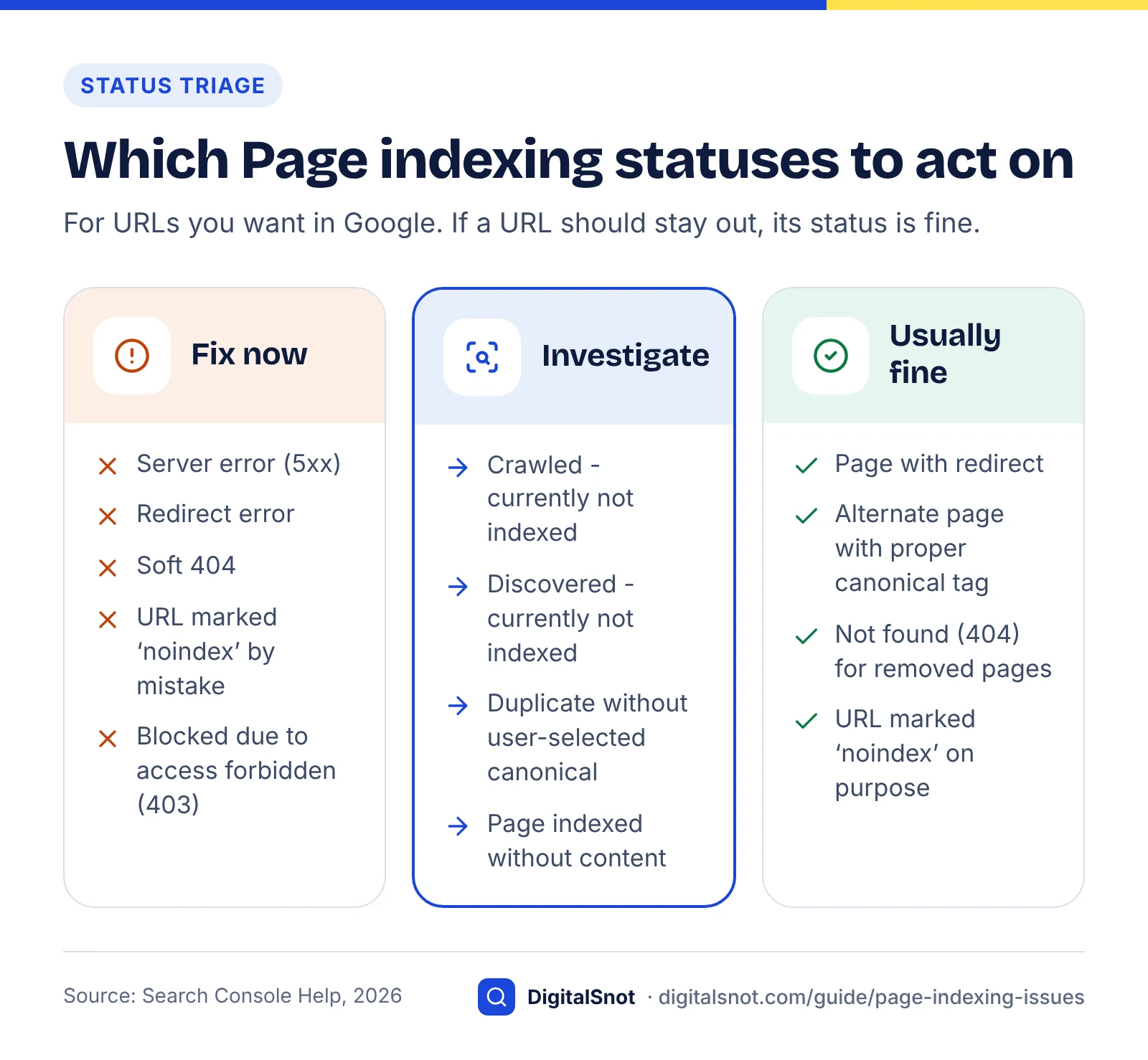
Sort every status into one of three groups: errors that block pages you want indexed (fix now), decisions Google made about pages you want indexed (investigate), and exclusions that are normal or deliberate (leave alone). Only the first two need work, and only for URLs that matter.
The Page indexing report shows how many of your URLs are indexed and not indexed, and groups the not-indexed URLs by reason. Two habits make it far more useful.
- Use the sitemap filter. Google's help says the default view, "All known pages", covers every URL Google knows about, while "All submitted pages" shows only URLs listed in a sitemap you submitted. If your sitemap lists only pages you want indexed, a not-indexed URL in that view is much more likely to be a real problem.
- Remember the report trails reality. The same help page says it can take up to a few weeks after Google learns a URL before it crawls some or all of a site, and that indexing is never instant, even when you request it. A page published yesterday is not yet a problem.
What goes in each group
- Fix now: Server error (5xx), Redirect error, Soft 404, Blocked due to unauthorized request (401), Blocked due to access forbidden (403) and URL blocked due to other 4xx issue, plus URL marked ‘noindex’ and URL blocked by robots.txt when nobody meant to exclude the page. These are usually technical, quick to fix and quick to verify.
- Investigate: Crawled - currently not indexed, Discovered - currently not indexed, Duplicate without user-selected canonical and Duplicate, Google chose different canonical than user. Google reached the page, or knows it exists, but chose not to index it or chose another URL. There is no single setting to change.
- Usually fine: Page with redirect, Alternate page with proper canonical tag, Not found (404) for pages you removed, Blocked by page removal tool, and exclusions you set on purpose. Google's help says the alternate page status needs no action and that a 404 is not necessarily a problem when a page was removed without a replacement.
Two statuses are warnings on indexed pages: Indexed, though blocked by robots.txt and Page indexed without content. Both deserve a look, because the URL is indexed but Google cannot see the page properly.
Every status at a glance: cause, fix and how long to wait
The table below covers every reason in the Page indexing report: the cause to check first, the fix, and how long to wait before judging the result. Where Google states a timescale we use it; where it does not, the figure is our rule of thumb and is labelled as such.
How we built it: in October 2026 we took each status name and definition from Search Console Help's Page indexing report article, matched it to the Google documentation that covers the fix (canonicals, noindex, HTTP status codes and recrawling), and added the waiting times Google documents. The "likely cause" column is our judgement of what to check first, not Google's wording. You can repeat the exercise from the sources listed at the end of this guide.
| Status (Search Console Help name) | Group | Likely cause to check first | Fix | How long to wait |
|---|---|---|---|---|
| Server error (5xx) | Fix now | Server overloaded, timing out or crashing on one template | Check logs and hosting capacity, fix the failing template, confirm a 200 in a live test | Validate fix: up to about two weeks (Google) |
| Redirect error | Fix now | A chain that is too long, a loop, or a bad or empty URL in the chain | Point each old URL straight at the final live page in one hop | Days to weeks (Google) |
| URL blocked by robots.txt | Fix if unintended | A Disallow rule broader than intended, often left over from a staging site | Edit robots.txt and test the exact path | Days to weeks (Google) |
| URL marked ‘noindex’ | Fix if unintended | A CMS or plugin setting, a staging tag copied to live, or an X-Robots-Tag header | Remove the tag or header, then check the live test says indexing is allowed | Days to weeks (Google) |
| Soft 404 | Fix now | Page returns 200 but looks like an error page or is nearly empty | Return 404 or 410 if the page is gone; add real content if it is not | Days to weeks (Google) |
| Blocked due to unauthorized request (401) | Fix if public | Password protection on a page meant to be public | Remove the login, or let Googlebot verify its identity | Days to weeks (Google) |
| Not found (404) | Usually fine | Page deleted, or a link with a typo | Leave genuine removals; 301 moved pages; fix internal links that point to the 404 | No wait needed; Google drops removed URLs over time |
| Blocked due to access forbidden (403) | Fix if public | Firewall, CDN bot rule, security plugin or file permissions blocking Googlebot | Allow verified Googlebot through every security layer | Days to weeks (Google) |
| URL blocked due to other 4xx issue | Fix if public | Another client error code from the server or a security layer | Debug the page with URL Inspection, as Google suggests | Days to weeks (Google) |
| Blocked by page removal tool | Usually fine | Someone filed a temporary removal request | Cancel it if the page should return; use noindex or a 404 for permanent removal | Re-check after two weeks (our rule of thumb) |
| Crawled - currently not indexed | Investigate | Thin, near-duplicate or low-value page, often a pattern across one template | Improve, merge or remove the page, strengthen internal links, then request indexing once | Google gives no timeline; review after 4–6 weeks (our rule of thumb) |
| Discovered - currently not indexed | Investigate | Weak internal links, low crawl demand, or a server that struggles under crawling | Link to the page from important pages, fix server speed and errors, cut low-value URLs | Up to a few weeks is normal for new URLs (Google) |
| Alternate page with proper canonical tag | Usually fine | Working as intended: the page points to an indexed canonical | Nothing | None |
| Duplicate without user-selected canonical | Investigate | Similar pages with no canonical tag, such as parameter, print or tag versions | Declare the canonical on the preferred URL, or make the page substantially different | Days to weeks (Google) |
| Duplicate, Google chose different canonical than user | Investigate | Signals disagree: the canonical tag names one URL; links, sitemap or redirects favour another | Make redirects, canonical tags, internal links and the sitemap all name the same URL | Days to weeks (Google) |
| Page with redirect | Usually fine | The URL redirects, so its target is considered instead | Remove it from your sitemap and update internal links to the target | None |
| Indexed, though blocked by robots.txt (warning) | Investigate | Robots.txt blocks a page that other pages link to | To keep it out, unblock it and add noindex; to keep it in, just unblock it | Days to weeks (Google) |
| Page indexed without content (warning) | Fix now | Google could not read the content, such as an unsupported format or content hidden from Googlebot | Run a live test and make sure Googlebot receives the same content visitors see | Days to weeks (Google) |
The "days to weeks" figure comes from Google's page on how to ask Google to recrawl your URLs, which says crawling can take anywhere from a few days to a few weeks and that a crawl request does not guarantee inclusion at all. The "about two weeks" figure is from the Page indexing help article, which says validation typically takes up to about two weeks but can take much longer.
Crawled - currently not indexed: quality and duplication
Crawled - currently not indexed means Google fetched the page and decided not to add it to the index, at least for now. When there is no technical fault, it is usually a judgement about value: the page looks too similar to other pages, too thin, or not useful enough to keep.
Google's help text for this status is short: the page was crawled but not indexed, it may or may not be indexed in the future, and there is no need to resubmit the URL for crawling. Repeated requests do not change Google's assessment.
Google has been more direct in conversation. On its Search Off the Record podcast, reported by Search Engine Roundtable in July 2026, John Mueller and Martin Splitt said quality problems, including obviously low-quality AI-generated content, can lead Google to skip indexing pages. Mueller added that when Google has serious quality concerns about a site, it tends to crawl and index fewer of its pages. Their advice was to step back and look at the site's overall quality when many pages go unindexed with no technical cause, rather than treating each URL as a separate fix.
Crawled vs discovered: two statuses explained
Look for the pattern first
Export the affected URLs and sort them by template or folder. A handful of scattered blog posts is a page-level problem. Hundreds of tag pages, near-identical location pages or product variants is a template problem, and the fix is a decision about that template.
How to fix it, in order
- Rule out a technical cause. Run a live test in URL Inspection. Confirm indexing is allowed and that Google receives the full main content, not an empty shell waiting on JavaScript.
- Check for a near-duplicate. If two of your pages answer the same question, Google may keep only one. Merge them into the stronger page and redirect the other. Our guide to service pages versus blog posts covers how to avoid keyword cannibalisation.
- Ask what the page adds. Does it offer anything a searcher cannot find on ten other pages, such as your prices, process, photos, data or local detail? If not, improve it, fold it into a better page, or remove it.
- Check the basics on the page. Run it through the free On-Page SEO Checker to confirm the title, headings and canonical tag say what you expect. It flags signals that confuse Google; it cannot judge whether the content is good enough, which is your call. Our on-page SEO checklist explains each element.
- Link to it from relevant indexed pages. A page with no internal links signals that it does not matter.
- Request indexing once, then wait. Judge the result after several weeks, not days.
Example: a clinic with 40 area pages
Example (hypothetical): a dental clinic in Pune publishes 40 "dentist in [neighbourhood]" pages, each with the same text and only the area name changed. Twelve are indexed; 28 sit in Crawled - currently not indexed. Requesting indexing for the 28 achieves nothing, because Google already has pages that say the same thing. A better plan is one strong Pune page with real detail about the clinic, plus pages only for branches that actually exist, each with its own address, team and directions, with the weak pages redirected to the main one.
If improving content across a whole site is the real task, that is the core of our content SEO work.
Discovered - currently not indexed: discovery and crawl capacity
Discovered - currently not indexed means Google knows the URL exists but has not crawled it yet. On a small site this usually points to weak internal links or low crawl demand. On large sites, or on slow servers, crawl capacity becomes a real factor.
Google's help text says the page was found but not crawled yet, and that typically Google wanted to crawl the URL but expected this to overload the site. That explanation covers the server side of the problem; the demand side matters just as much on smaller sites.
Crawl budget is rarely the answer for small sites
Google's crawl budget management guide is written for large sites, roughly 1 million or more unique pages with content that changes about weekly, and it calls these numbers rough estimates. It does name sites with many URLs in Discovered - currently not indexed as part of its audience, but for a site with a few hundred pages, budget is seldom the limit.
Crawl budget combines crawl capacity (how much crawling your server can take) and crawl demand (how much Google wants to crawl). The guide says that even if the capacity limit is not reached, Google will crawl a site less when demand is low. Demand is the side a small site can most influence: pages that look unimportant, are poorly linked or sit among many low-value URLs get crawled less.
Check the server side
Google's documentation on how HTTP status codes affect its crawlers says 5xx and 429 responses make Google's crawlers temporarily slow down, and that network and DNS errors cause unreachable indexed URLs to be removed within days. A struggling server slows the crawling of new pages and can push existing ones out.
Search Console's Crawl Stats report shows a host status for robots.txt availability, DNS resolution and server connectivity. Its help page says that if a robots.txt request returns neither a valid file nor a 404, Google slows or stops crawling until it gets an acceptable response, so a flaky robots.txt can hold back the whole site. If response times are slow, our five quick website speed checks include a server response test.
What to do
- Confirm you want the URL indexed. Filter, parameter and tag URLs often do not deserve it.
- Link to it from your home page, a category or service page, or a related article that is already indexed.
- List it in your XML sitemap, and keep the sitemap free of redirected, noindex and duplicate URLs.
- Check the Crawl Stats host status and your server logs for errors, timeouts and slow responses.
- Remove or consolidate large sets of low-value URLs so Google's crawling goes to pages that matter.
What not to do: the crawl budget guide warns against using noindex to save crawling, because Google still requests the page before it sees the tag, and against using robots.txt to shift budget temporarily to other pages. Robots.txt is for URLs you never want crawled.
Canonical, redirect, noindex and soft 404 statuses
These statuses mostly reflect signals you control. Make every signal point the same way and most of them either resolve themselves or turn out to be correct. To see those signals for one URL in a single pass, run it through our free Indexability Checker, which reports the status code, any redirects, the robots.txt rule, noindex in a meta tag or X-Robots-Tag header, and the canonical.
Duplicates and canonicals
A canonical URL is the version of a page Google treats as the main one when several URLs show the same or very similar content. Google's guide on how to specify a canonical ranks the methods: redirects are a strong signal, rel="canonical" annotations are a strong signal, and sitemap inclusion is a weak one. It says the methods stack when combined, warns against naming different canonicals with different methods, and recommends a self-referencing canonical with an absolute URL on the canonical page itself.
- Alternate page with proper canonical tag: the page points to its canonical, which is indexed. Google says there is nothing to do.
- Duplicate without user-selected canonical: Google sees the page as a duplicate and has picked another URL as canonical. Google says this is not an error. If it picked the wrong URL, declare the canonical explicitly; if the page is not really a duplicate, make its content substantially different.
- Duplicate, Google chose different canonical than user: you marked this page as canonical, but Google thinks another URL is a better canonical and indexed that one. Inspect the URL and compare the user-declared canonical with the Google-selected canonical, then fix whichever signal disagrees. Typical culprits are internal links to an old or parameter URL, or a sitemap listing a different version.
Redirects
Page with redirect is normal: Google's help describes it as a non-canonical URL that redirects to another page, so it is not indexed, while the target may or may not be. Expect a rise after a migration. Remove redirected URLs from your sitemap and point internal links at the final address.
Redirect error is a real fault. Google lists a chain that is too long, a redirect loop, and a bad or empty URL in the chain as typical causes. The free Redirect Checker shows every hop with its status code and the final URL, and flags chains and loops. Aim for a single 301 from each old URL to a live page that returns 200.
noindex and robots.txt
URL marked ‘noindex’ means Google found a noindex directive, in a meta tag or an HTTP header, and left the page out. If the page should be indexed, remove it; the URL Inspection help says that if "Indexing allowed?" shows "No", the site is returning a noindex tag or header. URL blocked by robots.txt means Google could not crawl the page because of a robots.txt rule, and Google notes this does not guarantee the page stays out of the index.
The two are often confused. Google's page on blocking indexing with noindex says that for noindex to work, the page must not be blocked by robots.txt, because a blocked page is never crawled, so Google never sees the tag. That is how pages end up as Indexed, though blocked by robots.txt: Google respects the block but can still index a URL other pages link to. To keep such a page out, unblock it and add noindex. To find which robots.txt line is responsible, the free Robots.txt Tester checks a URL against a site's file for Googlebot, Bingbot or AI crawlers and shows the matching rule.
Soft 404 and Not found (404)
A soft 404 is a page that tells visitors it does not exist, or looks like an error page, but returns a 200 success code. Google's HTTP status documentation says such pages are excluded from Search. Empty search results and "product unavailable" pages with nothing else on them are common examples. Return a real 404 or 410 for pages that are gone, and give pages you want to keep real content.
Not found (404) is usually fine. Google's help says a 404 is not necessarily a problem if the page was removed without a replacement, and recommends a 301 redirect when a page has moved. Do fix internal links that point to 404s.
Access errors: 401, 403, other 4xx and 5xx
Blocked due to unauthorized request (401) means Googlebot met a login. Blocked due to access forbidden (403) on public pages often comes from a firewall, CDN bot setting or security plugin treating Googlebot as a threat; our guide to blocking AI crawlers explains how CDN bot rules can catch Googlebot by accident. Server error (5xx) means Googlebot could not access the URL, the request timed out or the site was busy, and Google's HTTP documentation says indexed URLs that keep returning server errors are eventually dropped.
Use URL Inspection to test fixes before you request indexing
Test every fix with the URL Inspection tool's live test before you click Request indexing. The live test tells you whether Google can crawl and read the page now; it cannot tell you whether Google will index it or which canonical it will choose.
Google's URL Inspection tool help says the tool shows information about Google's indexed version of a page and lets you test whether a URL might be indexable. A positive live test is not a guarantee that the page will appear in Search results, only that it can be crawled and parsed, and the Google-selected canonical can only be determined from the indexed data.
Three checks before you click Request indexing
Three checks before you request indexing
- Indexing allowed? The live test must show "Yes". "No" means a noindex tag or header is still present somewhere, often in an HTTP header or a CMS setting.
- The page fetches and renders. Confirm the fetch succeeded with a 200 response and that the tested page contains your main content and links, not a cookie wall, an error message or an empty JavaScript shell.
- The canonical points here. If the user-declared canonical names another URL, you are asking Google to index that URL instead. For an already indexed page, also compare the Google-selected canonical.
When all three pass, click Request indexing once. Google's recrawl page says there is a quota for submitting individual URLs, that requesting the same URL again will not get it crawled any faster, and that crawling can take anywhere from a few days to a few weeks. Our post on how long SEO takes puts these delays in context.
Fixing many URLs at once
For a fix that affects a whole template, such as removing a sitewide noindex, do not inspect URLs one by one. Keep the fixed URLs in your sitemap, open the issue in the Page indexing report and click Validate fix. Google's help says validation typically takes up to about two weeks, and sometimes much longer.
Decision table: what the live test is telling you
| If the live test shows | It means | Do this |
|---|---|---|
| Indexing allowed: No | A noindex tag or header is still present | Remove it everywhere it is set, then retest |
| Fetch failed, or blocked by robots.txt | Google cannot crawl the page | Fix the server, firewall or robots.txt rule, then retest |
| User-declared canonical is a different URL | Your page asks Google to index another URL | Correct the canonical if that was not intended |
| Everything passes, but the report says Crawled - currently not indexed | The technical side is fine; Google chose not to index | Work on content, duplication and internal links, then request indexing once |
| Everything passes and the URL is on Google | Nothing to fix in indexing | Look at rankings, content and clicks instead |
Internal links and sitemaps that help discovery
Internal links tell Google a page exists and that it matters; sitemaps list the URLs you want crawled. Use both, keep them clean, and they solve most Discovered - currently not indexed problems on small and medium sites.
Internal links Google can follow
Google's link best practices say Google can generally only crawl a link if it is an HTML <a> element with an href attribute. Links that only work through script events on buttons or other elements may never be followed. The same page asks for descriptive anchor text that makes sense on its own, rather than "click here".
In practice, link every page you want indexed from at least one relevant indexed page, ideally a hub such as a service, category or location page. Link new blog posts from older posts on the same topic, not only from a date-ordered archive where they slide out of view.
To spot problems on a small site, the free Website SEO Audit crawls up to 50 pages the way a search engine does, starting from your sitemap and robots.txt, and reports broken links, redirects, duplicate titles, missing meta tags and sitemap problems with a health score. Compare the pages it reaches with the pages you expect; anything missing is probably poorly linked. Larger sites need a full desktop or cloud crawler.
Sitemaps that send clean signals
A sitemap is a file that lists the URLs you want search engines to crawl. Include only canonical URLs that return 200 and are meant to be indexed. That keeps the "All submitted pages" view meaningful and avoids sending a canonical signal for URLs you do not want.
Google's guide to building and submitting a sitemap says Google ignores the <priority> and <changefreq> values, and uses <lastmod> only if it is consistently and verifiably accurate. Update lastmod only when a page's content changes meaningfully.
Indexing and AI features: why it matters more now
AI Overviews and AI Mode only link to pages that are indexed and eligible to show with a snippet in Google Search. Google says there are no additional technical requirements, so every indexing problem in this guide is also an AI visibility problem.
Google's AI features and your website documentation states that to be eligible as a supporting link in AI Overviews or AI Mode, a page must be indexed and eligible to be shown in Google Search with a snippet. Snippet controls such as nosnippet, max-snippet and noindex limit how your content can appear in these features.
Indexed but never in AI answers? Check these settings
Search Console now has a site-level switch as well. The Search generative AI control can exclude a site from AI Overviews, AI Mode and generative AI features in Discover. Google's help says it does not affect ranking or inclusion elsewhere in Search, does not stop AI training (that is Google-Extended), and that exclusion generally takes a few days after a change, though some content can take longer (checked October 2026). If indexed pages never show up in AI features, check that nobody switched this on and that no template adds nosnippet or a tight max-snippet limit.
To see whether indexed pages earn AI impressions, use the generative AI report described in our guide to the Search Console AI performance report.
Other AI assistants use other indexes
Microsoft's Bing Webmaster Guidelines say they cover how Bing finds, crawls and indexes content across search, Copilot and grounding results. They recommend IndexNow, XML sitemaps, crawlable internal links and links from relevant external sites for discovery, and say to use IndexNow when URLs are added, updated or removed. They also note that the NOARCHIVE directive stops content being used in Copilot responses. Verify your site in Bing Webmaster Tools and check your important pages there too.
Indexing is the first gate, not the whole race. Once your pages are indexed in both engines, our guide on how to get cited in AI search covers what makes AI answers choose one indexed page over another.
A triage checklist: what to fix first
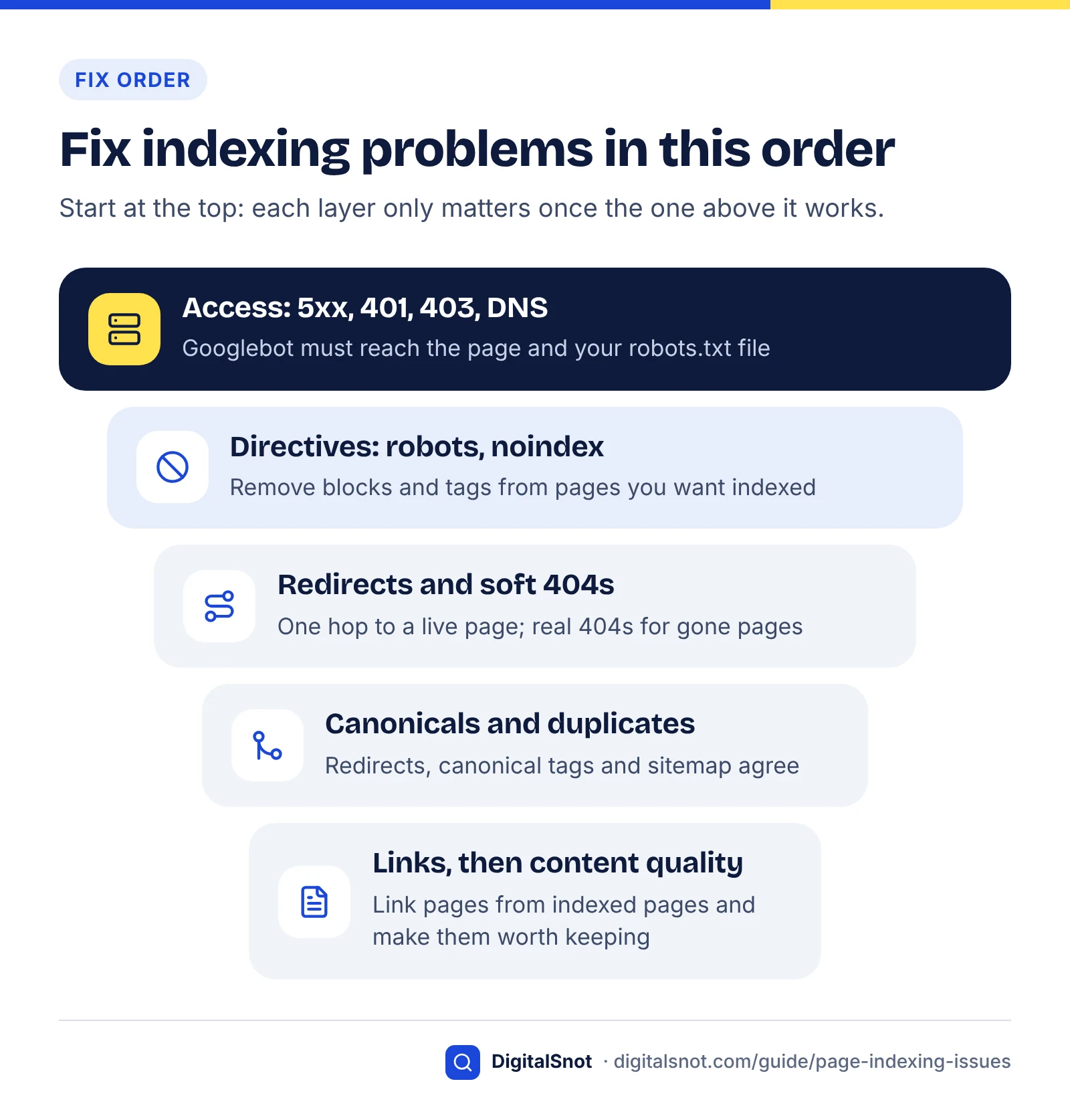
Work from access to quality. A page Google cannot reach makes every later fix pointless, and rewriting a page with a stray noindex tag is wasted effort.
Decision table: if you see this, do that
| If you see | And | Then |
|---|---|---|
| Any status | The URL is one you do not want indexed | Leave it, and make sure it is not in your sitemap |
| Server error (5xx), Blocked due to unauthorized request (401) or Blocked due to access forbidden (403) | On pages you want indexed | Fix the server, login or firewall first, then Validate fix |
| URL marked ‘noindex’ or URL blocked by robots.txt | Nobody meant to exclude the pages | Remove the rule, test the URL, then request indexing |
| Redirect error or Soft 404 | On live or recently moved pages | Use single-hop 301s to live pages and real 404s for gone pages |
| Either duplicate status | Google's canonical is the wrong page | Make redirects, canonical tags, links and the sitemap agree |
| Discovered - currently not indexed | Small site, healthy server | Add internal links from indexed pages and list the URL in your sitemap |
| Discovered - currently not indexed | Slow server or Crawl Stats host problems | Fix hosting, timeouts and robots.txt availability first |
| Crawled - currently not indexed | A few scattered pages | Improve or merge those pages, then request indexing once |
| Crawled - currently not indexed | Hundreds of pages from one template | Decide whether the template deserves to be indexed; improve, consolidate or remove it |
| A sudden jump in any status | Right after a site release or plugin update | Check what changed in that release before anything else |
A monthly indexing routine
- Open the Page indexing report with the "All submitted pages" filter and note the indexed and not-indexed counts.
- Read the reasons from the top of the fix order down: access errors, directives, redirects and soft 404s, canonicals, then discovery and quality.
- For each reason affecting important URLs, inspect two or three examples with a live test.
- Fix the cause at template level where you can, then use Validate fix or request indexing once.
- Log what you changed and when, and check the Crawl Stats host status and Bing Webmaster Tools for the same pages.
On small sites, indexing problems often come down to a few causes: a setting left on, messy redirects, a struggling server, or pages that repeat each other. Fix them in order, test before you ask, and give Google time to recrawl.
If you would rather have an expert work through it, our technical SEO service covers crawling, indexing, canonicals and site structure. When you are ready, talk to us about your site.
Free tools in this guide
- On-Page SEO Checker Check titles, headings, images, links, schema and indexing for any page.
- Indexability Checker See what stops Google indexing a page: status, redirects, robots.txt, noindex, canonical and HTML size.
- Redirect Checker Trace 301/302 redirects, chains and loops to the final URL.
- Robots.txt Tester Test a URL against robots.txt and see which rule blocks or allows it.
- Website SEO Audit Crawl up to 50 pages and get a health score, every issue and a 30-day plan.
By the numbers
- site size below which Search Console Help says you probably don't need the Page indexing report and can check key pages one by one
- ~500 pages
- Source: Search Console Help
- unique pages changing about weekly: the rough site size Google's crawl budget guide is written for
- 1 million+
- Source: Google for Developers
- how long Google says crawling can take after you ask it to recrawl a URL, with no guarantee of indexing
- Days to weeks
- Source: Google Search Central
- typical upper limit for a Page indexing "Validate fix" run, though Google says some take much longer
- ~2 weeks
- Source: Search Console Help
Frequently asked questions
Why is my page not indexed by Google?
Either something blocks it or Google chose not to index it. Blocking causes include server errors, redirect problems, a noindex tag, a robots.txt rule or a login. Choices include treating the page as a duplicate of another URL or judging it too thin to keep. Search Console's Page indexing report and the URL Inspection tool show which reason applies to each URL, so start there before changing anything.
What does "Crawled - currently not indexed" mean?
It means Google fetched the page but decided not to add it to its index for now. Google's help says the page may or may not be indexed in the future and that you do not need to resubmit it. When there is no technical fault, it usually reflects duplication or low value, so improve, merge or remove the page and strengthen internal links rather than requesting indexing repeatedly.
What does "Discovered - currently not indexed" mean?
It means Google knows the URL exists but has not crawled it yet. Google's help says this typically happens when crawling was expected to overload the site. On small sites the more common causes are weak internal links and low crawl demand, so link to the page from important indexed pages, list it in your sitemap and check your server for errors and slow responses.
How long does it take Google to index a page?
There is no fixed time. Google says crawling can take anywhere from a few days to a few weeks after you ask it to recrawl a URL, and that a request does not guarantee indexing. A Validate fix run in the Page indexing report typically takes up to about two weeks but can take longer. New pages on well-linked, healthy sites tend to be picked up sooner.
Should I keep clicking Request indexing?
No. Google says there is a quota for individual URL requests and that asking again for the same URL will not get it crawled any faster. Fix the cause first, confirm the live test in URL Inspection passes, request indexing once, then wait. For fixes that affect many pages, use Validate fix in the Page indexing report and keep the fixed URLs in your sitemap.
Is "Duplicate without user-selected canonical" a problem?
Usually not. Google says it is not an error: it treats the page as a duplicate of another URL it has chosen as canonical, and does not serve duplicates. It only needs action if Google picked the wrong page. In that case, add a canonical tag pointing to your preferred URL and make internal links and your sitemap point there too. If the page is not really a duplicate, make it substantially different.
Do I need to fix every URL in the Page indexing report?
No. Google says you should not expect every URL on a large site to be indexed and that the goal is to get your critical pages and canonical versions indexed. Redirects, alternates with proper canonical tags, removed pages and deliberate noindex pages belong in the not-indexed list. Focus on statuses affecting pages you actually want people to find.
Can a page appear in AI Overviews if it is not indexed?
No. Google says a page must be indexed and eligible to be shown in Google Search with a snippet to appear as a supporting link in AI Overviews or AI Mode, and there are no additional technical requirements. Snippet controls such as nosnippet and the Search generative AI control in Search Console can also keep indexed pages out of these features.
Does blocking a page in robots.txt remove it from Google?
Not reliably. Robots.txt stops crawling, but Google can still index a blocked URL if other pages link to it, which shows up as Indexed, though blocked by robots.txt. To keep a page out of results, allow crawling and add a noindex meta tag or X-Robots-Tag header. Google says noindex only works when the page is not blocked by robots.txt.
Does crawl budget affect small websites?
Rarely. Google's crawl budget guide is written for large sites, roughly a million or more unique pages changing about weekly, and it calls those numbers rough estimates. On a site with a few hundred pages, Discovered - currently not indexed usually points to weak internal links, low crawl demand or a struggling server rather than a budget limit.
Sources
Every figure and claim in this guide comes from the sources below. We checked each one when writing and link to the original so you can read it yourself. Credit belongs to the authors and publishers listed. How we write and check our articles.
-
1
In-depth guide to how Google Search works
Google Search Central · Crawling, rendering, indexing and serving; duplicate clustering; no guarantee of crawling or indexing.
-
2
Has Google found all your pages?
Search Console Help · Not every URL should be indexed; sites under about 500 pages may not need the report.
-
3
Page indexing report
Search Console Help · Exact status names and meanings, sitemap filter, crawl timing and Validate fix duration.
-
4
Ask Google to recrawl your URLs
Google Search Central · Recrawl takes a few days to a few weeks; URL quota; repeat requests do not help.
-
5
Google On Discovered vs Crawled Not Indexed Quality Issues & AI-Generated Content
Search Engine Roundtable · July 2026 report of Mueller and Splitt linking unindexed pages to site quality.
-
6
Crawl Budget Management
Google for Developers · Which sites need crawl budget work, capacity vs demand, and tactics to avoid.
-
7
How HTTP status codes affect Google's crawlers
Google for Developers · Soft 404s, 5xx and 429 slowing crawling, and DNS or network errors dropping URLs.
-
8
Crawl Stats report
Search Console Help · Host status checks and how robots.txt fetch failures slow or stop crawling.
-
9
How to specify a canonical with rel="canonical" and other methods
Google Search Central · Strength of redirects, rel=canonical and sitemap signals; consistent, absolute canonicals.
-
10
Block search indexing with noindex
Google Search Central · noindex only works when the page is not blocked by robots.txt.
-
11
URL Inspection tool
Search Console Help · Indexed vs live data, live test limits, canonical fields and Indexing allowed.
-
12
SEO link best practices for Google
Google Search Central · Crawlable links need an a element with an href; descriptive anchor text.
-
13
Build and submit a sitemap
Google Search Central · priority and changefreq ignored; lastmod used only when consistently accurate.
-
14
AI features and your website
Google Search Central · AI Overviews and AI Mode need indexed, snippet-eligible pages; snippet controls.
-
15
Search generative AI control
Search Console Help · Site-level exclusion from AI Overviews, AI Mode and Discover AI features; timing.
-
16
Webmaster Guidelines
Bing Webmaster Tools · Discovery for Bing and Copilot: IndexNow, sitemaps, crawlable links; NOARCHIVE.