Guide · Technical SEO
Server log analysis for SEO and AI bots: a beginner's guide
A beginner's method for server logs: get the file, find Googlebot and AI crawlers, verify them, and turn what they fetch into fixes, with tested commands.

On this page (12 sections)
- 1What server logs show that other tools don't
- 2Get your logs: shared hosting, CDNs and managed platforms
- 3Read a log line
- 4Identify search, AI and agent bots
- 5Verify bots and spot impostors
- 6A beginner workflow: five questions to ask your log
- 7Find crawl waste and the errors bots hit
- 8Which AI bots visit, and what they fetch
- 9Find the pages bots never crawl
- 10Worked example: one week of logs for a small clinic
- 11Turn findings into fixes: a decision table
- 12Sources
Your web server keeps a record of every request it answers. Server log analysis for SEO means reading that record to see which search engine and AI bots visit, what they fetch and where they fail. It is the only first-hand record of crawling you have: Search Console shows Google's own summary, and analytics tools are built to measure people, not bots.
Who this is for: small-business owners, in-house marketers and developers who can download a file and paste a command, with no enterprise software. What you'll be able to do: get your logs from shared hosting, a CDN or a managed platform; read a log line; tell genuine Googlebot, Bingbot and AI crawlers from impostors; answer five practical questions; and turn the answers into a short list of fixes.
Every filtering command in this guide was tested on a synthetic week-long log in the combined format, the format Apache and Nginx use; the DNS lookups follow Google's documented usage. Facts about each bot come from the operator's own documentation, checked in October 2026.
What server logs show that other tools don't
A server access log shows every request that reached your server, with the URL, the status code returned and the claimed identity of the visitor. No other source puts every bot, every URL and the exact response in one place.
A server access log is a plain text file in which your web server writes one line per request: a page, an image, a script or a robots.txt fetch. Because bots announce themselves in each request, the log tells you which crawler asked for which URL and when, and whether your server answered with the page, a redirect or an error.
| Source | Which bots it covers | What you see | Main limit |
|---|---|---|---|
| Raw server access log | Every bot and person whose request reaches your server | Every request: IP, time, URL, status code, size, referrer, user agent | You must download and filter it; user agents can be faked; CDN cache hits never reach it |
| Search Console Crawl Stats | Google's crawlers only | Totals, response codes, file types, crawl purpose, Googlebot type, example URLs | Example URLs, not every request; nothing about other bots |
| Analytics such as GA4 | Built to measure people | Sessions, sources, conversions | Not designed to report crawler requests |
Google's Crawl Stats report is the best free companion to your logs. It shows total crawl requests, download size, average response time and host status, broken down by response, file type, crawl purpose and Googlebot type, and you can open each group to see example URLs. Use it to sanity-check your own counts for Google, and use the log for everything else.
What logs cannot tell you
Logs record fetches, not results. A visit from OAI-SearchBot shows ChatGPT's search crawler can reach a page; it does not show that ChatGPT cited it. For impressions in AI Overviews and AI Mode, use the reports covered in our guide to the Search Console AI performance report. Logs also miss any request your CDN answered from its cache, and they cannot prove who sent a request until you verify the IP address.
Do small sites need log analysis?
Not for crawl budget. Google's crawl budget guide is written for sites with about 1 million or more unique pages that change weekly, or 10,000 or more pages that change daily, and Google calls those numbers rough estimates. It adds that if your pages are usually crawled the day they are published, you don't need the guide.
Small sites still gain from logs, for different reasons. In our view, the useful findings on a site with a few hundred pages are errors on important pages, firewalls quietly blocking bots you want, impostors, and pages no bot ever reaches. If organic traffic dropped recently, a log check also helps rule crawling in or out before you work through recovering from a core update.
Get your logs: shared hosting, CDNs and managed platforms
Most hosts let you download raw access logs: on cPanel they sit under Metrics, on your own server they live in /var/log, and on Cloudflare you can export them with Logpush. Aim for one to four weeks of data.
Shared hosting with cPanel
Open the Metrics section and choose Raw Access. Pick the domain and download its log, which arrives as a compressed .gz file you can unzip on any computer. The same page can archive logs monthly into your home directory; switch that on if you want history, but the archives count towards your disk space. If your host uses another control panel, look for a page named "Logs" or ask support.
Your own server (VPS or dedicated)
Nginx usually writes to /var/log/nginx/access.log. Apache writes to /var/log/apache2/access.log on Debian and Ubuntu, and to /var/log/httpd/access_log on Red Hat-family systems. Older days are rotated into numbered files, often gzipped. One command joins them all into a single file, whether compressed or not: gzip -dcf access.log* > all.log
Sites behind Cloudflare or another CDN
A CDN changes two things. First, responses served from the CDN's cache never reach your server, so your origin log undercounts. Second, unless your server restores the original visitor address, every line shows the CDN's IP, which makes bot verification impossible.
Cloudflare documents the fix in Restoring original visitor IPs. Your server reads the CF-Connecting-IP header: on Apache with mod_remoteip (and %h changed to %a in the log format), on Nginx with the realip module or by adding $http_cf_connecting_ip to the log format.
You can also skip the origin log and export Cloudflare's own request logs with Logpush. Cloudflare's Logpush pricing page says Logpush is available on the Free, Pro and Business plans with self-service, usage-based pricing (checked October 2026); check the current allowance and charges for your plan before you start. Start the export before you need it, because you will want a few weeks of history.
Managed hosts and website builders
Managed hosting platforms vary. Ask support one precise question: "Can I download raw access logs in the combined format, and how many days do you keep?" Hosted website builders generally don't hand out server logs; if yours doesn't, Search Console's Crawl Stats report is your main view of Googlebot.
Treat logs as personal data
Access logs contain visitors' IP addresses. Keep only what you need, store the files somewhere private, and filter down to bot lines before you share anything with a colleague or agency.
Read a log line
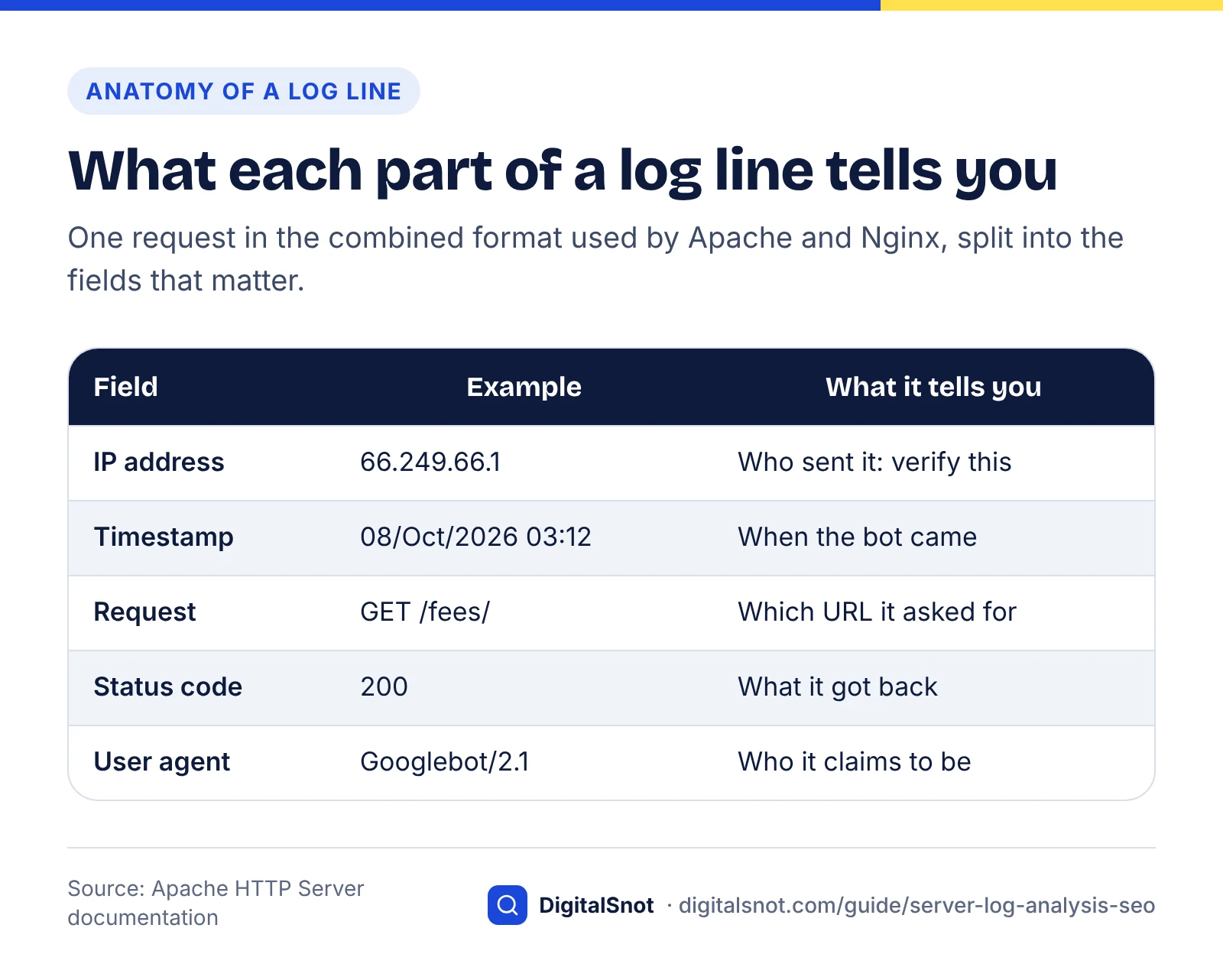
Each line in the combined format holds the visitor's IP address, the timestamp, the request, the status code, the response size, the referrer and the user agent. Once you can read one line, you can filter a million.
Apache's log file documentation defines the combined format as "%h %l %u %t \"%r\" %>s %b \"%{Referer}i\" \"%{User-agent}i\"", which is the Common Log Format plus the referrer and user agent. Nginx predefines the same layout under the name combined and uses it whenever no other format is set, according to its log module documentation: $remote_addr - $remote_user [$time_local] "$request" $status $body_bytes_sent "$http_referer" "$http_user_agent"
Example (a typical Googlebot line, using the IP address from Google's own documentation):
66.249.66.1 - - [08/Oct/2026:03:12:09 +0530] "GET /treatments/root-canal/ HTTP/1.1" 200 18452 "-" "Mozilla/5.0 (compatible; Googlebot/2.1; +http://www.google.com/bot.html)"
Split on spaces, as the command-line tool awk does, and the fields you need have fixed positions:
- Field 1, IP address (
66.249.66.1): who sent the request. This is what you verify. - Field 4, timestamp (
[08/Oct/2026:03:12:09): when, with the time zone in field 5. - Field 7, URL (
/treatments/root-canal/): what was requested, between the method in field 6 and the protocol in field 8. - Field 9, status code (
200): what the bot got back. - Field 10, bytes (
18452): the size of the response. - The last quoted field, user agent: who the visitor claims to be. Here, Googlebot.
The status codes that matter for bots
- 200: the page was served. This is what you want for every page you care about.
- 301 and 308: permanent redirects. Fine when a URL has moved; wasteful when your own links still point at the old address.
- 302 and 307: temporary redirects. Check they are really temporary.
- 304: not modified. The bot already had the latest copy, which saves both sides work.
- 404 and 410: not found or gone. Normal for deleted junk; a problem when you still link to the URL.
- 403: forbidden. Usually a firewall, security plugin or CDN rule refusing the bot.
- 429 and 5xx: rate limited or server error. These hurt crawling.
Google explains the effect in how HTTP status codes and network errors affect Google Search. 5xx and 429 responses make its crawlers slow down temporarily, URLs that persistently return a server error are removed from the index, and network timeouts and DNS errors are treated much like 5xx errors. Other 4xx codes do not change Google's crawl rate.
If your lines look different
Run head -3 all.log and compare with the example. If your host adds fields at the start, such as a virtual host name, every field number in this guide shifts by the same amount; adjust $7 and $9 to match.
Identify search, AI and agent bots
Find bots by the name token in the user-agent field, then group them by job: search, training or user-triggered. The job tells you what a visit means for your visibility.
| Token in the log | Operator | Job | What a visit means for you |
|---|---|---|---|
Googlebot | Search crawling | Google can fetch the page for its index | |
Google-Agent | User-triggered agent | A Google agent acted on a person's request; generally ignores robots.txt | |
bingbot | Microsoft | Search crawling | Bing can fetch the page for its index |
OAI-SearchBot | OpenAI | Search | The page can be surfaced in ChatGPT search |
GPTBot | OpenAI | Training | Content may be used to train OpenAI's models |
ChatGPT-User | OpenAI | User-triggered | A ChatGPT user's question led to your page; robots.txt may not apply |
Claude-SearchBot | Anthropic | Search | Content analysed to improve Claude's search answers |
ClaudeBot | Anthropic | Training | Content may be used for model training |
Claude-User | Anthropic | User-triggered | A Claude user's question led to your page |
PerplexityBot | Perplexity | Search | The page can be surfaced and linked in Perplexity; not used for training |
Perplexity-User | Perplexity | User-triggered | A Perplexity user's question led to your page; generally ignores robots.txt |
The jobs come from each operator's documentation: OpenAI's overview of its crawlers, Anthropic's help article on its crawlers, Perplexity's crawler documentation and Google's page on user-triggered fetchers. Two details matter for logs. OpenAI says sites opted out of OAI-SearchBot won't be shown in ChatGPT search answers, and Anthropic warns that blocking Claude-User may reduce your visibility for user-directed web search.
Count each bot from the command line
These commands run in Terminal on macOS and Linux, and in Windows Subsystem for Linux. First, save every bot line to its own file:
grep -iE "googlebot|bingbot|gptbot|oai-searchbot|chatgpt-user|claudebot|claude-searchbot|claude-user|perplexitybot|perplexity-user|google-agent" all.log > bots.log
Then count lines per bot:
for b in Googlebot bingbot GPTBot OAI-SearchBot ChatGPT-User ClaudeBot Claude-SearchBot Claude-User PerplexityBot Perplexity-User Google-Agent; do echo "$b $(grep -ci "$b" bots.log)"; done
Count lines, not matches. Many bots write their name twice, once as the token and once in their information URL, so a quicker-looking grep -o count doubles some bots and not others. We hit exactly this when testing.
Or use the free analyser
If you prefer not to use a terminal, drop the file into our free AI Bot Log Analyzer. It reads Apache and Nginx logs (plain or .gz) in your browser without uploading them, and shows visits per crawler, the pages each one read, errors and blocks, and daily activity. It identifies bots by user agent, so treat its counts as claims until you have verified the IPs as described next.
Verify bots and spot impostors
Treat every user agent as a claim until the IP address checks out. For Googlebot, run a reverse DNS lookup and then a forward lookup, as Google documents; for AI bots, match the IP against the operator's published list; for Bingbot, use Bing's Verify Bingbot tool.
Verify Googlebot with two DNS lookups
Google's page on verifying requests from its crawlers and fetchers describes this method:
- Reverse lookup the IP. Run
host 66.249.66.1. Google's example returnscrawl-66-249-66-1.googlebot.com. - Check the domain. Googlebot names end in
googlebot.com(some usegeo.googlebot.com). Google's user-triggered fetchers resolve to names undergoogle.comorgoogleusercontent.cominstead. - Forward lookup the name. Run
host crawl-66-249-66-1.googlebot.com. - Compare. It must return the original IP,
66.249.66.1. If it does, the request came from Google.
The forward step matters because whoever controls an IP address can set its reverse name to anything, including a googlebot.com lookalike. On Windows, nslookup does both lookups.
To list the reverse name for every IP claiming to be Googlebot, save the Googlebot lines first with grep "Googlebot" all.log > googlebot.log, then run:
for ip in $(awk '{print $1}' googlebot.log | sort -u); do echo "$ip -> $(host $ip | awk '{print $NF}')"; done
Any IP whose name doesn't end in googlebot.com (or google.com or googleusercontent.com) is not Google. Run the forward lookup on the ones that pass. Google says the manual method is enough for most cases, and recommends matching against its published IP ranges for large-scale checks; those ranges are JSON files, such as user-triggered-agents.json for agents.
Real Googlebot or fake? How to check
Verify AI bots against published IP lists
OpenAI and Perplexity verify differently: by published IP address lists rather than DNS names.
- OpenAI publishes one file per bot:
openai.com/gptbot.json,openai.com/searchbot.jsonandopenai.com/chatgpt-user.json. - Perplexity publishes
perplexity.com/perplexitybot.jsonandperplexity.com/perplexity-user.json, says the ranges are updated regularly and calls those files the source of truth. For firewall rules it suggests matching the user agent and the IP ranges together. - Anthropic names its three bots in its help article on its crawlers, so check that article for its current verification advice before you trust or block an IP. It also warns that blocking Anthropic's IP addresses may not reliably opt you out, because it stops Anthropic reading your robots.txt (checked October 2026).
To check every GPTBot IP in your log in one go, pull the ranges out of the JSON file, list the IPs, then test each one:
curl -s https://openai.com/gptbot.json | grep -oE '[0-9a-fA-F:.]+/[0-9]+' > gptbot-ranges.txt
grep "GPTBot" all.log | awk '{print $1}' | sort -u > gptbot-ips.txt
python3 -c "import ipaddress as i; r=[i.ip_network(l.strip(),strict=False) for l in open('gptbot-ranges.txt')]; [print(ip.strip(), any(i.ip_address(ip.strip()) in n for n in r)) for ip in open('gptbot-ips.txt')]"
Each IP prints True (inside OpenAI's ranges) or False (not OpenAI). Swap the file name and bot token to check OAI-SearchBot, ChatGPT-User or Perplexity's bots. Download the lists fresh each time, because they change.
Verify Bingbot
Bing's Verify Bingbot help page points to a tool that gives a verdict on whether an IP address from your logs that claims to be Bingbot really is one. It is available inside Bing Webmaster Tools and as a public tool. Microsoft also publishes a list of Bingbot IP ranges as a JSON file, bingbot.json, that you can match the crawler's IP against.
Our comparison: how each operator says to verify its bots
Method: on 14 October 2026 we read each operator's crawler documentation, linked above, and recorded the same three facts for each. Repeat the check before you build firewall rules, because these pages change.
| Operator | Tokens to look for | Documented verification | Robots.txt note |
|---|---|---|---|
| Googlebot, Google-Agent | Reverse then forward DNS; or match JSON IP range files | User-triggered fetchers such as Google-Agent generally ignore it | |
| Microsoft | bingbot | Verify Bingbot tool; or match its list of Bingbot IPs | Not covered on the verification page |
| OpenAI | GPTBot, OAI-SearchBot, ChatGPT-User | Match one JSON IP file per bot | Settings are independent; may not apply to ChatGPT-User |
| Anthropic | ClaudeBot, Claude-SearchBot, Claude-User | Check its help article for current advice | Opt out with robots.txt, not IP blocks |
| Perplexity | PerplexityBot, Perplexity-User | Match JSON IP files plus the user agent | Perplexity-User generally ignores it |
What the comparison tells you:
- Search engines and AI companies verify differently. Google gives you a DNS check and Bing a verification tool; OpenAI and Perplexity rely on published IP lists.
- User-triggered visits may bypass robots.txt. Google and Perplexity say their user-triggered fetchers generally ignore it, and OpenAI says it may not apply to ChatGPT-User.
- Lists go stale. Perplexity calls its JSON files the source of truth, so fetch them on a schedule rather than pasting ranges into a firewall once.
Impostors and stealth crawlers
An impostor is a request that uses a bot's name but fails verification. Scrapers and vulnerability scanners borrow Googlebot's name because some sites wave it through. Block failing IPs at your firewall or CDN; a robots.txt rule does nothing, because impostors ignore it. Never block by user agent alone, or you block the real Googlebot too.
Some crawling never announces itself. In 2025 Cloudflare reported tests in which new, unindexed domains disallowed all crawling, yet Perplexity still answered detailed questions about their content. When its declared crawler was blocked, Cloudflare saw requests with a generic Chrome-on-macOS user agent from IPs outside Perplexity's published ranges, rotating across networks: about 3–6 million requests a day, beside 20–25 million from the declared Perplexity-User. In the same tests, ChatGPT-User fetched robots.txt and stopped when disallowed. You cannot spot such traffic by user agent, only by patterns such as bursts of content requests from unexpected networks.
A beginner workflow: five questions to ask your log
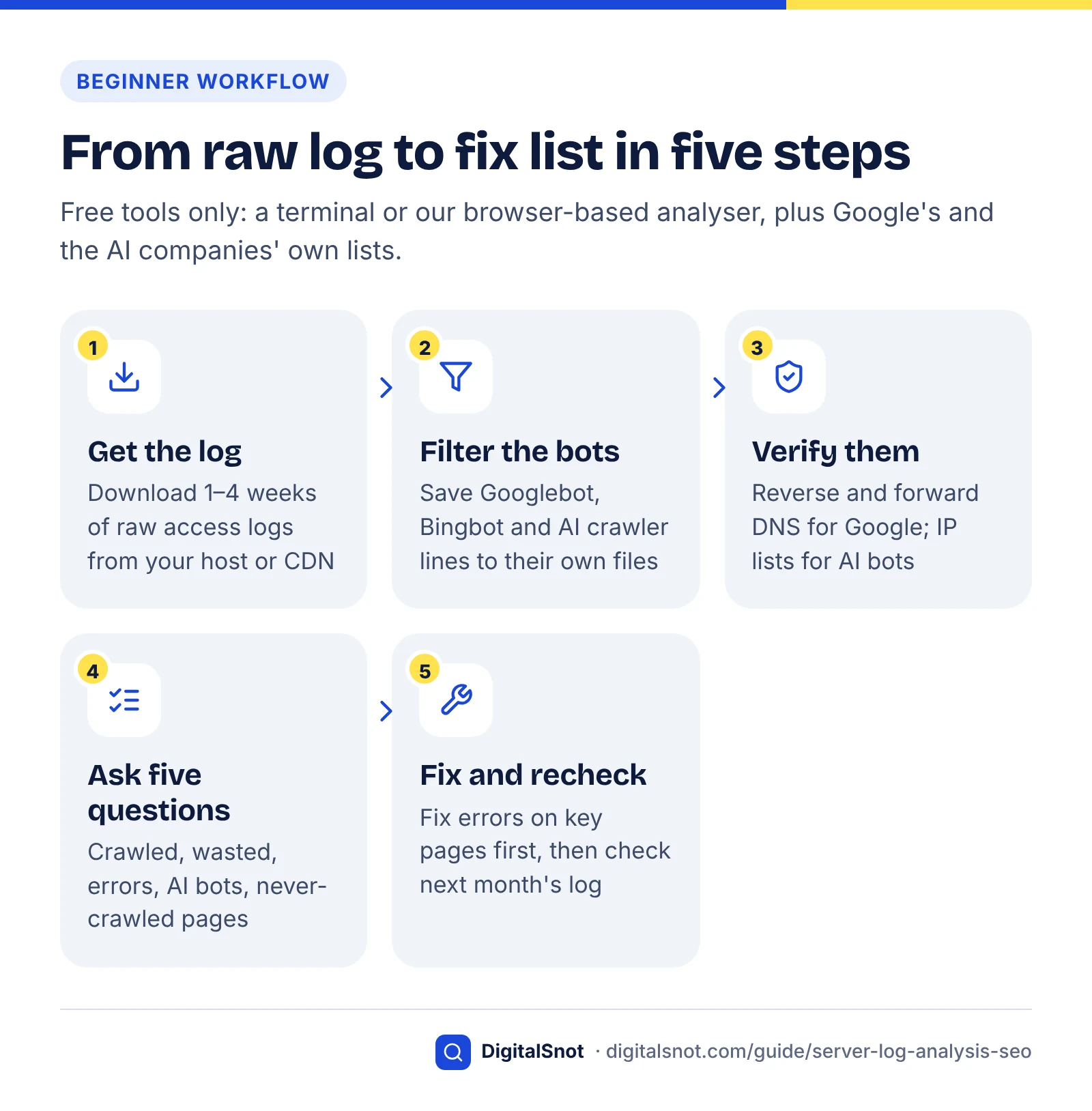
Work through five questions in order: what gets crawled, what is wasted, which errors bots hit, which AI bots visit, and which important pages are never crawled. With verified bot lines in a file, each question takes one or two commands.
Set up once:
- Combine the files:
gzip -dcf access.log* > all.log - Save Googlebot lines:
grep "Googlebot" all.log > googlebot.log - Remove impostors. Put each IP that failed verification on its own line in
fake-ips.txt, then rungrep -vwFf fake-ips.txt googlebot.log > googlebot-verified.log
Question 1: what gets crawled?
List the URLs verified Googlebot requested most, and the status codes it received:
awk '{print $7}' googlebot-verified.log | sort | uniq -c | sort -rn | head -20
awk '{print $9}' googlebot-verified.log | sort | uniq -c | sort -rn
Your homepage, service pages and recent articles should be near the top. If internal search results, tag archives or old URLs crowd the list, crawling is going where you don't need it. Compare the status totals with the Crawl Stats report; they won't match exactly, but a big gap usually means a CDN cache, a missing log file or a different date range.
Find crawl waste and the errors bots hit
Crawl waste is bot requests spent on URLs you don't need crawled: redirects, parameter duplicates and dead pages. Errors are the 4xx and 5xx responses bots receive. Fix errors on important pages first; waste mainly matters on large sites.
Question 2: what is wasted?
Count requests to URLs with parameters, and see which parameters they use:
awk '$7 ~ /\?/' googlebot-verified.log | wc -l
awk '$7 ~ /\?/ {split($7, a, "?"); print a[2]}' googlebot-verified.log | cut -d= -f1 | sort | uniq -c | sort -rn | head
Typical culprits are internal search (s or q), sorting and filtering, pagination and comment replies. The fix is usually to stop linking to them, rather than to block them. If you do disallow a pattern such as internal search in robots.txt, test the rule against a real URL with the free Robots.txt Tester, which shows whether a given crawler may fetch a path and which line decides. Remember that Google still requests noindexed pages before dropping them, which also uses crawl time.
Then find the URLs that redirect most often:
awk '$9 == 301 || $9 == 302 {print $7}' googlebot-verified.log | sort | uniq -c | sort -rn | head
Repeated redirects on the same URLs usually mean your menus, internal links or sitemap still use an old or non-canonical address, such as a missing trailing slash. Update the links to the final URL. For any URL that redirects more than once, run it through the Redirect Checker to see every hop and status code, and collapse chains into one step.
Question 3: which errors do bots hit?
List every 4xx and 5xx response with its URL:
awk '$9 >= 400 {print $9, $7}' googlebot-verified.log | sort | uniq -c | sort -rn | head -20
Sort what you find into three groups:
- 5xx on any page you care about: fix first. Google slows crawling when it meets server errors and removes URLs that keep returning them. Ask your host or developer what fails and when; the timestamps help.
- 403 or 429 for a bot you want: a firewall, security plugin or rate limit is refusing it. Allow the verified IPs.
- 404s: split them into URLs you still link to (fix the link, or redirect to the closest replacement) and junk nobody links to (leave as 404 or 410).
The combined format does not record response times. Crawl Stats shows Google's average response time; if it is climbing, our website speed checks post covers what to test next.
Which AI bots visit, and what they fetch
Count requests and errors for each AI bot, then look at which pages they fetch. Search bots (OAI-SearchBot, Claude-SearchBot, PerplexityBot) reaching your key pages matter for AI answers; training bots tell you about load and policy, not visibility.
Question 4: which AI bots visit?
One loop gives requests and errors per bot:
for b in GPTBot OAI-SearchBot ChatGPT-User ClaudeBot Claude-SearchBot Claude-User PerplexityBot Perplexity-User; do echo "$b: $(grep -c "$b" all.log) requests, $(grep "$b" all.log | awk '$9 >= 400' | wc -l) errors"; done
Then see what one bot fetched, with status codes:
grep "OAI-SearchBot" all.log | awk '{print $9, $7}' | sort | uniq -c | sort -rn | head -20
And check whether AI bots read your discovery files:
grep -iE "gptbot|oai-searchbot|claudebot|perplexitybot" all.log | awk '{print $7}' | grep -E "sitemap|feed|robots.txt" | sort | uniq -c
What AI crawlers do in your server logs
What the patterns mean
Lots of 404s. AI crawlers are often clumsier than Googlebot. In Vercel's December 2024 analysis of its network, ChatGPT's crawler spent 34.82% of its fetches on 404 pages and 14.36% following redirects, and Claude's crawler 34.16% on 404s, against 8.22% and 1.49% for Googlebot. Vercel found that, apart from robots.txt, many of these requests were for outdated files in a /static/ folder, and said the crawlers need better URL selection. The same post counted 569 million GPTBot requests and 370 million from Claude in a month, together about 20% of Googlebot's 4.5 billion. Redirect old URLs that still have value; let true junk return 404.
Sitemap and feed fetches. On Google's Search Off the Record podcast on 1 October 2026, John Mueller said he had seen AI crawlers fetch his sitemap and RSS files in his own logs, Search Engine Journal reported. He did not name the crawlers, and suggested sticking to the generic name sitemap.xml or focusing on RSS feeds for sites that want their content in AI systems. Check that both files load cleanly.
403s, or no AI search bots at all. Something is refusing them, or your robots.txt says no. Run a key page through the free AI Crawler Checker: it shows, crawler by crawler, whether your robots.txt lets ChatGPT search, Perplexity, Claude, Google and Bing fetch the page, and tests for firewalls and bot checks that refuse AI crawlers. Whether you should let each bot in is a business decision; our guide to blocking AI crawlers walks through the options.
A trickle of user-triggered visits. ChatGPT-User, Claude-User and Perplexity-User arrive when a person asks an assistant about something your page covers. Low numbers are normal and are a sign of real-world interest.
Remember that a fetch is not a citation. If AI search bots reach your pages but you never appear in answers, the work moves to content and reputation, covered in our guide to getting cited in AI search.
Find the pages bots never crawl
Compare the URLs in your sitemap with the URLs verified Googlebot fetched; whatever is left over has not been crawled in your log window. Those pages are new, poorly linked, missing from your sitemap, or seen as low priority.
Question 5: which pages are never crawled?
Turn the sitemap into a list of paths, list the paths Googlebot fetched successfully, and compare the two:
grep -oE "<loc>[^<]+" sitemap.xml | sed -E 's#<loc>https?://[^/]+##' | sort -u > sitemap-paths.txt
awk '$9 == 200 || $9 == 304 {print $7}' googlebot-verified.log | sort -u > crawled-paths.txt
comm -23 sitemap-paths.txt crawled-paths.txt
The last command prints sitemap URLs that verified Googlebot did not fetch. If your sitemap is an index of several sitemaps, run the first command on each child file. Use the longest log window you have, because a page crawled every three weeks will look "uncrawled" in a seven-day log. Repeat the same comparison with OAI-SearchBot or PerplexityBot lines to see which pages AI search crawlers never reach.
For pages that matter, the usual fix is internal links from pages that are crawled often, such as your homepage, service hubs and popular articles. Our on-page SEO checklist covers internal linking. Then inspect one or two of the URLs in Search Console's URL Inspection tool to see when Google last crawled them and whether anything blocks them.
Worked example: one week of logs for a small clinic
This is a hypothetical example. It shows how the five questions turn a raw log into a fix list for a typical small business site.
Example: a dental clinic in Pune runs a WordPress site with 118 URLs in its sitemap. The owner downloads one week of raw logs from cPanel: 33,860 lines. Method: we generated a synthetic log with these characteristics and ran every command in this guide on it; the figures below are that output, not data from a real site. The impostor IP is 203.0.113.45, an address reserved for documentation.
| Question | What the log showed | Action |
|---|---|---|
| Verification | 2,140 lines claimed Googlebot; 144 of them (6.7%) came from one IP whose reverse DNS did not end in googlebot.com, requesting /wp-login.php and /xmlrpc.php | Block the IP at the firewall; exclude it from analysis |
| 1. What gets crawled | 1,996 verified Googlebot requests; 1,402 (70.2%) returned 200 and 90 (4.5%) returned 304 | Healthy base; look at the rest |
| 2. What is wasted | 396 requests (19.8%) went to parameter URLs, led by internal search (?s=); 260 (13.0%) hit redirects, all internal links missing a trailing slash | Stop linking to search results; fix the menu and footer links |
| 3. Errors | 30 server errors (1.5%), every one on /book-appointment/; 214 404s (10.7%) on old offer pages and draft URLs | Fix the booking page today; leave unlinked 404s alone |
| 4. AI bots | GPTBot 420 requests (21.9% errors), ClaudeBot 380 (22.6% errors), OAI-SearchBot 160, Claude-SearchBot 40, ChatGPT-User 35; PerplexityBot 75, every one a 403 | A security plugin blocks PerplexityBot; decide whether to allow it |
| 5. Never crawled | 23 of 118 sitemap URLs (19.5%), including six treatment pages such as braces and Invisalign | Link every treatment page from the homepage and treatments hub |
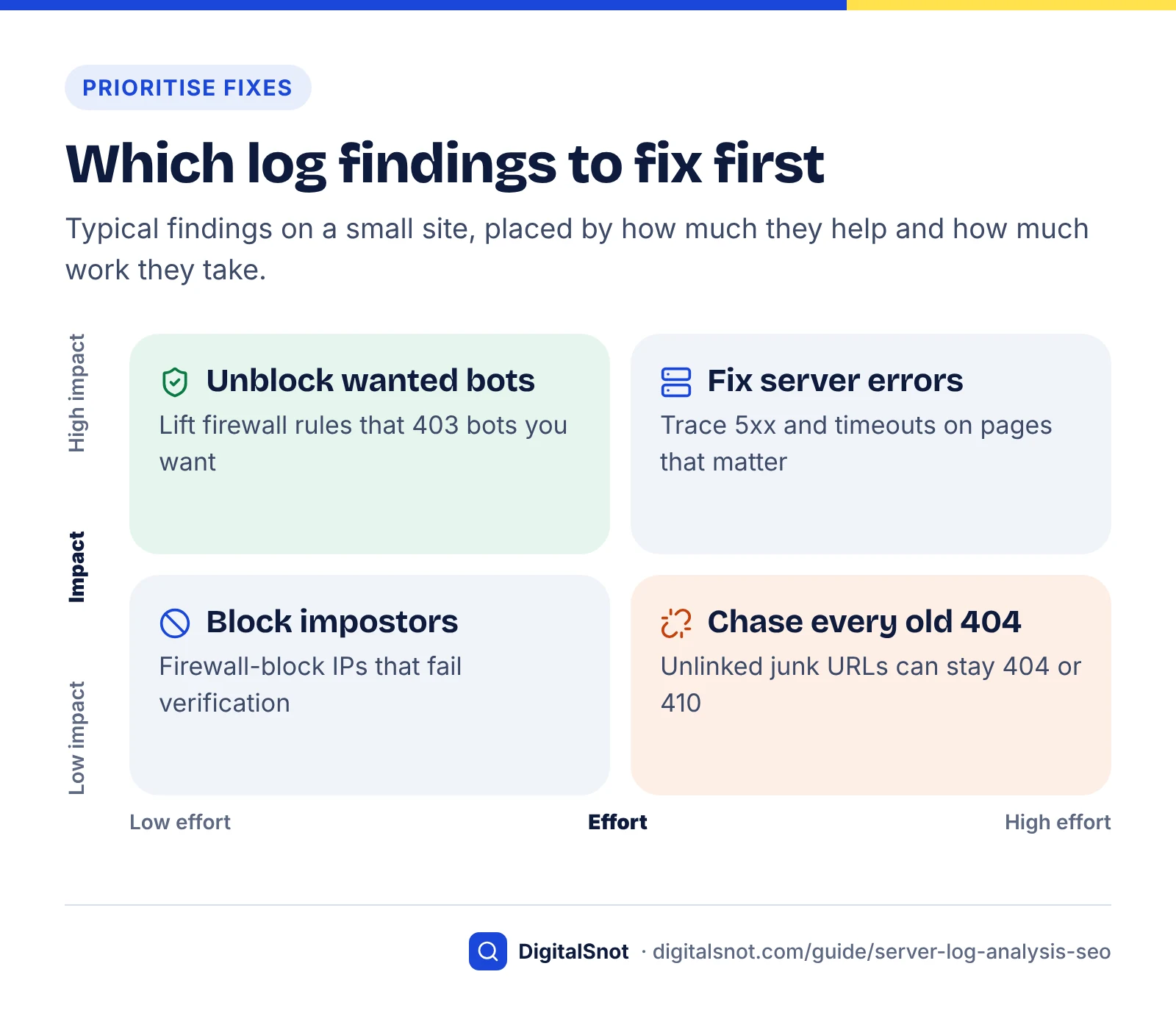
The order of work follows the impact. The failing booking page costs patients as well as crawls, so it comes first; six treatment pages never being fetched comes next, because those pages earn appointments. The 19.8% of crawling spent on parameter URLs looks large, but on a 118-URL site it is tidy-up work, not an emergency. The AI findings need a decision rather than a repair: if the clinic wants to appear in Perplexity's answers, it should allow PerplexityBot's verified IPs and re-check the log a week later. AI bots also fetched /sitemap.xml 23 times and /feed/ 21 times, so keeping both accurate pays off.
Turn findings into fixes: a decision table
Match each finding to its usual cause and fix, and avoid the tempting wrong move in the last column. Work from top to bottom: errors on important pages first, tidy-up last.
| If your log shows… | It usually means… | Do this | Don't |
|---|---|---|---|
| 5xx or timeouts on important pages | Server, plugin or database failures | Fix with your host or developer; recheck within a week | Wait for Google to retry on its own |
| 403 or 429 for a verified bot you want | Firewall, CDN rule or security plugin | Allow its verified IPs; test with the AI Crawler Checker | Allow by user agent alone |
| Bot-named requests from IPs that fail verification | Impostors or scanners | Block those IPs at the firewall or CDN | Add robots.txt rules; impostors ignore them |
| 404s on URLs you still link to | Broken internal links or sitemap entries | Fix the links, or 301 to the closest replacement | Redirect every 404 to the homepage |
| 404s on old junk nobody links to | Normal history | Leave as 404 or 410 | Block them in robots.txt |
| The same URLs redirecting again and again | Links point at old or non-canonical URLs | Update links and sitemap to the final URL | Leave chains of two or more hops |
| A large share of parameter URLs | Internal search, filters or sorting being linked | Stop linking them; test any disallow rule first | Panic on a small site |
| Important sitemap URLs never crawled | Weak internal links or a stale sitemap | Link them from often-crawled pages; check the sitemap | Resubmit the sitemap and hope |
| No AI search bots at all | Blocked in robots.txt or at the CDN | Check robots.txt and CDN bot settings; decide a policy | Assume AI bots haven't found you |
How often to check
For most small sites, run the five questions monthly and keep a one-line summary of each: verified Googlebot requests, share of errors, AI search bots seen, uncrawled key pages. Run an extra check after a redesign, a migration, a robots.txt change or a change to your CDN's bot settings, because those are the moments bots get blocked by accident. If you send or receive a monthly report, our post on what to look for in a monthly SEO report explains where crawl health fits.
Mistakes to avoid
- Analysing CDN IPs. Restore the visitor IP first, or every verification fails.
- Reading too short a window. One day of logs proves little; use one to four weeks.
- Treating crawl volume as a score. More Googlebot requests is not better in itself; requests to the right pages that return 200 are.
Log checks sit alongside the wider checks in our technical SEO audit checklist. If you would rather have someone set up log exports, bot verification and monitoring for you, that is part of our technical SEO service, and you can get in touch to talk it through.
Free tools in this guide
- AI Bot Log Analyzer See how AI crawlers crawl your site from your server access log.
- Robots.txt Tester Test a URL against robots.txt and see which rule blocks or allows it.
- Redirect Checker Trace 301/302 redirects, chains and loops to the final URL.
- AI Crawler Checker See which AI crawlers can read your page, and what they see without JavaScript.
By the numbers
- requests made by OpenAI's GPTBot across Vercel's network in one month, against 370M for Anthropic's Claude (Vercel, December 2024)
- 569M
- Source: Vercel
- of ChatGPT crawler fetches went to 404 pages in Vercel's 2024 data, against 8.22% for Googlebot
- 34.82%
- Source: Vercel
- unique pages: the rough site size Google's crawl budget guide is written for (or 10,000+ pages changing daily)
- 1M+
- Source: Google for Developers
- daily requests Cloudflare attributed to an undeclared Perplexity crawler in its 2025 tests, beside 20–25M from declared Perplexity-User
- 3–6M
- Source: Cloudflare Blog
Frequently asked questions
What is log file analysis in SEO?
Log file analysis is reading your web server's access log to see which bots requested which URLs and what response each received. It shows what Googlebot, Bingbot and AI crawlers such as GPTBot and OAI-SearchBot actually fetched, where they hit errors or redirects, and which pages they never reach. Unlike Search Console, it covers every bot, and unlike analytics, it records crawler requests rather than human sessions.
How do I get my server logs on shared hosting?
On cPanel hosting, open the Metrics section and choose Raw Access, then download the log for your domain as a compressed .gz file. You can also switch on monthly archiving there if you want history, though archives use disk space. On other control panels, look for a Logs page or ask support whether you can download raw access logs in the combined format and how many days they keep.
How can I tell if Googlebot is real?
Run a reverse DNS lookup on the IP address, for example host 66.249.66.1, and check the name ends in googlebot.com. Then run a forward lookup on that name and confirm it returns the same IP. Google documents this two-step check and also publishes its crawler IP ranges as JSON files for large-scale checks. A request that fails either step is not from Google, whatever its user agent says.
How do I verify GPTBot, ClaudeBot or PerplexityBot?
Match the IP address against the operator's published list. OpenAI publishes a JSON file per bot (gptbot.json, searchbot.json and chatgpt-user.json), Perplexity publishes perplexitybot.json and perplexity-user.json, and Anthropic lists its crawler IPs in its help centre. Download the lists fresh each time, because they change. An IP outside the list is not that operator's bot, even if the user agent claims it is.
Why don't my logs match the Search Console Crawl Stats report?
The two count different things. Crawl Stats covers Google's crawlers only and shows example URLs, while your log covers every request that reached your server. Gaps usually come from CDN caching, which answers some requests before they reach your server, from missing or rotated log files, from different date ranges, or from impostors that use Googlebot's name. Verify the IPs before comparing totals.
Do small websites need log file analysis?
Not for crawl budget, which Google says mainly concerns sites with around a million or more pages, or 10,000 or more pages changing daily. Small sites still benefit, because logs reveal server errors on key pages, firewalls blocking bots you want, impostors, and important pages no bot ever reaches. A monthly check of one to four weeks of logs is enough for most small businesses.
Why do AI crawlers hit so many 404 pages?
They often request outdated URLs and assets. Vercel's December 2024 data showed ChatGPT's crawler spent 34.82% of its fetches on 404 pages and Claude's 34.16%, against 8.22% for Googlebot, and Vercel said the exact cause was unclear. Redirect old URLs that still have value to their replacements, fix internal links that point to dead pages, and let true junk return 404 or 410.
Should I block bots that pretend to be Googlebot?
Yes, block IP addresses that claim to be Googlebot but fail the reverse and forward DNS check, using your firewall or CDN. Don't rely on robots.txt, because impostors ignore it, and never block by user agent alone, because that would also block the real Googlebot. Recheck occasionally, since a verification can fail for temporary DNS reasons.
Why can't I see any AI bots in my server logs?
Your robots.txt, firewall, security plugin or CDN may be refusing them, a CDN may be answering their requests from its cache, or your log covers too short a period. Check robots.txt and firewall rules with a crawler checker, look for 403 responses, and if you use Cloudflare, check its bot settings and consider exporting its own request logs with Logpush.
How much log data do I need?
One to four weeks is enough for most small and medium sites. A single day can mislead, because Google may crawl some pages only every few weeks, so they would look uncrawled. Larger sites benefit from a full month or more. Keep the files private, since they contain visitors' IP addresses, and delete them once you have your summary.
Sources
Every figure and claim in this guide comes from the sources below. We checked each one when writing and link to the original so you can read it yourself. Credit belongs to the authors and publishers listed. How we write and check our articles.
-
1
Crawl Stats report
Search Console Help · What Crawl Stats shows: totals, response, file type, purpose, Googlebot type, host status, example URLs.
-
2
Crawl Budget Management
Google for Developers · Site sizes the guide targets (1M+ or 10k+ changing daily); noindexed pages still requested.
-
3
Restoring original visitor IPs
Cloudflare Docs · CF-Connecting-IP with Apache mod_remoteip (%h to %a) and the Nginx realip module.
-
4
Logpush pricing
Cloudflare Docs · Self-service, usage-based Logpush pricing on Free, Pro and Business plans; Enterprise through the account team.
-
5
Log Files - Apache HTTP Server Version 2.4
Apache Software Foundation · Combined Log Format definition and the meaning of each field.
-
6
Module ngx_http_log_module
nginx.org · Predefined combined log format, used when no other format is set.
-
7
How HTTP status codes, and network and DNS errors affect Google Search
Google Search Central · 5xx and 429 slow crawling; persistent server errors drop URLs; other 4xx do not change crawl rate.
-
8
Overview of OpenAI Crawlers
OpenAI · GPTBot, OAI-SearchBot and ChatGPT-User roles and their JSON IP range files.
-
9
Does Anthropic crawl data from the web, and how can site owners block the crawler?
Anthropic (Claude Help Center) · ClaudeBot, Claude-SearchBot, Claude-User and their jobs; IP blocks not a reliable opt-out.
-
10
Perplexity Crawlers
Perplexity · PerplexityBot and Perplexity-User roles; JSON IP lists as the source of truth.
-
11
Google User-Triggered Fetchers
Google for Developers · User-triggered fetchers, including Google-Agent, generally ignore robots.txt; agent IP range file.
-
12
Verify Requests from Google Crawlers and Fetchers
Google for Developers · Reverse and forward DNS check with the host command; domains; published IP ranges.
-
13
Verify Bingbot
Bing Webmaster Tools · Verify Bingbot tool, in Bing Webmaster Tools and as a public tool.
-
14
Microsoft list of Bingbot IP addresses released
Search Engine Land · Microsoft publishes Bingbot IP ranges as a JSON file (bingbot.json) and keeps it up to date.
-
15
Perplexity is using stealth, undeclared crawlers to evade website no-crawl directives
Cloudflare Blog · 2025 tests: undeclared crawler with generic user agent and IPs outside published ranges.
-
16
The rise of the AI crawler
Vercel · December 2024 crawler volumes and 404 and redirect shares for ChatGPT, Claude and Googlebot.
-
17
Google's Mueller Says AI Crawlers Access Sitemaps & RSS In His Logs
Search Engine Journal · Mueller, 1 October 2026 podcast: AI crawlers fetch his sitemap and RSS files.