llms.txt: what it is and whether your website needs one
What the llms.txt proposal is, what Google says about it, why robots.txt is what controls AI crawlers, and a low-cost way to add an llms.txt file if you want one.

On this page (9 sections)
If you have read about AI search lately, you have probably seen llms.txt described as a file every website now needs. It is not. It is a short, optional file that some sites add and most do not. This post explains what llms.txt is and is not, what Google says about it, what really controls whether AI crawlers can read your site, and a low-cost way to add one if you decide it is worth it, using a made-up dental clinic in Pune.
What llms.txt is
llms.txt is a proposal that Jeremy Howard of Answer.AI published on 3 September 2024, with the format set out at llmstxt.org. The idea is a plain Markdown file at the root of a website, at /llms.txt, that gives language models a short guide to the site: what it is, and which pages hold the useful information.
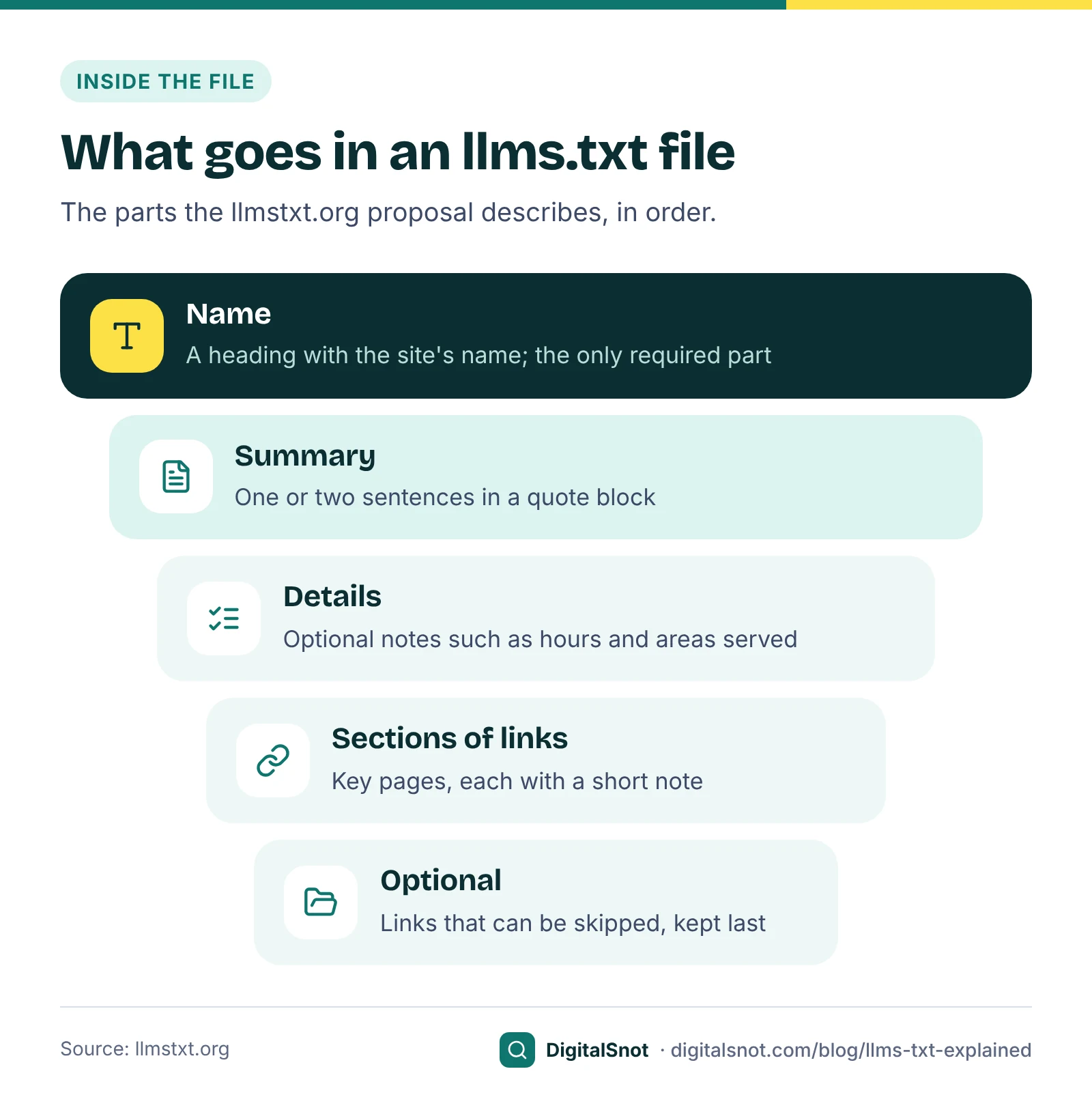
The proposal describes the file in this order:
- A heading with the name of the site or project. This is the only part the proposal requires.
- A short summary in a quote block.
- Optional paragraphs or lists with more detail, without headings.
- Sections under smaller headings, each listing links, with an optional note after a colon.
- A section named Optional, for links that can be skipped when a shorter version is needed.
The proposal chose Markdown rather than a format such as XML because it expects many of these files to be read by language models and agents. It also suggests offering Markdown copies of individual pages, which is a separate and much larger job.
What llms.txt is not
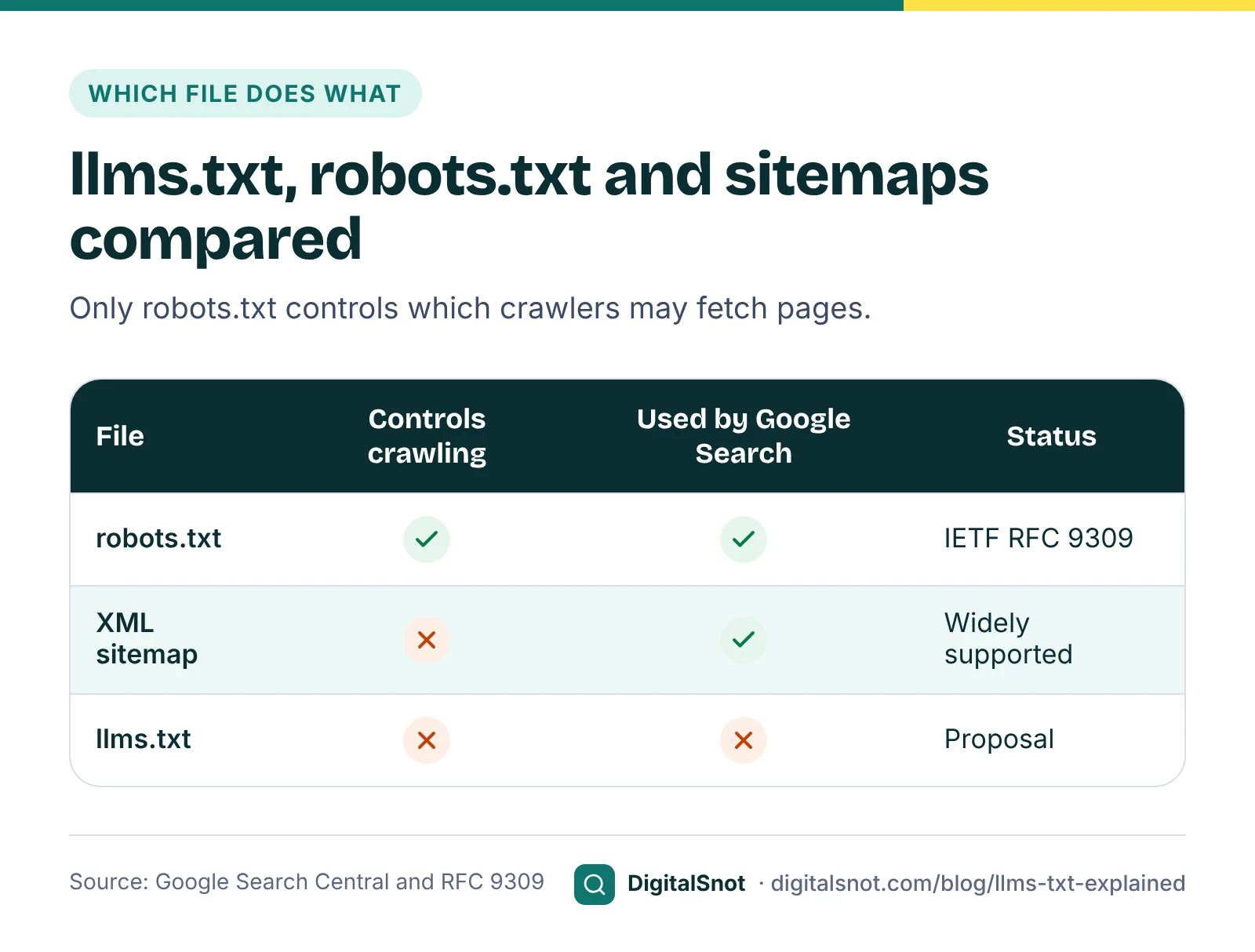
- Not a web standard. The rules for robots.txt are published by the IETF as RFC 9309. llms.txt is a proposal on its own website.
- Not an access control. It does not allow or block any crawler. That is what robots.txt does.
- Not a sitemap. An XML sitemap lists your pages for search engines; llms.txt is a short written guide to the pages that matter most.
- Not something Google Search uses. Google has said so in its own documentation, as the next section shows.
What Google says about llms.txt
Google's guide to optimising your website for generative AI features in Google Search says you do not need to create machine-readable files, AI text files, special markup or Markdown to appear in Google Search, and that Google Search does not use llms.txt. Keeping one neither helps nor harms your visibility in Search, and Google says it is fine to keep one for other services that use it.
Google's page on AI features and your website sets out what does matter for AI Overviews and AI Mode. There are no additional technical requirements: a page must be indexed and eligible to be shown in Google Search with a snippet to appear as a supporting link. The same page lists the controls if you want to limit what Google shows from your pages, namely nosnippet, data-nosnippet, max-snippet and noindex.
Elsewhere at Google, Chrome's Lighthouse has an experimental Agentic Browsing category that checks for an llms.txt file, among other signs that a page is ready for AI agents. It is a diagnostic for agents, not a Google Search check; our guide to making your website ready for AI agents covers what else it looks at.
And ChatGPT, Perplexity or other AI tools? The crawler documentation we checked from OpenAI and Google tells site owners to control access with robots.txt. We make no claim that any AI search engine reads llms.txt, and neither does our generator.
What actually controls AI crawlers: robots.txt
Whether an AI company's crawler may read your pages is decided by robots.txt, the file at yoursite.com/robots.txt. The names that matter most to a small business:
- OAI-SearchBot and GPTBot. OpenAI's crawler overview says OAI-SearchBot is used for ChatGPT search, and GPTBot for content that may be used to train its models. The two settings are independent, so you can allow OAI-SearchBot to appear in ChatGPT search and block GPTBot. OpenAI says changes can take about 24 hours to reach its search results.
- Google-Extended. This is a token in robots.txt, not a separate crawler. Google's common crawlers page says it controls whether content Google crawls is used to train future Gemini models and to ground answers, and that it does not affect a site's inclusion in Google Search and is not a ranking signal. Blocking it does not take you out of AI Overviews, which are part of Google Search.
To leave AI Overviews and AI Mode while staying in ordinary results, use the page controls above, or Search Console's site-wide Search generative AI control under Settings. Each has a cost in visibility, so read our guide to blocking AI crawlers without losing AI search before you change anything.
Two cautions. RFC 9309 makes clear that robots.txt rules are not a form of access authorisation: reputable crawlers follow them, but they do not protect private content. And OpenAI says robots.txt rules may not apply to ChatGPT-User, which fetches a page only when a person asks ChatGPT to open it.
Our AI Crawler Checker shows where you stand. Enter a page and it reads the site's robots.txt and shows, crawler by crawler, whether ChatGPT search, Perplexity, Claude, Google, Bing and AI training crawlers may fetch it and which rule decides. It also tests for a page-level noindex, firewalls that refuse AI crawlers, and what a crawler that does not run JavaScript sees in the raw HTML.
A low-cost way to add one: Smile Studio Dental
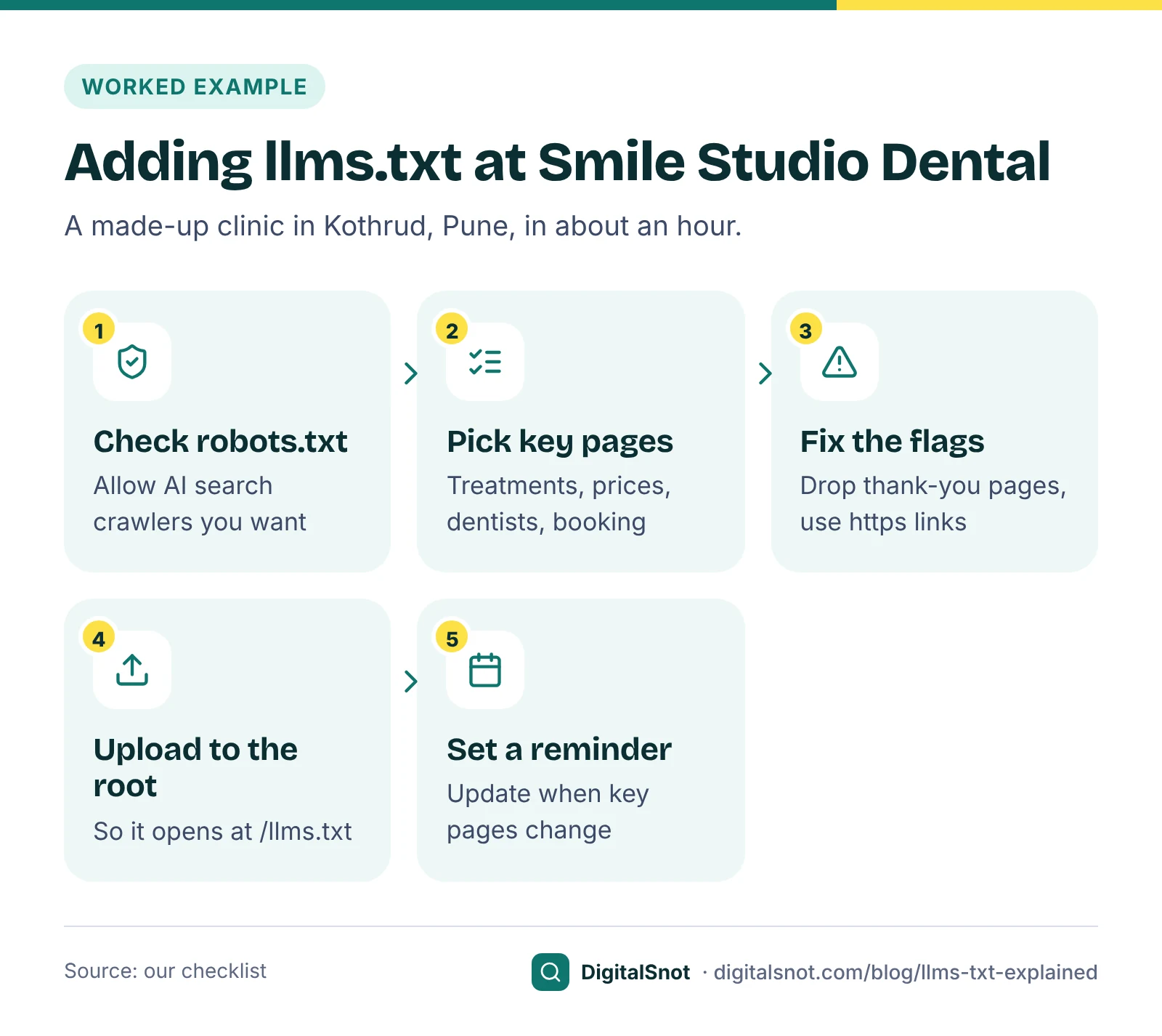
Smile Studio Dental, a made-up clinic in Kothrud, Pune, decided an llms.txt was worth an hour of its receptionist's time, as a tidy summary for any tool that looks for it. This is how it went:
- Check the basics first. The AI Crawler Checker showed that a plug-in had added rules blocking both GPTBot and OAI-SearchBot. The clinic wants to appear in ChatGPT search, so in our Robots.txt Generator it chose Allow for the AI search crawlers and Block for the training crawlers, added its sitemap, and uploaded the new robots.txt. The generator explains every line and checks the file against Google's robots.txt rules and RFC 9309.
- List the pages that explain the clinic. In our llms.txt Generator, she typed the clinic's name, website and a two-sentence summary, added clinic hours and the areas it serves as details, then pasted the sitemap and ticked the treatment pages, prices, the dentists' page and the booking page, each with a short note.
- Fix what the checks flag. The generator flagged a thank-you page and a page of blog listings, which are usually left out, and a privacy policy link that still used http://. She removed the first two, fixed the link, and moved the privacy policy and an older blog post into the Optional section, last in the file.
- Upload it to the root. She downloaded llms.txt and uploaded it with cPanel's File Manager into the folder that holds the home page, so it opens at the site's address followed by /llms.txt.
- Set a reminder. Our suggestion: check the file whenever you add, rename or remove a key page, for example each time you update your sitemap.
The generator runs in your browser, and nothing you type is uploaded. It does not open your website or check whether each page works, so open a few of the links yourself after you upload.
Is it worth your time?
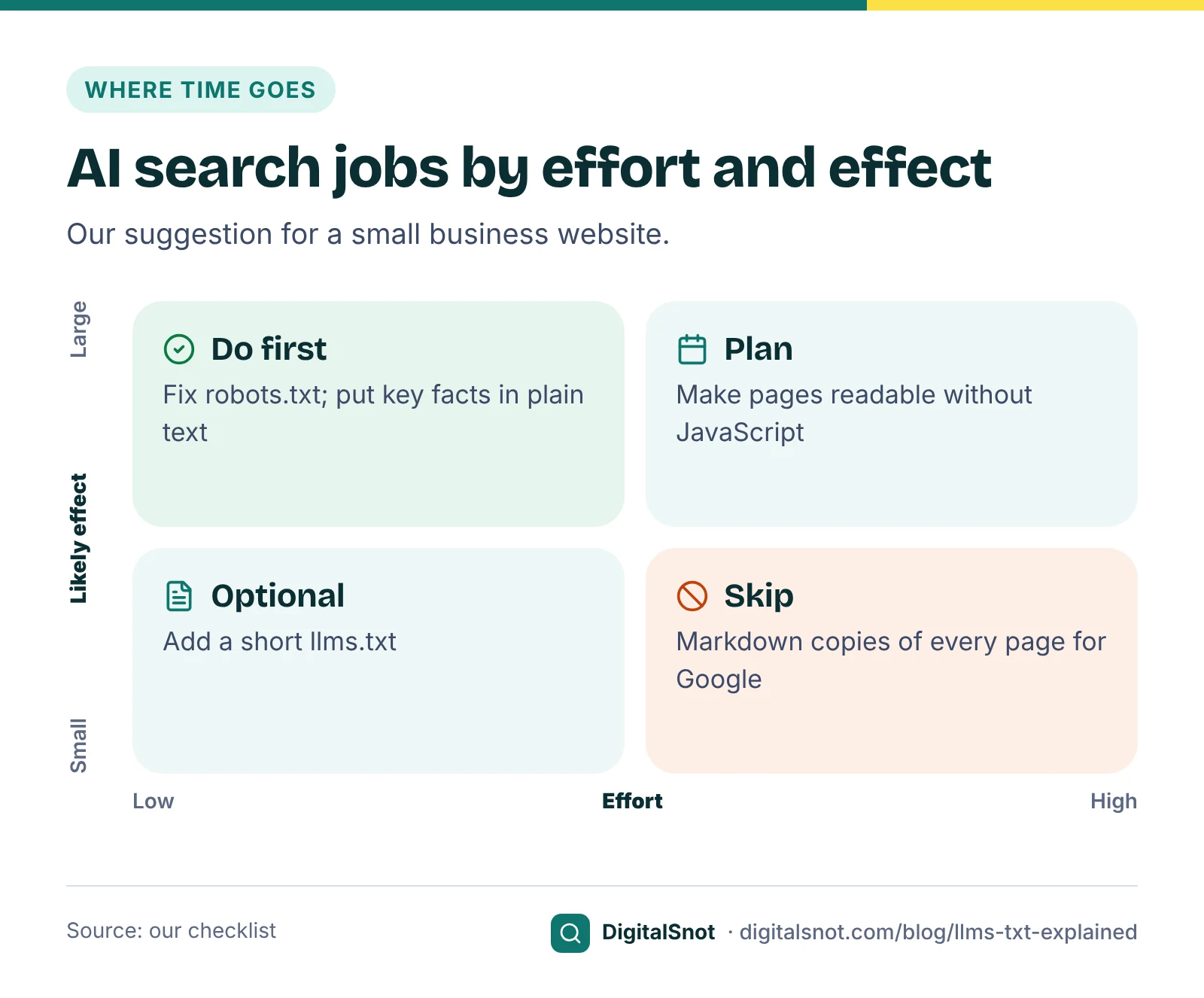
For most small businesses, llms.txt comes after the things that decide whether AI tools can read and trust your site at all. Our suggestion for where an hour goes first:
- Pages crawlers can read. Your services, prices, areas and contact details in plain HTML text, not only in images or added by JavaScript.
- A correct robots.txt. AI search crawlers allowed, and training crawlers allowed or blocked as you choose.
- Consistent facts. The same name, address, phone number and hours on your site and your listings. Our post on fixing wrong business facts in ChatGPT shows how to find and correct them.
Once those are right, an llms.txt is a cheap extra. It may help tools and agents that look for it, it costs nothing to host, and Google says it does no harm in Search. Just do not expect it to change your rankings or your AI visibility by itself.
Mistakes to avoid
- Treating llms.txt as a way to block AI. It blocks nothing. Use robots.txt.
- Listing every page. A long dump of addresses is a sitemap, not a guide. Keep to the pages that explain your business.
- Putting facts in it that the site does not show. Prices or claims that appear only in llms.txt can disagree with your pages. Keep the file a summary of what is already published.
- Forgetting it. A file full of broken links after a redesign is worse than no file.
- Paying for it. It is a short text file. You can write it yourself in under an hour.
Your next step
Run your home page through the AI Crawler Checker first. If the AI search crawlers you care about are allowed and your key facts are in plain text, make an llms.txt with the generator if you want one, and move on. If you want a full check of how AI search sees your business, our AI search optimisation service covers it, or start with a free SEO audit.
Free tools in this article
- AI Crawler Checker See which AI crawlers can read your page, and what they see without JavaScript.
- Robots.txt Generator Build a robots.txt for your site type, with AI crawler choices and a line-by-line explanation.
- llms.txt Generator Build an llms.txt file from your key pages, in the format the llmstxt.org proposal describes.
Frequently asked questions
What is llms.txt?
A proposal, published in September 2024 by Jeremy Howard of Answer.AI and set out at llmstxt.org, for a Markdown file at the root of a website. It gives the site's name, a short summary and links to key pages with notes, as a guide for language models. It is not a web standard.
Does Google use llms.txt?
Google's guide to its generative AI features says Google Search does not use llms.txt and that you do not need AI text files or Markdown to appear in Google Search. Keeping one neither helps nor harms your visibility there, and Google says it is fine to keep one for other services.
Does llms.txt block AI crawlers?
No. llms.txt does not allow or block anything. To control AI crawlers, use robots.txt: for example, OAI-SearchBot for ChatGPT search, GPTBot for OpenAI training and Google-Extended for Gemini training and grounding.
Will an llms.txt get my business into ChatGPT answers?
We make no claim that it will. OpenAI's crawler documentation tells site owners to use robots.txt to allow OAI-SearchBot if they want to appear in ChatGPT search. Pages crawlers can read and consistent business facts matter far more than this file.
Where do I put an llms.txt file?
At the root of your site, so it opens at your domain followed by /llms.txt, as the proposal describes. On most hosting you can upload it with cPanel's File Manager or FTP into the folder that holds your home page.
Is llms.txt the same as robots.txt or a sitemap?
No. robots.txt tells crawlers which pages they may fetch, and an XML sitemap lists your pages for search engines. llms.txt is a short written guide to your most useful pages, and it does not control crawling or indexing.
Sources
Every figure and claim in this article comes from the sources below. We checked each one when writing and link to the original so you can read it yourself. Credit belongs to the authors and publishers listed. How we write and check our articles.
-
1
/llms.txt: a proposal to provide information to help LLMs use websites
Answer.AI · The original proposal by Jeremy Howard, 3 September 2024
-
2
The /llms.txt file
llmstxt.org · The file format: a required heading, summary, details, link sections and an Optional section
-
3
Optimizing your website for generative AI features on Google Search
Google Search Central · No AI text files or Markdown needed; Google Search does not use llms.txt; fine to keep for other services
-
4
AI features and your website
Google Search Central · No additional technical requirements; indexed and snippet-eligible pages; nosnippet, data-nosnippet, max-snippet and noindex controls
-
5
Overview of OpenAI Crawlers
OpenAI · OAI-SearchBot and GPTBot are independent; about 24 hours for changes; robots.txt may not apply to ChatGPT-User
-
6
Google's common crawlers
Google for Developers · Google-Extended controls Gemini training and grounding and does not affect Search inclusion or ranking
-
7
Search generative AI control
Search Console Help · The site-wide setting for AI Overviews and AI Mode in Search Console
-
8
RFC 9309: Robots Exclusion Protocol
IETF · The robots.txt standard; its rules are not a form of access authorisation
-
9
Lighthouse agentic browsing scoring
Chrome for Developers · Experimental Agentic Browsing category, which includes an llms.txt check