Guide · AI search
How to track AI referral traffic in GA4 (ChatGPT, Gemini and more)
Set up GA4 to show visits and leads from ChatGPT, Gemini, Perplexity, Copilot and Claude with a tested regex, and learn which AI clicks GA4 cannot see.
On this page (10 sections)
- 1What GA4 can and cannot see from AI assistants
- 2The AI Assistant default channel: what it covers and misses
- 3Build a custom channel group with a safe regex
- 4Landing pages, conversions and engagement from AI visitors
- 5Why AI Overviews and AI Mode clicks show as organic
- 6Estimating the AI traffic you cannot see
- 7Agentic browsers and bots: keeping them out of your numbers
- 8Which setup do you need? A decision table
- 9A monthly AI traffic report
- 10Sources
AI referral traffic from ChatGPT, Gemini, Copilot and Claude now has a home of its own in Google Analytics 4. Since 13 May 2026, GA4's default channel group includes an AI Assistant channel, so many chatbot visits no longer hide in Referral. The channel only sees visits that arrive with a recognisable referrer, though, and some of the AI clicks that matter most, from Google's own AI Overviews and AI Mode, are counted as Organic Search by design.
This guide shows what GA4 records from each AI surface, how to catch the assistants Google's channel may miss with a tested regex, and how to estimate the AI visits GA4 cannot attribute at all. Facts link to Google's, OpenAI's and Microsoft's own documentation, checked in October 2026.
Who this is for: small-business owners, in-house marketers and analysts who use GA4 and want a straight answer on how many visits and leads AI assistants send. What you will be able to do:
- Say which AI visits GA4 can attribute, and which end up in Organic Search or Direct.
- Build an AI channel with a regex we tested against 30 source values.
- Find the pages AI visitors land on and whether they convert.
- Estimate the AI traffic you cannot see, as a range rather than a guess.
- Run a monthly AI traffic report that survives GA4's changes.
What GA4 can and cannot see from AI assistants
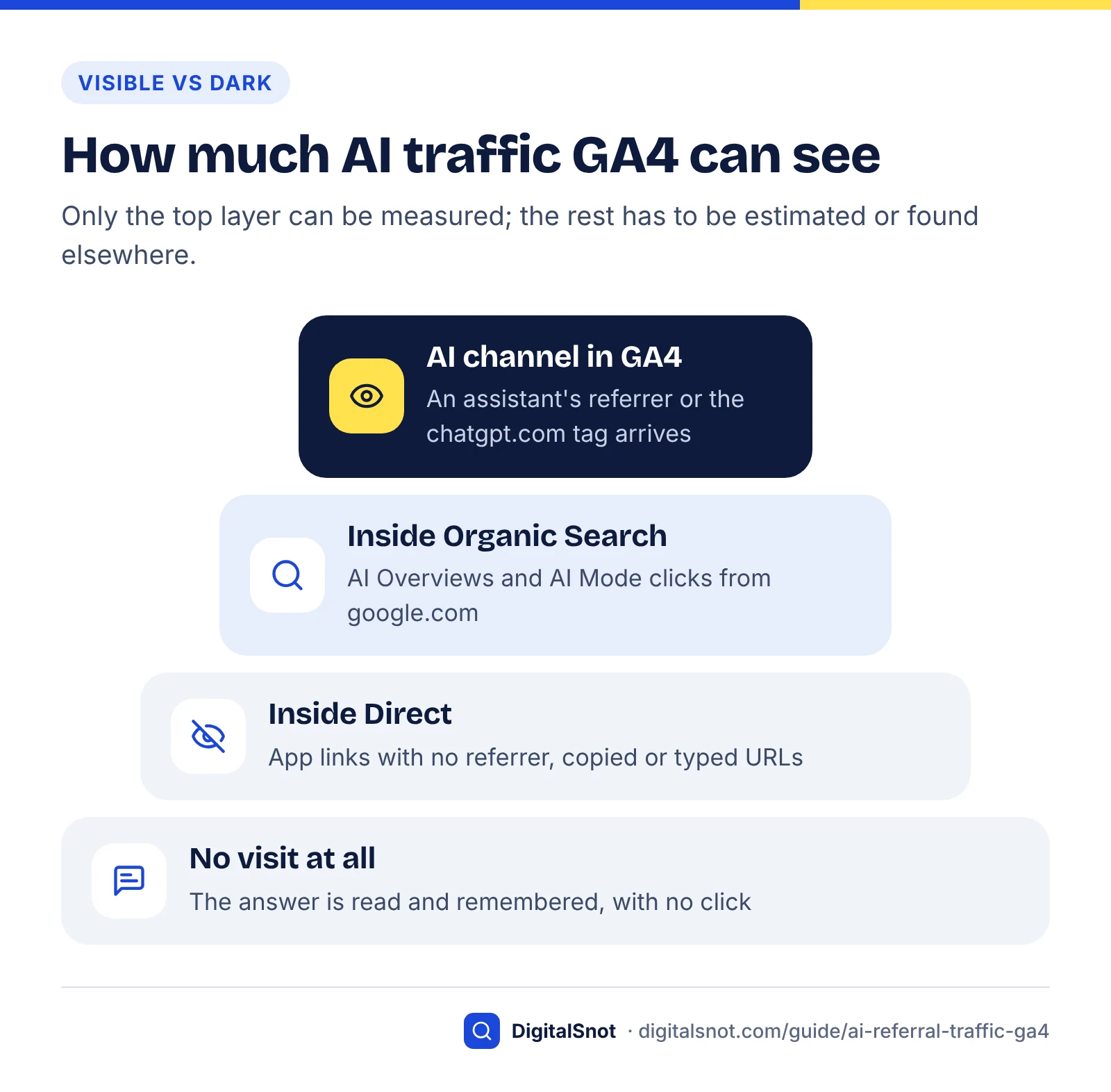
GA4 can attribute an AI visit only when the click arrives with a recognisable referrer or a campaign tag. Visits from chat assistants on the web usually do. Clicks from Google's AI Overviews and AI Mode arrive from google.com and count as Organic Search, and links opened without a referrer, or copied and pasted, count as Direct.
GA4 decides where a session came from using two kinds of evidence. If the landing URL carries campaign (UTM) parameters, those set the source and medium. If it does not, GA4 relies on the referrer: the address of the previous page, which the browser sends with the click.
Browsers send only part of that address. The MDN documentation on Referrer-Policy explains that the default policy, strict-origin-when-cross-origin, sends only the origin to another site. Your analytics receives chatgpt.com, never the address of the conversation, so GA4 can tell you a visitor came from ChatGPT but not what they asked. If a site sets a stricter policy, no referrer arrives and the visit counts as Direct.
ChatGPT is the easiest assistant to measure because it also tags its links. OpenAI's publishers and developers FAQ says ChatGPT adds utm_source=chatgpt.com to referral URLs, and that publishers who allow OAI-SearchBot can track that referral traffic in tools such as Google Analytics. Because the tag travels inside the link, it survives a lost referrer, as long as your own redirects keep the query string.
Where each kind of AI visit lands
The table maps each AI surface to the default GA4 channel it lands in, based on Google's channel definitions (checked October 2026).
| Visit from | What GA4 receives | Default channel | Can you isolate it? |
|---|---|---|---|
| ChatGPT | chatgpt.com referrer and the utm_source=chatgpt.com tag | AI Assistant; some sessions may show as chatgpt.com / (not set) | Yes |
| Gemini app (gemini.google.com) | A Gemini referral | AI Assistant | Yes |
| Copilot and Claude | The assistant's domain as referrer, when the browser sends one | AI Assistant (both named by Google) | Yes |
| Perplexity, DeepSeek, Grok and others | The assistant's domain as referrer | Depends on Google's unpublished list; check your data | Yes, with a custom channel |
| Google AI Overviews and AI Mode | google.com, like any Google result | Organic Search | No |
| App links with no referrer or tag, copied or typed URLs | No source information | Direct | No |
Two rules follow. Anything that arrives with an assistant's domain as its source can be isolated, whether or not Google's channel catches it. Nothing you configure in GA4 will separate AI Overviews and AI Mode clicks from other Google organic clicks, or recover a visit that arrived with no source; those gaps need other data.
The AI Assistant default channel: what it covers and misses
The AI Assistant channel is a built-in GA4 channel for visits from AI chatbots. Google added it to the default channel group on 13 May 2026. It needs no setup, but Google does not publish its list of recognised assistants, and it deliberately excludes AI Overviews and AI Mode.
Google's What's new in Google Analytics page says the 13 May 2026 release lets you identify visitors from chatbots such as ChatGPT, Gemini and Claude through a new AI Assistant channel in Default Channel Group reports. The default channel group help page gives the mechanism: when the referrer matches Google's list of AI assistants, GA4 sets the medium to ai-assistant and the campaign to (ai-assistant). The same page lists ChatGPT, Gemini, DeepSeek, Copilot and Grok as example sources, and says Organic Search includes Google's AI Overviews and AI Mode.
To see it, open Reports, then Acquisition, then Traffic acquisition, with Session default channel group as the primary dimension. To list the individual assistants, filter Session medium for ai-assistant and add Session source. The default group cannot be edited, so if you disagree with how a visit is classified, a custom channel group is the only fix.
Which assistants Google's pages name: our comparison
Method: in October 2026 we recorded which assistants are named in four Google Analytics Help texts: the default channel group definition, the 13 May 2026 release note, the 11 June 2026 Source group release note and the AI assistants example on the custom channel groups page. "Named" means the assistant is given as an example; a dash does not mean it is excluded.
| Assistant | Default channel definition | 13 May 2026 release note | Source group note, 11 Jun 2026 | Custom group example |
|---|---|---|---|---|
| ChatGPT | Named | Named | Named | Named |
| Gemini | Named | Named | – | Named |
| Claude | – | Named | – | Named |
| Copilot | Named | – | – | Named |
| Perplexity | – | – | Named | Named |
| DeepSeek | Named | – | – | – |
| Grok | Named | – | – | – |
What the comparison shows:
- Only ChatGPT is named everywhere. OpenAI is also the only maker in this list we found documenting a tracking tag, so ChatGPT is the most reliably measured assistant.
- Perplexity is never named in the AI Assistant channel's own documentation. It appears only in the Source group note and the custom channel example. Check whether perplexity.ai sessions sit in AI Assistant or Referral in your property before you report them.
- The list belongs to Google, and it is not fixed. The two pages about the channel already name different assistants, so treat any list as a snapshot.
- Source group is a useful cross-check. Since 11 June 2026, a Source group dimension consolidates variant source names into one value, with built-in grouping for ChatGPT (OpenAI) and Perplexity, and Google populated it retroactively.
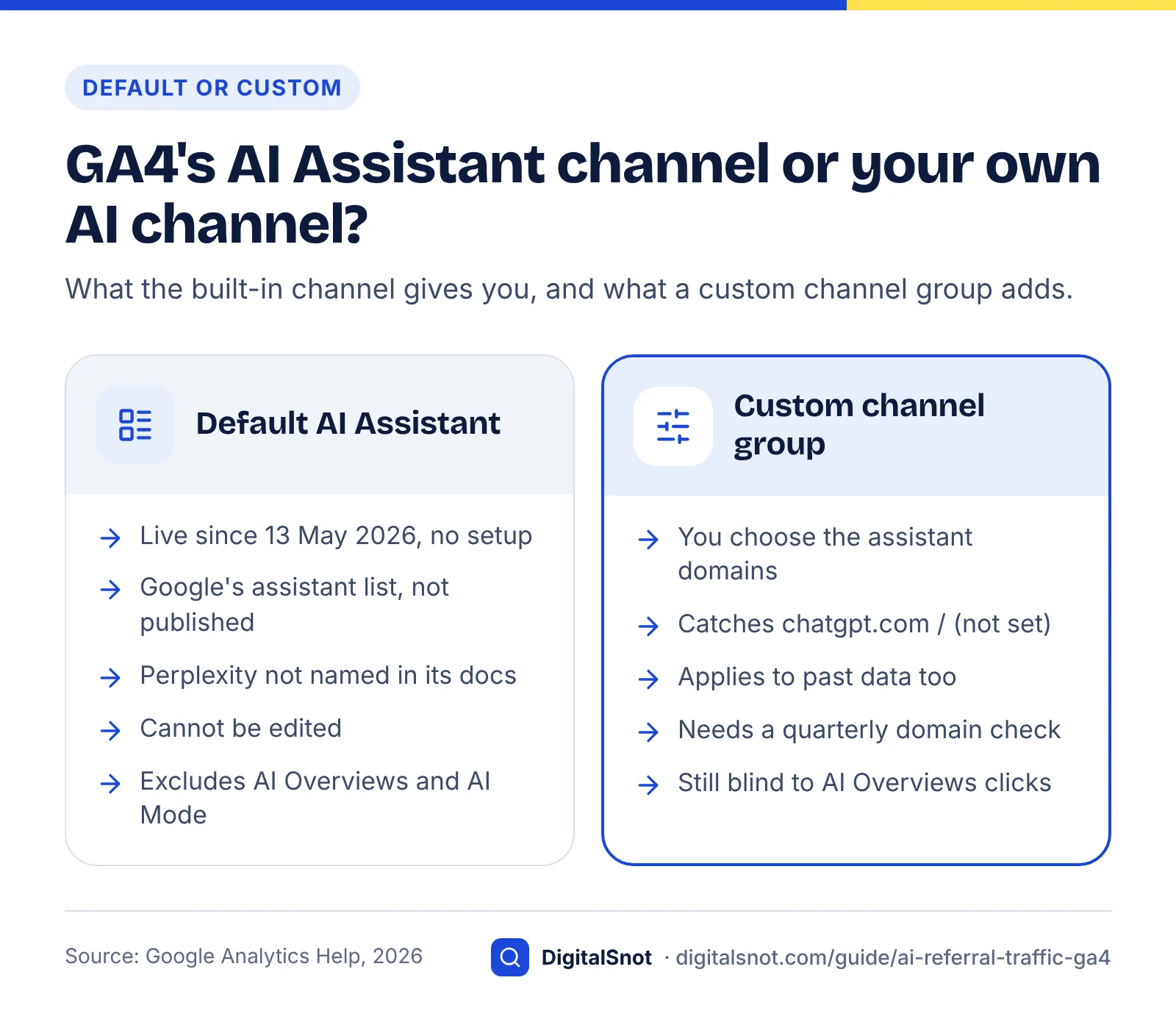
For many small sites, the default channel is a sound start. Build a custom channel when you care about an assistant Google may not count, when chatgpt.com visits show up in Unassigned, or when you need a trend line that starts before May 2026.
Build a custom channel group with a safe regex
A custom channel group lets you define your own AI channel and apply it to past data. Add a channel called AI assistants whose condition is Source matches the anchored regex below, or Medium exactly matches ai-assistant, then move it above Organic Search and Referral.
The pattern
^(www\.)?(chatgpt\.com|perplexity\.ai|gemini\.google\.com|claude\.ai|copilot\.microsoft\.com|copilot\.com|copilot\.cloud\.microsoft|chat\.deepseek\.com|grok\.com)$
Every host in it is an address where people use an assistant on the web. chatgpt.com is the source OpenAI writes into its tag. Google's Gemini Apps Privacy Hub names gemini.google.com as the Gemini web app, and Anthropic's Get started with Claude article sends web users to claude.ai. Consumer Copilot has used both copilot.microsoft.com and copilot.com, and Microsoft's admin documentation says the updated Copilot app's primary address is copilot.cloud.microsoft, with older addresses redirecting there. All three stay in the pattern so older and newer sessions are grouped together. Perplexity runs on perplexity.ai, DeepSeek's web chat on chat.deepseek.com and Grok on grok.com.
Three details make the pattern safe:
- Dots are escaped. In a regex, an unescaped dot means "any character";
\.means a literal dot. - It is anchored.
^and$tie the match to the whole source value, so chatgpt.com.example.net, or a shop with gemini in its name, cannot match. Google's regex help says GA4 already treats a regex as a full match by default, so the anchors change nothing inside GA4, but they keep the pattern safe if you reuse it in a tool that matches partially. - It matches sources, not mediums. ChatGPT's tag sets a source but no medium, and Google's guide to URL builders says missing UTM parameters produce (not set) values. Matching on source catches chatgpt.com / (not set) as well as chatgpt.com / referral and chatgpt.com / ai-assistant.
Step by step
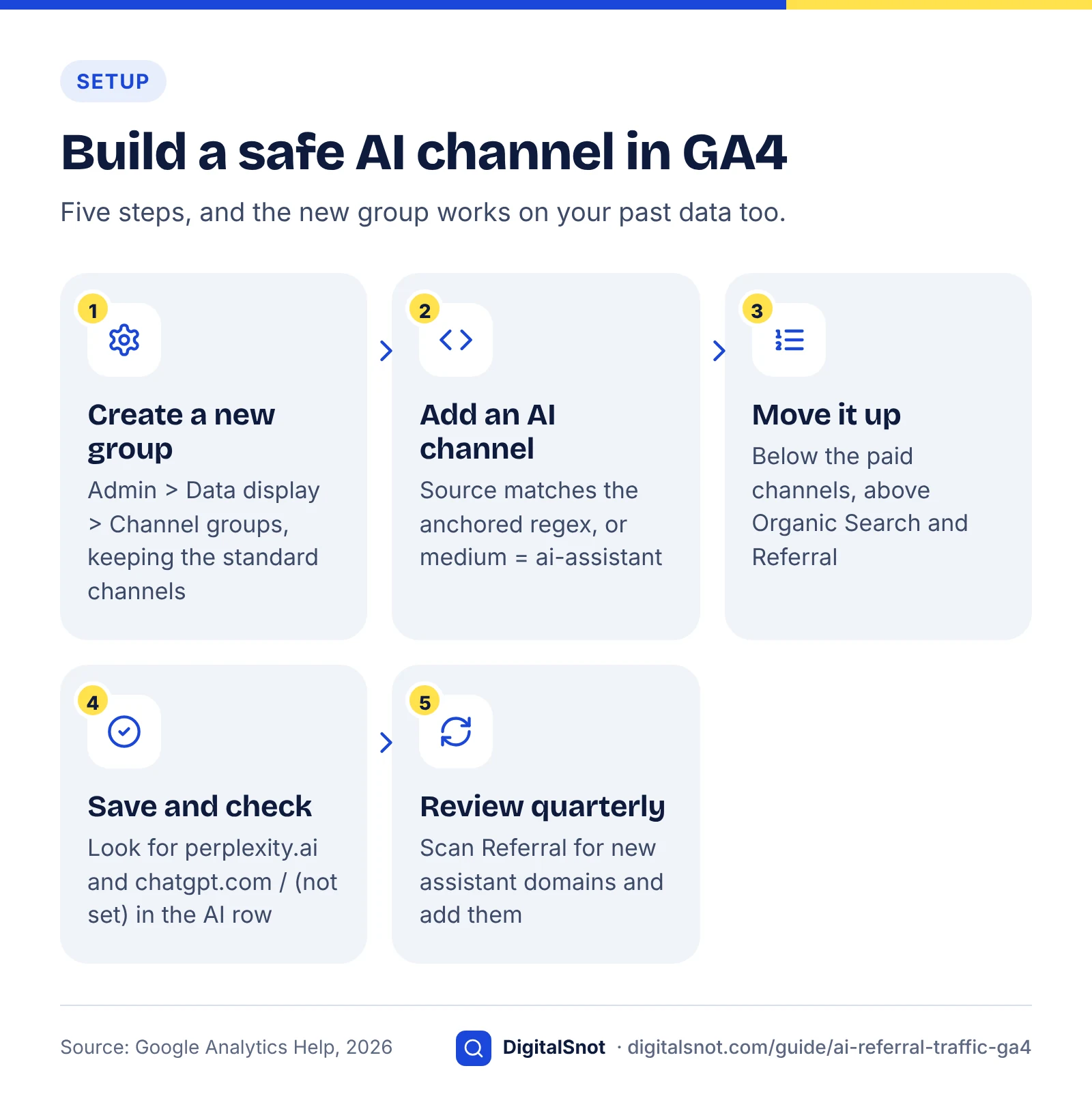
- In GA4, go to Admin > Data display > Channel groups and create a new channel group, named for example "Channels with AI". Keep the standard channels in it so the rest of your traffic is classified as before.
- Add a channel named AI assistants. Set the condition to Source, matches regex, and paste the pattern. Add an OR condition, Medium exactly matches ai-assistant, so anything Google's own list recognises is included too.
- Reorder the list: put AI assistants below the paid channels and above Organic Search and Referral. If your group already contains an AI Assistant channel, edit that one rather than adding a second.
- Save. Google says custom channel groups can be applied to reports retroactively, so open Traffic acquisition, choose your new group from the dimension drop-down and compare its AI assistants row with the default AI Assistant row for the same dates.
- To use the new rules everywhere, set the group as your primary channel group. Google notes that this changes data from that point forward only.
Why rule order matters
GA4 puts each session into the first channel whose definition it matches, working down the list. Google's AI assistants example tells you to move the channel above Referrals so data processes correctly. We also put it above Organic Search, so the AI rule is checked first whatever Google's other lists contain. Keeping it below the paid channels matters if you ever buy ads inside an AI assistant: tag those links with a paid medium such as cpc, and they will be counted as paid, not as AI referrals.
Google's own example matches assistant names with wildcards and has included variants such as bard. That is quick to set up, but it matches any source that contains those words, which is the problem our test measured.
We tested the pattern: method and results
Method: we ran four patterns against 30 source values in Python's regex engine in full-match mode, which is how GA4 evaluates a regex. Ten values were real assistant hosts. Twenty were traps, including google, bing, (direct), mail.google.com, openai.com, github.com, a spoofed chatgpt.com.example.net, seven invented business domains containing assistant names (such as gemini-jewellery.example and copilot-insurance.example) and two .ai domains. The loose patterns are typical of older tutorials; we wrote them for the test rather than copying any one source.
| Pattern | Assistant hosts matched (of 10) | Wrong matches (of 20) | Verdict |
|---|---|---|---|
| The anchored host list above | 10 | 0 | Use it |
Wildcard names: .*(chatgpt|openai|gemini|gpt|copilot|perplexity|claude|bard).* | 8 | 10 | Over-counts, and misses DeepSeek and Grok |
| Wildcard names plus any .ai domain | 8 | 12 | Worse: any .ai business becomes an "assistant" |
Bare names: chatgpt|perplexity|gemini|claude|copilot|deepseek|grok | 0 | 0 | Matches nothing in GA4's full-match mode |
The last row is an easy trap when you copy a pattern from a tool that matches partially: in GA4, chatgpt does not match chatgpt.com. In partial-match mode the same bare pattern caught all ten hosts and six of the traps. Python's engine is not GA4's, but these patterns use only basic syntax (alternation, groups, escaped dots and anchors) that behaves the same way in both.
Keep the pattern current
Assistant addresses change, and so may the assistants you want to measure, so plan to update the regex. Copilot alone now has consumer and work addresses that differ from the one older tutorials use. Each quarter, scan Referral for new AI hosts and add them. A standard GA4 property can hold two custom channel groups (five on GA4 360), each with up to 50 channels.
Landing pages, conversions and engagement from AI visitors
Once AI traffic has its own channel, look at where it lands and what it does next. Add the landing page to the AI rows, then compare engagement rate and key events, GA4's name for the actions you count as conversions, with Organic Search on the same pages.
Four views worth building
- AI sessions by assistant. Traffic acquisition with your custom group as the primary dimension, filtered to AI assistants, with Session source as a secondary dimension.
- AI landing pages. A free-form exploration with your channel group and Landing page + query string as rows, and Sessions, Engaged sessions, Engagement rate, Key events and Session key event rate as values.
- The same pages from Organic Search, added to that exploration so each page shows AI and organic side by side.
- Key events by channel: which enquiry, booking or purchase events AI visitors complete.
Find your ChatGPT visitors in GA4 in four steps
How to read the results
- Expect specific landing pages. An AI answer links to the page that supports it, often a guide, product or service page rather than your home page. Pages that attract AI visits are pages being cited, so take care when you rewrite or redirect them.
- Mind small numbers. With 40 AI sessions a month, a single enquiry moves the conversion rate by 2.5 percentage points. Compare quarters, not weeks, until you have dozens of key events.
- Compare like with like. Compare AI and organic visitors on the same landing page, not site-wide, because the two groups often arrive on different pages.
- Check the query string. Landing page + query string should show utm_source=chatgpt.com on ChatGPT visits. If it never does, a redirect may be stripping the tag: run a tagged URL through the free Redirect Checker and confirm the final hop still ends in ?utm_source=chatgpt.com.
When AI visits drop or never appear
If ChatGPT sends no visits at all, check access first, because OpenAI ties its referral tracking to allowing OAI-SearchBot. The free AI Crawler Checker reads your robots.txt and shows, crawler by crawler, whether ChatGPT search, Perplexity, Claude and other AI crawlers may fetch a page; our guide to choosing which AI crawlers to block explains which bots you can block without losing referrals.
If one page's AI visits drop to zero while the rest of the site holds steady, it has probably stopped being cited. The AI Citation Loss Analyzer checks the usual causes when a page stops appearing in AI answers, and our guide on how to get cited in AI search covers what earns citations in the first place.
Why AI Overviews and AI Mode clicks show as organic
Clicks from AI Overviews and AI Mode come from google.com, like any other Google result, so GA4 counts them as Organic Search. Google's channel definition says so explicitly, and Search Console counts them inside its Web search type. No referrer, tag or regex can separate them in GA4.
Google Search Central's AI features and your website documentation says sites appearing in AI features are included in Search Console's Performance report, within the Web search type, which matches GA4's Organic Search definition.
Do not confuse AI Mode with the Gemini app. AI Mode runs inside Google Search, so its clicks are organic. The Gemini app at gemini.google.com is a separate assistant that Google names as an AI Assistant source, so one person can appear in both channels on the same day.
Use Search Console for the AI part
Search Console's generative AI performance reports, announced on 3 June 2026 and rolled out to all websites on 31 August 2026, show how often your links appeared in AI Overviews and AI Mode, by page, country, device and date. They count impressions, not clicks. To join them with GA4:
- Export the generative AI report's Pages table for one month.
- In GA4, export Organic Search landing pages with sessions and key events for the same dates.
- Match the two lists by URL and flag the pages with the most AI impressions.
- Track those pages' organic sessions and key events month by month against pages with few AI impressions.
This shows which pages Google's AI features display and whether their organic visits still convert. It does not show how many clicks came from the AI answer itself. Our guide to the Search Console generative AI report covers the report in depth, and if organic traffic has already fallen, our post on whether AI Overviews took your clicks covers the diagnosis.
Expect few clicks from inside the AI answer. In Pew Research Center's 2025 study of 900 US adults' browsing, users clicked a link inside an AI summary on just 1% of visits to pages that had one. They clicked a traditional result on 8% of visits with a summary, against 15% without.
Why some AI clicks look like Google organic
Estimating the AI traffic you cannot see
You cannot measure AI visits that arrive with no source, but you can estimate them. Combine three signals (a form question, Direct visits to deep pages and AI fetches in your server logs) and report the result as a range next to the AI traffic GA4 can see.
Signal 1: ask people
Add a "How did you hear about us?" question to your enquiry or checkout form, with an option such as "AI assistant (ChatGPT, Gemini, Copilot…)". Divide the number who pick it by the key events GA4 credits to your AI channel: that ratio is your multiplier. People misremember and use several sources before they buy, so treat it as a rough guide, and only after a few dozen answers.
Signal 2: Direct visits to deep pages
Few people type the address of a deep guide or service page. Explore Direct sessions that land anywhere except your home page, contact page and other bookmarked pages, set a baseline from before you appeared in AI answers, and watch for a sustained rise that no email, print or offline campaign explains. Links shared by email or in messaging apps can also arrive without a referrer, so this gives an upper limit, not a count.
Signal 3: AI fetches in your logs
OpenAI's crawler documentation says ChatGPT may visit a page with the ChatGPT-User agent when someone asks it a question, and that ChatGPT-User does not crawl the web automatically. Counting those fetches by page shows where assistants read your content for users: exposure, not visits. A page fetched often and visited rarely is being answered without the click. The free AI Bot Log Analyzer finds AI crawler visits in an Apache or Nginx access log and lists the pages they fetched.
A worked example
Example (hypothetical): an accountancy practice in Leeds reviews one month of data.
| Input | Value | What it means |
|---|---|---|
| GA4 AI assistants channel | 180 sessions, 5 enquiries | Measured AI traffic |
| Form answers naming an AI assistant | 12 of 60 enquiries | Multiplier 12 ÷ 5 = 2.4 |
| Direct visits to deep pages | 290 a month, against a 210 baseline | 80 unexplained sessions |
| Low estimate | 180 sessions | Measured only |
| Central estimate | 260 sessions | 180 measured + 80 unexplained Direct |
| High estimate | About 430 sessions | 180 × 2.4, assuming hidden visitors convert like visible ones |
The practice would report: "AI assistants sent 180 sessions we can attribute, probably 260 to 430 in all, and 12 of 60 enquiries said they found us through an AI assistant." That sentence is honest about what was measured and what was estimated.
To turn that range into a forecast, the AI Visibility to Pipeline Estimator converts AI-answer visibility into estimated visits, leads and revenue from your own numbers. Plan with the central figure. Never add estimated sessions to GA4 data, and never relabel all Direct traffic as AI.
Agentic browsers and bots: keeping them out of your numbers
Some AI tools now browse websites on a person's behalf. GA4 removes known bots automatically, but it cannot show how many it removed or flag an agent that runs a normal browser, so check your server logs before you trust a sudden jump in AI or Direct traffic.
Google's help page on known bot-traffic exclusion says GA4 excludes known bot traffic automatically, using a combination of Google research and the International Spiders and Bots List maintained by the IAB. You cannot switch it off or see how much traffic it excluded.
Agents are harder to spot. A browser agent that loads your page in a real browser can run your GA4 tag like a person does, and GA4 has no field that says "agent". Request headers, IP addresses and user agents live in your server and CDN logs, not in GA4.
Signs worth investigating
- A spike in one channel with near-zero engagement time and no key events.
- Many sessions from one city on a day you changed nothing.
- Landing pages visited in an order no person would follow, such as every page in sitemap order.
These are reasons to check the logs, not proof. If your access log shows an AI user agent fetching the same pages at the same times, you have your answer.
What not to do
- Do not filter out whole cities or every low-engagement session; real customers go with the bots.
- Do not block user-triggered AI fetchers to tidy your reports. They fetch pages for people asking about you.
- Do not value AI traffic by sessions alone. Base it on key events.
Which setup do you need? A decision table
For most sites, the default channel plus one custom group is enough, but the right setup depends on what you see in your data. Find your situation in the first column.
| If this is true | Do this | Avoid this |
|---|---|---|
| You only need a monthly count of chatbot visits | Use the default AI Assistant channel | Building a regex nobody will maintain |
| perplexity.ai or another assistant shows under Referral | Custom channel group with the anchored pattern | Adding loose ".ai" or "gpt" fragments |
| chatgpt.com / (not set) appears in Unassigned | Custom group that matches on Source | Filtering those sessions out |
| You need a trend from before 13 May 2026 | Custom group, applied retroactively | Comparing the AI Assistant row year on year |
| You want AI Overviews and AI Mode clicks | Search Console generative AI report plus organic landing pages | Trying to regex google.com |
| You are cited in ChatGPT but see no ChatGPT visits | Check OAI-SearchBot access and redirects that drop the tag | Assuming ChatGPT never links to you |
| Direct visits to deep pages keep rising | Add the form question and report a range | Relabelling Direct as AI |
| AI or Direct traffic spikes with no engagement | Check server logs for agents and bots | Excluding cities blindly |
| You run ads inside an AI assistant | Tag them with a paid medium; keep the AI channel below paid | Letting ad clicks inflate AI referrals |
A monthly AI traffic report
A useful AI traffic report fits on one page: measured AI visits and conversions from GA4, AI exposure from Search Console, an estimate of what neither can see, and notes on anything that changed. Pull every figure for the same dates.
| Block | Metrics | Where from | What to look for |
|---|---|---|---|
| AI visits | Sessions by assistant, month on month | GA4 custom AI channel | Which assistants grow; new AI hosts in Referral |
| AI landing pages | Top 10 pages by AI sessions, engagement rate | GA4 exploration | Pages gaining or losing AI visits |
| AI conversions | Key events and session key event rate, against Organic Search | GA4 exploration | Quality as well as volume |
| Google AI exposure | AI impressions by page | Search Console generative AI report | High-exposure pages whose organic clicks fall |
| Untracked estimate | Form share, Direct deep-page excess, range | Forms, GA4 | Whether the range is widening |
| Notes | Site changes, GA4 changes, data issues | Your change log | Anything that explains a jump |
Annotate the May 2026 break
Before 13 May 2026, chatbot visits in the default channel group sat mostly in Referral or Unassigned. A year-on-year comparison of the AI Assistant row therefore shows growth that is partly reclassification. Use your custom channel group, which applies to past data, for any trend that crosses that date, and say so in the report.
Keep each month's exports, because definitions change and old views cannot always be rebuilt. Our checklist of what to look for in a monthly SEO report covers the rest of the report, and our post on how ChatGPT recommends businesses explains what drives these numbers.
Measuring AI traffic honestly comes down to three habits: count what GA4 can attribute, label what it cannot, and estimate the gap as a range. For help setting this up or growing the numbers, our AI search optimisation service covers measurement as well as visibility, and you can get in touch to talk it through.
Free tools in this guide
- Redirect Checker Trace 301/302 redirects, chains and loops to the final URL.
- AI Crawler Checker See which AI crawlers can read your page, and what they see without JavaScript.
- AI Citation Loss Analyzer Find the likely reason AI answers stopped citing a page.
- AI Bot Log Analyzer See how AI crawlers crawl your site from your server access log.
- AI Visibility to Pipeline Estimator Estimate the visits, leads and pipeline your AI visibility can bring.
By the numbers
- GA4 adds an AI Assistant channel to the default channel group for visits from chatbots such as ChatGPT, Gemini and Claude
- 13 May 2026
- Source: Google Analytics Help
- of visits to Google results pages with an AI summary included a click on a link inside that summary (March 2025 data)
- 1%
- Source: Pew Research Center
- Search Console generative AI reports, which count AI Overviews and AI Mode impressions but not clicks, reach all websites
- 31 Aug 2026
- Source: Google Search Central Blog
- custom channel groups allowed on a standard GA4 property (5 on GA4 360), each holding up to 50 channels
- 2 groups
- Source: Google Analytics Help
Frequently asked questions
Does GA4 track ChatGPT traffic automatically?
Mostly, yes. Since 13 May 2026, GA4 puts visits from recognised AI assistants, including ChatGPT, into an AI Assistant channel in the default channel group. ChatGPT also adds utm_source=chatgpt.com to its links, so its visits are easy to find under Session source. Some sessions can still appear as chatgpt.com / (not set) in Unassigned, which a custom channel group matching on source fixes.
What is the AI Assistant channel in GA4?
The AI Assistant channel is part of GA4's default channel group. When a visit's referrer matches Google's list of AI assistants, GA4 sets the medium to ai-assistant and the campaign to (ai-assistant). Google gives ChatGPT, Gemini, Claude, DeepSeek, Copilot and Grok as examples. It excludes Google's AI Overviews and AI Mode, and you cannot edit it.
Why does my ChatGPT traffic show as (not set) or Unassigned?
ChatGPT tags its links with utm_source=chatgpt.com but no utm_medium. Google says missing UTM parameters produce (not set) values, and sessions whose rules match no channel are shown as Unassigned. A custom channel group whose AI channel matches on Source rather than Medium puts these visits back with the rest of your AI traffic.
Can GA4 show traffic from Google AI Overviews or AI Mode?
No. Clicks from AI Overviews and AI Mode come from google.com and GA4's Organic Search channel includes them by definition. No regex can separate them. Search Console's generative AI performance report, available to all sites since 31 August 2026, shows how often your pages appeared in those features, but it counts impressions, not clicks.
How do I track Perplexity traffic in GA4?
Look for perplexity.ai under Session source in the Traffic acquisition report. Perplexity is not named in Google's AI Assistant channel documentation (checked October 2026), so its visits may sit in Referral. To group them reliably, add a custom channel group with an AI channel whose Source condition includes perplexity.ai, placed above Organic Search and Referral.
What regex should I use for AI traffic in GA4?
Use an anchored list of documented assistant hosts with escaped dots, matched on Source: ^(www\.)?(chatgpt\.com|perplexity\.ai|gemini\.google\.com|claude\.ai|copilot\.microsoft\.com|copilot\.com|copilot\.cloud\.microsoft|chat\.deepseek\.com|grok\.com)$. GA4 treats a regex as a full match, so bare names such as chatgpt match nothing, and wildcard fragments catch unrelated sites.
Why does some AI traffic show as Direct in GA4?
GA4 labels a visit Direct when it arrives with no source information. That happens when someone copies a link from an AI answer into a new tab, types your address after reading about you, or opens a link from an app that sends no referrer or campaign tag. These visits cannot be attributed, only estimated with signals such as a form question.
Is Gemini traffic counted as organic search?
It depends which Gemini. The Gemini app at gemini.google.com is an AI assistant, and Google names Gemini as an example source for the AI Assistant channel. AI Mode and AI Overviews run inside Google Search, so their clicks are counted as Organic Search. The same person can appear in both channels on the same day.
Do custom channel groups change historical data in GA4?
Google says custom channel groups can be applied to your reports retroactively, so a new AI channel also groups past sessions. Setting a custom group as the primary channel group is different: it only changes data from that point forward. A standard property can have two custom channel groups, each with up to 50 channels.
Sources
Every figure and claim in this guide comes from the sources below. We checked each one when writing and link to the original so you can read it yourself. Credit belongs to the authors and publishers listed. How we write and check our articles.
-
1
Referrer-Policy header
MDN Web Docs · Default strict-origin-when-cross-origin policy sends only the origin to other sites.
-
2
Publishers and Developers - FAQ
OpenAI Help Center · ChatGPT adds utm_source=chatgpt.com; referral tracking for sites that allow OAI-SearchBot.
-
3
What's new in Google Analytics
Google Analytics Help · AI Assistant channel release (13 May 2026) and Source group dimension (11 June 2026).
-
4
Default channel group
Google Analytics Help · AI Assistant rule and examples; Organic Search includes AI Overviews and AI Mode; Direct.
-
5
Custom channel groups
Google Analytics Help · AI assistants example, ordering above Referrals, retroactive use, group and channel limits.
-
6
Gemini Apps Privacy Hub
Gemini Apps Help · gemini.google.com as the Gemini web app address.
-
7
Get started with Claude
Claude Help Center · claude.ai as the Claude web app address.
-
8
Manage Microsoft Copilot Chat
Microsoft Learn · copilot.cloud.microsoft as the primary address of the updated Copilot app.
-
9
About regular expressions (regex)
Google Analytics Help · GA4 regex is a full match by default; partial matching needs wildcards.
-
10
URL builders: Collect campaign data with custom URLs
Google Analytics Help · Missing UTM parameters result in (not set) values.
-
11
AI features and your website
Google Search Central · AI Overviews and AI Mode traffic is reported in Search Console under the Web search type.
-
12
Introducing Search Generative AI performance reports in Search Console
Google Search Central Blog · Impressions-only AI reports, announced 3 June 2026, rolled out to all sites 31 August 2026.
-
13
Google users are less likely to click on links when an AI summary appears in the results
Pew Research Center · 2025 study: 1% clicked a link inside AI summaries; 8% vs 15% clicked a traditional result.
-
14
Overview of OpenAI Crawlers
OpenAI · ChatGPT-User visits pages when users ask questions and does not crawl automatically.
-
15
Known bot-traffic exclusion
Google Analytics Help · Automatic exclusion via Google research and the IAB list; cannot be disabled or measured.