YouTube Partner Program eligibility: how close is your channel to earning?
The YouTube Partner Program thresholds in India, the higher bar from 1 February 2027, what else YouTube checks, and how to work out your channel's gap.
On this page (9 sections)
- 1The two levels, and what each one gives you
- 2What changes on 1 February 2027
- 3Work out your gap: an example
- 4What else YouTube checks before you can apply
- 5How YouTube reviews your channel
- 6Policy problems that block monetisation
- 7A plan to close the gap
- 8Is the Partner Program the right goal for a business?
- 9Sources
If you have been posting on YouTube for a while, you have probably opened the Earn tab in YouTube Studio and wondered how far away it is. This post sets out the current YouTube Partner Program eligibility thresholds for India, the change YouTube has announced for 1 February 2027, the other conditions you must meet, how YouTube reviews a channel and the policy problems that block monetisation. Then it shows how to work out your own gap, using a made-up channel, Sharma Maths Classes in Kota.
The two levels, and what each one gives you
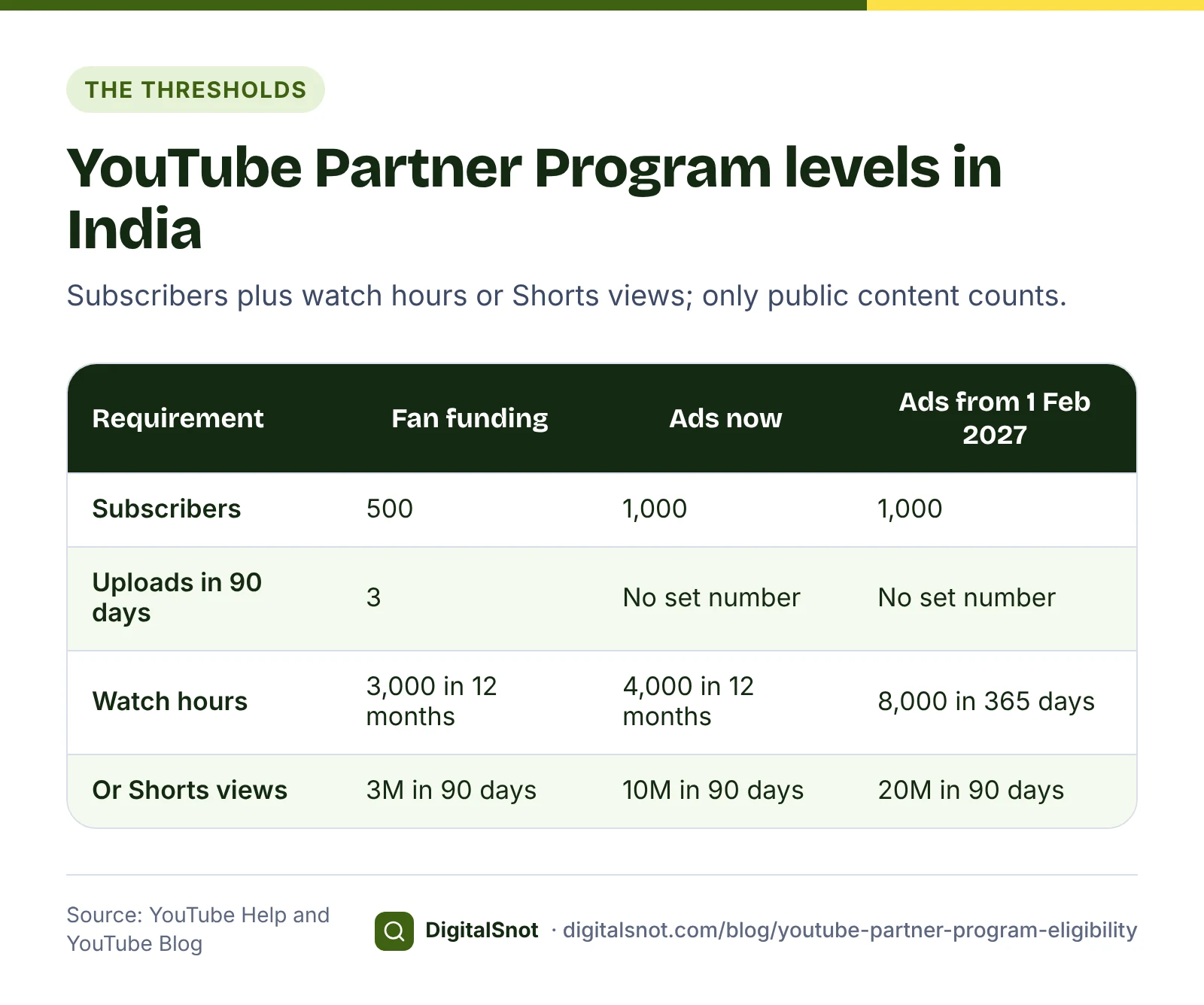
YouTube's expanded Partner Program is available in India, so there are two ways in. The lower level gives you fan funding and Shopping; the higher level adds a share of ad revenue.
| Requirement | Fan funding and Shopping | Ad revenue |
|---|---|---|
| Subscribers | 500 | 1,000 |
| Public uploads | 3 in the last 90 days | No set number |
| Public watch hours | 3,000 in the last 12 months | 4,000 in the last 12 months |
| Or public Shorts views | 3 million in the last 90 days | 10 million in the last 90 days |
| What it gives | Channel memberships, Super Chat, Super Stickers, Super Thanks and Shopping | A share of ad revenue, as well as the fan funding features |
Two details catch people out. First, only public content counts. YouTube's Partner Program overview leaves out watch time from private, unlisted and deleted videos, from paid ad campaigns, and from live streams that were not kept as videos. Second, watch time in the Shorts feed does not count towards the watch-hour threshold. Shorts have their own route, through Shorts views.
What changes on 1 February 2027
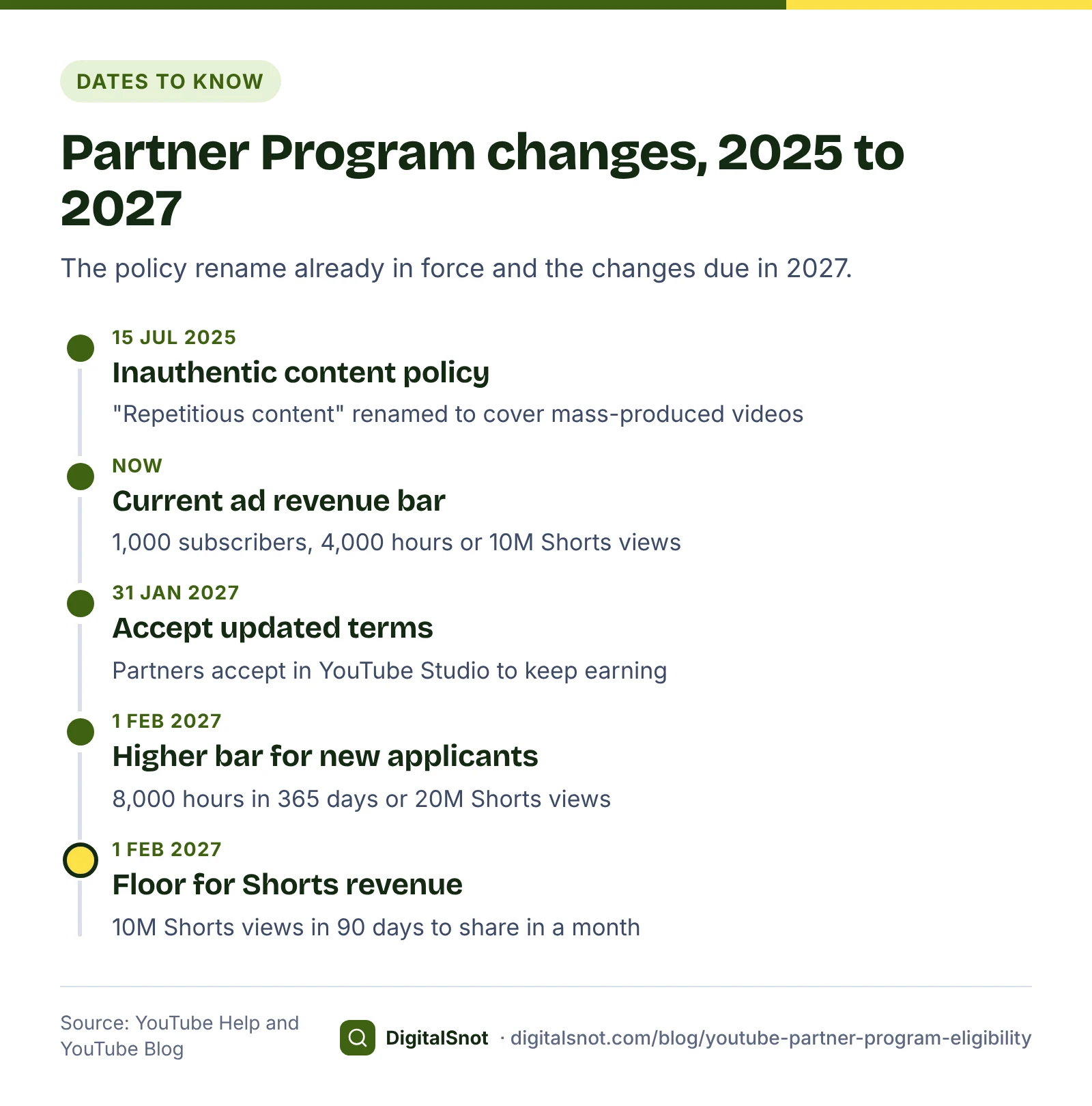
YouTube announced on its official blog that, from 1 February 2027, new applicants for ad revenue will need 1,000 subscribers and either 8,000 public watch hours in the last 365 days or 20 million Shorts views in the last 90 days. Channels already in the Partner Program keep their status, and the 500-subscriber level for fan funding and Shopping does not change.
Two more changes on the same date affect channels that are already in:
- A floor for Shorts revenue. YouTube's Shorts monetisation policies say that from 1 February 2027 a channel needs at least 10 million qualified Shorts views in the last 90 days to share in Shorts ad and Premium revenue for a month. A channel below that stays in the Partner Program, and its long-form earnings are not affected.
- New terms to accept. YouTube's page on changes to the Partner Program asks partners to accept the updated terms in YouTube Studio by 31 January 2027. Partners who do not will stop earning from the related features from 1 February 2027.
What this means for you: the higher numbers are for channels that apply from 1 February 2027, and the watch-hour target doubles. If you are close to the current ad revenue bar, aim to meet it and apply before then. If you are far from it, plan for the new numbers now.
Work out your gap: an example
In YouTube Studio, note four numbers: subscribers, public watch hours in the last 12 months, Shorts views in the last 90 days and public uploads in the last 90 days. Put them into our YouTube Partner Program Calculator. It checks them against both levels and the 2027 rules and shows what is still needed. It runs in your browser and uses only the numbers you type; YouTube Studio shows your exact progress.
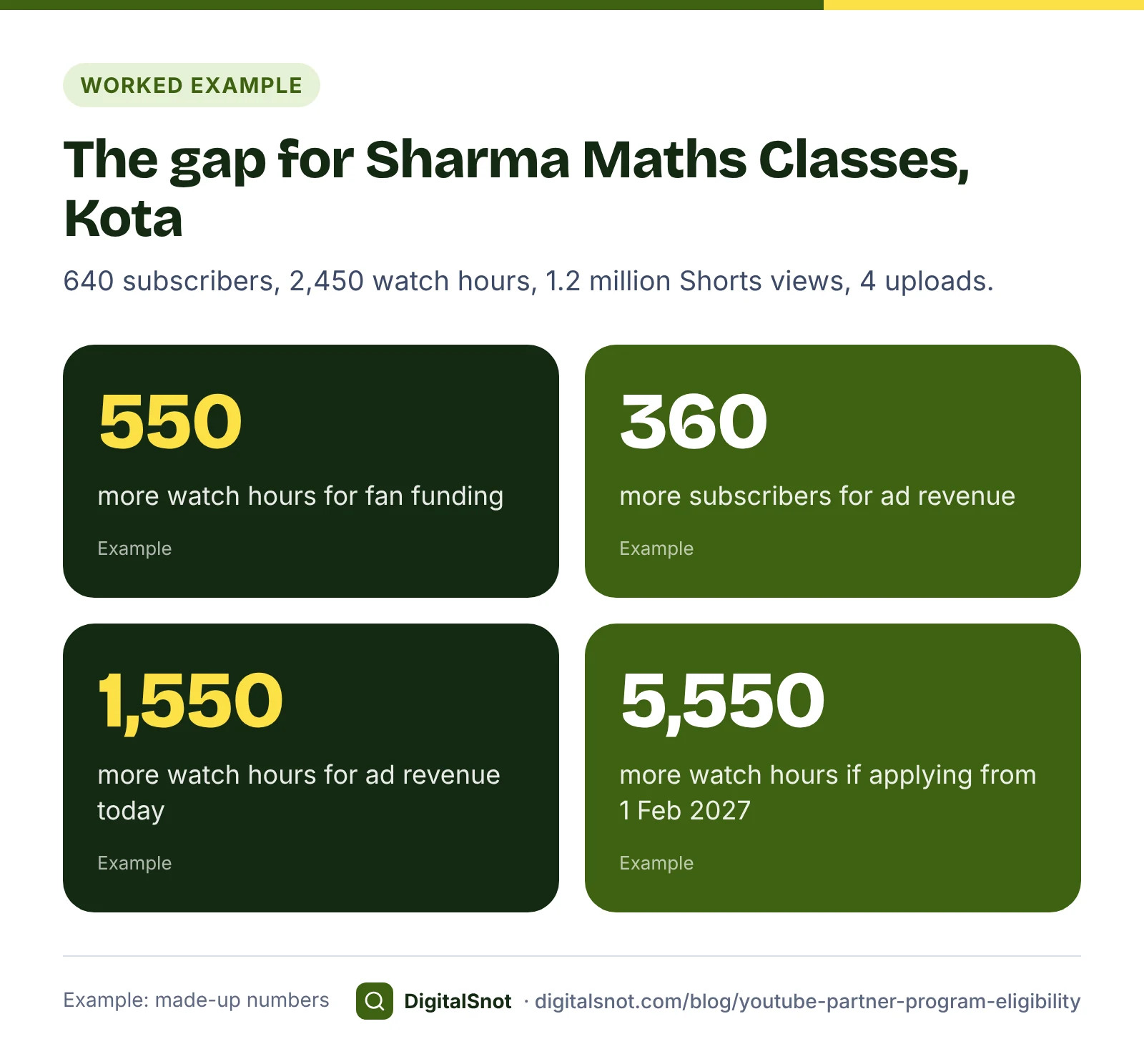
Take Sharma Maths Classes, a made-up coaching channel in Kota, with 640 subscribers, 2,450 public watch hours in 12 months, 1.2 million Shorts views in 90 days and 4 public uploads in 90 days:
- Fan funding: subscribers and uploads are met. It needs 550 more watch hours, or 1.8 million more Shorts views.
- Ad revenue today: 360 more subscribers, and 1,550 more watch hours or 8.8 million more Shorts views.
- Ad revenue for a new applicant from 1 February 2027: 360 more subscribers, and 5,550 more watch hours or 18.8 million more Shorts views.
To turn hours into views, multiply views by the average view duration in minutes and divide by 60. If a 12-minute lesson keeps viewers for 4.5 minutes on average, 1,000 views give 75 watch hours. The 550-hour gap then needs about 7,300 more views across public long videos. That is a clearer target than "make more videos": it tells the teacher to work on average view duration, with a stronger opening and chapters, as well as on reach.
What else YouTube checks before you can apply
The numbers are only the first gate. YouTube's eligibility page lists these conditions as well:
- You follow YouTube's channel monetisation policies.
- You live in a country or region where the Partner Program is available. India is one.
- Your channel has no active Community Guidelines strikes.
- 2-Step Verification is turned on for the Google Account that owns the channel.
- You have access to advanced features. These need phone verification plus enough channel history, or ID or video verification, as YouTube explains in its page on intermediate and advanced features.
- You have an AdSense account linked to the channel.
Most of these take minutes. Turn on 2-Step Verification and check feature eligibility in YouTube Studio's settings well before you reach the numbers, so they do not hold up your application.
How YouTube reviews your channel
Meeting the thresholds does not mean automatic acceptance. Every channel that applies goes through a review, in which YouTube looks at the channel as a whole against its monetisation policies. Reviewers may focus on things such as the channel's main theme, its most viewed and newest videos, and video details such as titles. YouTube says a decision typically comes in about a month.
If the channel is rejected, fix the problems before you try again. According to YouTube's rejection FAQ, you can reapply 30 days after a first rejection, or 90 days after a later one. If you think the decision was wrong, you can appeal within 21 days.
Policy problems that block monetisation
For business and education channels, the policies that matter most are about whether the content is clearly your own. YouTube's channel monetisation policies set out two of them:
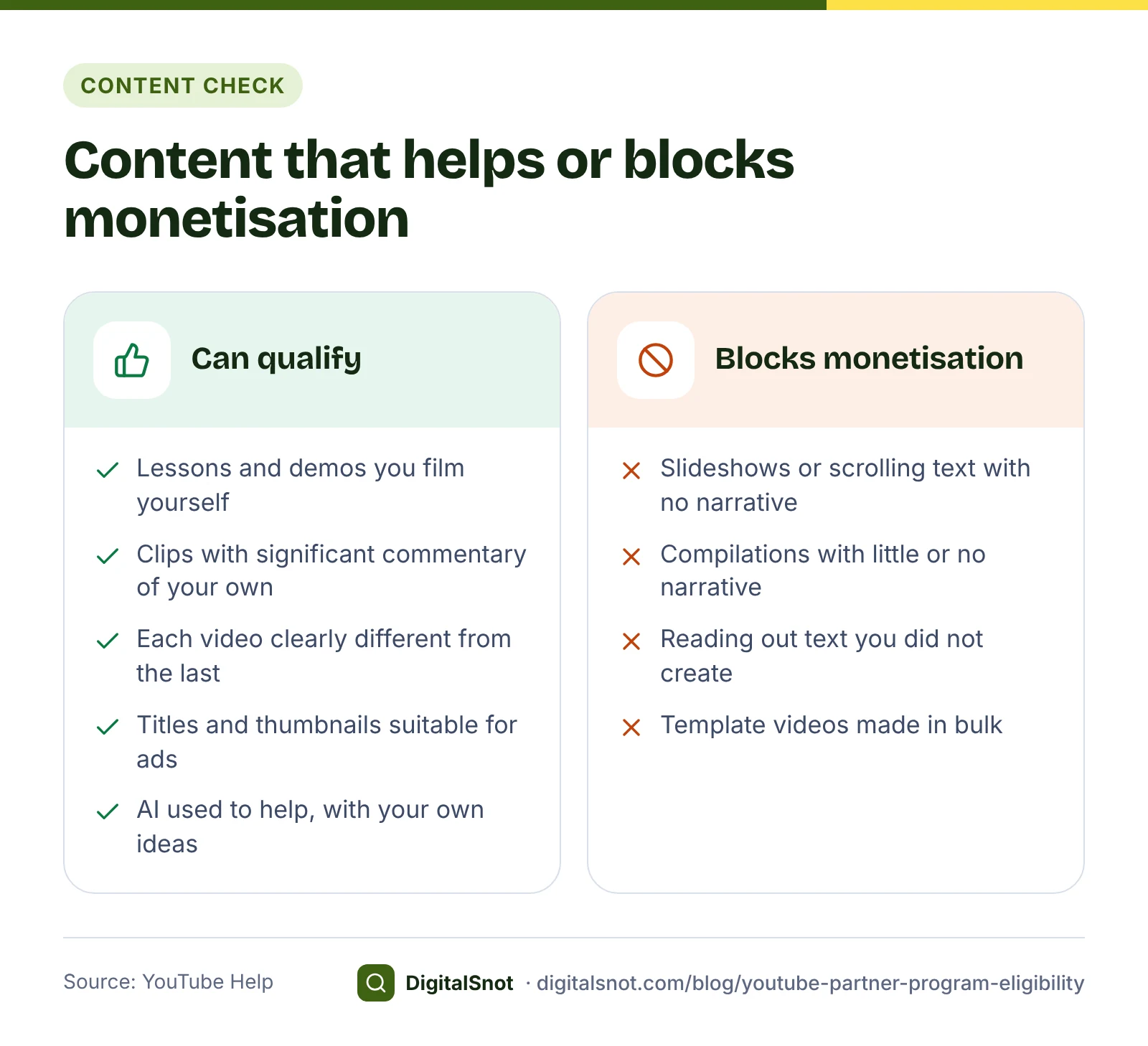
- Reused content: material already on YouTube or elsewhere online, used without significant original commentary, substantive changes, or educational or entertainment value. The policy applies even if you have the original creator's permission, and it is separate from copyright.
- Inauthentic content: on 15 July 2025 YouTube renamed its "repetitious content" policy "inauthentic content", to make clear that it covers mass-produced and repetitive videos. YouTube's examples include image slideshows or templated storylines with little narrative, and AI-generated videos made with generic templates. Using AI is not banned in itself; channels that use it can still be monetised if they follow the policies.
For a coaching channel, the line is easy to see. A lesson the teacher films and explains is original. A slideshow of textbook pages read aloud, with nothing added, is the kind of video these policies describe.
Two more things matter once you are in. The advertiser-friendly content guidelines apply to the thumbnail, title, description and tags as well as the video, and decide whether a video earns full, limited or no ads. A yellow monetisation icon means limited or no ads; you can edit the video or ask for a human review. And an active Community Guidelines strike stops an application.
Go through our YouTube Monetisation Policy Checklist before you apply. It covers eligibility, reused and inauthentic content, each section of the advertiser-friendly guidelines and strikes, with YouTube's own guidance for compilations, reaction videos, slideshows and AI videos. Its score is our measure of how much of the checklist you have ticked, not a prediction of YouTube's decision.
A plan to close the gap
These steps are our suggestions, based on what counts towards the thresholds:
- Keep old public videos public. Watch hours from private, unlisted and deleted videos do not count, so hiding an old video to tidy the channel can take hours off your total.
- Upload on a steady schedule. Three public uploads in 90 days is part of the fan funding level, and a regular rhythm gives viewers a reason to come back.
- Work on average view duration. A clear opening, chapters and a tight edit raise the hours each view brings in.
- Use Shorts to point viewers to long videos. Shorts views count only on the Shorts route; time in the Shorts feed does not add to watch hours.
- Do not pay for views. Views and watch time from ad campaigns are left out of the thresholds, and bought subscribers are no audience at all.
- Tidy the channel a reviewer will see. Our YouTube Channel Audit Checklist walks through the name, banner, description, links, Home tab, feature access and upload defaults.
Is the Partner Program the right goal for a business?
For most local businesses, a channel earns its keep through enquiries, not ad revenue. A dental clinic or a bakery may never reach 4,000 watch hours, and does not need to: a video that answers a customer's question and leads to a booking is worth more than a small ad share. If that is you, start with our post on your first 10 YouTube videos as a local business, and treat monetisation as a bonus.
If your channel is the business, as it is for a coaching institute or a creator, run your numbers through the calculator this week, tick the policy checklist, and set a monthly target for hours or Shorts views. All the tools mentioned here are in our YouTube tools, and none of them signs in to your channel. If you want a second opinion on a channel plan, get in touch.
Free tools in this article
- YouTube Partner Program Calculator See how close your channel is to the YouTube Partner Program, including the 2027 changes.
- YouTube Monetisation Policy Checklist Tick through YouTube's monetisation policies, and see what they say about the content you make.
- YouTube Channel Audit Checklist Tick through your channel's branding, profile, Home tab, features, defaults and team access.
Frequently asked questions
How many subscribers do I need to earn on YouTube in India?
500 for fan funding and Shopping, with 3 public uploads in the last 90 days and either 3,000 public watch hours in 12 months or 3 million Shorts views in 90 days. Ad revenue needs 1,000 subscribers with 4,000 watch hours in 12 months or 10 million Shorts views in 90 days.
Do Shorts count towards the 4,000 watch hours?
No. Watch time in the Shorts feed does not count towards the watch-hour threshold. Shorts have their own route instead: 10 million public Shorts views in the last 90 days for ad revenue, or 3 million for fan funding and Shopping.
What changes on 1 February 2027?
New applicants for ad revenue will need 1,000 subscribers and either 8,000 watch hours in the last 365 days or 20 million Shorts views in 90 days. Channels already in the programme keep their status, but from that date they need 10 million Shorts views in 90 days to share in Shorts revenue for a month, and must accept the updated terms by 31 January 2027.
Does making old videos private reduce my watch hours?
Yes. Only public videos count, so watch time from videos you make private or unlisted, or delete, no longer counts towards the threshold. Keep useful old videos public while you are working towards the Partner Program.
How long does the review take, and what if I am rejected?
YouTube says a decision typically comes in about a month. After a first rejection you can reapply 30 days after the rejection, and after a later one 90 days after it. You can also appeal within 21 days if you think the decision was wrong.
Can I monetise a channel that uses AI or reposted clips?
Using AI is not banned, but mass-produced videos made with generic templates count as inauthentic content and cannot be monetised. Clips from elsewhere need significant original commentary, substantive changes or educational value, and permission from the original creator is not enough on its own.
Sources
Every figure and claim in this article comes from the sources below. We checked each one when writing and link to the original so you can read it yourself. Credit belongs to the authors and publishers listed. How we write and check our articles.
-
1
YouTube Partner Program overview & eligibility
YouTube Help · Thresholds, what counts as public watch time, the other conditions (policies, country, strikes, 2-Step Verification, advanced features, AdSense) and the review
-
2
Overview of the expanded YouTube Partner Program
YouTube Help · The 500-subscriber level, its features and the eligible countries, including India
-
3
New opportunities to earn and changes to the YouTube Partner Program
YouTube Blog · From 1 February 2027: 8,000 watch hours in 365 days or 20 million Shorts views for new applicants; existing partners unaffected
-
4
YouTube Shorts monetization policies
YouTube Help · From 1 February 2027, 10 million qualified Shorts views in 90 days to share in Shorts revenue for a month
-
5
Changes to the YouTube Partner Program
YouTube Help · Accept the updated terms in YouTube Studio by 31 January 2027 to keep earning
-
6
YouTube channel monetization policies
YouTube Help · Reused content, and the 15 July 2025 renaming of repetitious content to inauthentic content
-
7
My channel was rejected for monetization FAQs
YouTube Help · Review in about a month; reapply after 30 days, or 90 days after a later rejection
-
8
Appeal a YouTube Partner Program suspension or application rejection
YouTube Help · Appeals within 21 days
-
9
Get access to intermediate and advanced features
YouTube Help · Advanced features need phone verification plus channel history, or ID or video verification
-
10
Advertiser-friendly content guidelines
YouTube Help · Guidelines cover the video, thumbnail, title, description and tags
-
11
Monetization icon guide for YouTube Studio
YouTube Help · The yellow icon means limited or no ads; editing or requesting a human review