Guide · Local SEO
How to remove fake Google reviews and stay within review laws
What Google will and won't remove, how to report and appeal a fake review, what to do about review bombing and extortion, and how US, UK and Indian review laws compare.

On this page (11 sections)
- 1Which reviews Google will remove and which it won't
- 2Our analysis: match each review to a policy, a route and a likely outcome
- 3How to report a fake Google review and appeal, step by step
- 4How to gather evidence that a review is fake
- 5Review bombing and extortion: what to do
- 6How to reply to a fake review in public
- 7When Google says no: legal routes and other options
- 8Review laws compared: US, UK and India
- 9Never do these: buying, gating and incentivising reviews
- 10Protect your rating over the long term
- 11Sources
A one-star review from someone who has never been through your door. Twenty ratings in an afternoon after a post goes viral. A message offering to "make the bad reviews stop" for a fee. Fake Google reviews cost small businesses customers, and the scale is large: Google says it blocked or removed more than 292 million policy-violating reviews in 2025, according to its 2026 post on protecting businesses on Maps. Plenty still get through, and this guide explains how to remove fake Google reviews that break Google's rules.
The honest headline is that Google removes a review only when it breaks Google's content policy. Reviews that are negative, unfair or wrong in your view stay up, and no agency can change that. What you control is how well you match a review to the policy it breaks, your evidence, your public reply, and whether your own review habits stay within the law.
Who this is for: owners and marketers of local businesses (clinics, trades, restaurants, shops, agencies) dealing with fake, competitor or extortion reviews, and anyone who has been offered a "review package" and wants to know the risks.
What you will be able to do after reading:
- Tell in a minute whether Google is likely to remove a review, and which route to use.
- Report a review, track it and use your one appeal well.
- Handle review bombing and extortion without making it worse.
- Reply to fake reviews in a way that reassures future customers.
- Understand the fake review rules in the US, the UK and India, including which parts are mandatory and which are voluntary.
Which reviews Google will remove and which it won't
Google removes a review only when it breaks its Maps user-generated content policy. A review that is harsh, unfair or factually disputed, but describes a real experience, stays up however much it hurts.
Google's help page on reporting inappropriate reviews says you can report any review, but only reviews that violate Google's policies are eligible for removal. Disagreeing with what a customer says is not a reason Google accepts. That makes the policy itself your most useful document, because every successful report names a specific breach.
What the policy prohibits
Google's prohibited and restricted content policy for Maps covers reviews, ratings, photos and other contributions. The sections that matter most for fake reviews are these:
- Fake engagement. Fake engagement is content that does not reflect a genuine experience. It includes paid reviews and reviews posted from several accounts by, or at the request of, one person.
- Conflict of interest. A conflict of interest is a relationship that biases the reviewer, such as current or former employment, a contractual relationship, or another professional or personal affiliation. Reviewing your own business or a competitor's falls here.
- Incentivised or biased reviews. Reviews given in return for payment, a discount, free goods or any other benefit are not allowed, and merchants may not offer such incentives.
- Off-topic content. Reviews must be about a real experience at that place. General political or social commentary and personal rants are not allowed.
- Harassment, hate speech and personal information. Threats, urging others to pile on, attacks on protected groups and posting someone's private details without consent are all prohibited.
- Profanity, advertising, gibberish and impersonation. Profanity used to offend, promotional content, meaningless or repeated text, and posing as someone else are also against the policy.
What usually stays up
Some reviews feel fake but do not breach a named policy, or the breach cannot be seen from outside. In our reading of the policy, these usually stay up:
- An honest but angry one-star review, even if you think the customer was unreasonable.
- A review that gets details wrong, such as the price or the wait, where the reviewer did visit.
- A review from a name you cannot find in your records, with no other sign that it is fake. Customers often use nicknames or a partner's account.
- A complaint about a problem you have since fixed.
- A star rating with no text, unless it is part of a visible pattern such as a sudden burst.
For these, a calm public reply does more than a report that will be rejected. Reviews making false, damaging factual claims have a legal route, covered later.
Our analysis: match each review to a policy, a route and a likely outcome
Before you report anything, match the review to the policy it breaks, because the policy decides where you report it and how likely removal is. The table below does that for 12 situations owners commonly face.
Method: we listed 12 common fake or unfair review situations, matched each to the section of Google's Maps user-generated content policy that covers it and to the reporting route Google documents, then graded the likely outcome as strong, possible or unlikely, based only on how clearly the policy text covers it (checked October 2026). The grades are our judgement, not Google's; Google does not publish removal rates.
| Review problem | Policy it may breach | Where to report it | Likely outcome |
|---|---|---|---|
| Threats, slurs, or a staff member's home address or phone number | Harassment, hate speech, personal information | Report review | Strong: the breach is visible in the text |
| Link to or promotion of another business | Advertising and solicitation | Report review | Strong |
| Comment on a news story, politics or a viral post, not a visit | Off-topic | Report review | Strong if the text shows it; Google may also pause new reviews |
| Review clearly meant for another business (a service you don't offer, the wrong town) | Off-topic: not about an experience at your place | Report review, then reply | Possible: depends on how obvious the mismatch is |
| Reviewer says they got a discount or gift for the review | Incentivised or biased reviews | Report review, and check your own staff did not offer it | Possible, and a warning sign for your own profile |
| Review by a current or former employee, or a competitor | Conflict of interest | Report review; keep evidence of the link for an appeal | Possible: the relationship must be evident |
| Burst of one-star ratings within hours from accounts with no history | Fake engagement | Report each review; Google's spike protections may pause reviews | Possible: patterns are easier to act on than single reviews |
| One-star burst followed by a demand for money | Fake engagement, plus extortion | Merchant extortion report form, plus a report on each review | Google investigates and tells you the outcome, without details |
| A single review from a name you cannot find in your records | Fake engagement, if not based on a real experience | Report review | Unlikely without other evidence |
| A competitor's profile full of fake five-star reviews | Fake engagement, incentivised reviews | Google Maps: Suggest an edit, then Report business conduct | Possible; you may not be told the result |
| A false factual claim, such as accusing you of a crime | Possibly unlawful (defamation), not only a policy issue | Google's legal removal request, after legal advice | Depends on local law and your evidence |
| An honest but harsh one-star review | None | Do not report; reply and fix the cause | Stays up |
The pattern is that removal depends on what Google can see. A breach visible in the review text, such as a slur, a link or a political rant, is the strongest case. A breach that depends on facts only you know ("this person never visited") is the weakest, unless it is part of a pattern or you can show the relationship.
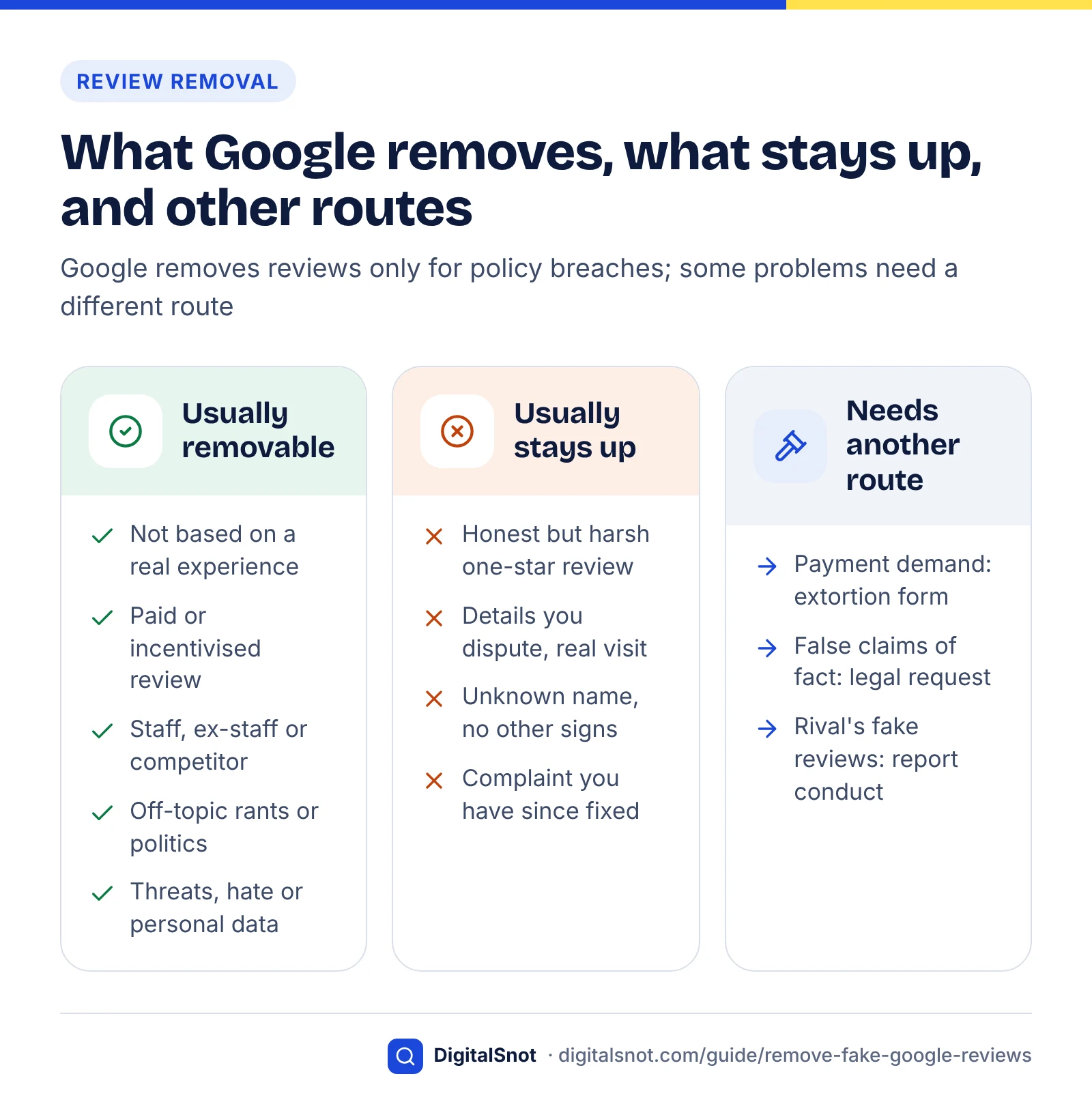
Decision flow: what to do with the review in front of you
- If someone has asked you for money to remove reviews, go straight to the extortion steps below. Do not reply to the demand.
- If the text breaks a policy you can name (harassment, hate speech, personal information, advertising, off-topic), report it with that reason and reply only if future customers need context.
- If it is one of many reviews in a short burst, report each one, gather pattern evidence and post a short factual reply on the most visible ones.
- If you believe the reviewer was never a customer but the text looks normal, check your records, report it as fake engagement and reply politely that you cannot find the visit. Expect that it may stay.
- If it states something false and damaging as fact, report it to Google, keep evidence and take legal advice before using the legal route.
- If it is an honest complaint, do not report it. Reply, fix the problem and ask more customers for reviews.
How to report a fake Google review and appeal, step by step
Report the review from Google Maps, your Business Profile or the Reviews Management Tool, choosing the policy reason that fits, then track it in the Reviews Management Tool. If Google decides there is no violation, you can submit one appeal for that review.
These steps follow Google's help page on reporting inappropriate reviews (checked October 2026). Menu labels change, so look for the closest match.
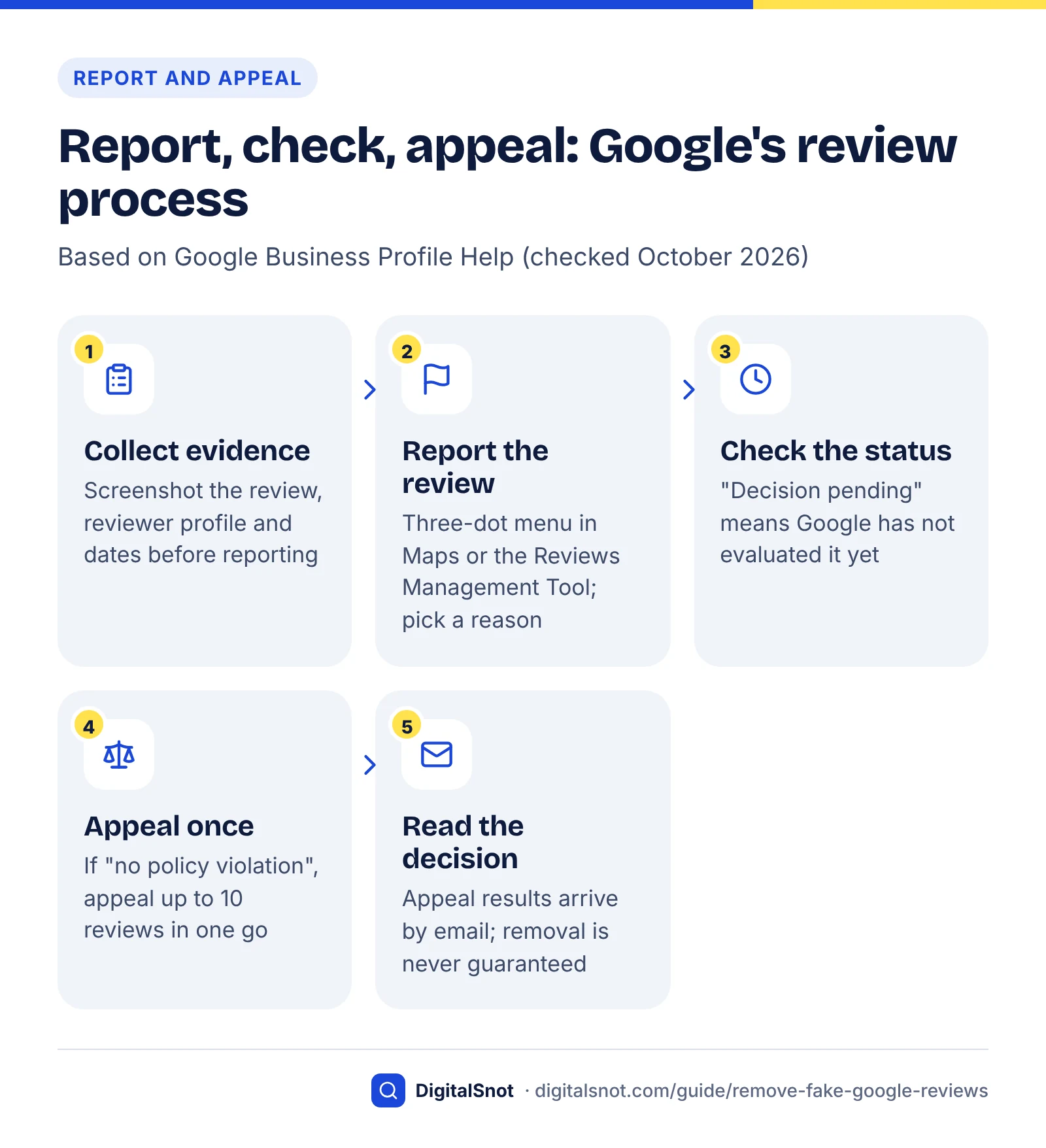
Route 1: report from Google Maps or your Business Profile
- Open Google Maps and find your business, or open your Business Profile and go to its reviews ("Read reviews").
- Find the review. In Maps, open the three-dot menu next to it; on your profile, use the report icon beside the review.
- Select Report review.
- Choose the reason that matches the policy breach you identified, then submit.
Route 2: report in the Reviews Management Tool
- Open the Reviews Management Tool, which is linked from Google's help page, and confirm the Google Account that manages the profile.
- Select the business.
- Choose the option to report a new review, find the review and select Report.
- Pick the reason, such as spam or profanity, and submit.
Use the tool even if you reported from Maps, because it is where you check the status and appeal. Nothing in Google's help suggests repeated flags from friends or staff speed things up, so report each review once, with the most accurate reason.
Check the status
In the Reviews Management Tool, choose to check the status of a review you reported. Google lists three statuses:
- Decision pending: the review has been flagged but not yet evaluated.
- Report reviewed – no policy violation: Google evaluated it and found no breach. You can appeal once.
- Escalated – check your email for updates: the review is under appeal, and Google will email you the result.
Google's page also notes that its systems occasionally remove legitimate reviews by mistake. If a genuine customer tells you their review has vanished, contact Business Profile support rather than asking them to post it again and again.
Appeal once, and make it count
- In the Reviews Management Tool, choose the option to check the status of a review you reported previously and see appeal options.
- Select Appeal eligible reviews. You can select up to 10 reviews in one appeal.
- Submit, then wait for the email. If Google finds a breach, the review is removed; if it complies with the policy, it stays live.
Because each review gets only one appeal, prepare it properly: know the exact policy section the review breaks and have your evidence ready (see the next section). If the reviews are part of one burst, our suggestion is to appeal them together, so the pattern is visible in a single request.
Report a fake Google review, step by step
What reporting cannot do
We found no paid, priority or "partner" removal channel in Google's Business Profile help. Agencies and "review removal" services use the same report, appeal, extortion and legal routes that you can use yourself for free. Any service that guarantees removal is promising something Google does not offer.
How to gather evidence that a review is fake
Evidence turns "I don't recognise this person" into "this review breaks a named policy, and here is why". Collect it before you report, because reviews can be edited and reviewer profiles can change or disappear.
- Capture the review. Screenshot it with the date, star rating and reviewer name visible, and copy the link to the review.
- Look at the reviewer's profile. Dozens of reviews across unrelated cities in one day, or a profile with a single review, are not proof alone, but they help show a pattern.
- Check your own records. Search bookings, invoices and your till system for the name, date and service mentioned, and record the result, including "no match".
- Look for a pattern. Several reviews within hours, similar wording, or a complaint no real customer has made are stronger together than apart.
- Document any relationship. For a suspected former employee or competitor, save the facts that show it, such as a leaving date or a public profile naming their employer.
- Keep every demand. If anyone asks for money, goods or services to remove reviews, keep screenshots that show the dates and the sender's contact details. Google's extortion report asks for exactly this.
A simple evidence log
Keep one row per review in a spreadsheet. It makes appeals faster and gives you a clear record if you later need a lawyer or the police.
| Column | What to record | Example (hypothetical) |
|---|---|---|
| Date found | When you first saw the review | 3 Oct 2026, 10:40 |
| Review link and screenshot | Direct link plus a saved image | Link and file name |
| Reviewer | Display name and profile link | "J. Smith", one review in total |
| Why we think it is fake | Facts only, no guesses about identity | No booking under this name; mentions a service we don't offer |
| Policy breached | The exact section name from Google's policy | Fake engagement |
| Reported | Date and route | 4 Oct 2026, Reviews Management Tool |
| Status and appeal | Each status change, appeal date and outcome | No violation found; appealed 9 Oct |
Two limits. You will rarely prove who wrote a review, and you do not need to: Google judges the review against its policy, not your theory of its author. And do not try to unmask or confront a reviewer; in the US the FTC's review rule bans using threats or intimidation to get negative reviews removed.
Review bombing and extortion: what to do
Review bombing is a sudden flood of negative reviews from people reacting to something other than a real visit, such as a viral post or a news story. Review extortion turns the same flood into a threat: someone posts fake one- and two-star reviews, then demands money, goods or services to remove them.
Google says it now responds to spikes directly. In its 2026 Maps post, Google says that when it sees a sudden spike in spam reviews, it will remove the fake content, pause new reviews on the profile, alert the Business Profile owner and show a banner telling consumers why contributions are paused. The same post says its systems were upgraded to stop scams such as demands for payment to remove fake one-star reviews.
If someone demands payment
- Do not pay or negotiate. Google's help page on negative review extortion scams warns that engaging or paying can encourage further attempts and does not guarantee the reviews will be removed.
- Preserve the evidence. Screenshot the demands with dates and sender details, copy the links to the suspicious reviews, and note when you first saw the spike and when the demand arrived.
- Use the merchant extortion report form. Google's help page links to it. Enter your contact and profile details, describe the reviews and how the extortionist contacted you, attach your screenshots and submit. Google says its team investigates and tells you the outcome, but does not share specifics for privacy and security reasons.
- Report the reviews themselves as well. Google says the extortion channel is only for direct demands for money or favours; the reviews still go through the normal report flow, usually as fake engagement.
- Consider a police report. Extortion is a criminal matter. Report it to your local police or national cybercrime reporting service and keep the reference number with your evidence log.
Review bombing or extortion: what to do
If it is a pile-on without a demand
- Report each review as off-topic or fake engagement, whichever the text supports.
- Reply to the most visible reviews with one calm, factual line (templates in the next section). Do not argue in the replies.
- If Google pauses reviews on your profile, resume asking customers once the pause lifts.
If you run a restaurant, café or bar, our post on Google Business Profile for restaurants covers the rest of the profile work that helps you recover.
How to reply to a fake review in public
Reply briefly, calmly and factually, writing for future customers rather than the reviewer. Say you cannot find a record of the visit, invite the person to contact you, and never accuse, threaten or share personal details.
A reply is the one part of a fake review you control. People deciding whether to book read it as evidence of how you treat customers.
Rules for replying
- Stick to facts you can check. "We cannot find a booking under this name" is safer than "this is a fake review from a competitor".
- Do not accuse genuine customers of lying. If you are wrong, you insult a real customer in public, and in the US the FTC rule bans false public accusations, threats or intimidation aimed at removing negative reviews.
- Never share personal information such as order or health details. Our local SEO guide for clinics covers patient privacy in replies.
- Offer nothing in return for removing or changing the review. A refund conditional on deleting it is an incentive tied to a review, which Google's policy bans.
- Keep it to two to four sentences. Long rebuttals read as defensive.
Three reply templates
Suspected fake, with no record of the visit:
Thank you for taking the time to post. We cannot find a booking or visit that matches this name or date, so we would like to understand what happened. Please contact us on [phone or email] so we can look into it.
Review meant for another business:
Thanks for your feedback. We don't offer [service] at [location], so this may be about a different business. If we have got that wrong, please get in touch on [phone or email] and we will put it right.
Review bomb after a news story or viral post:
We have received a number of reviews today from people who have not visited us, following [event]. We have reported them to Google. If you are a customer with a concern, please contact us directly on [phone or email].
If Google later removes the review, there is nothing more to do. If the review stays up, your reply stays beside it for every future reader, which is why the tone matters more than winning the argument.
When Google says no: legal routes and other options
If your appeal fails and the review makes false statements of fact that harm your business, Google has a separate legal removal process. It is slower and usually needs legal advice, so keep it for reviews that may be unlawful, not merely unfair.
Google's Report Content for Legal Reasons page explains the process: you pick the Google product, choose the legal reason, and include the specific URL of the content rather than a home page. If the same content appears in more than one Google product, Google asks for a separate notice for each. A legal request rests on the law where you are, not on Google's content policy.
Defamation law differs between countries, and an opinion ("the worst meal I've had") is usually treated differently from a false statement of fact ("they were shut down by the health inspector"). Take advice from a lawyer in your country before you file, and before you contact the reviewer about it.
Other routes worth knowing
- Competitors with fake positive reviews. Google's help page on reporting a business on Google Maps says reviews posted in exchange for payment, deals or discounts are prohibited. To report the business, open its place in the Maps app, tap Suggest an edit and choose Report business conduct.
- Fake or misleading listings. The same page points to the Business Redressal Complaint form for suspicious business names, phone numbers or website links, and lets you submit 10 or more profiles at once using a spreadsheet.
Review laws compared: US, UK and India
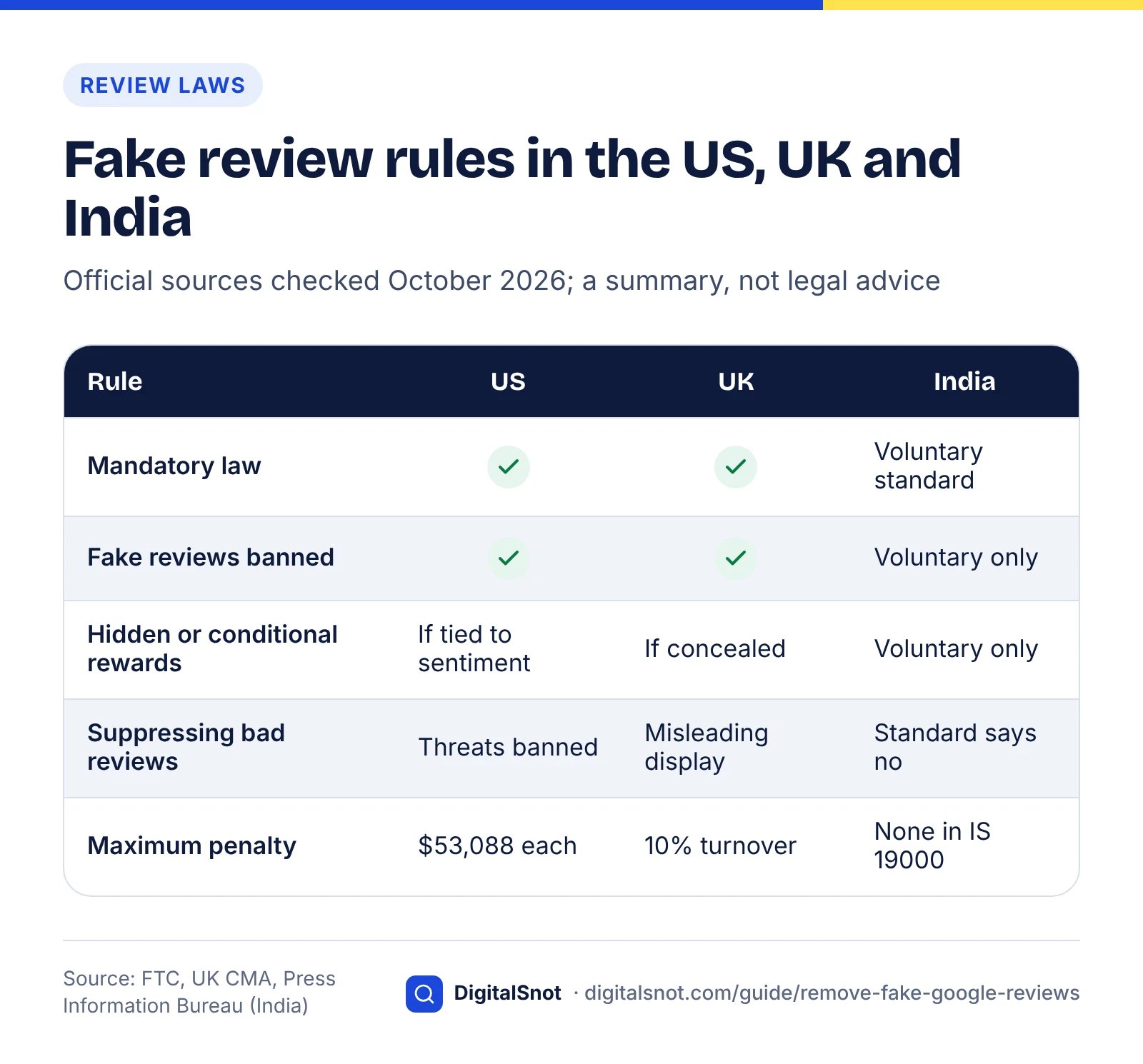
In the US and the UK, fake reviews are banned by specific, mandatory rules with heavy penalties. In India, the dedicated online reviews standard, IS 19000:2022, is voluntary, although general consumer law still applies. Google's own policy applies in all three on top of the law.
This is a summary for business owners, not legal advice, based on official pages checked in October 2026.
United States: the FTC Consumer Review Rule
The Federal Trade Commission announced its final rule banning fake reviews and testimonials in August 2024, and the rule became fully effective on 21 October 2024. It is binding federal law. Among other things, it bans:
- Creating, selling or buying fake reviews (by people who do not exist or never used the product) when the business knew or should have known.
- Rewarding reviews on condition that they express a particular sentiment, positive or negative.
- Undisclosed reviews by a company's officers and managers.
- Presenting a website the business controls as an independent review site.
- Suppressing negative reviews with unfounded legal threats, physical threats, intimidation or false public accusations.
Enforcement has started. On 22 December 2025 the FTC warned 10 companies about possible violations of the rule. The letters are not formal findings, but they say violations could lead to a federal lawsuit with civil penalties of up to $53,088 per violation.
United Kingdom: the DMCC Act and the CMA's guidance
Since 6 April 2025, the Digital Markets, Competition and Consumers Act 2024 regime has let the Competition and Markets Authority (CMA) decide for itself whether consumer law has been broken, without going to court, and fine a business up to 10% of its global turnover. Fake reviews are on the Act's list of banned practices.
The CMA's fake reviews guidance (CMA208), dated 4 April 2025, explains the ban under Schedule 20 of the Act. It covers fake reviews, concealed incentivised reviews, and publishing reviews or star ratings in a misleading way. Businesses that publish reviews must take steps to prevent fakes and hidden incentives, and should update ratings and review counts promptly when fakes are removed.
In January 2025 the CMA also secured undertakings from Google: businesses found boosting their ratings with fake reviews get a prominent warning on their Google profile and have their review function switched off, and repeat offenders can have all their reviews deleted for six months or more.
The CMA is now using its powers. On 27 March 2026 it opened investigations into five businesses over reviews and ratings, including whether Dignity asked staff to write positive reviews and whether Pasta Evangelists customers were offered undisclosed discounts for five-star reviews. The CMA said it expected to give an update in September 2026; we found no published findings (checked October 2026).
India: IS 19000:2022 and consumer law
India's dedicated standard is IS 19000:2022, "Online Consumer Reviews — Principles and Requirements for their Collection, Moderation and Publication". The Department of Consumer Affairs and the Bureau of Indian Standards (BIS) launched it in November 2022, and the government's statement on the framework says the standards are voluntary and applicable to every online platform that publishes consumer reviews.
In May 2024 the Department of Consumer Affairs consulted stakeholders on a draft Quality Control Order for IS 19000:2022, the step that would make it mandatory. The proposed prohibitions include publishing reviews collected with a biased objective, editing reviews to alter their message, and preventing or discouraging negative reviews. We found no official notice that the order has been finalised (checked October 2026), so treat IS 19000 as voluntary for now.
Voluntary does not mean anything goes. In 2023 the Central Consumer Protection Authority ordered a coaching institute to discontinue false testimonials and misleading claims on its website. In our view, invented reviews used in marketing carry a similar risk under general consumer law, and Google's policy applies in India regardless.
The three regimes side by side
| Question | United States | United Kingdom | India |
|---|---|---|---|
| Main rule | FTC Consumer Reviews and Testimonials Rule (16 CFR Part 465) | DMCC Act 2024 banned practices, explained in CMA208 | IS 19000:2022, a BIS standard |
| Mandatory or voluntary | Mandatory federal law | Mandatory law | Voluntary; a draft order to make it mandatory was consulted on in May 2024 |
| In force since | 21 October 2024 | 6 April 2025 | Launched November 2022 |
| Fake reviews | Banned: creating, selling or buying them | Banned practice | Against the standard's integrity and accuracy principles |
| Incentivised reviews | Banned if the reward depends on the sentiment | Banned if the incentive is concealed | Reviews collected with a biased objective should not be published |
| Suppressing negative reviews | Threats, intimidation and false accusations banned | Publishing reviews in a misleading way banned | Must not prevent or discourage negative reviews |
| Enforcer and maximum penalty | FTC; up to $53,088 per violation (December 2025 letters) | CMA; up to 10% of global turnover | No penalty in the standard itself; consumer law enforced by the CCPA |
For a small business, the practical answer is the same everywhere: follow the strictest version. No fake, bought, staff or conditional reviews, and no hiding or discouraging negative ones.
Never do these: buying, gating and incentivising reviews
Do not buy reviews, filter out unhappy customers or reward people for reviewing you. Each breaks Google's policy, most break the law in the US or the UK, and the penalties are shown to your customers.
When Google finds that an owner broke the fake engagement policy, its page on Business Profile restrictions says it may remove the reviews and also block new reviews for a set period, unpublish existing reviews for a set period and show consumers a warning that fake reviews were removed. A warning on your profile costs more trust than a few honest one-star reviews ever could.
The tactics to refuse
- Buying reviews, or paying for negative reviews of a competitor. Both are fake engagement under Google's policy and fall under the US and UK bans above.
- Review gating. Review gating is asking only the customers you expect to be happy, or using a "rate us first" form that sends only good ratings to Google. Google's policy bars businesses from discouraging negative reviews or selectively asking for positive ones.
- Incentives. Discounts, free items, prize draws or loyalty points in exchange for a review are banned by Google even if the review is honest.
- Staff, friends and family reviews, or review swaps with other businesses. These are conflicts of interest or reviews not based on a real experience.
- "Guaranteed removal" services that threaten reviewers. They can only use the routes described above, and in the US unfounded legal threats to suppress reviews break the FTC rule. Our guide to choosing an SEO agency lists questions to ask before you hire anyone.
Asking every customer for an honest review is allowed, and it works. Our post on getting more Google reviews without breaking the rules explains what Google allows and a routine you can start this week.
Protect your rating over the long term
The best protection against fake reviews is a steady flow of genuine ones, checked every week. The more real reviews you have, the less any single fake can move your average, and the sooner you spot a problem.
Worked example: why review volume protects you
Example (hypothetical): two cafés each have an average rating of 4.6. One has 10 reviews; the other has 100. Each receives one fake one-star review.
- Café with 10 reviews: (10 × 4.6 + 1) ÷ 11 = 4.27, a drop of 0.33 stars.
- Café with 100 reviews: (100 × 4.6 + 1) ÷ 101 = 4.56, a drop of 0.04 stars.
This is a simple average for illustration; Google does not publish exactly how it calculates the rating it displays. The point holds either way: a business with few reviews is far more exposed to a single fake, so building genuine volume is the most effective long-term defence.
A weekly and monthly routine
- Ask every customer, the same way, every time. Our free Google review link and QR generator builds a direct review link, a printable QR code and ready-to-send messages from your Business Profile; test the link once to check it opens the review form for the right location.
- Check new reviews weekly, and log anything suspicious while the reviewer's profile is still visible.
- Reply to every review within a week, good and bad, so any fake sits among genuine conversations.
- Keep profile access tidy by removing former staff and agencies as managers. Our Google Business Profile optimisation guide covers access and the rest of the profile.
- Watch your business facts, not just reviews. Google's 2026 Maps post says verified owners are getting email alerts to review important edits before they go live; act on them. Every few months, run your website and listings through our AI Answer Consistency Checker to catch a wrong phone number or address in one listing.
- Report monthly on rating, review count, reports filed and outcomes; see what to look for in a monthly SEO report if an agency does this for you.
Customer reviews
Reviews shape AI answers as well
AI assistants now describe and recommend local businesses too, and reviews are one of the signals our guide to local SEO for AI search examines. Our post on how ChatGPT recommends businesses covers the ChatGPT side.
Fake reviews are frustrating, but the process is learnable: name the policy, report through the right route, appeal once with evidence, reply calmly, and keep building genuine reviews. If you would like help with review monitoring and the rest of your profile, our local SEO service covers it, alongside our other SEO services, and you can get in touch to talk it through.
Free tools in this guide
By the numbers
- policy-violating reviews Google says its systems and analysts blocked or removed from Maps in 2025
- 292M+
- Source: Google
- appeal per review: if Google finds no policy violation in a review you reported, you can submit a one-time appeal
- 1
- Source: Google Business Profile Help
- maximum civil penalty per violation cited in the FTC's December 2025 warning letters under the US Consumer Review Rule
- $53,088
- Source: US Federal Trade Commission
- of global turnover: the most the UK CMA can fine a business directly for breaking consumer law, since 6 April 2025
- 10%
- Source: UK Competition and Markets Authority
Frequently asked questions
Can I delete a Google review from my Business Profile myself?
No. Business owners cannot simply delete customer reviews. You can report a review from Google Maps, your Business Profile or the Reviews Management Tool, and Google removes it only if it breaks Google's Maps user-generated content policy, for example fake engagement, conflict of interest, off-topic content, harassment or hate speech. Reviews that are negative but describe a genuine experience stay up, so reply to those publicly instead.
How do I report a fake Google review?
Open Google Maps, find your business, go to the review, open the three-dot menu and select Report review, then choose the reason that matches the policy it breaks. You can also report from the Reviews Management Tool, which is where you check the status later. Pick the most accurate reason, keep screenshots and a link to the review, and report each review once rather than flagging it repeatedly.
How long does Google take to decide on a reported review?
Times vary, so track it in the Reviews Management Tool. "Decision pending" means Google has not evaluated the review yet. "Report reviewed – no policy violation" means it found no breach, and you can then appeal once. "Escalated – check your email for updates" means your appeal is being handled and the result will arrive by email. Check back every few days and keep your evidence log up to date.
How many times can I appeal a Google review decision?
Once per review. If Google decides a review you reported does not break its policies, the Reviews Management Tool lets you submit a one-time appeal, and you can include up to 10 reviews in one appeal. Because there is no second chance, name the exact policy the review breaks and have your evidence ready before you appeal. If the appeal fails, only a legal route remains for unlawful content.
Will Google remove a review from someone who was never a customer?
Only if Google can see that it is not based on a real experience, which is fake engagement under its policy. A single normal-looking review from a name you cannot find in your records usually stays up, because customers often use nicknames or other people's accounts. Your case is stronger when the review is part of a sudden burst, mentions services you do not offer, or comes from a profile with a suspicious pattern.
What should I do if someone threatens bad reviews unless I pay?
Do not pay or negotiate. Google warns that paying can encourage further attempts and does not guarantee removal. Screenshot every demand with dates and sender details, note when the review spike started, and submit Google's merchant extortion report form, which is linked from its help page on negative review extortion scams. Report the reviews themselves through the normal flow too, and consider reporting the extortion to the police.
Is it illegal to buy Google reviews?
In the US and the UK, yes. The FTC's Consumer Review Rule, in force since 21 October 2024, bans buying fake reviews, with civil penalties of up to $53,088 per violation cited in 2025. The UK's DMCC Act has banned fake reviews since 6 April 2025, with CMA fines of up to 10% of global turnover. India's IS 19000:2022 review standard is voluntary, but Google bans paid reviews everywhere.
Can I offer a discount in exchange for a Google review?
No. Google's policy bans offering money, discounts, free goods or services in exchange for posting a review, or for changing or removing a negative one. This includes prize draws for reviewers. Reviews prompted by incentives can be removed, and businesses that break the rules may face restrictions on their profile.
Do paid review removal services work?
They have no special access. We found no paid or priority removal channel in Google's Business Profile help, so these services use the same report, appeal, extortion and legal routes you can use free. Be wary of any service that guarantees removal or sends legal threats to reviewers; in the US, unfounded legal threats used to suppress negative reviews are banned under the FTC's Consumer Review Rule.
What happens if Google catches a business with fake reviews?
Google removes the fake reviews and may restrict the profile. Its help page lists blocking new reviews for a set period, unpublishing existing reviews for a set period and showing customers a warning that fake reviews were removed. Under undertakings agreed with the UK CMA in 2025, offending businesses get a warning alert and their reviews switched off, and repeat offenders can lose all reviews for six months or more.
Sources
Every figure and claim in this guide comes from the sources below. We checked each one when writing and link to the original so you can read it yourself. Credit belongs to the authors and publishers listed. How we write and check our articles.
-
1
New ways we're protecting businesses on Maps
Google (The Keyword) · 2025 enforcement figures (292M+ reviews); spike pauses, banners and owner edit alerts (2026).
-
2
Report inappropriate reviews on your Business Profile
Google Business Profile Help · Only policy violations removed; report routes, statuses, one-time appeal of up to 10 reviews.
-
3
Prohibited & restricted content
Maps User Generated Content Policy Help · Policy sections: fake engagement, conflict of interest, off-topic, harassment, incentives.
-
4
Report negative review extortion scams on your Business Profile
Google Business Profile Help · Extortion pattern, do not pay, evidence to keep and the merchant extortion report form.
-
5
Report Content for Legal Reasons
Google Legal Help · Legal removal webform: choose product and reason, specific URLs, one notice per product.
-
6
Report a business on Google Maps
Google Maps Help · Report business conduct for paid reviews; Business Redressal Complaint form and bulk reports.
-
7
Federal Trade Commission Announces Final Rule Banning Fake Reviews and Testimonials
US Federal Trade Commission · What the August 2024 rule bans, including insider reviews and review suppression.
-
8
FTC Warns 10 Companies About Possible Violations of the Agency's New Consumer Review Rule
US Federal Trade Commission · 22 Dec 2025 letters; penalties up to $53,088 per violation; rule effective 21 Oct 2024.
-
9
CMA to boost consumer and business confidence as new consumer protection regime comes into force
UK Competition and Markets Authority · DMCC regime from 6 April 2025; direct enforcement; fines up to 10% of global turnover.
-
10
Fake reviews (CMA208)
UK Competition and Markets Authority · Banned practice under Schedule 20; publisher duties; updating aggregated ratings.
-
11
CMA secures important changes from Google to tackle fake reviews
UK Competition and Markets Authority · January 2025 undertakings: warning alerts, review blocking, deletion for repeat offenders.
-
12
Fake and misleading reviews: 5 businesses under CMA investigation
UK Competition and Markets Authority · Investigations opened 27 March 2026, including staff reviews and undisclosed discounts.
-
13
To safeguard and protecting consumer interest from fake and deceptive reviews in e-commerce, Bureau of Indian Standards (BIS) notifies framework
Press Information Bureau, Government of India · IS 19000:2022 launched November 2022; voluntary; applies to platforms publishing reviews.
-
14
Department of Consumer Affairs organizes stakeholder consultation on protection of consumers from online fake reviews
Press Information Bureau, Government of India · May 2024 consultation on a draft Quality Control Order; proposed prohibitions.
-
15
CCPA issues Order against M/s IQRA IAS Institute, to discontinue the false testimonials and misleading claims from their website with immediate effect
Press Information Bureau, Government of India · 2023 CCPA order against false testimonials under Indian consumer law.
-
16
Business Profile restrictions for policy violations
Google Business Profile Help · Sanctions for fake engagement: blocked and unpublished reviews, consumer warnings.


