Guide · Local SEO
Local keyword research: find what nearby customers search
How to find the searches nearby customers make, from "near me" and city terms to Hindi and Hinglish queries, and decide which deserve a page, a profile field or tracking.

On this page (11 sections)
- 1How local searches differ: implied and stated location
- 2Start with your services and real customer language
- 3Location modifiers and "near me" searches
- 4Free tools for local keyword ideas, compared
- 5Build a local keyword matrix and decide what gets a page
- 6Hindi, Hinglish and transliterated searches in India
- 7Voice and visual local searches
- 8Map keywords to your profile, service pages and location pages
- 9Track local rankings properly
- 10Local keyword mistakes to avoid
- 11Sources
Most local searches never mention a place. Someone in Gomti Nagar types "pest control" or "pest control near me", or asks their phone "deemak ka ilaj kaun karta hai", and Google supplies the location from where they are. Local keyword research is the process of finding the searches nearby customers make, both the ones that name a place and the ones that don't, and deciding which deserve a page, which belong on your Google Business Profile and which you should simply test and track.
This guide builds on our keyword research guide, which covers seed terms, intent, metrics, clustering and scoring. Here we cover only what changes when the customer is nearby, including "near me", Hindi and Hinglish searches, and results that change from one street to the next.
Who this is for: owners and in-house marketers of businesses that serve customers in a place, such as clinics, trades, salons, coaching centres, restaurants and shops, including Indian businesses whose customers search in English, Hindi and everything in between. What you'll be able to do: build a local keyword matrix, size local demand with free Google tools, decide which combinations of service, place and language get their own page, and set up tracking that reflects how local results really work.
How local searches differ: implied and stated location
Local searches come in two forms. In a stated search the person types the place ("dentist in Aliganj"); in an implied search they don't ("dentist", "dentist near me"), and the search engine uses their location instead. Most keyword lists capture only the stated form, which is why they understate local demand.
Google's help page on improving your local ranking says local results are based mainly on relevance, distance and prominence, and that when someone doesn't specify a location in their search, Google calculates distance from what it knows about where they are. For an implied search, the place comes from the searcher's device or connection, not from their words.
Google's Search Quality Rater Guidelines (September 2025 edition) treat the two cases separately, with their own sections on queries with an explicit location and on visit-in-person queries and user location. AI assistants behave in a similar way. OpenAI's help article on searching the web with ChatGPT says ChatGPT can estimate a general location from your IP address and may rewrite a local request into a search such as "top restaurants San Francisco". It also advises adding your city, neighbourhood or postal code when local results show the wrong area (checked October 2026).
| Query form | Example | Where the location comes from | What it means for research |
|---|---|---|---|
| Stated city | termite treatment lucknow | Typed by the searcher | Appears in keyword tools as its own phrase; match it in titles and copy |
| Stated area or landmark | pest control near hazratganj | Typed by the searcher | Usually too small for tools; find it in Search Console and your profile's search terms |
| Implied (bare service) | pest control | The searcher's location | Size it by setting a tool's location to your city, not by adding the city to the phrase |
| Proximity words | pest control near me, pest control mere paas | The searcher's location | Cannot be won by repeating the phrase; depends on your profile, reviews and distance |
| AI assistant prompt | who does termite treatment in gomti nagar? | Typed, or estimated from the connection and added to the search | Your pages need the stated form (service plus place) that the assistant searches with |
So you need tools that let you set a location, plus your own first-party data, because most neighbourhood-level variations are too small for any tool to report.
Start with your services and real customer language
The best local seed keywords come from your Business Profile and your own customer conversations, because they record how people near you actually ask. Keyword tools come second, to size and expand what you already know.
The general seed method is in the keyword research guide. A local business should add four sources that tool-led lists miss:
- Business Profile search terms. In your profile's Performance view, the Searches metric lists the search terms people used to find your business. Google's Business Profile performance help says the metric updates at the start of each month, can take up to five days to appear, and is available only for verified profiles. These are the terms that surfaced your listing itself, which your website analytics never sees.
- Calls, WhatsApp chats and enquiry forms. Write down the exact words, the language and script, and any place names callers mention ("near the metro station", "behind the market").
- Reviews, yours and competitors'. Customers name services, problems and neighbourhoods in their own words, often in Hindi or Hinglish.
- Front-line staff. Ask receptionists and technicians what people call each service, which areas callers say they are in, and what they ask first: price, timing or safety.
Write each service in two vocabularies
List every service the way you sell it and the way customers ask for it. A pest control firm sells "anti-termite treatment"; customers search "termite control", "deemak treatment" or "दीमक का इलाज". A dental clinic offers "endodontic treatment"; patients ask for a "root canal" or an "RCT". Keep both columns, note where each phrase came from, and let customer wording win when the two differ.
List the places customers name
Next, list the places: your city, the neighbourhoods you serve, landmarks people navigate by, pincodes and local spellings (customers may write "Gomti Nagar" or "Gomtinagar"). Include only places you genuinely serve within the time customers expect. A keyword for an area you cannot reach brings enquiries you will have to turn away, and it makes your service area look larger than it is.
Location modifiers and "near me" searches
A local modifier is a word that narrows a search: a place, a proximity phrase such as "near me", or a qualifier such as price, quality, urgency or audience. Each family signals a different need, and only some of them justify new content.
- Place: city, area, landmark or pincode ("in Indira Nagar", "near Hazratganj").
- Proximity: near me, nearby, closest, and in Hinglish "mere paas", "paas mein" or "aas paas".
- Price: cost, charges, rate, fees, cheap, and "kitne ka" or "kharcha".
- Quality and trust: best, top rated, trusted, "sabse achha".
- Urgency and time: open now, 24 hours, same day, emergency, "abhi", "aaj".
- Audience and attribute: for flats, for offices, herbal, safe for pets, female doctor, home visit.
What "near me" changes, and what it doesn't
"Near me" tells the search engine to use the searcher's location, which it usually does for a local service anyway. You cannot move closer to a searcher by writing "near me" on a page, so treat it as a query to test and track rather than a phrase to repeat in your copy. What wins near-me searches is the same as for implied ones: an accurate address or service area, a complete Business Profile and a steady flow of genuine reviews, which our post on getting more Google reviews covers.
In AI Mode the wording can matter more. A 2026 study by Local SEO Data, a company that sells a local search data API, ran 1,120 searches across seven service categories in 13 US cities in May 2026. It found that 28.5% of businesses shown in the local pack were missing from AI Mode for the same query. For a bare "divorce lawyer" search, AI Mode returned no business listings at all; adding "near me" brought listings back in 38 of 38 tests.
That is one vendor, one country and a narrow set of queries, so don't read it as a rule for every category or for Indian searches. It is still reason enough to keep "near me" (and "mere paas") as a column in your matrix, and to check AI Mode both with and without it.
Implied vs stated local searches
Free tools for local keyword ideas, compared
Use four free Google tools together: Business Profile search terms show what surfaces your listing, Search Console shows what surfaces your website, Keyword Planner estimates demand in a location you choose, and Google Trends compares wording across regions. Each sees a different slice of local search, and none sees all of it.
To build this table we read each tool's Google help pages in October 2026 and recorded the same four things: what it reveals about local demand, how precise its location data is, how it handles languages and scripts, and its main blind spot. You can repeat the check; help pages change, so re-read them before relying on a detail.
| Tool | Local signal | Location precision | Languages and scripts | Main blind spot |
|---|---|---|---|---|
| Business Profile performance (Searches) | Terms people used to find your listing | Your own profile only | Terms as people typed them | Monthly; verified profiles only; nothing on competitors |
| Search Console Performance report | Queries that showed your website | Country is the finest location filter | Queries as typed; regex can match any script | Only queries you already appear for |
| Google Keyword Planner | Average monthly searches in a location you set | Country, territory, region or city | Each spelling and script is its own keyword | Built for advertisers; exact-match figures only |
| Google Trends | Relative interest, ranked by region or city | Regions and cities; metros in some countries only | Compare terms in different scripts side by side | Relative interest, not search counts |
Keyword Planner: set the location, then compare bare and stated terms
Keyword Planner is the free Google tool that estimates search volume for a specific city. Google's guide to refining keyword ideas says you can enter countries, territories, regions and cities as locations, and that a Nearby option helps you find places close to the one you entered. Its Keyword Planner help page says average monthly searches are specific to the location and network settings you select, are averaged over 12 months by default, and are reported for exact-match keywords.
- Open Discover new keywords and enter your service seeds in every form customers use: English, Hinglish and Hindi.
- Set the location to your city, not your country. Use the Nearby option to check whether neighbouring towns you serve should be added.
- Note the volume for the bare service term ("pest control") with the location set to your city. Because the figure is tied to the location you set rather than to the words typed, it can include people in the area who never typed the city.
- Note the volume for the stated version ("pest control lucknow"). The gap between the two numbers shows how much of your local demand never names the city.
- Treat every figure as a relative signal. If your account shows ranges rather than exact numbers, use them to compare options, not to forecast visits.
Search Console: filter by country and device, then use regex
Search Console cannot filter by city, but it can show which local phrasings already earn your site impressions. Google's help page on advanced filtering in the Performance report explains that you can combine filters such as country and device, and filter queries with a Custom (regex) option. The regex uses RE2 syntax and matches anywhere in the query unless you anchor it with ^ or $.
Set the country to India (or your own country), then try groups like these in the Queries filter:
- Proximity words:
(near me|nearby|mere paas|paas mein|मेरे पास) - Your areas, with and without spaces:
(gomti ?nagar|indira ?nagar|aliganj|hazratganj|गोमती) - One service across scripts and spellings:
(termite|deemak|dimak|दीमक)
Compare Mobile with Desktop for each group, then switch to the Pages tab to see which URL each group lands on. Two of your pages sharing the same area or service group is an early sign that they are competing with each other.
Google Trends: compare wording across regions
Trends tells you which wording people use where, not how many people search. Google's help page on exploring results by region says a search shows a list of regions or cities ranked by the term's popularity, and that metro areas are available only for some countries. Compare "termite", "deemak" and "दीमक" within India to see which states lean towards which form, and make sure your pages use the forms your area favours.
Sort the questions you collect by intent
Calls, reviews and People also ask will give you dozens of full questions. Paste up to 50 into our free AI Prompt Intent Classifier to sort them by intent, from information to ready to buy. Buying questions ("deemak control kitne ka hai") belong on service pages; information questions ("how do I know if I have termites") may suit a guide or FAQ. Check the sorting yourself: the tool reads wording, not your market.
Build a local keyword matrix and decide what gets a page
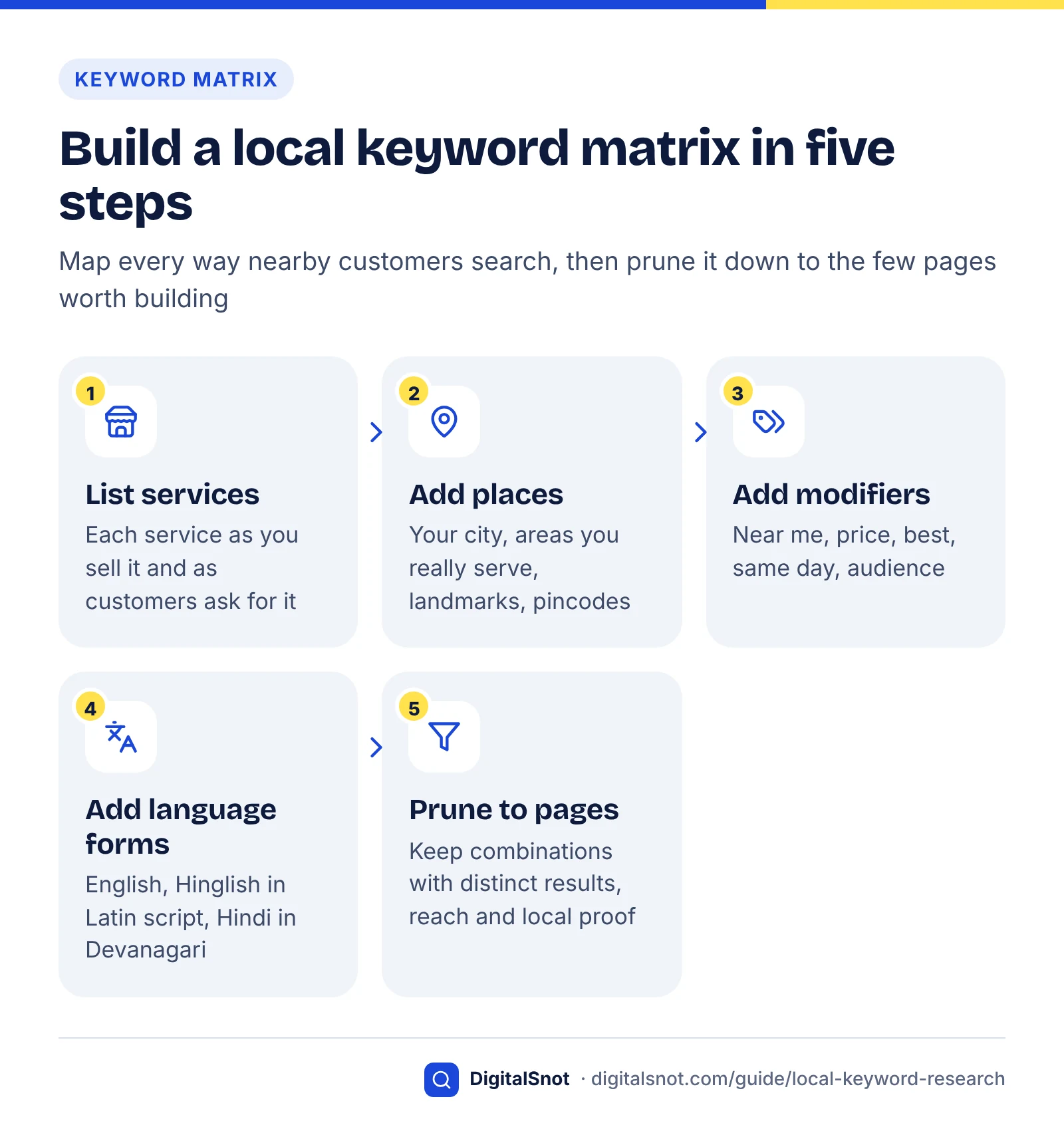
A local keyword matrix lists every combination of service, place, modifier and language form, so you can see the whole demand space before deciding what to build. Most cells never need their own page: one strong service page, your Business Profile or a tracked test query covers them.
This is a framework we built for this guide. The example business is hypothetical; the phrasings are realistic ways people search, but no volumes are shown because they must come from your own tools and data.
Example (hypothetical): a pest control company based in Gomti Nagar, Lucknow, with a second technician team in Aliganj, offers termite treatment, cockroach control and bed bug treatment across the city.
| Axis | Values in the example | Count |
|---|---|---|
| Service | termite treatment, cockroach control, bed bug treatment | 3 |
| Place | Lucknow, Gomti Nagar, Indira Nagar, Aliganj, Hazratganj | 5 |
| Modifier | none, near me, cost, best, same day | 5 |
| Language form | English, Hinglish (Hindi in Latin letters), Hindi in Devanagari | 3 |
| Combinations | 3 × 5 × 5 × 3 | 225 |
That is 225 combinations before spelling variants such as "deemak" and "dimak" or "Gomti Nagar" and "Gomtinagar". Nobody should build 225 pages. The matrix is a map of demand and a test list, not a publishing plan.
One cell, many strings
Take a single cell, termite treatment × Gomti Nagar × cost, and it still appears in several forms:
| Form | How the search might look |
|---|---|
| English | termite treatment cost gomti nagar |
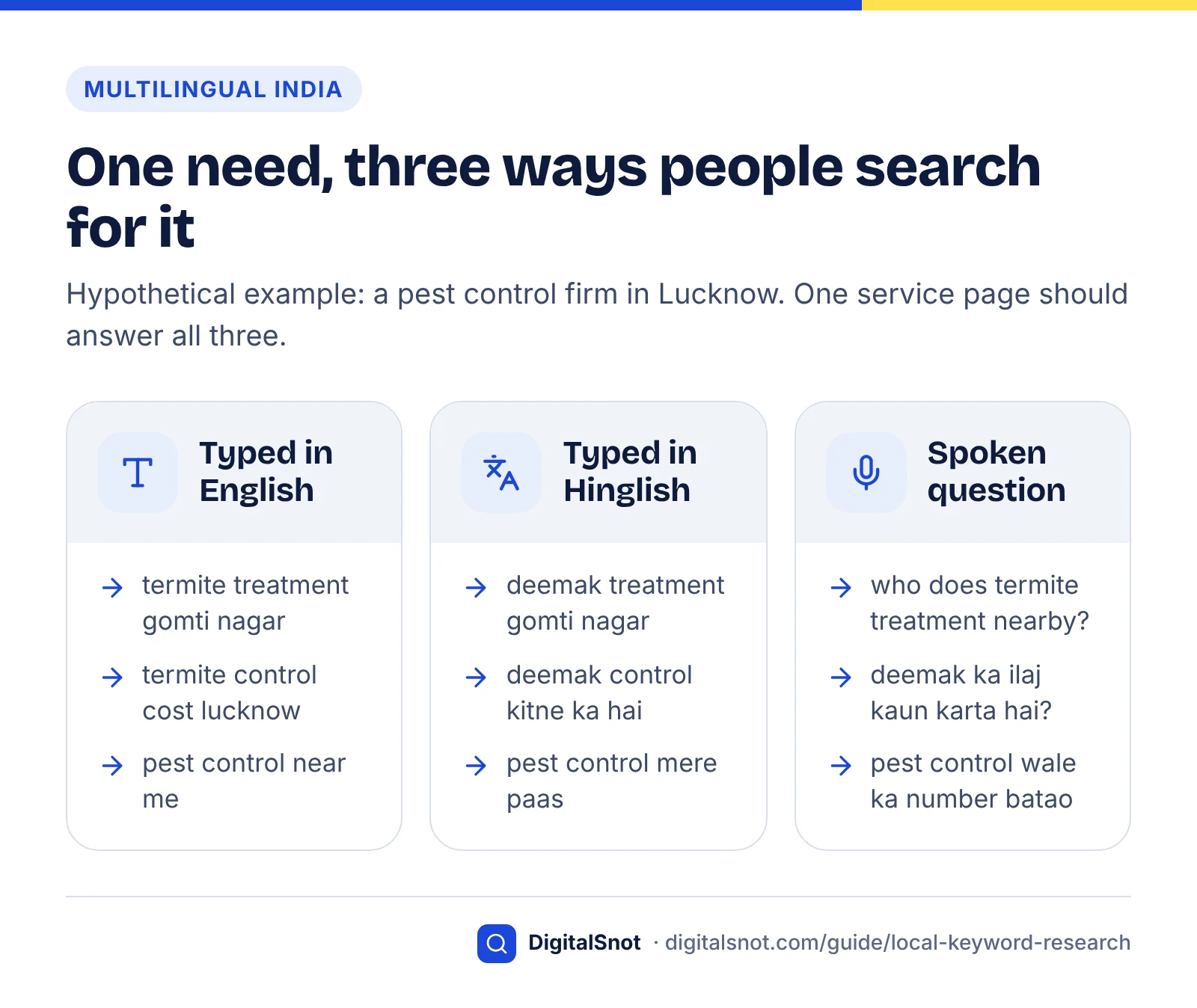
| Hinglish (Latin script) | gomti nagar mein deemak treatment kitne ka hai |
| Hindi (Devanagari) | गोमती नगर में दीमक ट्रीटमेंट का खर्चा |
| Mixed | termite treatment ka rate lucknow |
| Spoken | gomti nagar mein deemak ka ilaj kaun karta hai |
All five share one need and should land on one page: the termite treatment page, with a price section and a list of the areas served. They differ only in how you find and measure them.
Decide which combinations get a page
Run every combination through two pass-or-fail gates before scoring it. Reach: do you actually serve this place, in the time customers expect? Local proof: can you publish something specific to this place, such as a team based there, jobs done there, local conditions, or prices and timings that differ? A combination that fails either gate gets no page, however attractive its volume. Google's spam policies list "multiple domain names or pages targeted at specific regions or cities that funnel users to one page" as an example of doorway abuse.
Combinations that pass both gates go through the value × intent × feasibility score from our keyword research scoring model. Then apply this decision table:
| If the combination is… | Then… | Why |
|---|---|---|
| A distinct service whose results differ from your other services | Give it a service page | Different results mean a different need |
| A service plus the city you are based in | Cover it on the service page and your Business Profile | The city version and the implied version share one need |
| A service plus an area that passes both gates | One location page for the area, linking to each service | Avoids a page for every service × area pair |
| An area that fails either gate | List it in an "areas we cover" section and your profile's service area | Honest coverage without a thin page |
| A "near me" or implied form | No page; strengthen the profile and reviews, and test it | Proximity comes from the searcher's location |
| A price modifier | A price section on the service page; a separate cost guide only if the results are guides | Price questions are part of choosing a provider |
| "Best" or "top rated" | Earn reviews and third-party mentions; no self-ranked list | "Best" is judged on reputation, not on your own claims |
| Same day, 24 hours or open now | A section and accurate profile hours, only if true | A false promise costs more than the click is worth |
| Hindi in Devanagari, with steady demand you can see | A full Hindi version of the service page on its own URL | Google reads a page's language from its visible text |
| Hinglish or a spelling variant | Use the common form naturally on the English page; no separate page | Same need, same page; a variant page would be a near-duplicate |
For the hypothetical firm, the 225 combinations come down to three service pages (each with price, areas and same-day sections, and the Hinglish terms customers use), one location page for Aliganj, where the second team is based, and an "areas we cover" section listing Indira Nagar and Hazratganj. Its profile search terms show plenty of English and Hinglish but few Devanagari searches, so it replies to Hindi reviews in Hindi and leaves Hindi pages for its next quarterly review. Everything else becomes a list of about 20 test queries to track.
Price questions raise a separate choice: whether a cost guide should be a page of its own or a section of the service page. Our post on service pages versus blog posts explains how to tell from the results page.
Hindi, Hinglish and transliterated searches in India
Indian customers search in English, in Hindi written in Devanagari, and in Hindi typed with Latin letters, often called Hinglish, and they frequently mix all three in one query. Treat each script and spelling as a separate keyword in your tools, but as one need when you plan pages.
Google has built for this. In October 2025, after launching AI Mode in English and Hindi in India, Google began rolling out AI Mode in seven more Indian languages: Bengali, Kannada, Malayalam, Marathi, Tamil, Telugu and Urdu. The same post launched Search Live, which lets people talk to Search and use their camera, in English and Hindi. In August 2026 Google began rolling out Ask Maps in Hindi, so people in India can ask Google Maps about places in Hindi (checked October 2026).
One thing Google has not documented is how AI Mode handles typed Hinglish that mixes Hindi and English words in Latin script. We found no Google statement on it (checked October 2026). Test it yourself: run your Hinglish queries in AI Mode and note whether the answers and businesses match the English and Hindi versions.
Hinglish keyword research in 15 seconds
Why scripts and spellings matter in your tools
- Different scripts are different strings. "दीमक" and "deemak" are separate keywords to a tool. A keyword tool cannot tell which language a romanised word belongs to, so it will not separate Hinglish from English for you. Enter each script and spelling as its own keyword.
- Romanised spellings vary. There is no single correct way to type Hindi in Latin letters: customers write "deemak" or "dimak", "achha" or "accha", "paas" or "pass". Collect every spelling customers use and group them with regex rather than picking one.
- Names cross scripts badly. In a 2021 post, Google Research explained that most place names in Google Maps in India weren't stored in Indian scripts, so a search in Gujarati for a hospital known by its English initials, KD Hospital, failed to find it and showed a hospital further away. Google built models to transliterate place names into 10 Indian languages, and notes that the automatic output may contain some errors. Check how your business and area names appear when someone searches in Hindi.
How to write pages for multilingual searchers
Google's guidance on managing multilingual sites says it works out a page's language from the visible content, not from code-level language attributes or the URL, and it recommends separate URLs for each language version, connected with hreflang annotations. Three practical rules follow:
- A Hindi page should be fully in Hindi, written or checked by a fluent speaker, on its own URL. A page that mixes English paragraphs with machine-translated Hindi serves neither audience.
- Hinglish terms belong inside your English pages, used naturally: "termite (deemak) treatment", or an FAQ question phrased the way customers ask it. Many people who type Hinglish read English pages comfortably, and a page written entirely in romanised Hindi is hard to read and maintain.
- Your Business Profile name stays exactly as it appears on your signage. Google's guidelines for representing your business say the name should reflect your real-world business name, so don't add a Hindi or English version that your signage doesn't show. Reply to reviews in the reviewer's language instead; it reads naturally and shows you serve customers in that language.
Voice and visual local searches
Voice and camera searches start from spoken questions and photos rather than typed keywords, so you research them by collecting what customers say and what they photograph. No Google report separates them out, which makes this qualitative work.
They matter more in India than almost anywhere. At Google for India 2022, Google said the share of Indians using voice search every day was nearly twice the global average, and it announced a speech recognition model built to better understand people who speak in Hinglish. In its October 2025 AI Mode announcement, Google described people in India as its largest user base for both voice and visual search globally.
Spoken searches: add a question column
Spoken searches are full sentences, often code-mixed: "Gomti Nagar mein deemak ka ilaj kaun karta hai?" rather than "termite treatment gomti nagar". Add a "spoken question" column to your matrix for each service and fill it from call notes. These questions make good subheadings and FAQ entries on the service page, because they match how people actually ask.
Our free AI-Friendly FAQ Generator suggests the FAQ questions a service page is missing, with an outline for each answer, and scores your answers as you write them. Use the suggestions only as a starting point: rewrite the questions in the words your callers use, add the local details only you know, and check every fact before you publish.
Visual searches: name the problem people photograph
A customer who photographs termite damage on a door frame, or a bug on a mattress, starts with an image, not a word. When the search moves on to text, it uses the name of the problem. Make sure each service page names the problems in the words customers use, shows clear photos of what the problem looks like, and describes them in captions and alt text. Don't expect a separate "visual keyword" list from any tool; there isn't one.
Map keywords to your profile, service pages and location pages
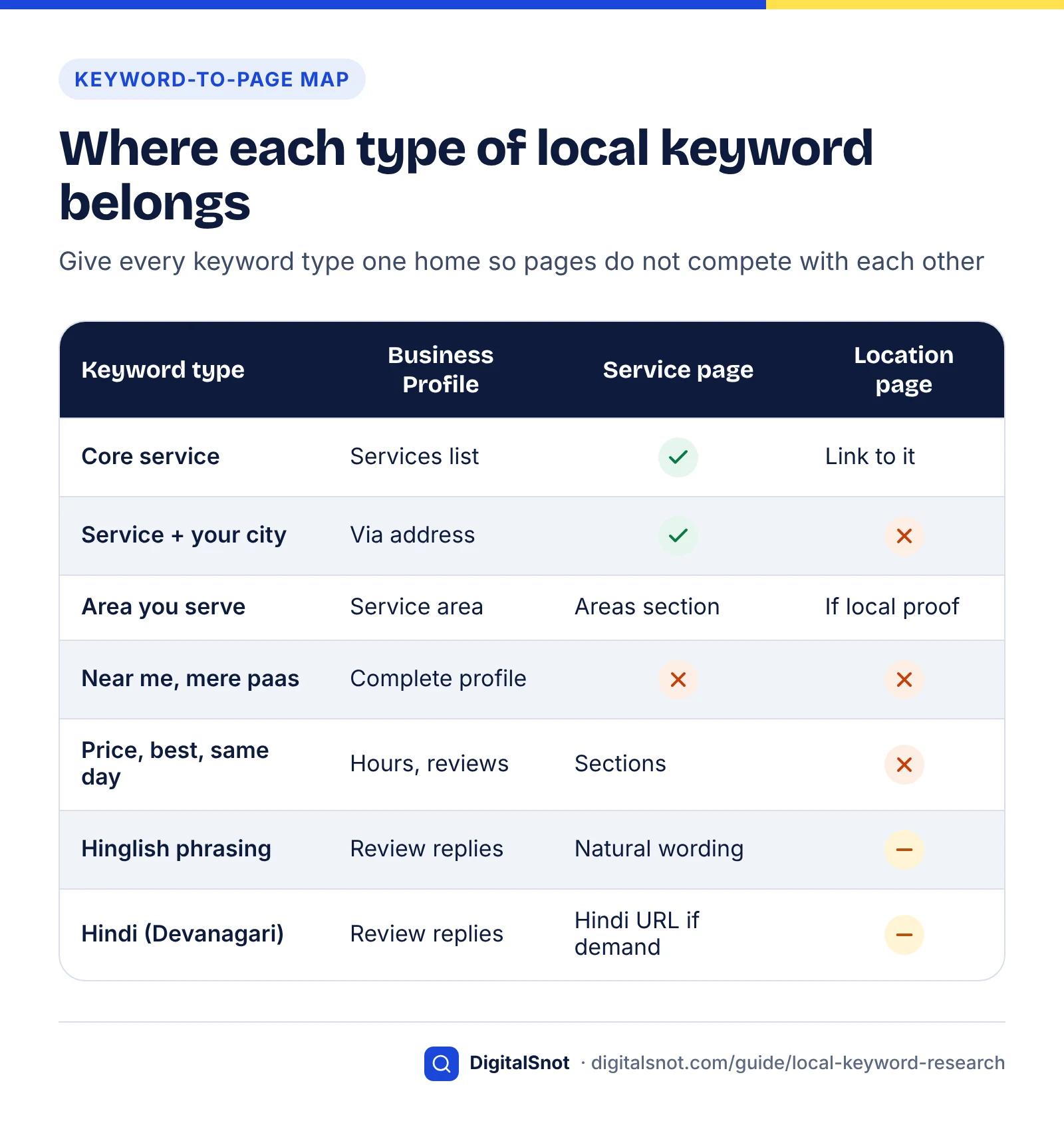
Give each keyword type one home. Your Business Profile carries what Google matches to your listing (categories, services and service area), service pages carry each service in every way customers phrase it, and location pages exist only for places where you can show real local proof.
Business Profile
- Name: exactly as on your signage. Google's guidelines say that including unnecessary information, such as location details or service details, isn't permitted and could lead to the suspension of your profile.
- Categories: the guidelines say not to use categories solely as keywords. Pick the category that describes your core business, then add others only where they are true.
- Services and service area: list each service in customer wording and set only the areas you really serve.
Our Google Business Profile optimisation guide walks through every field. Clinics have an extra layer, practice versus practitioner listings, which our post on local SEO for clinics explains.
Service pages
Each service page targets one service cluster in all its forms: the English name, the Hinglish term, price and same-day questions, and the areas served. Put the service and city in the title; a title carrying an area and a city gets long quickly, so check it in our free Google SERP Preview, which shows in pixels where titles and descriptions truncate on desktop and mobile. Our post on title tag mistakes covers the usual errors, and the on-page SEO checklist covers headings, copy and internal links.
Location pages
Build one page per place that passes both gates, and fill it with what only that place has: the team based there, typical jobs, local conditions, directions and timings. If you cannot write three specific facts about an area, it belongs in the "areas we cover" list.
Track local rankings properly
Track local keywords by area, device and language, starting with first-party data: your profile's search terms, Search Console filtered by country, device and regex groups, and repeated checks from the places you serve. A single rank check from your office tells you little, because local results depend on how far the searcher is from you.
Local map results
A monthly routine
- Record your profile's search terms once the month's data appears, and tag each term by matrix axis: service, place, modifier and language form.
- Run your Search Console regex groups for places, proximity words, Hinglish and Devanagari terms, filtered to your country, and compare mobile with desktop.
- Check rankings from where customers are. Ask staff in different areas to search on their phones, or use a rank tracker that checks from several points across your service area. Paid grid trackers do this at scale; compare them on how many points they check, how often, and whether they report Maps and AI answers separately.
- Test AI answers repeatedly. Run the same 10–20 test queries in AI Mode with and without "near me", in English and Hindi, several times each, and record how often you are named. Our guide to local SEO for AI search sets out a full testing method, and our guide to the Search Console generative AI report explains what Google's own AI data can and cannot tell you.
Read the signals: a decision table
| If tracking shows… | Then… |
|---|---|
| An area name in your profile search terms with no matching content | Add it to your areas section; run both gates before considering a page |
| Devanagari queries growing in Search Console | Plan a full Hindi version of your top service page |
| Two of your pages appearing for the same area or service group | Merge them, or give each a distinct target |
| Strong Maps visibility but no AI Mode mentions for bare queries | Compare near-me and bare versions over several runs; strengthen profile completeness and reviews |
| Impressions for an area you don't serve | Make your service area clear on the page and profile; don't chase it |
Review the whole matrix every quarter, and whenever you add a service, a branch or a language. When you report results, show trends by area and service rather than single positions; our post on what a monthly SEO report should include lists what to ask for.
Local keyword mistakes to avoid
Most local keyword mistakes come from treating a place name as a keyword to repeat rather than a fact to support. Avoid these:
- Repeating "near me" in titles and copy. It reads badly and does not change where the searcher is.
- Building a page for every service × area pair. Near-identical city pages are the pattern Google's doorway abuse policy describes.
- Stuffing keywords or areas into your Business Profile name. It breaks Google's guidelines and risks suspension.
- Researching only in English. In India, your customers' Hindi and Hinglish phrasing may be where competitors are weakest.
- Trusting one rank check or one AI answer. Local results change with the searcher's location, and AI answers change from run to run.
Local keyword research rewards businesses that know their customers' words and their own patch. Start with your profile's search terms and a week of call notes, build the matrix, prune it hard, and publish fewer, better pages. If you would like help building the matrix and the pages behind it, our local SEO service covers keyword research, profiles and location strategy, and you can get in touch to talk it through.
Free tools in this guide
By the numbers
- AI Mode tests in which adding "near me" to a bare "divorce lawyer" search brought local listings back (US, May 2026)
- 38 of 38
- Source: Local SEO Data via PRWeb
- of local-pack businesses were missing from Google AI Mode for the same search (1,120 searches, 13 US cities, May 2026)
- 28.5%
- Source: Local SEO Data via PRWeb
- Indian languages AI Mode works in besides English: Hindi, plus seven more Google began rolling out in October 2025
- 8
- Source: Google India Blog
- Google says people in India are its largest user base for both voice and visual search globally (October 2025)
- Largest
- Source: Google India Blog
Frequently asked questions
What is local keyword research?
Local keyword research is the process of finding the searches people near your business make, including the many that never name a place, and deciding where each belongs: on your Google Business Profile, a service page, a location page or a list of queries you track. It extends ordinary keyword research with location settings, "near me" behaviour, local language and spelling, and the question of which places deserve their own page.
Should I put "near me" in my page titles or content?
No. "Near me" tells the search engine to use the searcher's location, which it usually does for local services anyway; Google says that when no location is given, it calculates distance from what it knows about the searcher. Repeating the phrase does not bring you closer. Put your service and city in titles, keep your Business Profile complete and accurate, and use "near me" as a query you test and track.
How do I find local search volume for my city?
Use Google Keyword Planner with the location set to your city. Google says its average monthly searches are specific to the location and network settings you choose and are averaged over 12 months by default. Compare the bare service term with the version that includes your city: the difference shows how much local demand never names the place. Treat the figures as relative signals, especially if your account shows ranges.
How can I see what people search to find my Google Business Profile?
Open your verified Business Profile, go to Performance and look at the Searches metric, which Google describes as the search terms people used to find your business. It updates at the start of each month and can take up to five days to appear. Record the terms every month and tag them by service, area, modifier and language to spot new keywords and areas worth covering.
Does Search Console show which city a search came from?
No. Search Console's Performance report filters by country, not city, alongside device, query and page. To study local searches, filter to your country, then use a Custom (regex) query filter to group area names, proximity words such as "near me", and Hindi or Hinglish terms. For city-level demand, use Keyword Planner with a city location and your Business Profile search terms.
Should I create separate pages for Hindi or Hinglish keywords?
Create a separate Hindi page only when you can see steady demand in Devanagari and have a fluent speaker to write and maintain it, on its own URL with hreflang annotations; Google works out a page's language from its visible text. Hinglish searches usually belong on your English page: use the common Hinglish term naturally and phrase FAQs the way customers ask, rather than building a romanised Hindi page.
How many location pages does a local business need?
Only as many as there are places you genuinely serve and can say something specific about, such as a team based there, local jobs, local conditions or different timings. Make one page per place, not one per service and place. Google's spam policies list pages targeted at specific regions or cities that funnel users to one page as doorway abuse, so near-identical city pages are a risk, not a shortcut.
Can I add my city or keywords to my Business Profile name?
No. Google's guidelines say your business name should match your real-world signage, and that including unnecessary information such as location details or service details is not permitted and could lead to suspension. Repeating the name in several scripts or languages is also listed as unacceptable. Put services in the services list, set your service area, and let your address and reviews do the local work.
How do I research voice searches for a local business?
Collect the questions customers actually say, from call notes, WhatsApp messages and front-line staff, because no Google report separates voice searches. Spoken queries are full sentences and often mix languages, such as "Gomti Nagar mein deemak ka ilaj kaun karta hai". Add a spoken-question column to your keyword matrix and answer the most common questions as headings or FAQs on the relevant service page.
How should I track local keyword rankings?
Track by area, device and language rather than with one rank check from your office, because local results depend on where the searcher is. Each month, record your Business Profile search terms, run Search Console regex groups for areas, proximity words and Hindi terms, check rankings from several points across your service area, and repeat AI Mode tests with and without "near me" several times.
Sources
Every figure and claim in this guide comes from the sources below. We checked each one when writing and link to the original so you can read it yourself. Credit belongs to the authors and publishers listed. How we write and check our articles.
-
1
Tips to improve your local ranking on Google
Google Business Profile Help · Relevance, distance and prominence; distance from the searcher's location when none is specified.
-
2
General Guidelines (Search Quality Rater Guidelines, 11 September 2025)
Google · Separate sections on explicit-location queries and visit-in-person queries and user location.
-
3
Searching the web with ChatGPT
OpenAI Help Center · Approximate IP-based location, location added to rewritten searches, adding a city or postcode.
-
4
Local SEO Data Study Finds 28.5% of Local Pack Businesses Are Invisible in Google AI Mode
Local SEO Data via PRWeb · 1,120 searches, 13 US cities (May 2026): 28.5% missing from AI Mode; "near me" restored listings in 38 of 38.
-
5
Understand your Business Profile performance & insights
Google Business Profile Help · Searches metric: terms used to find the business, monthly updates, verified profiles only.
-
6
Refine your new keywords in Keyword Planner
Google Ads Help · Location targeting by country, territory, region or city, and the Nearby option.
-
7
Use Keyword Planner
Google Ads Help · Average monthly searches specific to location and network; 12-month default; exact-match volumes.
-
8
Performance report (Search results): Advanced filtering and comparison
Search Console Help · Combining country and device filters; Custom (regex) query filters, RE2 syntax and matching rules.
-
9
Explore results by region
Google Trends Help · Ranked regions and cities, drilling down to metro areas, metros only in some countries.
-
10
Spam Policies for Google Web Search
Google Search Central · Doorway abuse, including pages targeted at specific regions or cities that funnel users to one page.
-
11
Supercharging Search for India: New Languages in AI Mode & Search Live debuts
Google India Blog · AI Mode in seven more Indian languages, Search Live in English and Hindi, voice and visual user base (Oct 2025).
-
12
Ask Maps gets more helpful in India
Google India Blog · Ask Maps rolling out in Hindi in India (August 2026).
-
13
Improving Indian Language Transliterations in Google Maps
Google Research · Place names transliterated into 10 Indian languages; the KD Hospital search example; possible errors.
-
14
Managing Multi-Regional and Multilingual Sites
Google Search Central · Language read from visible content; separate URLs per language; hreflang annotations.
-
15
Guidelines for representing your business on Google
Google Business Profile Help · Names match the real-world business name; no location or service details in names; categories not as keywords.
-
16
Google for India 2022: Using AI to make Google more helpful, secure, and private for India's changing digital needs
Google India Blog · Daily voice search use in India nearly twice the global average; Hinglish speech recognition model.


