Guide · Keyword research and content
YouTube SEO for AI answers: get your videos cited
Which topics deserve a video, and how to write titles, chapters and transcripts, embed videos on your site and measure citations in AI Overviews and ChatGPT.
On this page (12 sections)
- 1Why YouTube shows up so often in AI answers
- 2What the citation studies show, and what they don't
- 3Is video worth it for your business? A quick test
- 4Choose topics where AI answers need video
- 5Titles, descriptions and chapters machines can read
- 6Transcripts and captions
- 7Embed videos on your site with VideoObject markup
- 8A video-page checklist for small businesses (our analysis)
- 9Earn mentions in other creators' videos
- 10Measure video visibility in AI answers
- 11A 90-day video plan for a small business
- 12Sources
YouTube SEO for AI answers is the work of making your videos easy for AI Overviews, AI Mode, ChatGPT search and YouTube's own AI search to find, understand and cite. It overlaps with ordinary YouTube SEO, but the goal is different. Instead of chasing views and subscribers, you want your video, or the page it sits on, to be the source an AI answer points to when a customer asks a question you can answer.
The goal is worth taking seriously because YouTube is now one of the most cited sources in AI answers. In Ahrefs' September 2026 ranking of the websites Google AI Overviews cite most, youtube.com came first, ahead of Reddit and Wikipedia. But a citation share across a huge set of queries says nothing about whether video suits your business, or which of your topics deserve one. This guide helps you decide that first, then shows how to make each video readable by machines.
Who this is for: owners of local and service businesses, and in-house marketers, who have a YouTube channel or are considering one after seeing videos cited in AI answers. What you'll be able to do: test whether video is worth it for you, score topics, write titles, descriptions and chapters that machines can read, fix captions and transcripts, embed videos on your own site with VideoObject markup, and measure whether any of it shows up in AI answers.
Why YouTube shows up so often in AI answers
YouTube shows up often because many questions are "show me" questions, and because a YouTube video carries a lot of text that machines can read: a title, a description, chapters and a transcript. Google also states plainly that video is part of what its AI features can use.
Google's AI features and your website documentation lists "supporting your textual content with high-quality images and videos, when applicable" among the SEO practices that apply to AI Overviews and AI Mode. It also says there are no additional technical requirements to appear in them. Google's May 2026 guide to optimising for generative AI features also covers image and video content briefly, and its advice there follows Google's standard image and video SEO practice.
YouTube now has its own AI answer layer too. Ask YouTube is a conversational search feature that answers questions with text and video clips. YouTube's help page says answers can include clips from videos, shown with the video title and channel, and that on TVs a video starts playing at the point most relevant to the question. It is available to users in the United States searching in English on computers, phones and TVs, with availability expanding gradually (checked October 2026).
Our reading of why video gets cited
Google has not published why AI Overviews cite YouTube so often, so treat the following as our interpretation, not a stated rule:
- Some answers have to be seen. How to bleed a radiator, how to fold a fitted sheet or what a properly pointed brick wall looks like are easier to show than to describe. A video is often the best source available for questions like these.
- YouTube pages are rich in text. The title, description, chapter labels and transcript give a retrieval system plenty to match against a question, and chapters point to the exact moment that answers it.
- The catalogue is wide. For many narrow how-to questions a relevant video already exists, while a good web page on the same question may not.
None of this means a video automatically beats a page. For questions about prices, rules or opening hours, a clear page usually serves people better, and the page is what gets quoted. Much of this guide is about telling those cases apart. If you are new to how AI answers choose sources in general, start with our guide to getting cited in AI search; this one adds the video layer on top.
What the citation studies show, and what they don't
The best current data, from Ahrefs' Brand Radar tool, puts YouTube first among the domains Google AI Overviews cite, and finds that brands mentioned in more YouTube videos tend to be more visible in AI answers. Both findings have limits that matter for a small business.
YouTube's share of AI Overview citations
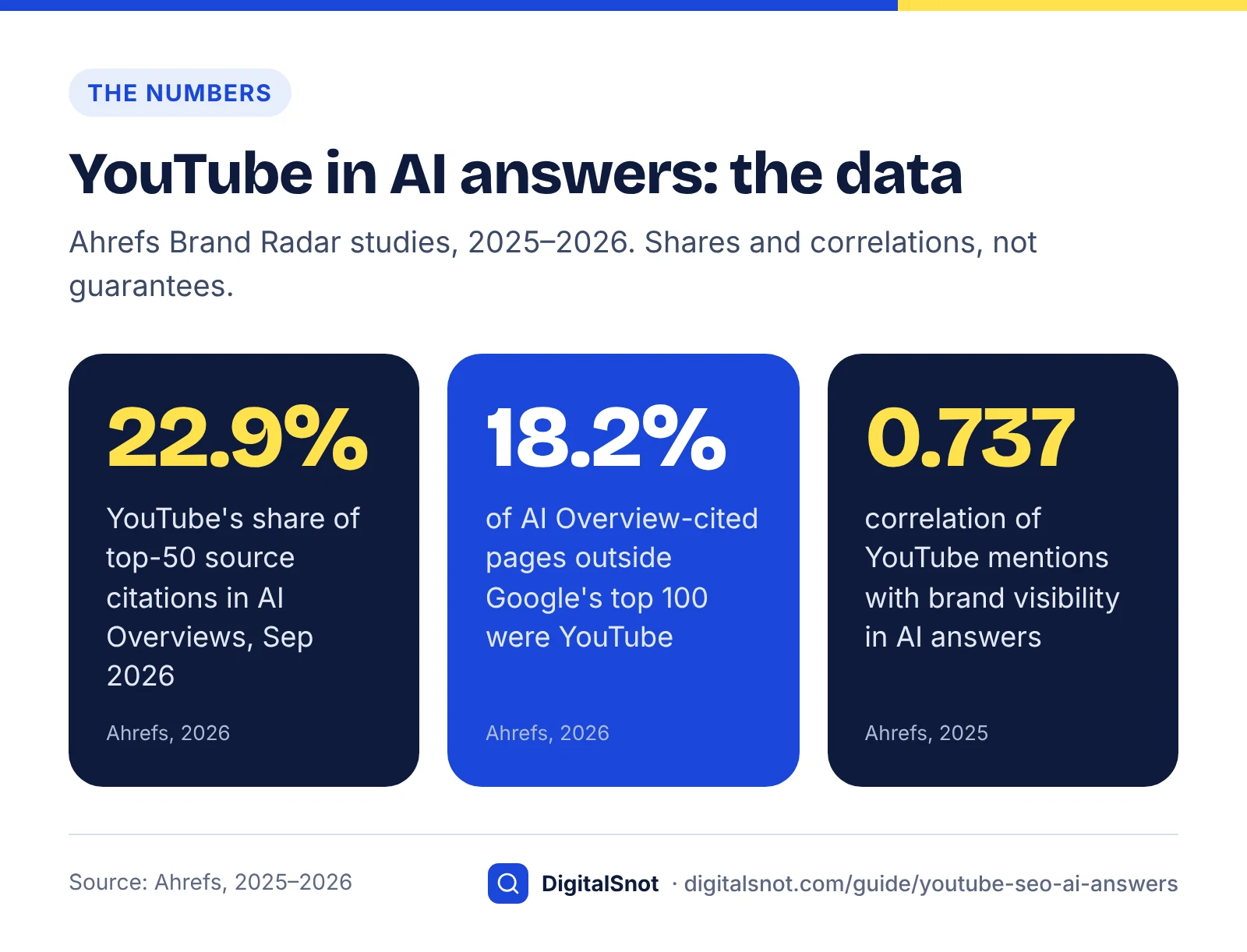
For its September 2026 ranking, Ahrefs tracked the domains AI Overviews cited across a broad set of US queries and ranked them by mention share: each domain's slice of the citations earned by the top 50 sources combined. YouTube held 22.9%, Reddit came second, and English Wikipedia was seventh with 4.0%. Ahrefs updates the ranking each month, so the shares move: in its June 2026 data YouTube's share was 20.9%. Because the base is the top 50 sources rather than every citation, this does not mean that more than one in five AI Overview links goes to YouTube.
Other engines and studies tell a slightly different story. An analysis of 30 million cited sources by Peec AI, published in March 2026, found Reddit was the most cited domain across ChatGPT, AI Mode, Gemini, Perplexity and AI Overviews combined, with YouTube second and LinkedIn third. The same analysis says ChatGPT leaned towards editorial sites such as Forbes and TechRadar, while Google's AI Mode and AI Overviews leaned more towards platforms such as Facebook and Yelp. The fair summary: YouTube sits at or near the top in both studies, and its lead is clearest in Google's AI Overviews.
Videos can be cited without ranking
Ahrefs' 2026 update to its study of AI Overview citations, based on 863,000 search results pages, found that only 38% of AI Overview citations came from pages in Google's top 10, down from 76% in Ahrefs' earlier version of the study. Among cited pages that did not rank in the top 100 for the same keyword at all, 18.2% were YouTube URLs. For a small business that struggles to rank a web page against national brands, that is the most useful number here: a video can reach an AI Overview by a route that does not depend on your site's rankings.
YouTube mentions and brand visibility
Ahrefs' study of 75,000 brands (December 2025) measured which signals correlate with how often a brand appears in ChatGPT, AI Mode and AI Overviews. YouTube mentions had the strongest correlation of any factor, at about 0.737, ahead of branded web mentions at roughly 0.66 to 0.71. Ahrefs counted a YouTube mention when a brand's name appeared in a video's title, transcript or description, and the plain count correlated slightly more strongly than mentions weighted by views (0.737 against 0.717).
Two cautions apply. This is correlation, not proof that more videos will make you visible: big brands get mentioned on YouTube and everywhere else because people talk about them. And the sample is brands large enough to measure, not a dentist in one town. Treat it as a pointer, not a forecast for your channel.
Is video worth it for your business? A quick test
Video is worth it when three things are true: videos already appear for the questions your buyers ask, the answer is easier to show than to tell, and you can film something only your business can show. If none of them is true, put the time into text pages first.
The three questions
- Do videos already appear? Take five questions customers ask before they buy. Search each in Google (note any AI Overview, AI Mode answer or video results), in YouTube search and in ChatGPT search. Count how often a video is cited or shown.
- Does the answer need to be seen? Ask whether a customer would understand the answer better by watching than by reading. Techniques, finished results, places, products in use and before-and-after changes usually pass. Prices, rules, eligibility and opening hours usually fail.
- Can you film something only you can show? Your own process, your premises, real jobs (with the customer's permission) and your staff explaining things in their own words are original material. A slideshow of stock clips is not. Google's AI guide favours what it calls non-commodity content, which "provides unique expert or experienced takes that go beyond common knowledge", and video is one of the clearest ways to show that experience.
Decision table: what to do with your answers
| If this is true | Then do this | Why |
|---|---|---|
| Videos appear for most of your buyers' questions, and you can film the answers | Make video a regular part of your content plan, starting with your highest-scoring topics (next section) | Demand and format are both proven for your queries |
| Videos appear for some questions only | Film those questions; answer the rest with text pages | Video effort goes where it can be cited |
| No videos appear, and the answers are facts, prices or rules | Write or improve text pages first | A page is what AI answers quote for these questions |
| No videos appear, but the answer is visual and you can film it | Test two or three videos | There may be a gap no one has filled, but demand is unproven |
| You already have videos on YouTube | Fix titles, descriptions, chapters and captions before filming anything new | It is the cheapest improvement available |
| You cannot film regularly | Make a few evergreen videos for your top questions and embed them on your site; skip the "channel strategy" | A handful of useful videos beats an abandoned channel |
One more check before you commit: clicks. Being cited in an AI answer does not guarantee a visit, and AI summaries tend to reduce clicks on ordinary results, as we explain in our post on AI Overviews and your traffic. Judge a video's value in enquiries, trust and phone calls, not only in website sessions.
Is video worth it for AI answers?
Choose topics where AI answers need video
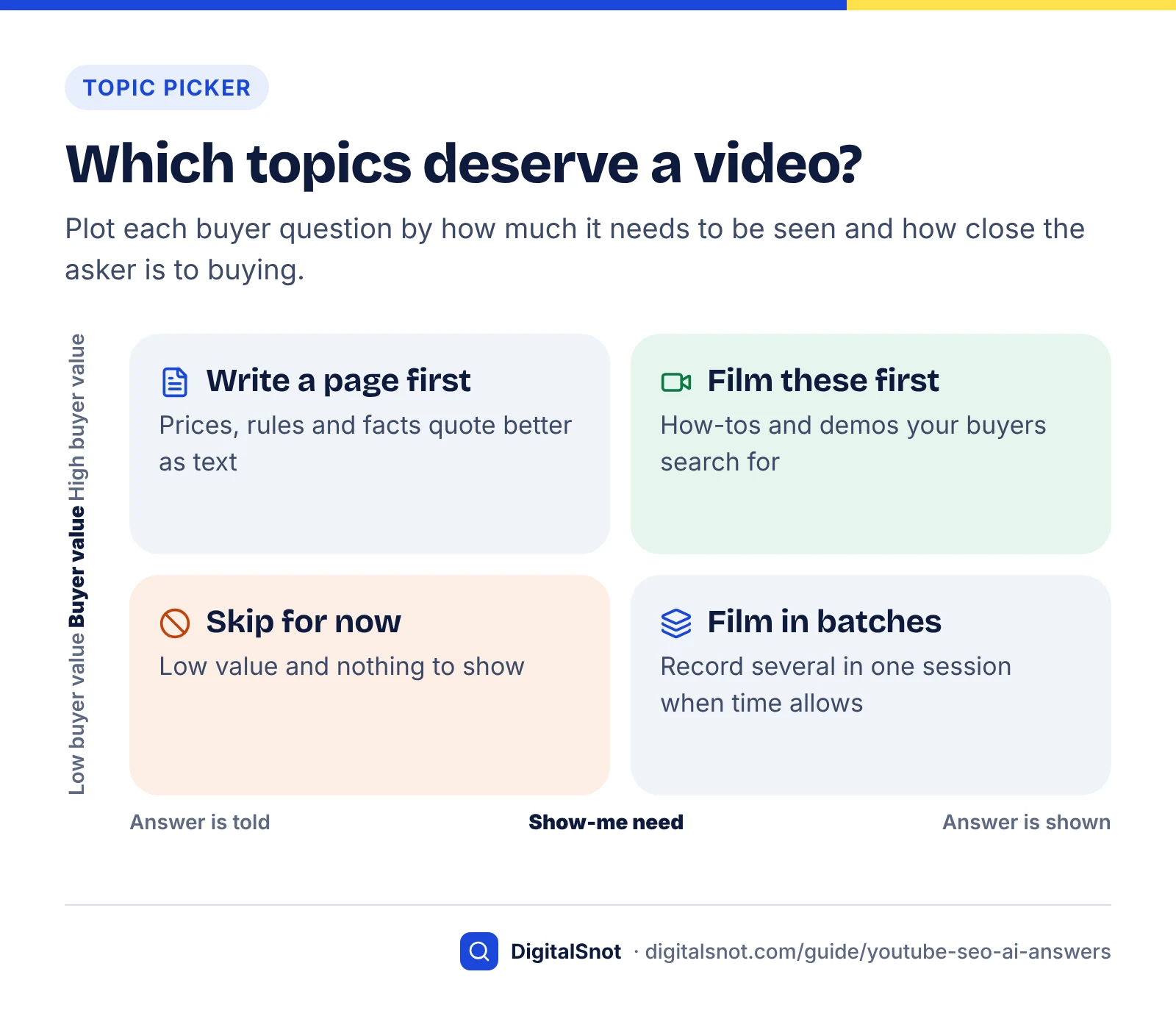
Choose topics by scoring each buyer question on four things: how much the answer needs to be seen, whether videos are already cited for it, how close the person asking is to buying, and whether you can show something competitors cannot. Film the high scorers first.
Build the question list
Start from real questions, not keywords you would like to rank for: what customers ask on the phone, by email and at the counter, plus the related questions Google shows for your main topics. Our keyword research guide shows how to collect and group them. YouTube's own tips for video descriptions are worth reading before you write, and the Research tab in YouTube Analytics shows what viewers search for on YouTube.
When the AI answer for a question cites web pages rather than videos, paste those pages into our free Cited Content Pattern Analyzer. It classifies each cited page by format (how-to, comparison, definition and so on) and shows what they have in common. If every cited source is a written how-to with a table, a page is probably the format to beat, not a video.
Score each topic: the video-fit score
This is a simple framework we built for this guide; none of it comes from YouTube or Google. Score each question from 0 to 2 on four criteria, then add up the total.
| Criterion | 0 | 1 | 2 |
|---|---|---|---|
| Show-me need | Reading is enough | Seeing helps | Hard to follow without seeing it |
| Video already cited | No videos in Google, YouTube or ChatGPT answers | Videos in one of them | Videos in two or more |
| Buyer value | Rarely asked by buyers | Sometimes asked by buyers | Often asked just before buying |
| Only-you footage | Nothing distinctive to show | Some footage of your own | Your process, premises or results, clearly shown |
A total of 7 or 8 means film it now. A total of 5 or 6 means film it after the top group, or batch several in one session. A total of 3 or 4 means write a page first and add photos. A total of 0 to 2 means skip it for now.
Worked example (hypothetical)
Example: a two-person tiling firm in Manchester scores three questions from its list.
- "Can I regrout a shower without removing the tiles?" Show-me need 2, video already cited 2, buyer value 1, only-you footage 2. Total 7: film it.
- "How much does a bathroom refit cost in Manchester?" Show-me need 0, video already cited 1, buyer value 2, only-you footage 1. Total 4: write a page, with a cost table the firm can keep up to date.
- "Which tiles work best in a wet room?" Show-me need 1, video already cited 2, buyer value 1, only-you footage 1. Total 5: film it later, alongside other product questions in one session.
Titles, descriptions and chapters machines can read
Write the title in the words people use for the question, open the description with a two- or three-sentence answer, and add chapters with clear labels. These are the parts of a video that YouTube search, Google and AI systems can read as text.
YouTube's explanation of how YouTube search works says it estimates relevance from "how well the title, tags, description, and video content match your search query". It then weighs engagement, such as the watch time of a video for a particular query, and quality signals that show which channels demonstrate expertise, authoritativeness and trustworthiness on a topic. It also says search results are not a list of the most-viewed videos for a search, which is good news for small channels with focused answers.
Titles
- Put the question or task first, in your customers' words. "How to regrout a shower without removing tiles" beats "Bathroom tips with Sam, episode 12".
- YouTube's description tips suggest picking one or two main words that describe the video and featuring them prominently in both the title and the description.
- Promise only what the video delivers. A title that oversells attracts people who leave quickly, which works against the watch-time signal YouTube describes.
Descriptions
YouTube's tips for video descriptions say to use the first few lines to describe the video, because that is what viewers see first. They also say to give every video a unique description, because that makes it easier to find through search, and to check how the description looks in YouTube search, on the watch page and on mobile devices. A structure that works for people and for retrieval:
- Answer first. Two or three sentences that answer the question the title asks, as if the viewer will read nothing else.
- Who is speaking. Your name, role, business name and town, in one line.
- Chapters. The timestamp list described below.
- One relevant link. The page on your site that goes deeper, such as the service page or the written guide where the video is embedded.
- Key terms, written naturally. Materials, tools, product names and place names you mention in the video, spelled correctly.
Chapters
Chapters split a video into labelled sections that viewers can jump between. YouTube's Video chapters help page sets three rules for adding them in the description: the first timestamp must be 00:00, there must be at least three timestamps in ascending order, and each chapter must be at least 10 seconds long. YouTube can also create automatic chapters, but not every video is eligible, chapters are unavailable while a channel has active strikes, and chapters you enter yourself override the automatic ones.
Chapters matter beyond YouTube. Google's video structured data documentation says that if your video is hosted on YouTube, Google Search may automatically enable key moments for it based on the video's description on YouTube. Key moments are the labelled segments Google can show with a video result, each linking to that point in the video.
Write chapter labels as the steps or sub-questions someone would search for. "03:30 Applying the new grout" is useful to a person and to a machine; "03:30 Part 3" is useful to neither.
YouTube chapters explained in 15 seconds
Transcripts and captions
Upload an accurate transcript or edit YouTube's automatic captions so the text of your video says what you actually said. The transcript is the largest block of text attached to a video, and mistakes in it, especially in your business name, product names and place names, are mistakes a machine can repeat.
YouTube's help page on automatic captioning warns that automatic captions might misrepresent the spoken content because of mispronunciations, accents, dialects or background noise, and recommends reviewing them. You edit them in YouTube Studio under Subtitles. For an automatic track, YouTube has you duplicate and edit it, which creates a new track with your corrections.
Three ways to get accurate captions
- Edit the automatic track. Quickest for short videos: read it once and fix names, numbers and technical terms.
- Upload a transcript and let YouTube time it. YouTube's guide to adding subtitles and captions explains that YouTube can align a plain transcript to the video. It is not recommended for videos over an hour long or with poor audio, and the transcript must be in the language spoken in the video.
- Upload a timed caption file. Best if you script videos or your editing app exports captions.
Say the important words out loud
A transcript can only contain what was said. In the first 30 seconds, say who you are, what business you run and where, and give the answer the video promises. Ahrefs' brand study counted brand names in transcripts as YouTube mentions, which is a useful reminder that the spoken word becomes searchable text. If you mention a product, a standard or a place, say its full name at least once.
Put a text version on your own page
When you embed the video on your site, add a written summary rather than pasting the raw transcript: a direct answer, the steps as a numbered list, and any figures or warnings. That gives Google's AI features, ChatGPT search and Perplexity a passage on your own domain to quote. Run the summary through our free AI Answer Snippet Extractor, which scores each paragraph out of 100 as a quotable snippet, and rewrite any paragraph that only makes sense next to the video.
Embed videos on your site with VideoObject markup
For each video that answers an important question, create a page on your site where the video is the main content, add a written summary, and describe the video with VideoObject structured data. That gives Google a watch page it can show in video results, and gives AI answers a citable page on your own domain rather than only a youtube.com URL.
What Google needs from a watch page
Google's video SEO best practices define a watch page as a page where the video is the main content, and suggest a dedicated watch page for each video where that makes sense for your business. Several points from that documentation are easy to miss:
- An indexed page is not an indexed video. Google says that just because the watch page is indexed doesn't mean the video will be.
- A valid thumbnail is required for a video to be eligible for video features, ideally at a stable URL.
- Video sitemaps and structured data help Google find and understand the video, and the details in each should match the video and the page.
- The Video indexing report in Search Console shows how many watch pages have an indexed video and why others were not indexed.
A blog post with a video halfway down is not a watch page in this sense, so don't expect it to win a video result. Our post on service pages versus blog posts helps you decide where a topic's main page should live; the watch page can then link to it.
The VideoObject fields to fill in
Google's video structured data documentation says you must include its required VideoObject properties for the markup to be eligible in Google Search, so check the current list there before you publish. For a YouTube video embedded on your page, complete these fields:
name: the video title. Google asks for unique text for each video on your site.description: the answer-first summary.thumbnailUrl: the URL of the video's thumbnail image.uploadDate: the date the video was first published, in ISO 8601 format. Google recommends including a time zone.duration: the length, in ISO 8601 format, for examplePT6M30Sfor six and a half minutes.embedUrl: the player URL. Google preferscontentUrl, the address of the video file itself, but acceptsembedUrlwhen that isn't available, which is the usual case for YouTube embeds.
Key moments on your own page
For videos on your own pages, Google documents two ways to enable key moments: Clip markup, where you list each segment's start time and label, and SeekToAction markup, where you describe your timestamp URL pattern and Google finds the moments itself. Both need a URL that can link to a point in the video and a video at least 30 seconds long. To opt out of key moments, Google says to use the nosnippet meta tag, but that is a page-wide control, so think twice.
Markup to skip
Don't add Learning Video markup. Google announced in June 2025 that Learning Video was one of seven structured data types it would phase out of Search results, along with Course Info and ClaimReview, and said the change would not affect rankings. And don't expect VideoObject to earn AI citations by itself: Google says its AI features need no special schema, so the markup's job is to help Google's video results understand the page. Our schema markup guide covers which types still earn search features in 2026.
Tools that help, and one limit
Our free Video Schema and Sitemap Generator writes VideoObject markup and a video sitemap entry for a YouTube video embedded on your page, and checks the required fields. It does not make Clip or SeekToAction markup, so add those by hand if you need them, then test the page in Google's Rich Results Test. Our Schema Markup Generator is useful for a related job: Organization markup with your YouTube channel URL in sameAs, which ties the channel to your business as one entity.
A video-page checklist for small businesses (our analysis)
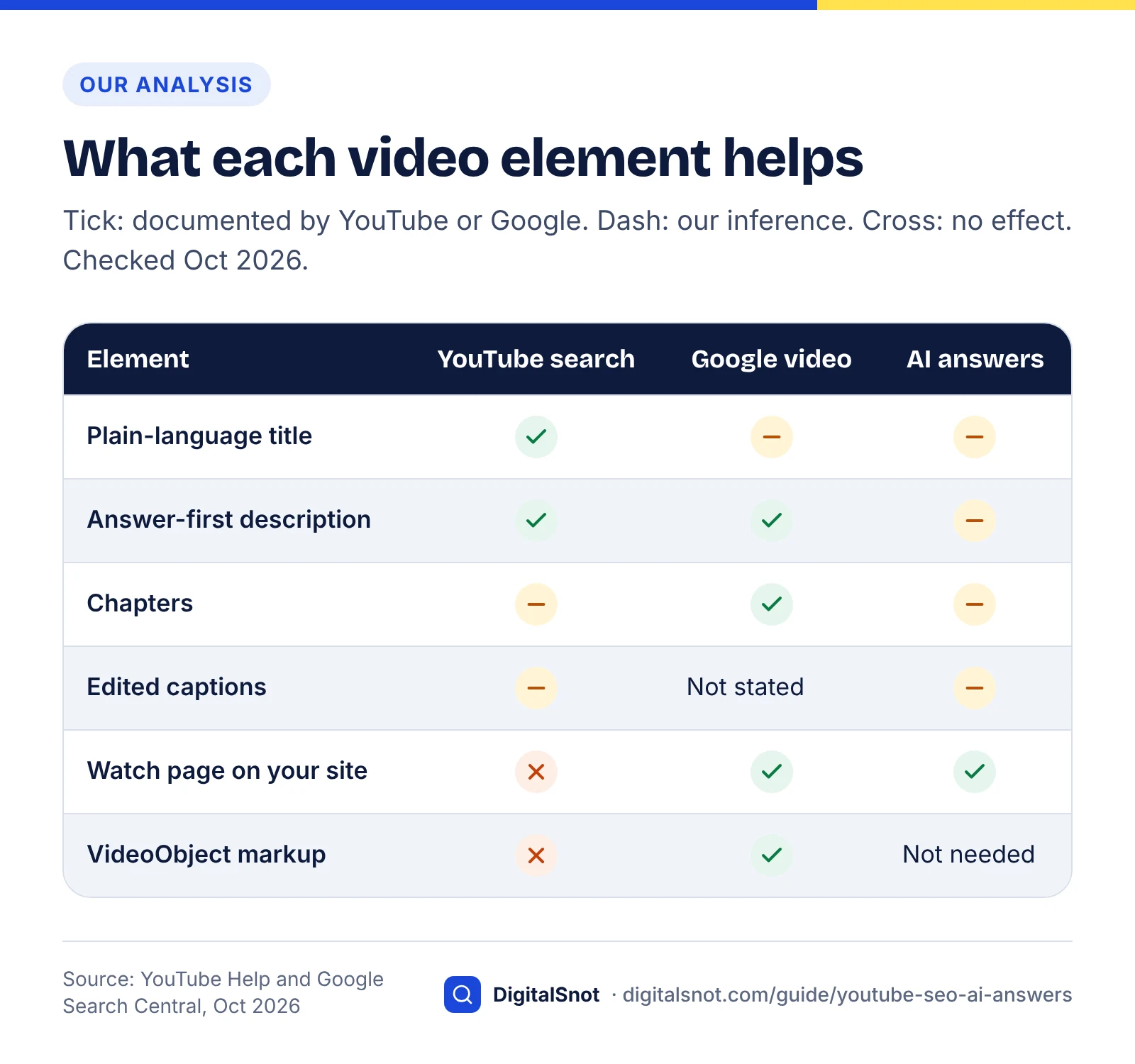
The table below takes each element of a video and its page, and shows what it helps: YouTube search, Google's video results and AI answers. Most guides list these as tactics. The point here is to separate the effects YouTube and Google actually document from the ones that are educated guesses.
Method: in October 2026 we read YouTube's help pages on descriptions, chapters and captions, YouTube's explanation of how search works, and Google's video SEO, video structured data and AI features documentation. A cell says "Documented" only where one of those pages states the effect. "Inferred" means it follows from how these systems read text, but no page says so. You can repeat the check with the links in the sources list.
| Element | YouTube search | Google video results | AI answers | What to do |
|---|---|---|---|---|
| Title in buyers' words | Documented: the title is a relevance factor | Inferred: it is the text the result shows | Inferred: readable text matched to the question | Lead with the question or task |
| Answer-first description | Documented: the description is a relevance factor, and its first lines are seen first | Documented for key moments, which Google may build from the description | Inferred | Two or three sentences of answer, then who is speaking |
| Chapters | Documented as navigation; any search effect is inferred | Documented: can feed key moments for YouTube videos | Inferred: Ask YouTube plays clips from the most relevant point | Start at 00:00, three or more chapters, 10 seconds or longer, labels as steps |
| Edited captions or transcript | Inferred: "video content" is a relevance factor | Not stated | Inferred: transcripts are text, and Ahrefs counted them as mentions | Fix names, numbers and technical terms |
| Brand and town said aloud | Inferred | Not stated | Inferred: it lands in the transcript | Say who you are and where in the first 30 seconds |
| Thumbnail | Inferred: affects clicks, which feed engagement | Documented: a valid thumbnail is required | Not stated | Clear, honest image at a stable URL |
| Watch page on your site | No effect | Documented: the video must be the main content | Documented in general terms: Google lists supporting text with videos among the SEO practices for its AI features | One page per important video, with a written summary |
| VideoObject markup | No effect | Documented: helps Google understand the video; Clip or SeekToAction for key moments | Not needed: Google says AI features need no special schema | Fill in name, description, thumbnailUrl, uploadDate, duration and embedUrl |
What the checklist tells you
- There is no separate "AI video SEO" layer. Every element documented for AI answers is also documented for Google's ordinary video results, which matches Google's advice that its usual SEO practices, including supporting text with videos, apply to its AI features.
- The description does double duty. It is the YouTube field Google names as a source for key moments, and the chapters live inside it.
- Transcript quality is the biggest undocumented bet. No page we read says captions affect ranking or citation, but the transcript is most of the text attached to a video, so fixing it is cheap insurance.
- The watch page is the only element that puts a citable URL on your own domain. Everything else improves a youtube.com page.
The checklist applied: a worked example (hypothetical)
Example: the Manchester tiling firm from earlier films "Can I regrout a shower without removing the tiles?" on a phone with a clip-on microphone. Here is how each element comes out.
- Title: "How to regrout a shower without removing tiles (step by step)".
- Description, first lines: "Yes, you can regrout a shower without removing the tiles: rake out the old grout, clean the joints, apply new grout and seal it once it has cured. Sam, a tiler at [business name] in Manchester, shows each step and the mistakes that make new grout crack."
- Chapters: 00:00 What you need; 00:40 Raking out the old grout; 02:15 Cleaning the joints; 03:30 Applying the new grout; 05:10 Sealing and curing; 06:00 Mistakes that cause cracks.
- Captions: the automatic track is duplicated and edited, with the business name, "Manchester" and the product names corrected.
- Spoken intro: "I'm Sam from [business name]. We're tilers in Manchester. Yes, you can regrout without taking the tiles off, and here's how."
- Watch page: a page on the firm's site with the video at the top, a 150-word answer, the steps as a numbered list, a link to the bathroom tiling service page, and VideoObject markup that uses embedUrl.
- Measurement: the question and four variations go into the monthly prompt test described below.
Earn mentions in other creators' videos
Get your business named in other people's videos: reviews, tutorials, local guides and interviews. In Ahrefs' brand study, mentions in YouTube videos were the factor most closely linked to AI visibility, and a mention in someone else's video is something you cannot simply publish yourself.
Keep the earlier caveat in mind: the link is a correlation measured on large brands. Treat mentions as reputation work that is worth doing even without AI answers, because it is.
Where small businesses can earn mentions
- Creators who already cover your topic. Search YouTube for your service plus your town, and note the channels whose videos AI answers cite for your questions.
- Suppliers and manufacturers. Brands whose products you install or use often want real practitioners for demonstration videos.
- Local media and community channels. Local news, business groups and podcasts that publish on YouTube need expert guests.
- Collaborations. A joint video with a complementary business, such as a plumber and a tiler, gives both of you a mention in front of a relevant audience.
- Customers who already film. Thank customers who post about your work, and ask permission before reusing anything.
What not to do
- Don't pay for mentions without clear disclosure. Treat any paid or gifted placement as advertising.
- Don't buy views, comments or subscribers. They add nothing an AI answer can use and distort your own analytics.
- Don't stuff keywords or your brand name into titles and descriptions. Write them for the viewer.
- Don't publish fake reviews or testimonials in video form. They are the same deception in a different format.
Mentions on YouTube work alongside mentions elsewhere. Our post on how ChatGPT recommends businesses explains the wider picture, and if you serve a local area, our guide to local SEO for AI search covers reviews, listings and local "best of" pages.
Measure video visibility in AI answers
Measure in three places: a fixed set of questions you test in AI tools every month, YouTube Analytics for how people find your videos, and Search Console for your watch pages. No single report shows when your video is cited in an AI answer, so you build the picture from all three.
Monthly results report
1. A monthly prompt test
- Pick 15 to 25 questions from your topic list, including every question you made a video for.
- Run each one in Google (noting AI Overviews and AI Mode), ChatGPT search and Perplexity, plus Ask YouTube if you are in the US. Run each prompt more than once, because AI answers vary between runs.
- Record whether a video is cited, whose it is, whether it is yours, and whether your watch page or another page on your site is cited.
- Repeat on the same day each month, and log what you changed in between.
A simple log is enough:
| Date | Question | Engine | Video cited? | Whose video | Your video or page cited? | Notes |
|---|---|---|---|---|---|---|
| 14 Oct | Can I regrout a shower without removing tiles? | AI Overviews | Yes | National DIY channel | No | Their chapter "Raking out" linked |
| 14 Oct | Same question | ChatGPT search | No | None | No | Cites two written how-tos |
These rows are an illustration, not real results. Look for patterns across months: if a competitor's video keeps being cited, compare its title, description and chapters with your checklist.
2. YouTube Analytics
YouTube's help page on understanding your video reach describes a "Traffic source: YouTube search" card listing the search terms that led to your videos, and an External card covering websites and apps that embed or link to them. The first shows which questions your videos really answer; the second shows whether your watch pages send viewers. Low-volume terms may be hidden, so small channels see partial lists.
3. Search Console
Search Console reports on your own site only, so a youtube.com URL cited in an AI Overview never appears there. What it does show is the Video indexing report for your watch pages, and the generative AI performance report for how often pages on your site appear in AI Overviews and AI Mode. Our guide to the Search Console AI performance report explains how to read it. If a watch page starts gaining AI impressions after you embed a video and add a summary, that is the clearest first-party signal you will get.
4. When a competitor's page is cited instead
If an AI answer cites a competitor's page for a question you made a video for, compare the two pages in our free AI Citation Gap Checker. It goes factor by factor, structured data included, so you will see whether their page has VideoObject markup and yours doesn't, alongside differences in answer-first structure, sources and authorship.
A 90-day video plan for a small business
A realistic first quarter is: decide, fix what you already have, film a few videos, build their pages, ask for mentions, then decide on evidence whether to continue. You need a phone, a clip-on microphone and good light, not a studio.
- Weeks 1 to 2: decide. List 20 buyer questions, run the three-question test and score each topic.
- Weeks 3 to 4: retrofit. Fix titles, descriptions, chapters and captions on any videos you already have.
- Weeks 5 to 8: film. Make three or four videos on your highest-scoring topics. Say who you are and give the answer in the first 30 seconds, and edit the captions before you publish.
- Weeks 9 to 10: build watch pages. Create one page per video with a written summary and VideoObject markup, linked from the relevant service page.
- Weeks 11 to 12: reach out and measure. Contact three to five creators or suppliers, then run your first full prompt test.
At day 90, keep going if your videos or watch pages appear in AI answers, if YouTube search terms show your buyers' questions, or if customers mention the videos. If none of that happens, keep the watch pages, which still help your site, and put the effort back into text pages for a quarter before testing again. Video is one format among several, and the questions your customers ask should decide how much of it you make.
If you want help choosing topics and building pages around your videos, that is part of our content SEO service, and you can see how it fits with our other SEO services. When you're ready to talk it through, get in touch.
Free tools in this guide
- Cited Content Pattern Analyzer See the formats and patterns of cited pages, and get a content plan.
- AI Answer Snippet Extractor Score every paragraph as an AI answer snippet and fix the near misses.
- Video Schema and Sitemap Generator Make VideoObject markup and a video sitemap entry for a YouTube video on your own web page.
- Schema Markup Generator Create JSON-LD for 10 schema types, with live checks for missing fields.
- AI Citation Gap Checker Compare your page with a cited competitor and see the gaps to close.
By the numbers
- YouTube's share of the citations earned by the top 50 domains cited in Google AI Overviews, September 2026
- 22.9%
- Source: Ahrefs
- of pages cited in AI Overviews that did not rank in Google's top 100 for the same keyword were YouTube URLs (Ahrefs, 2026)
- 18.2%
- Source: Ahrefs
- correlation between YouTube mentions and brand visibility in ChatGPT, AI Mode and AI Overviews, the strongest factor Ahrefs measured
- 0.737
- Source: Ahrefs
- where the first YouTube chapter timestamp must start; chapters also need at least three timestamps and 10 seconds each
- 00:00
- Source: YouTube Help
Frequently asked questions
Does YouTube help you appear in Google AI Overviews?
It can. Ahrefs' September 2026 data ranks youtube.com as the most cited domain in AI Overviews, and Google says its AI features can surface relevant video. A video is not a shortcut, though. It helps most for questions whose answers are easier to show than tell, when the title, description, chapters and transcript describe the answer clearly, and when the video is also embedded on a page of your own site.
Why does Google cite YouTube so often in AI answers?
Google has not said why. Our reading is that many questions are best answered by showing, and a YouTube video carries plenty of machine-readable text: a title, a description, chapter labels and a transcript. Google's documentation recommends supporting text with high-quality images and videos, and its May 2026 guide says sites that follow its video SEO advice are already optimising for generative AI search.
Do YouTube chapters help with SEO?
Chapters help viewers navigate, and Google says it may automatically enable key moments for YouTube videos based on the YouTube description, which is where chapters live. To add chapters, YouTube requires the first timestamp at 00:00, at least three timestamps in ascending order and chapters of at least 10 seconds each. Use labels that describe each step, because those labels are the text people and machines see.
Are YouTube's automatic captions good enough?
Often not without editing. YouTube warns that automatic captions can misrepresent what was said because of mispronunciations, accents, dialects or background noise, and business, place and product names are the usual casualties. Duplicate and edit the automatic track in YouTube Studio, or upload a transcript and let YouTube sync it, which YouTube does not recommend for videos over an hour long or with poor audio.
Should I embed my YouTube videos on my own website?
Yes, for videos that answer important customer questions. A dedicated page where the video is the main content can appear in Google's video results, and it gives AI answers a citable page on your domain, not only a youtube.com URL. Add a written summary and VideoObject markup, then check Search Console's Video indexing report to confirm Google indexed the video, not just the page.
Do I need VideoObject schema for embedded YouTube videos?
It helps Google's video features but is not needed for AI answers. Google's video structured data documentation describes fields such as name, description, thumbnailUrl, uploadDate, duration and embedUrl, which suits YouTube embeds where you have no direct video file URL. Google also says its AI features need no special schema, so treat VideoObject as help for video results, not as a citation switch.
Does ChatGPT cite YouTube videos?
Yes, though YouTube's lead is clearest in Google's AI Overviews. Peec AI's analysis of 30 million cited sources, reported by Search Engine Land in March 2026, found YouTube was the second most cited domain across ChatGPT, AI Mode, Gemini, Perplexity and AI Overviews combined, behind Reddit. The same report says ChatGPT leaned towards Wikipedia, Reddit and editorial sites, so strong text pages still matter for ChatGPT search.
How long should a video be to get cited in AI answers?
No study we found shows an ideal length. Make the video as long as the answer needs, and help people skip to the part they want with chapters. YouTube requires each chapter to be at least 10 seconds long, and Google's key moments markup for videos on your own site needs a video of at least 30 seconds. A video that answers one question clearly is easier to label and cite than a long, unfocused one.
What is Ask YouTube?
Ask YouTube is YouTube's conversational search feature. It answers questions with text and video clips that start at the point most relevant to the question, showing the creator's channel and video title. In October 2026, YouTube's help page says it is available in the United States in English on computers, phones and TVs, with availability expanding gradually. YouTube has not said exactly how it picks clips.
How can I tell if my videos are cited in AI answers?
There is no single report. Run a fixed set of buyer questions each month in Google, ChatGPT search, Perplexity and, in the US, Ask YouTube, and record whose videos are cited. Check YouTube Analytics for the search terms and external sites that bring viewers, and Search Console for your watch pages. Search Console does not report youtube.com URLs, because it only covers sites you own.
Sources
Every figure and claim in this guide comes from the sources below. We checked each one when writing and link to the original so you can read it yourself. Credit belongs to the authors and publishers listed. How we write and check our articles.
-
1
The 50 Most-Cited Websites in Google AI Overviews (September 2026)
Ahrefs · YouTube first by mention share (22.9%), Reddit second, English Wikipedia seventh (4.0%); share of the top 50 sources' citations; updated monthly (YouTube 20.9% in June 2026).
-
2
AI features and your website
Google Search Central · Support text with high-quality images and videos; no additional requirements or special schema for AI features.
-
3
Optimizing your website for generative AI features on Google Search
Google Search Central · May 2026: brief image and video tips in line with standard practice; non-commodity content with expert or experienced takes.
-
4
Search with Ask YouTube
YouTube Help · Answers can include clips with video title and channel (on TVs, starting at the most relevant point); US, English, computer, mobile and TV.
-
5
Top domains cited by AI search: Analysis based on 30M sources
Peec AI · March 2026, US: Reddit first, YouTube second, LinkedIn third across five AI engines; ChatGPT leans editorial, Google's AI surfaces lean social.
-
6
Update: 38% of AI Overview Citations Pull From The Top 10
Ahrefs · 863K SERPs: 38% of citations from the top 10; 18.2% of cited pages outside the top 100 were YouTube URLs.
-
7
Top Brand Visibility Factors in ChatGPT, AI Mode, and AI Overviews (75k Brands Studied)
Ahrefs · YouTube mentions correlate about 0.737 with AI visibility; mention means title, transcript or description.
-
8
Tips for video descriptions
YouTube Help · First lines, unique descriptions, one or two main words in title and description.
-
9
Navigating YouTube Search
How YouTube Works (YouTube) · Relevance, engagement and quality in YouTube search; results are not a most-viewed list.
-
10
Video Chapters
YouTube Help · Chapter rules (00:00 start, three or more, 10 seconds each), automatic chapters, overrides, strikes.
-
11
Video (VideoObject, Clip, BroadcastEvent) structured data
Google Search Central · Key moments from YouTube descriptions, Clip and SeekToAction rules, VideoObject fields, nosnippet opt-out.
-
12
Use automatic captioning
YouTube Help · Automatic captions may misrepresent speech; reviewing and editing them in YouTube Studio.
-
13
Add subtitles & captions
YouTube Help · Uploading a transcript for auto-sync and its limits (over an hour, poor audio, same language).
-
14
Video SEO best practices
Google Search Central · Watch pages, indexed page vs indexed video, valid thumbnails, sitemaps and the Video indexing report.
-
15
Simplifying the search results page
Google Search Central Blog · June 2025: Learning Video among seven structured data types phased out; rankings unaffected.
-
16
Understand your YouTube video reach
YouTube Help · YouTube search terms card, External traffic from embeds and links, hidden low-volume terms.