Google Ads match types: what broad, phrase and exact match mean today
How broad, phrase and exact match work in Google Ads today, why close variants apply to all three, when broad match needs Smart Bidding and where a small account should start.

On this page (10 sections)
- 1What each match type covers now
- 2Close variants apply to all three
- 3How Google chooses between your keywords
- 4Broad match and Smart Bidding
- 5Where a small local account should start
- 6A worked example: a physiotherapy clinic in Lucknow
- 7Negatives still work word for word
- 8Mistakes to avoid
- 9Your next step
- 10Sources
Google Ads match types decide which searches can show your ad. They have changed a lot in the last few years: exact match no longer means only those exact words, and broad match now reads much more than the words you typed. If your idea of match types comes from an older course, your ads are probably showing for searches you did not expect.
This post explains what each match type covers today, how Google chooses between your keywords, when broad match makes sense, and a starting setup for a small local account that you can test before you spend.
What each match type covers now
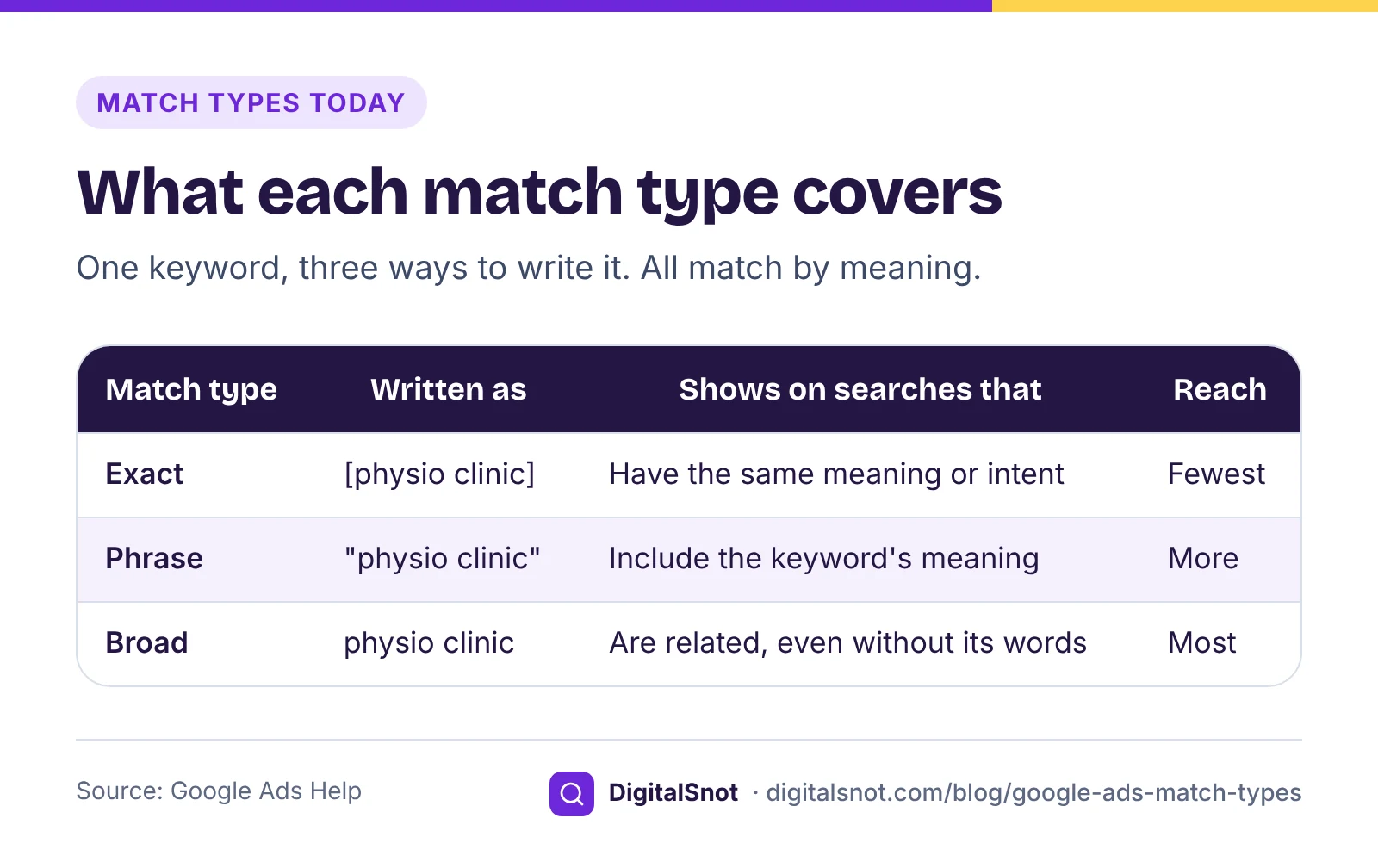
Google's page about keyword matching options describes three match types. You choose them by how you write the keyword:
- Exact match, written in brackets such as [physiotherapy gomti nagar]: your ad can show on searches with the same meaning or the same intent as the keyword. It gives you the most control and the fewest searches.
- Phrase match, written in quotes such as "physiotherapy clinic lucknow": your ad can show on searches that include the meaning of the keyword, often with other words before or after it.
- Broad match, written with no symbols: your ad can show on searches related to the keyword, which can include searches that do not contain its words at all. Google's own example is the keyword "low-carb diet plan" showing for searches such as "carb-free foods" and "Mediterranean diet books".
Broad match is the default. If you paste keywords into a new ad group without brackets or quotes, every one of them is broad.
The key word in all three definitions is meaning. Google decides whether a search shares the meaning or intent of your keyword, so none of them is a strict word filter any more.
Close variants apply to all three
Google's page on keyword close variants says that by default all match types can match close variants, and there is no way to opt out. Its list includes misspellings, singular and plural forms, stemmed forms (its example is floor and flooring), abbreviations, accents, reordered words with the same meaning, added or dropped function words such as "for", implied words, synonyms and searches with the same intent.
So [physiotherapy gomti nagar] can also show for "gomti nagar physiotherapy", and "physiotherapy clinic lucknow" for "physiotherapy clinics lucknow". That is usually what you want. The problem is when a variant changes what the person is looking for, and the only place you see that is the search terms report. Our post on finding wasted spend in the search terms report shows how to read it.
How Google chooses between your keywords
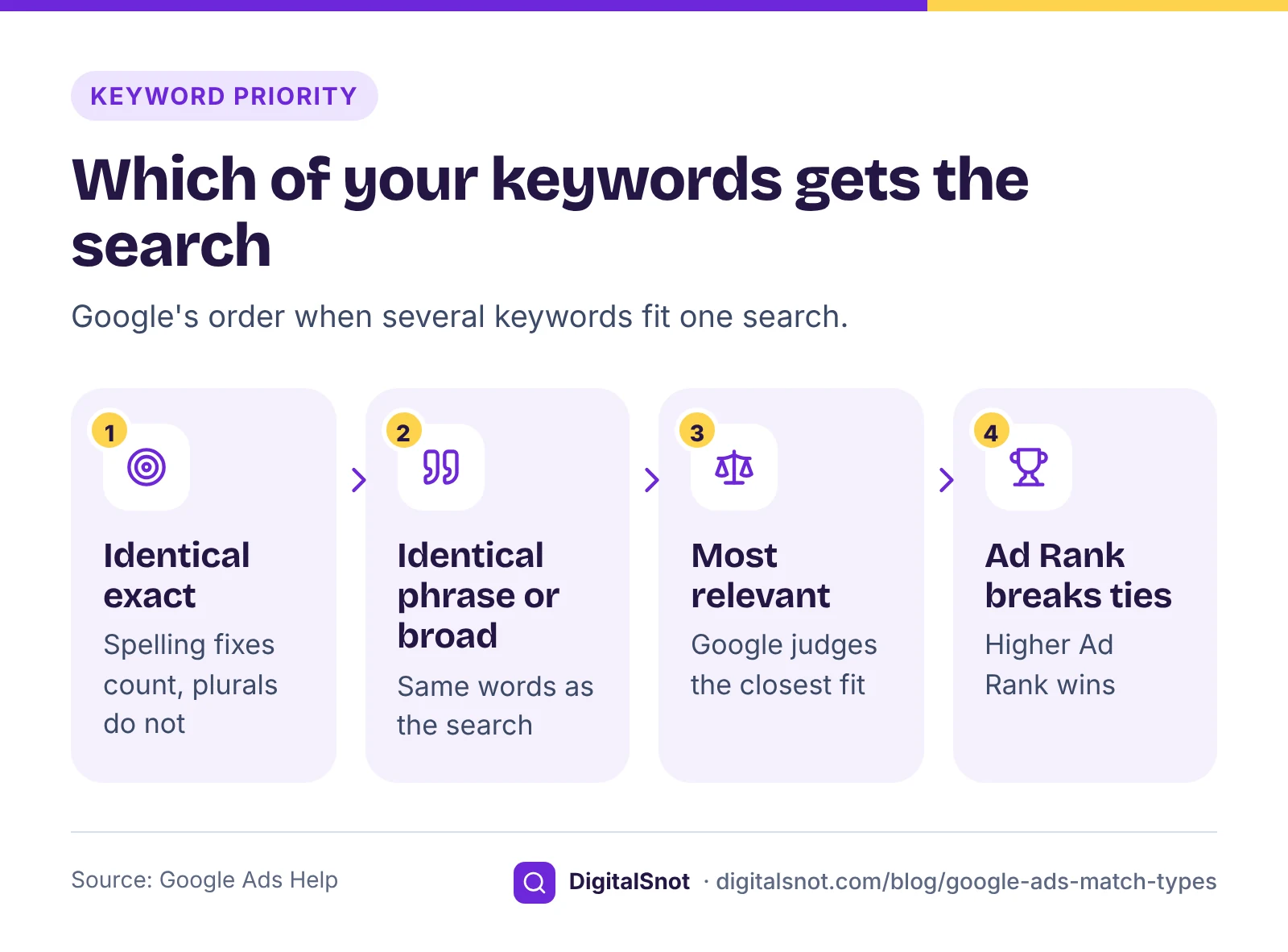
A search can fit several of your keywords at once, especially with broad match. Google's page about ad group prioritisation sets out the order it uses:
- An exact match keyword identical to the search comes first. "Identical" includes spelling corrections, but not plurals or synonyms.
- Next come phrase and broad match keywords that are identical to the search.
- Otherwise Google picks by relevance, and when two candidates are equal, the one with the higher Ad Rank wins.
This gives you a simple tool for control. If a search matters to you, add it as an exact match keyword in the ad group whose ad and landing page fit it best. Then that ad group gets the search, not whichever broad keyword happens to win.
You can test all of this before you spend. Put your keywords, negatives and a list of searches into the Keyword Match Type Simulator. For each search it shows which keywords will match, may match or will not match, with the reason, which keyword Google is likely to prefer, and whether a negative blocks it. Its word-level rules are our measure: Google's systems decide broad and close-variant matches, and the tool cannot see synonyms or Hinglish, so treat "may match" as a question your search terms report will answer.
Broad match and Smart Bidding
Broad match looks beyond the keyword. Google says it may take into account the person's recent searches, the content of your landing pages and assets, and the other keywords in the ad group to understand what you mean. The same page says it is critical to use Smart Bidding with broad match, because the bid for each search should reflect the signals in that auction.
Smart Bidding learns from your conversions. If your conversion tracking counts the wrong things, or very few things, broad match has little to learn from and can drift into searches that never become customers. Before you try broad match, make sure every call, form and WhatsApp lead is counted properly; our post on tracking calls and WhatsApp leads covers the set-up.
There is also a campaign-level broad match keywords setting. It treats every keyword in a Search campaign as broad and needs a conversion-based Smart Bidding strategy. Google's page says campaigns using it are being upgraded to AI Max from September 2026, so if you see that setting in an older campaign, expect it to change.
Where a small local account should start
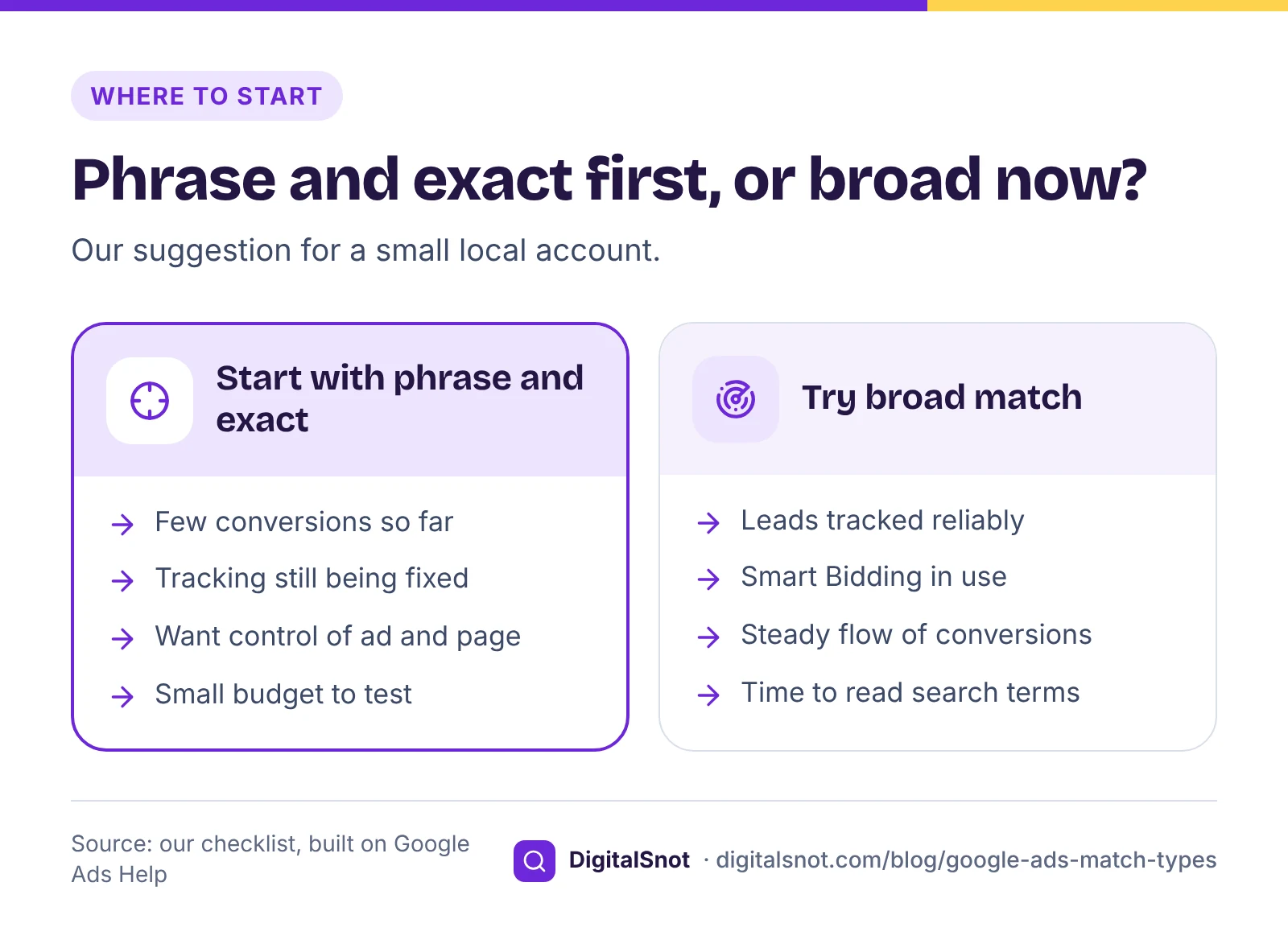
Our suggestion for a small local business, with one or two campaigns and a few enquiries a week, is to start narrower and widen once you have data:
- Group by theme first. Put keywords together when one ad and one landing page can answer all of them. The Keyword Theme Grouper turns a keyword list or a Keyword Planner download into themed ad groups, sets informational searches aside and flags words such as jobs, free and course as negatives. You can export the groups as a Google Ads Editor file.
- Use exact match for your most valuable searches, such as your service plus your area.
- Use phrase match for the rest, so searches still have to carry your keyword's meaning.
- Add negatives before launch, in singular and plural forms.
- Read the search terms report every week for the first month.
- Try broad match later, in one ad group or as an experiment, once conversions are tracked reliably and Smart Bidding has a steady flow of them to learn from.
A worked example: a physiotherapy clinic in Lucknow
Healwell Physiotherapy in Gomti Nagar, Lucknow, is a made-up clinic. Its owner starts with four keywords: [physiotherapy gomti nagar], "physiotherapy clinic lucknow", "back pain physiotherapy" and "physiotherapist home visit", plus the negatives course, courses, job and jobs. Here is what the Keyword Match Type Simulator says for six searches, first as written and then with every keyword turned into broad match.
| Search | Phrase and exact, as written | All keywords broad |
|---|---|---|
| physiotherapy gomti nagar | Will match the exact keyword, which is preferred | Will match; the identical keyword is preferred |
| physiotherapy clinic in lucknow | May match: "in" is a function word | Will match; 3 keywords compete |
| lucknow physiotherapy clinic | May match: reordered words | Will match; 3 keywords compete |
| back pain physiotherapy at home | Will match "back pain physiotherapy" | Will match; 4 keywords compete |
| physiotherapy course lucknow | Blocked by the negative "course" | Blocked by the negative "course" |
| physio near me | Will not match by our word rules | Will not match by our word rules; Google may still match it |
Two things stand out. With broad match, three or four keywords compete for the same searches, so the owner no longer controls which ad and page each person sees. And "physio near me", which the clinic would want, is not clearly covered either way. The owner adds "physiotherapy near me" as a phrase keyword, keeps the rest as written, and checks real searches after a week.
Negatives still work word for word
Negative keywords follow stricter rules than normal keywords. Google's page about negative keywords says they do not match close variants or other expansions. So "course" does not block "courses", and "job" does not block "jobs". Add each form yourself.
The other risk is a negative that blocks one of your own keywords. An account-level negative "home" added to stop "home remedies" searches would also stop "physiotherapist home visit". Paste your keywords and negatives into the Negative Keyword Conflict Checker before you add them. It checks each negative against your keywords level by level, account, list, campaign and ad group, and suggests where to move a negative so it blocks nothing you want.
Mistakes to avoid
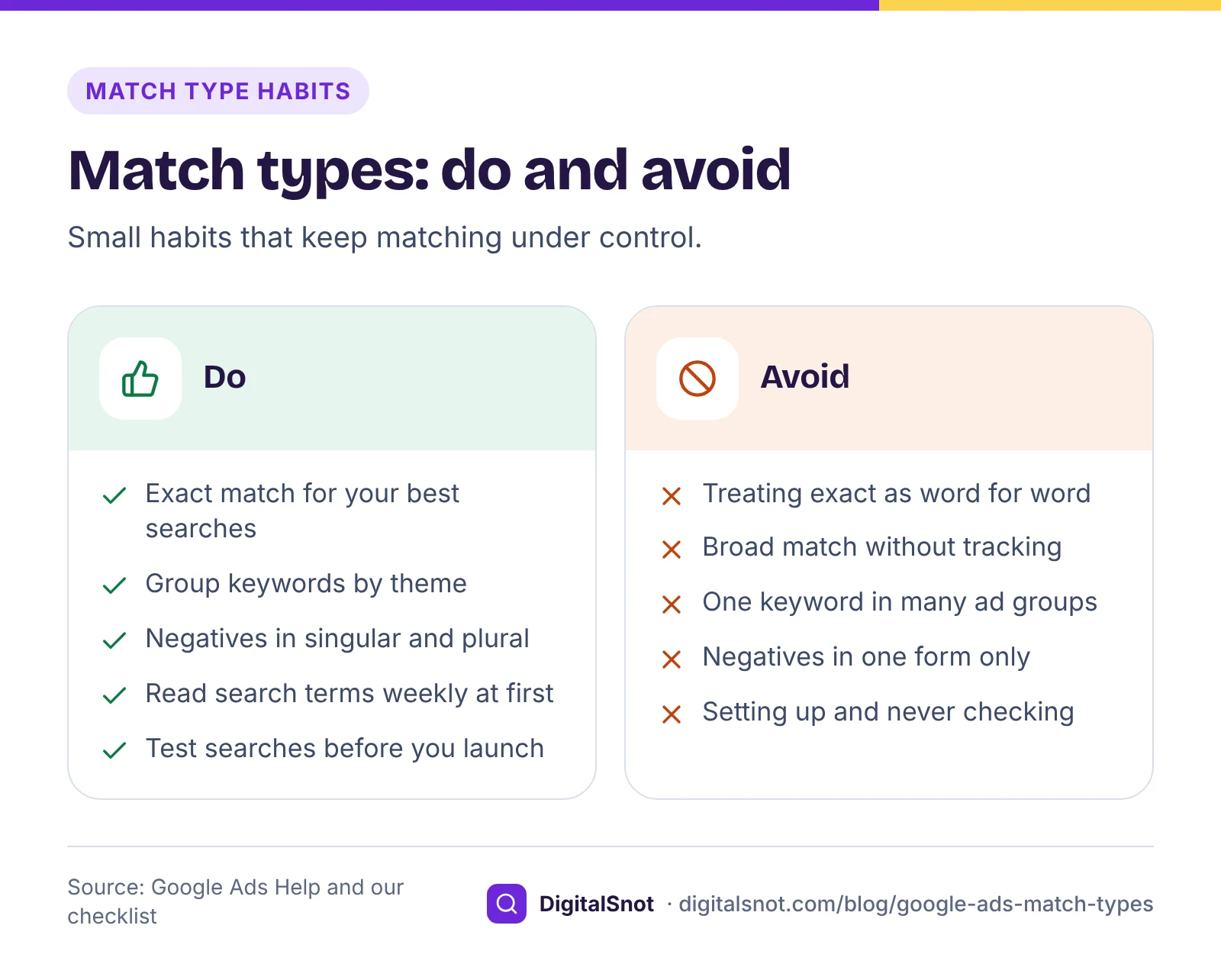
- Thinking exact means exact. Exact match covers close variants and searches with the same intent. Check what it really matched.
- Broad match with no reliable conversions. Without good conversion data, broad match has nothing to steer by.
- The same keyword in many ad groups. They compete with each other, and you lose control of which ad shows.
- Negatives in one form only. Add singular, plural and common spellings.
- Setting up and never looking again. Matching changes with Google's systems and your own keywords. Read the search terms report every month at least.
Your next step
Take ten searches from your last search terms report and five you hope customers type, and run them with your keywords through the Keyword Match Type Simulator. Fix the gaps it shows, then check your negatives with the Negative Keyword Conflict Checker. If you are still building the account, start with our keyword research guide and our post on setting a starting budget. More free tools are on our Google Ads tools page, and you can ask us to look over your keywords.
Free tools in this article
- Keyword Match Type Simulator Test broad, "phrase" and [exact] keywords and negatives against the searches people might type.
- Keyword Theme Grouper Turn a keyword list into themed ad groups, Performance Max search themes and negatives.
- Negative Keyword Conflict Checker Find negative keywords that block your own keywords, fix them by level and add starter lists for India.
Frequently asked questions
What is the difference between broad, phrase and exact match?
Exact match shows your ad on searches with the same meaning or intent as the keyword. Phrase match shows it on searches that include the meaning of the keyword. Broad match shows it on searches related to the keyword, even ones without its words. Broad is the default when you add a keyword without brackets or quotes.
Does exact match still mean the exact words?
No. Google says all match types can match close variants, such as plurals, misspellings, reordered words, dropped words like "for", synonyms and searches with the same intent, and there is no way to opt out. Check the search terms report to see what your exact keywords really matched.
Which keyword wins when a search matches several of my keywords?
Google prefers an exact match keyword identical to the search, counting spelling corrections but not plurals or synonyms. Next come identical phrase and broad keywords. Otherwise it picks by relevance, and the one with the higher Ad Rank wins a tie.
Should I use broad match in a small account?
Google says it is critical to use Smart Bidding with broad match, and Smart Bidding learns from conversions. Our suggestion for a small local account is to start with phrase and exact match, track every lead properly, and test broad match later in one ad group once conversions come in steadily.
Do negative keywords match close variants?
No. Google says negative keywords do not match close variants or other expansions, so "course" does not block "courses". Add singular, plural and synonym forms yourself, and check that no negative blocks one of your own keywords.
What is happening to the broad match campaign setting?
The setting turns every keyword in a Search campaign into broad match and needs a conversion-based Smart Bidding strategy. Google's help page says campaigns using it are being upgraded to AI Max from September 2026.
Sources
Every figure and claim in this article comes from the sources below. We checked each one when writing and link to the original so you can read it yourself. Credit belongs to the authors and publishers listed. How we write and check our articles.
-
1
About keyword matching options
Google Ads Help · Definitions of broad, phrase and exact match, broad as the default, the signals broad match uses and pairing it with Smart Bidding.
-
2
Keyword close variants
Google Ads Help · All match types can match close variants, with no opt-out, and the types of close variant.
-
3
About ad group and asset group prioritisation within a Google Ads account
Google Ads Help · Identical exact match keywords first, then identical phrase and broad, then relevance and Ad Rank.
-
4
About the broad match keywords campaign setting
Google Ads Help · The campaign setting needs conversion-based Smart Bidding; campaigns using it are upgraded to AI Max from September 2026.
-
5
About negative keywords
Google Ads Help · Negative keywords do not match close variants or other expansions.
-
6
About the search terms report
Google Ads Help · The report shows the real searches that triggered your ads.