Google Shopping for Indian shops: fixing Merchant Center disapprovals
Find out why Merchant Center stopped your products, fix the common issues in the right order, and get the India rules on GST-inclusive prices and shipping costs right.

On this page (11 sections)
- 1Where to see what is wrong
- 2Prices and stock that do not match your website
- 3Shipping costs for India
- 4GTIN, brand and MPN
- 5Images
- 6Titles that pass and sell
- 7Misrepresentation: the issue that affects the whole account
- 8A worked example: a handloom shop in Varanasi
- 9Mistakes to avoid
- 10Your next step
- 11Sources
Your Shopping campaign stops spending, or your products vanish from the Shopping tab, and Merchant Center shows disapproved products with a long list of issues, codes and links. Most Merchant Center disapprovals come from a handful of causes, and several can be fixed for every product at once.
This post shows where to find the issues, which to fix first, the common ones in plain words, the rules that are specific to India, and how to write titles that pass review. It is general guidance on Google's rules, not tax advice.
Where to see what is wrong
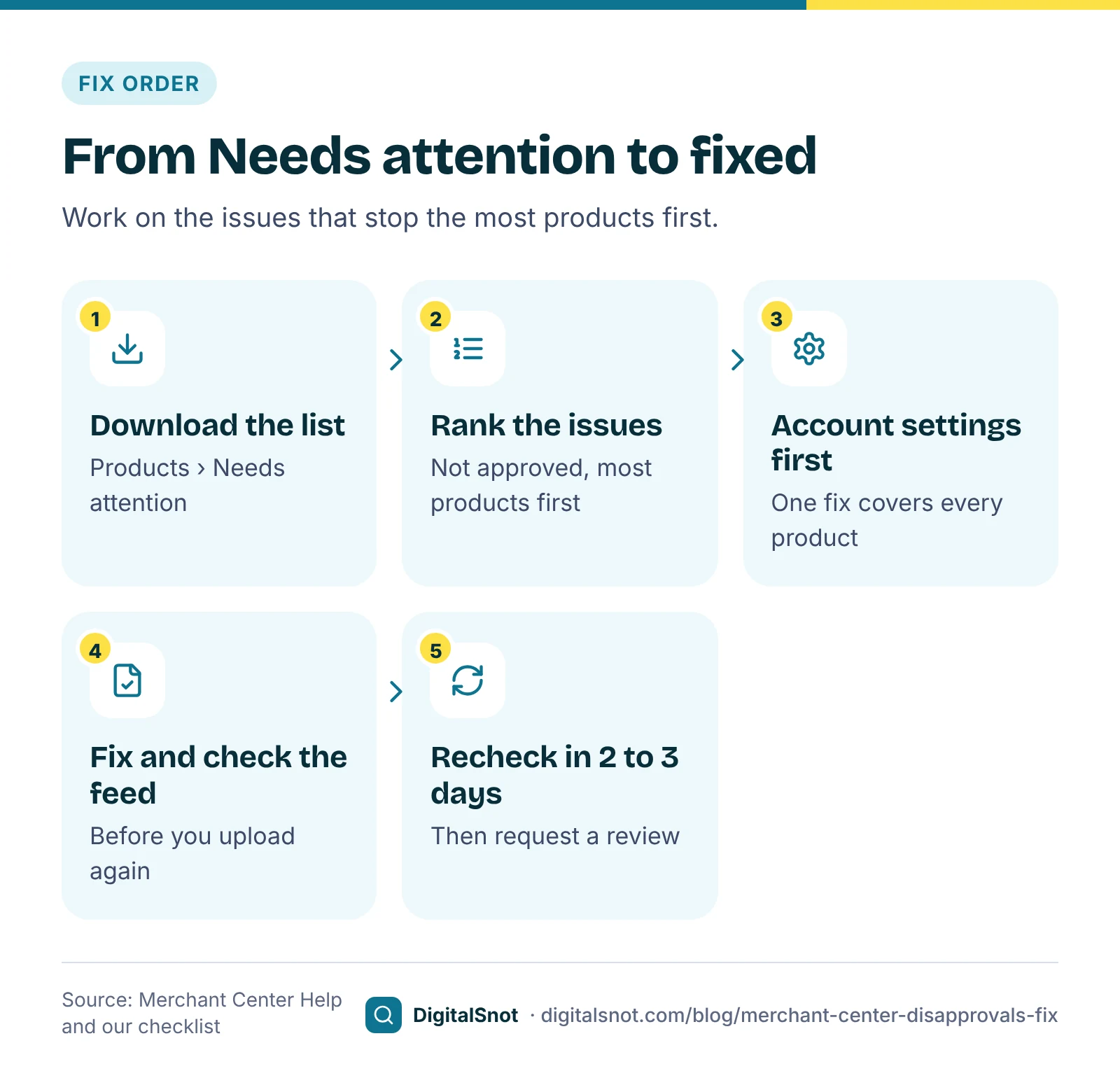
Google's page on checking product status in Merchant Center lists five statuses: Under review, Processing, Approved, Limited and Not approved. A not approved product cannot show. A limited product still shows, but only in some places or cases. Open Products, then the Needs attention tab, to see every issue with the number of products it affects. The download icon there saves a CSV file of the affected products.
That file is hard to read when you have hundreds of products and a dozen issues. Upload it to the Merchant Center Disapproval Fixer. It groups the issues by type, counts the products each one affects and puts the ones that stop the most products first (our ranking). For common issues, such as a missing GTIN, a price that does not match the website, missing shipping costs and image problems, it explains the issue in plain words with the fix from Merchant Center Help. It also lists the products with several issues and gives you a CSV fix list. It reads the file in your browser and never signs in to Merchant Center.
Prices and stock that do not match your website
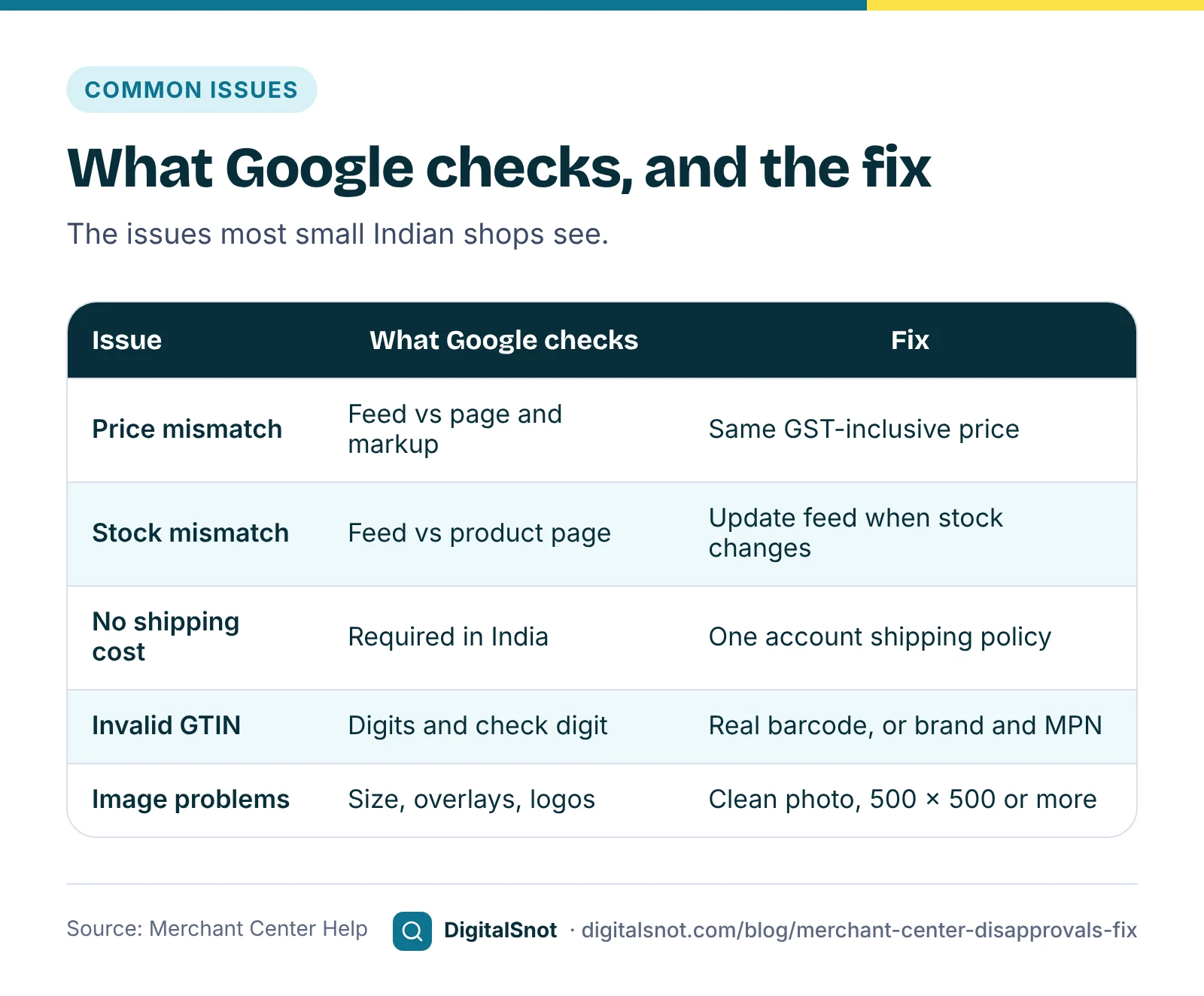
Google checks your product data against your website. Its page on fixing a mismatched product price explains that Googlebot compares the price in your data with the price on the landing page and in the page's structured data. When they differ, the product may be disapproved, and the page warns that this may lead to an account suspension. The usual causes:
- The feed is older than the website. You changed prices on the site and the feed updates once a week.
- The structured data shows a different price from the one on the page, often an old price left in a theme or plugin.
- The price loads with JavaScript after the page opens. The same page says this triggers the error.
- A sale ended on the site but not in the feed, or the other way round.
For a sale, keep the regular price in price and the lower price in sale_price, with sale dates so it starts and ends on time. Google's page on an invalid sale price explains the rules.
India has two price rules to get right. Google's page about tax information says that outside the United States and Canada, the price should include VAT or GST, and the landing page price must match. So your feed price is the GST-inclusive price your customer pays. India also has an optional maximum retail price attribute, available only in India, for the MRP.
Stock works the same way: the availability in your feed must match the product page. Google's page on mismatched availability covers the fixes, such as updating the feed whenever stock changes. To check one product page, run it through our Product Page Checker, which reads the price and stock in its structured data and checks that the price appears on the page.
Shipping costs for India
India is one of the countries where Google needs shipping costs. Google's page on free listings for products lists the countries where you must set up shipping settings or add shipping costs with the shipping attribute, and India is among them. The shipping attribute page warns that if you do not give a shipping cost for a region you ship to, your products or account could be disapproved.
The fix is often a single setting. Google's page on setting up shipping for an entire account explains how to add a shipping policy once, which then covers every product. Use the shipping attribute in your feed only for products that cost a different amount to send. Enter your own courier costs and free-shipping threshold, and keep them the same as what customers see at checkout.
GTIN, brand and MPN
A GTIN is the barcode number on the pack: 8, 12, 13 or 14 digits, the last of which is a check digit. Google wants the manufacturer's GTIN for every product that has one, as its page on a missing GTIN explains, and disapproves products with a GTIN that is made up, mistyped or belongs to another product, as the page on an invalid GTIN explains.
Many Indian shops sell things they make themselves, such as handloom, handicrafts or home-made food. Those products have no manufacturer GTIN. Leave gtin empty, use your shop name as the brand and your own product code as the MPN. Never paste your SKU into the GTIN column.
Before you upload a corrected feed, run it through the Merchant Center Feed Checker. It checks the required attributes, length limits, availability and condition values, price formats such as 1299.00 INR, GTIN check digits, brand and MPN, sale prices and the India rules for MRP and shipping. It can also give you a cleaned feed with the safe fixes made.
Images
Google's image link page sets the current minimum at 100 by 100 pixels, or 250 by 250 for clothing. That is changing: Google's 2026 product data specification update raises the minimum to 500 by 500 pixels for all products from 31 January 2027. If your product photos are smaller, replace them now.
The main image must show the product, not a logo or a "no image" picture, and must not carry promotional text such as "50% OFF", prices or watermarks; Google's page on text on an image covers this. When you replace an image, give it a new file name and address so Google fetches it again.
Titles that pass and sell
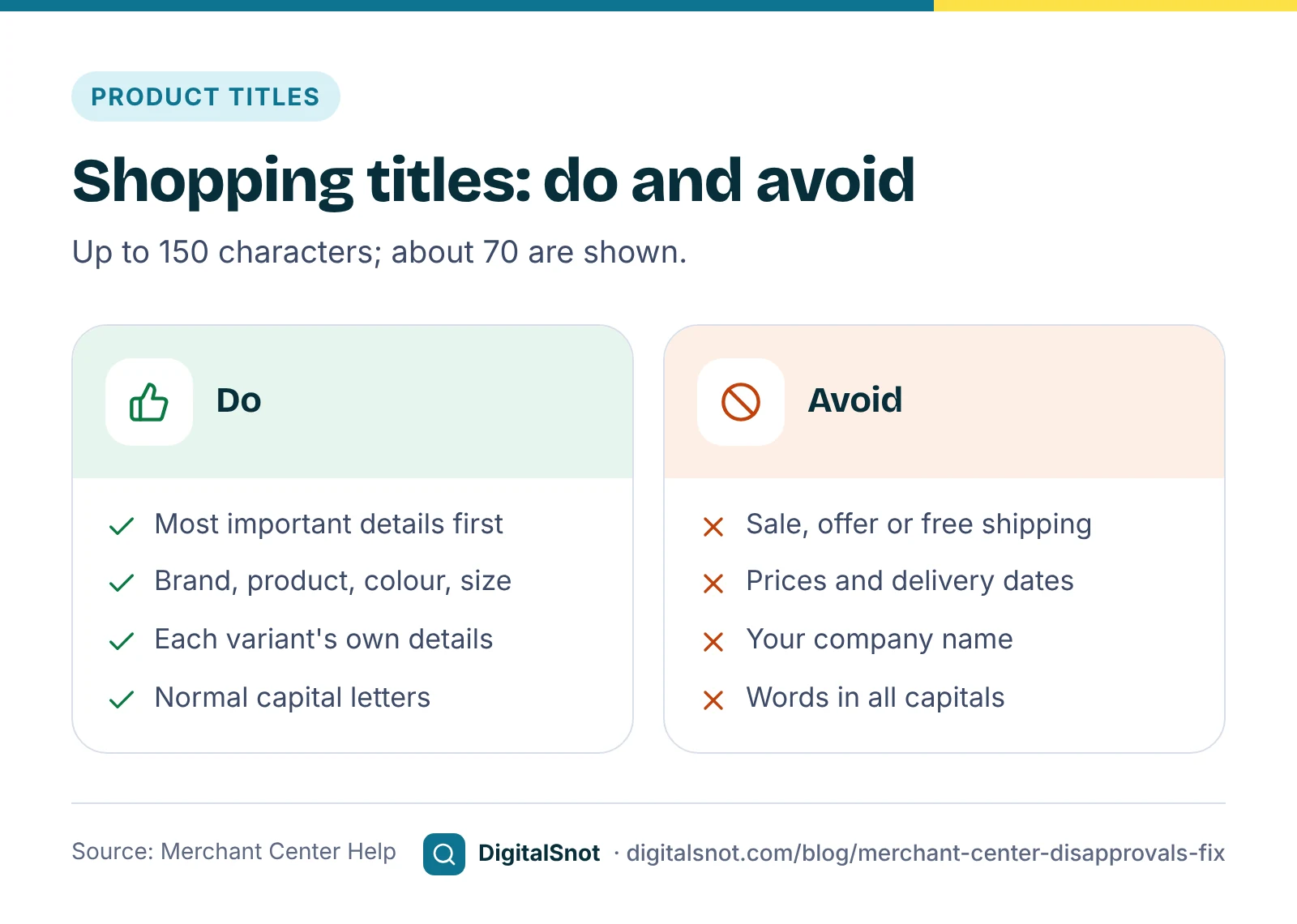
Google's page on the title attribute allows up to 150 characters, but Shopping ads and free listings show only about the first 70, so put the most important details first. It asks you to leave out promotional text and details such as price, sale price, sale dates, shipping, delivery dates and your company's name, which belong in their own attributes. Titles in capital letters can be flagged too.
The Shopping Title Optimizer rewrites every title in your feed in the order you choose, such as brand, product, colour and size. It uses only the words already in the title and the values in your feed's columns, so it never makes up a detail. It takes out promotional text, prices, symbols and capitals, and gives you a supplemental file with the new titles. For example, "BIG SALE Pure Banarasi Silk Saree RED ₹2999 FREE SHIPPING" becomes "Kesar Handloom Pure Banarasi Silk Saree, Red".
Misrepresentation: the issue that affects the whole account
Some issues are about your shop, not one product. Google's misrepresentation policy is the most serious of these, and it can lead to a suspension. It usually comes from missing or unclear business details, return and refund terms or prices. Check that your business name, address, phone number and email are on the website and match Merchant Center, and that your return and refund policy is clear and easy to find; our Return and Refund Policy Builder helps you write one. Fix everything first, then request a review.
A worked example: a handloom shop in Varanasi
Kesar Handloom in Varanasi is a made-up shop with 412 products. Its Needs attention download, with made-up numbers, looked like this:
| Issue | Products | Status | Fix |
|---|---|---|---|
| Missing shipping costs | 412 | Not approved | One shipping policy for the account |
| Mismatched price | 64 | Not approved | Daily feed updates; sale prices with dates |
| Invalid GTIN | 37 | Not approved | Remove SKUs from gtin; brand and MPN instead |
| Text on image | 22 | Not approved | Clean photos with new file names |
| Image too small | 15 | Warning | 500 × 500 photos before 31 January 2027 |
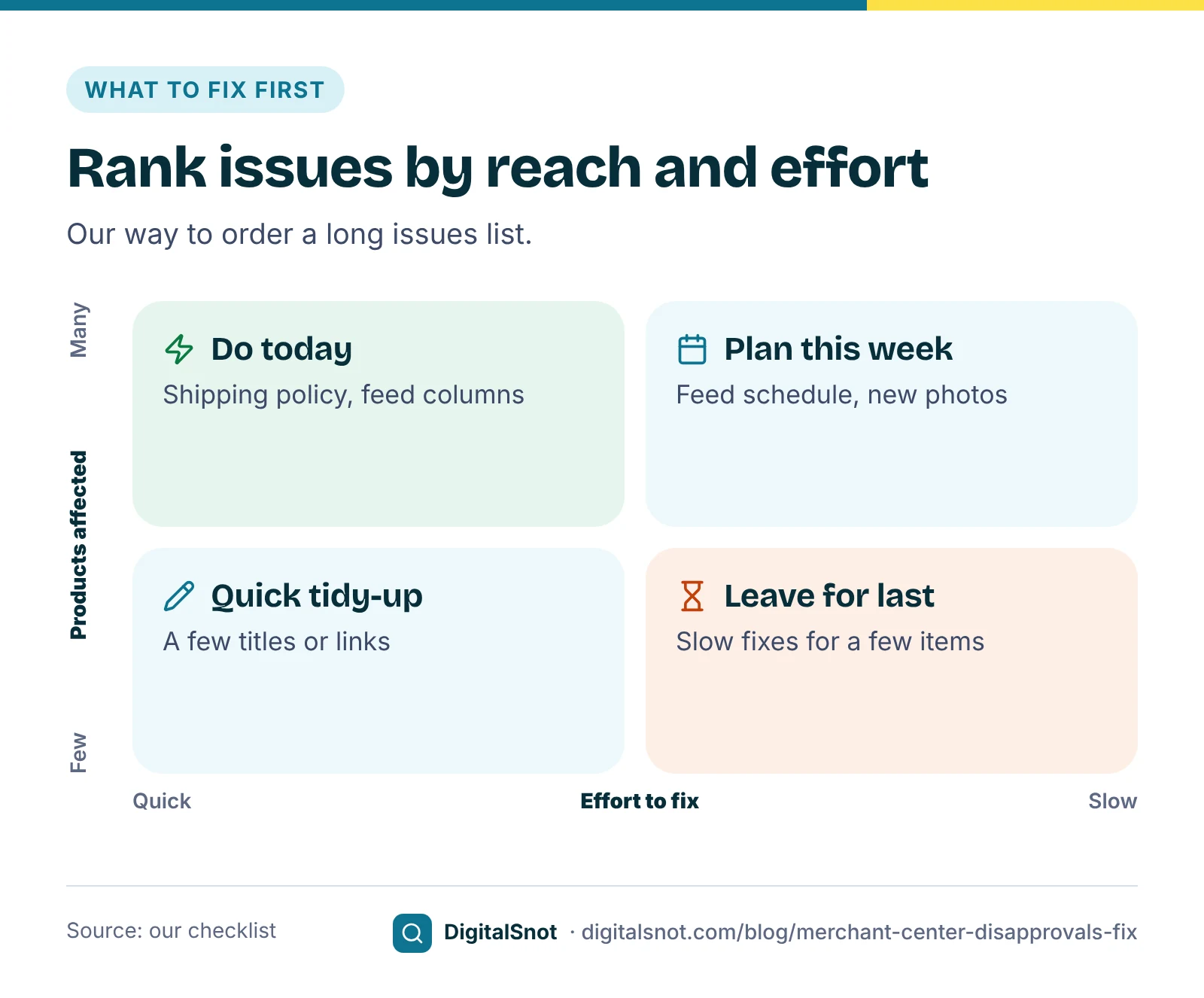
The order matters. One shipping policy freed most of the catalogue in a single step. The GTIN fix was one column in the feed, and the price fix meant scheduling the feed to update every day. The photos took longest, so they came last. Google's fix page for a missing product page, for example, says changes can take 24 to 72 hours to show on the Needs attention page, so the owner checked again two days later.
Mistakes to avoid
- Fixing products one by one when one account setting would fix them all.
- Prices without GST in the feed while the website shows GST-inclusive prices.
- Made-up or copied GTINs. They lead to disapprovals.
- Sale prices changed by hand on the site but not in the feed.
- Requesting a review before everything is fixed.
Your next step
Download your Needs attention list and upload it to the Merchant Center Disapproval Fixer. Fix the top issue, check the corrected feed in the Merchant Center Feed Checker, then tidy your titles with the Shopping Title Optimizer. If ads were disapproved as well, our post on disapproved ads and suspended accounts covers the Google Ads side. Our product page SEO guide helps the same pages in free results, more tools are on our e-commerce tools page, and you can ask us to look at your feed.
Free tools in this article
- Merchant Center Disapproval Fixer Turn the Merchant Center issues list into a fix plan: worst issues first, with Google's fix and a CSV.
- Product Page Checker Check a product page's Product markup, price, stock, identifiers, shipping, returns and search basics.
- Merchant Center Feed Checker Check a product feed for missing attributes, wrong formats, bad GTINs and duplicates before you upload it.
- Shopping Title Optimizer Rewrite feed titles in bulk: brand, product, size and colour in order, ready as a supplemental feed.
- Return and Refund Policy Builder Turn your return, refund, cancellation and delivery rules into a clear policy, with checks for gaps.
By the numbers
- characters at most in a product title; Shopping shows only about the first 70
- 150
- Source: Merchant Center Help
- pixels, the minimum image size for all products from 31 January 2027
- 500 × 500
- Source: Merchant Center Help
Frequently asked questions
What is the difference between not approved and limited in Merchant Center?
A not approved product cannot show until you fix its issue. A limited product still shows, but only in some places or cases. Fix not approved issues first, starting with the ones that affect the most products.
Should prices in my Merchant Center feed include GST?
Yes. Google says that outside the United States and Canada, the price should include VAT or GST, and the price on your landing page must match the price in your product data. Use the GST-inclusive price your customer pays. This is general guidance, not tax advice.
Do I need shipping costs in Merchant Center for India?
Yes. India is one of the countries where Google requires shipping settings or shipping costs. The simplest fix is one shipping policy for the whole account, with the shipping attribute only for products that cost a different amount to send.
My products have no GTIN. What should I do?
Do not make one up or use your SKU. Products you make yourself, or that have no manufacturer GTIN, should leave gtin empty and use your brand and your own product code as the MPN.
What image size does Merchant Center need?
Today the minimum is 100 by 100 pixels, or 250 by 250 for clothing. From 31 January 2027, Google requires at least 500 by 500 pixels for all products, so replace smaller photos before then.
How long does Merchant Center take after I fix an issue?
It depends on the issue. Google's fix pages for some issues say changes can take 24 to 72 hours to show on the Needs attention page. Fix everything first, then request a review where Merchant Center offers one.
Sources
Every figure and claim in this article comes from the sources below. We checked each one when writing and link to the original so you can read it yourself. Credit belongs to the authors and publishers listed. How we write and check our articles.
-
1
Check product visibility and status in Merchant Center
Merchant Center Help · Product statuses, the Needs attention tab and downloading affected products.
-
2
How to fix: Mismatched product price
Merchant Center Help · Prices compared with the landing page and structured data; possible suspension; JavaScript prices.
-
3
About tax information for your products
Merchant Center Help · Include VAT or GST in the price outside the United States and Canada.
-
4
Maximum retail price [maximum_retail_price]
Merchant Center Help · An optional MRP attribute, available only in India.
-
5
Free listings for products
Merchant Center Help · India is among the countries where shipping settings or costs are required.
-
6
Shipping [shipping]
Merchant Center Help · Missing shipping costs can lead to product or account disapproval.
-
7
Set up shipping settings for an entire account
Merchant Center Help · Account-level shipping policies that cover every product.
-
8
Image link [image_link]
Merchant Center Help · Current minimum image sizes of 100 by 100, or 250 by 250 for clothing.
-
9
Merchant Center product data specification update 2026
Merchant Center Help · A 500 by 500 pixel minimum for all products from 31 January 2027.
-
10
Title [title] and structured title [structured_title]
Merchant Center Help · Up to 150 characters, about 70 shown, and what to leave out of titles.
-
11
How to fix: Missing product page
Merchant Center Help · Changes can take 24 to 72 hours to show on the Needs attention page.
-
12
Request a review of your issues
Merchant Center Help · Asking Google to review once issues are fixed.