Google Ads disapproved your ad or suspended you? Check before you appeal
Tell a disapproved ad from a paused or suspended account, find the exact policy, fix the cause and appeal once, the way Google asks.
On this page (10 sections)
- 1Disapproved, paused or suspended: know which one you have
- 2Find the exact policy name first
- 3Common causes for local businesses
- 4Fix the cause, then appeal the right way
- 5A worked example: a packers and movers firm in Thane
- 6If the whole account is suspended
- 7Never open a new account to get round a suspension
- 8Mistakes to avoid
- 9Your next step
- 10Sources
If Google Ads disapproved your ad or emailed to say your account is suspended, it can feel like the end of your advertising. Usually it is not. Most problems come from a few common causes, Google tells you which policy is involved, and there is a set way to fix it and ask for a review.
This post helps you work out what kind of problem you have, find the exact policy, fix the cause and appeal in the right order. It also explains why opening a new account is the one thing that turns a fixable problem into a permanent one.
Disapproved, paused or suspended: know which one you have
These words mean different things, and each has its own route back.
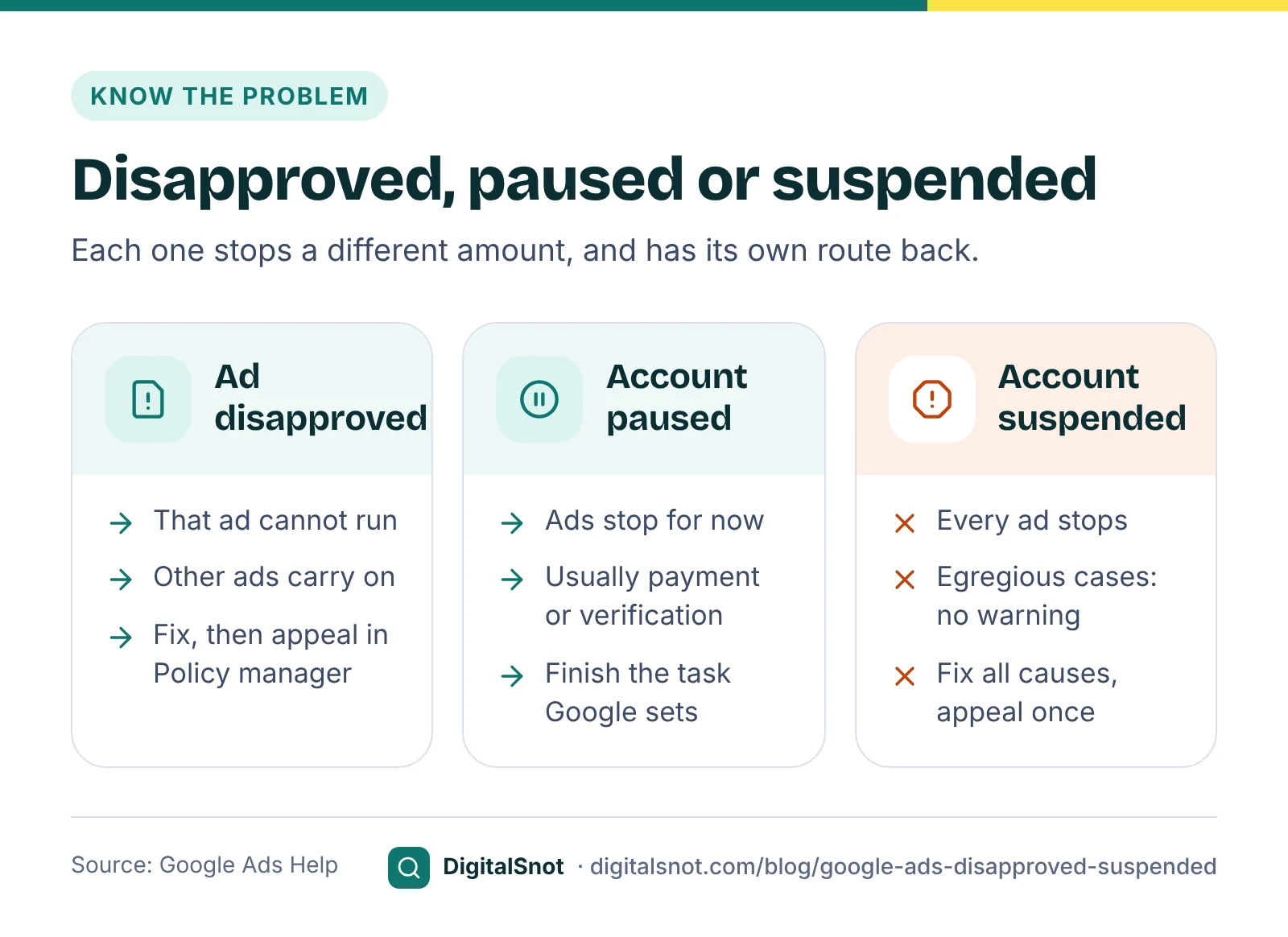
- Ad or asset disapproved: that ad or asset cannot run, but the rest of your account carries on. An ad marked "Eligible (limited)" can run, but only in some places or to some people. Google's page on finding your ad status explains each status.
- Account paused: usually Google is waiting for something from you, such as a payment check or advertiser verification. Google's page on account pausing says an account is paused if verification is not completed within the 30-day notice period.
- Account suspended: all your ads stop. Google's account suspensions overview says egregious violations lead to suspension straight away, without a warning, and that for other policies Google sends a warning at least 7 days before any suspension.
Find the exact policy name first
Do not guess. Every disapproval and suspension names a policy, and each policy page explains its own fix.
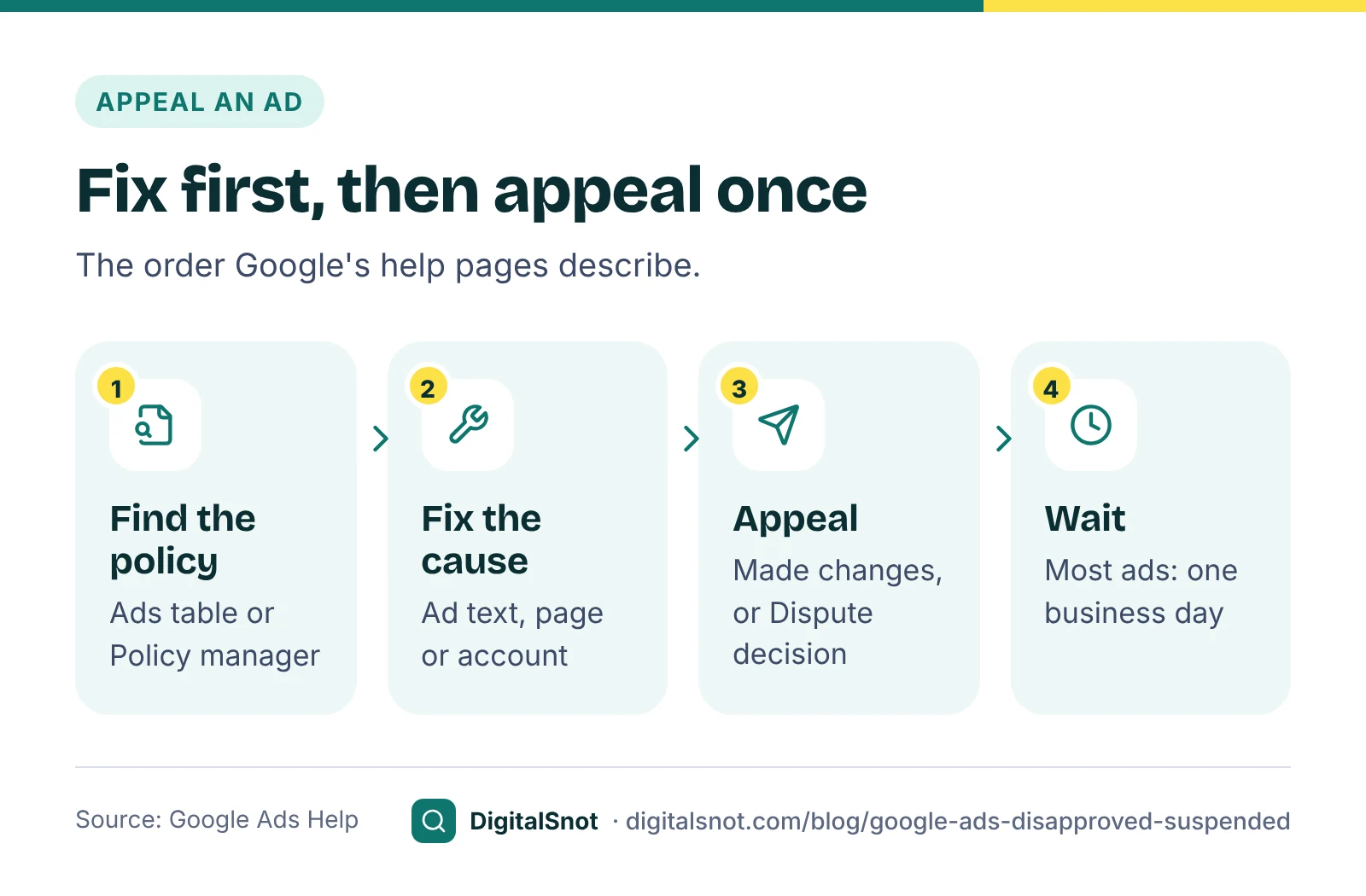
For ads, hover over the status in the Ads table, or add the Policy details column, to see why an ad is disapproved or limited. For a full list, open Tools, then Troubleshooting, then Policy manager. For a suspension, the notice in your account and Google's email name the policy.
If the message is hard to read, paste it into the Suspension and Policy Appeal Helper, or tick what you see from a list in Google's own policy names. It explains what the message means in Google's words with a link to the policy, what Google says to fix before you appeal, the evidence to gather and an appeal text to fill in. It runs in your browser and cannot see your account, so it works only from what you paste and tick.
Common causes for local businesses
For small local advertisers, a handful of policies cause most of the trouble.
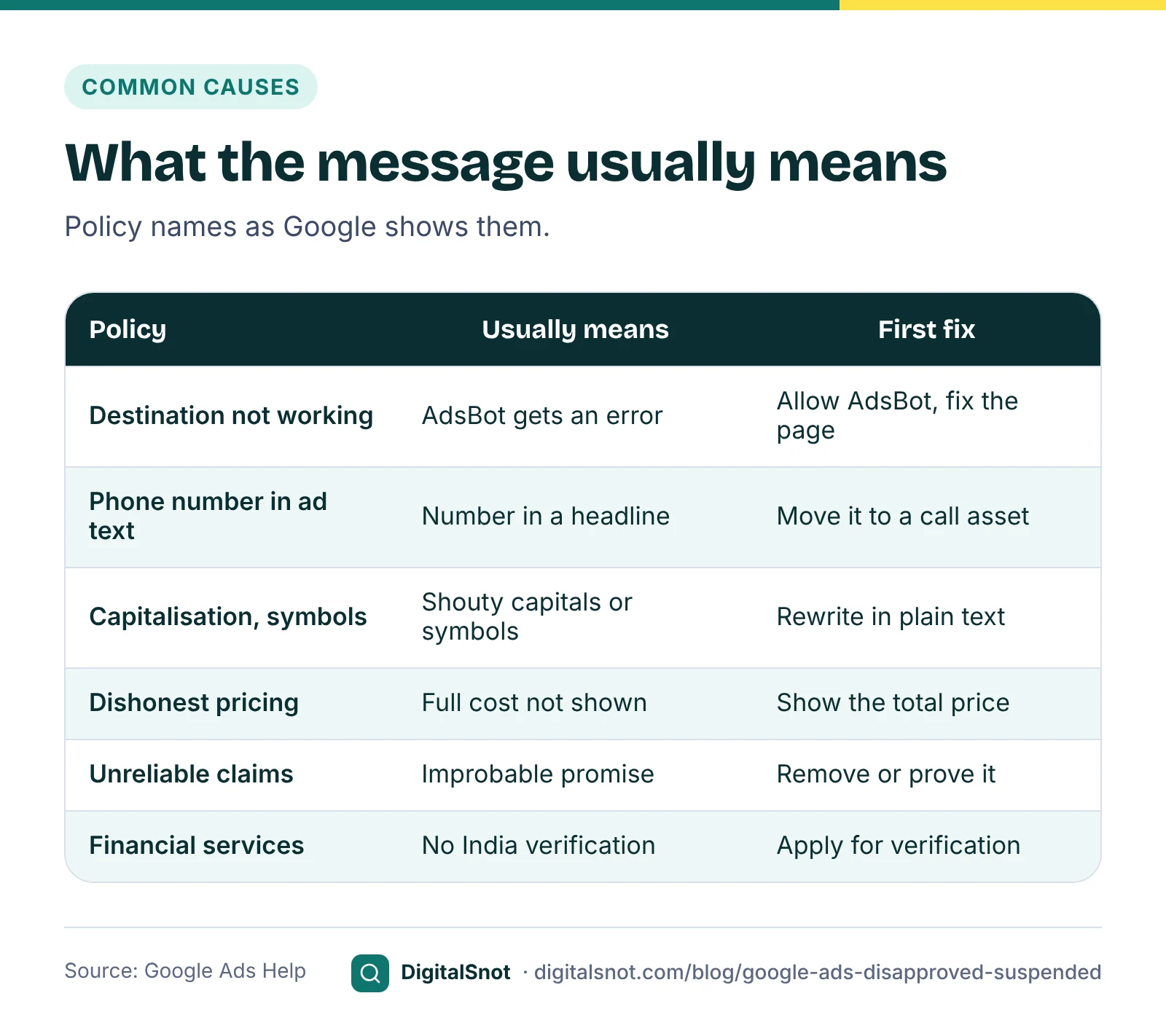
Destination not working
Google's Destination not working policy covers landing pages that return errors such as 404 or 500 to its crawler, AdsBot. A page can open for you and still fail for Google. Google's page on Destination not accessible says security settings, firewalls and website plugins can block its crawler, and suggests asking your developer to allow the AdsBot-Google and AdsBot-Google-Mobile user agents.
Phone numbers, capitals and symbols in the ad text
Google's editorial rules do not allow a phone number in the ad text; add it as a call asset instead. Its rules on capitalisation and punctuation and symbols catch words written in capitals to shout, decorative symbols and repeated punctuation.
Misrepresentation
Google's misrepresentation policies cover ads and pages that leave out or misstate information about your business, prices or results. Dishonest pricing practices covers not showing the full cost before purchase. Unreliable claims covers improbable promises. Unacceptable business practices, such as hiding who you are or suggesting a link to a brand you do not have, is egregious and leads to suspension without a warning.
Restricted categories
Some businesses need certification or verification first. Google's healthcare and medicines policy does not allow ads targeting India to promote prescription drugs, and online pharmacies need certification. To show financial services ads in India, Google's financial services verification for India requires you to show that the relevant regulator, such as the RBI or SEBI, licenses you, or that you are exempt.
Before you submit new ads, paste the text into the Google Ads Policy Pre-check. It highlights capitals, repeated punctuation, symbols, phone numbers, web addresses and risky claims such as "#1" or "best", with a link to the policy. It is not Google's review, so a clean result means fewer obvious problems, not a promise of approval.
Fix the cause, then appeal the right way
An appeal asks Google to look again. It only works when the cause is gone, or when you can show Google got it wrong.
- Fix the ad, the page or the account. Edit the ad text, repair the landing page or complete what Google asked for.
- Check the landing page as a whole. The Landing Page Checklist for Ads takes you through 22 questions, with Google's destination policies marked separately from its landing page guidance and our own conversion checklist. It works from your answers and does not open the page, so test it on a phone as well.
- Appeal with the right reason. Google's page on fixing a disapproved ad or appealing a policy decision says you can appeal from the Ads page or Policy manager, and choose "Made changes to comply with policy" or "Dispute decision".
- Wait for the result. Google's page about the ad review process says most ads are reviewed within one business day, and some take longer.
Appeals are limited. Google allows 3 appeals per ad; after 3 unsuccessful ones you need to contact Google Ads support. Since 21 July 2026, policy decisions made more than 6 months ago can no longer be appealed from inside the account.
A worked example: a packers and movers firm in Thane
Swift Shift Packers and Movers in Thane is a made-up business. One morning all its ads show "Destination not working", and one description is also disapproved.
The website loads fine for the owner. The cause: the firm moved to new hosting a week earlier, and the new firewall blocks automated visitors. The owner's developer allows Google's AdsBot user agents, then checks the page with Chrome's developer tools set to an AdsBot user agent, as Google's page on overriding the user agent describes. The second problem is a description that reads "Call 98XXX XXXXX for a free quote". The owner moves the number into a call asset and rewrites the line.
He appeals both with "Made changes to comply with policy", once. Someone suggests opening a fresh account "just to keep the ads running". He does not, for the reason below.
If the whole account is suspended
A suspension needs more care, because you usually get one good chance to explain.
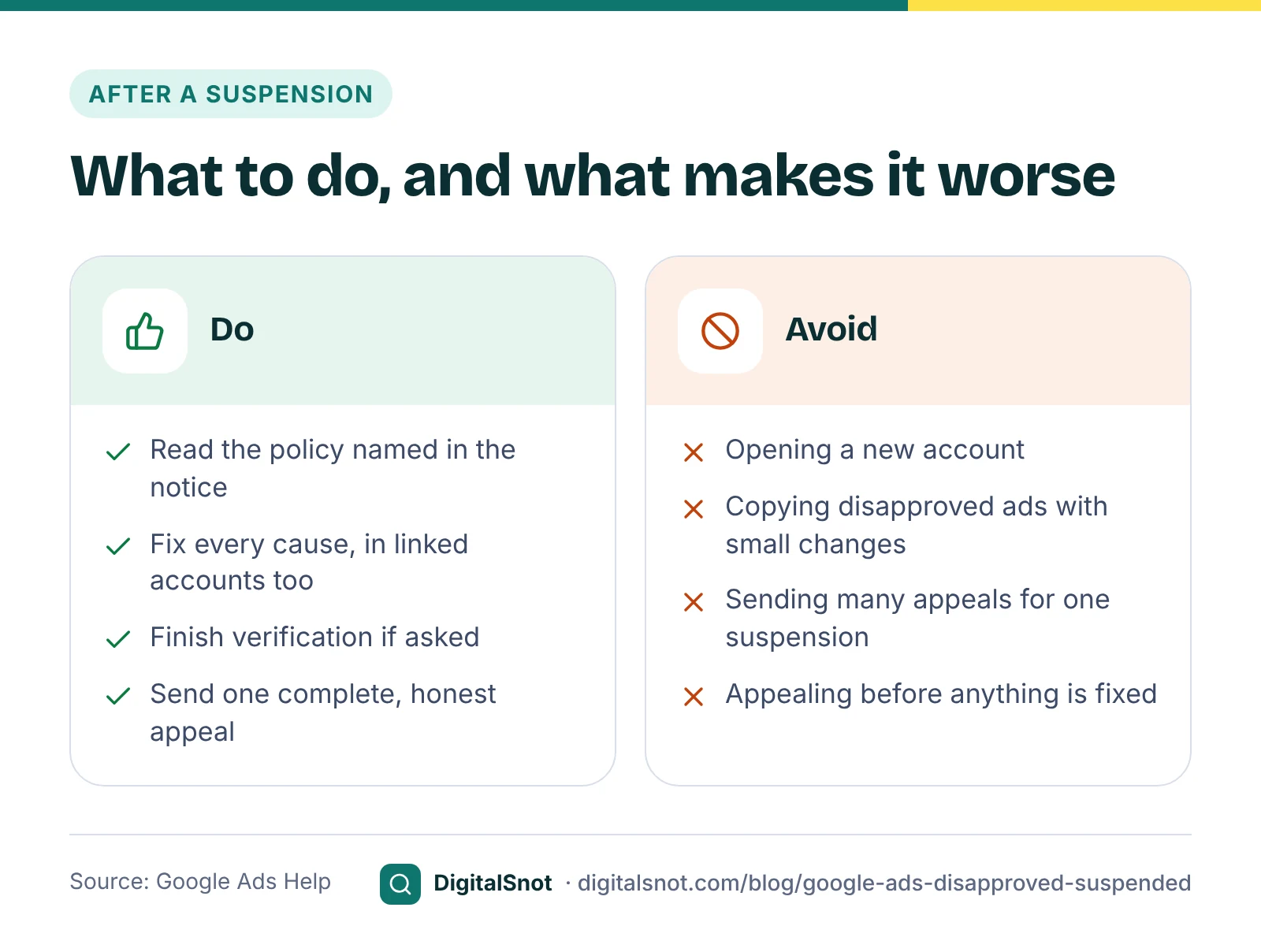
- Read the notice and the policy page, and fix every cause, including anything in linked accounts.
- Finish advertiser verification first if Google asks for it. Google's verification timelines say the deadline cannot be extended, reviews can take up to 5 business days, and in rare cases up to 30 days.
- Appeal once, completely. Google's suspensions overview says every advertiser has at least 6 months from the date of suspension to appeal, and that a suspension stays permanent unless an appeal succeeds. Google's page on billing and payment suspensions warns that if you file too many appeals for the same suspension, Google may not process them.
- Be accurate and honest. For egregious policies, Google says it reinstates accounts only in compelling circumstances, such as a mistake.
Never open a new account to get round a suspension
Google's circumventing systems policy says you cannot create multiple Google Ads accounts after a suspension to get around its policies. It is an egregious policy: accounts are suspended on detection, without a warning, and you are not allowed to advertise with Google Ads again.
A new account rarely stays hidden either. Google's suspensions overview says accounts related to a suspended account may be suspended too, and its billing suspensions page names accounts that share an email address, a payment method or a manager account. Appeal the original account instead.
Mistakes to avoid
- Appealing before fixing anything. An appeal with no change behind it usually fails and uses up one of your three.
- Copying a disapproved ad with small changes. Making variations of disapproved ads to get round a decision is also treated as circumventing systems.
- Testing the page only from your office. Google's crawler and your customers may see something different.
- Ignoring warnings. For most policies Google warns at least 7 days before a suspension. Act on the warning.
- Leaving it to the agency without checking. Ask which policy was named and what was changed before any appeal goes in.
Your next step
Open Policy manager today and note the exact policy name for each problem. Paste each message into the Suspension and Policy Appeal Helper to get the fixes in order, and check new ad text with the Google Ads Policy Pre-check before you submit it. Once your ads are running again, our posts on setting a starting budget and finding wasted spend in search terms help you get more from them. More free tools are on our Google Ads tools page, and you can contact us if you would like help.
Free tools in this article
- Suspension and Policy Appeal Helper Understand a suspension or disapproval, fix it in the right order and appeal with the right evidence.
- Google Ads Policy Pre-check Find capitals, symbols, phone numbers and claims in your ad text that may get it disapproved.
- Landing Page Checklist for Ads Check the page your ads send people to against Google's policies, its guidance and our conversion checklist.
By the numbers
- the least time every advertiser has to appeal an account suspension
- 6 months
- Source: Google Ads Help
Frequently asked questions
What is the difference between a disapproved ad and a suspended account?
A disapproved ad cannot run, but your other ads and campaigns carry on. A suspended account stops every ad in it. Each has its own route back: fix and appeal the ad in Policy manager, or fix the cause and appeal the suspension from the account.
How do I appeal a disapproved Google ad?
Fix the ad or landing page first. Then select the ad in the Ads table or open Policy manager, choose to appeal and pick "Made changes to comply with policy" or "Dispute decision". Google allows 3 appeals per ad, after which you need to contact Google Ads support.
How long do I have to appeal a Google Ads suspension?
Google says all advertisers have at least 6 months from the date of suspension to appeal. Without a successful appeal the suspension is permanent. Fix the cause and send one complete appeal rather than many short ones.
Can I open a new Google Ads account if mine is suspended?
No. Google's circumventing systems policy does not allow creating new accounts after a suspension to get around its policies. Accounts found doing this are suspended without a warning, and related accounts, for example ones sharing an email or payment method, can be suspended too.
Why does Google say my landing page is not working when it opens for me?
Google checks the page with its crawler, AdsBot. A firewall, security plugin or server setting can block AdsBot while the page opens normally for you. Ask your developer to allow the AdsBot-Google and AdsBot-Google-Mobile user agents, then appeal.
Can I put my phone number in my Google Ads text?
No. Google's editorial policy does not allow phone numbers in the ad text. Add your number as a call asset instead, so people can tap to call from the ad.
Sources
Every figure and claim in this article comes from the sources below. We checked each one when writing and link to the original so you can read it yourself. Credit belongs to the authors and publishers listed. How we write and check our articles.
-
1
Google Ads account suspensions overview
Advertising Policies Help · Egregious violations, 7-day warnings, at least 6 months to appeal, related accounts.
-
2
Circumventing systems
Advertising Policies Help · No new accounts after a suspension; suspension on detection without warning.
-
3
Fix a disapproved ad or appeal a policy decision
Advertising Policies Help · Appeal reasons, Policy manager, 3 appeals per ad, 6-month limit from 21 July 2026.
-
4
About the ad review process
Google Ads Help · Most ads are reviewed within one business day.
-
5
Find your ad status
Google Ads Help · Ad statuses, hovering for detail and the Policy details column.
-
6
Destination not working
Advertising Policies Help · Pages returning errors such as 404 or 500 to AdsBot are disapproved.
-
7
Destination not accessible
Advertising Policies Help · Firewalls and plugins can block AdsBot; allow its user agents.
-
8
Phone number in ad text
Advertising Policies Help · Phone numbers are not allowed in ad text; use a call asset.
-
9
Misrepresentation
Advertising Policies Help · Dishonest pricing, unreliable claims and unacceptable business practices.
-
10
Financial Services Verification - India
Advertising Policies Help · Financial services advertisers in India must show a regulator licence or exemption.
-
11
Healthcare and medicines
Advertising Policies Help · Prescription drugs cannot be promoted in ads targeting India; pharmacies need certification.
-
12
Timelines for Advertiser verification
Advertising Policies Help · The deadline cannot be extended; reviews take up to 5 business days, rarely 30.
-
13
Override user agent with Chrome DevTools
Advertising Policies Help · How to load a page as an AdsBot user agent to test it.
-
14
Billing and payment suspensions
Advertising Policies Help · Too many appeals may not be processed; accounts sharing an email, payment method or manager account.