Planning a Google Ads festival sale campaign (Diwali and more)
A dated plan for running Google Ads around Diwali or any festival sale: what to set up before, what to watch during and how to judge the results after.

On this page (10 sections)
- 1Start with the dates and the maths
- 2Four to six weeks before: offer, stock and pages
- 3One to two weeks before: ads, promotions and prices
- 4A few days before: tell Smart Bidding what to expect
- 5Budgets and pacing during the sale
- 6A worked example: a gift box shop in Indore
- 7After the sale: switch off, wait, then judge
- 8Mistakes to avoid
- 9Your next step
- 10Sources
A festival sale gives you a few days when people are ready to buy, and a lot can go wrong in them: ads still waiting for review, a budget that runs out at noon, sale prices that do not match the website, or a best-seller that sells out while the ads keep running. Most of these are avoided by planning your Google Ads festival sale campaign backwards from the date.
This post gives you a timeline for before, during and after the sale, with the Google Ads settings that matter at each step. It uses Diwali as the example, and the same plan works for Navratri, Christmas, Republic Day or your own anniversary sale.
Start with the dates and the maths
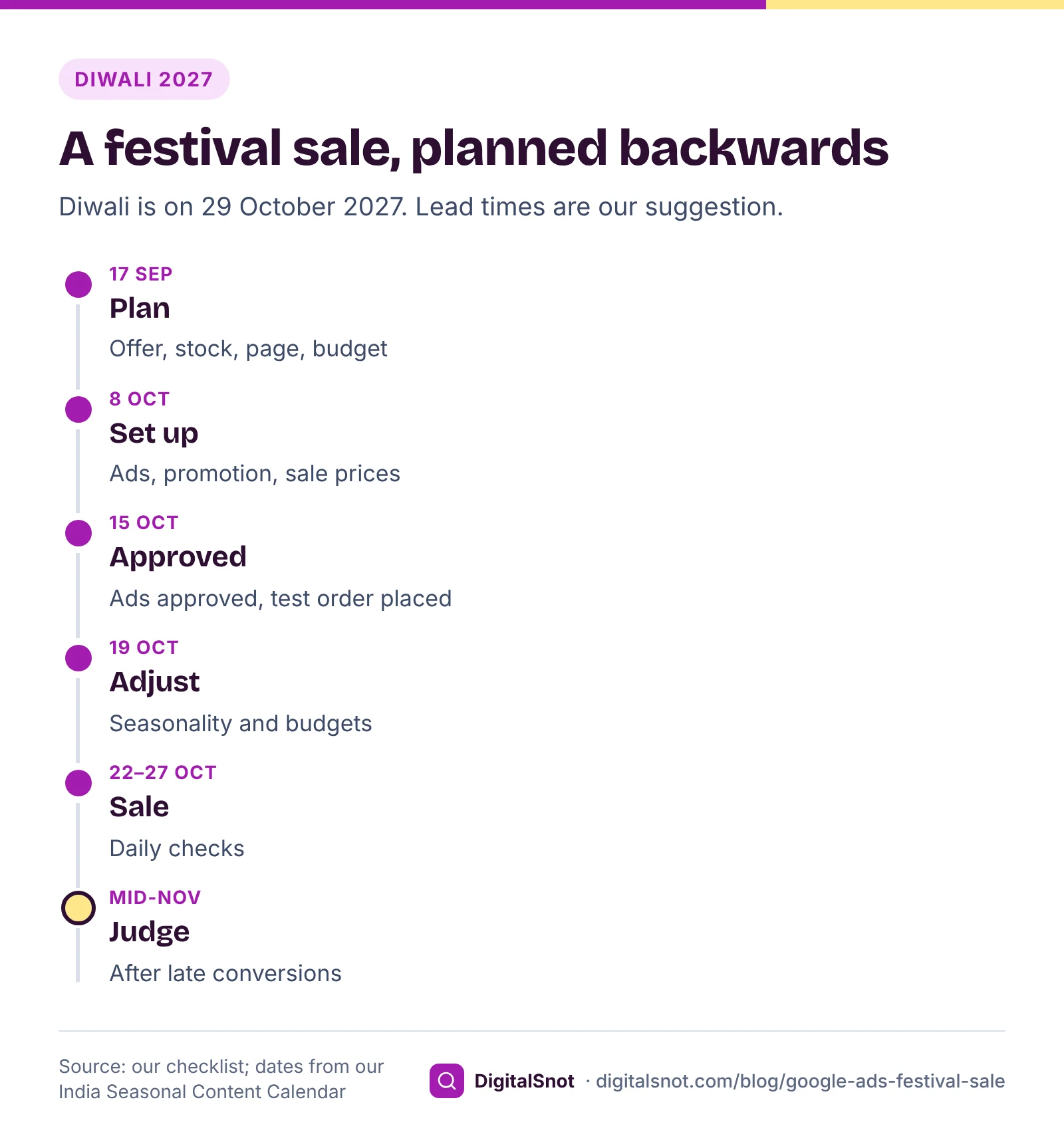
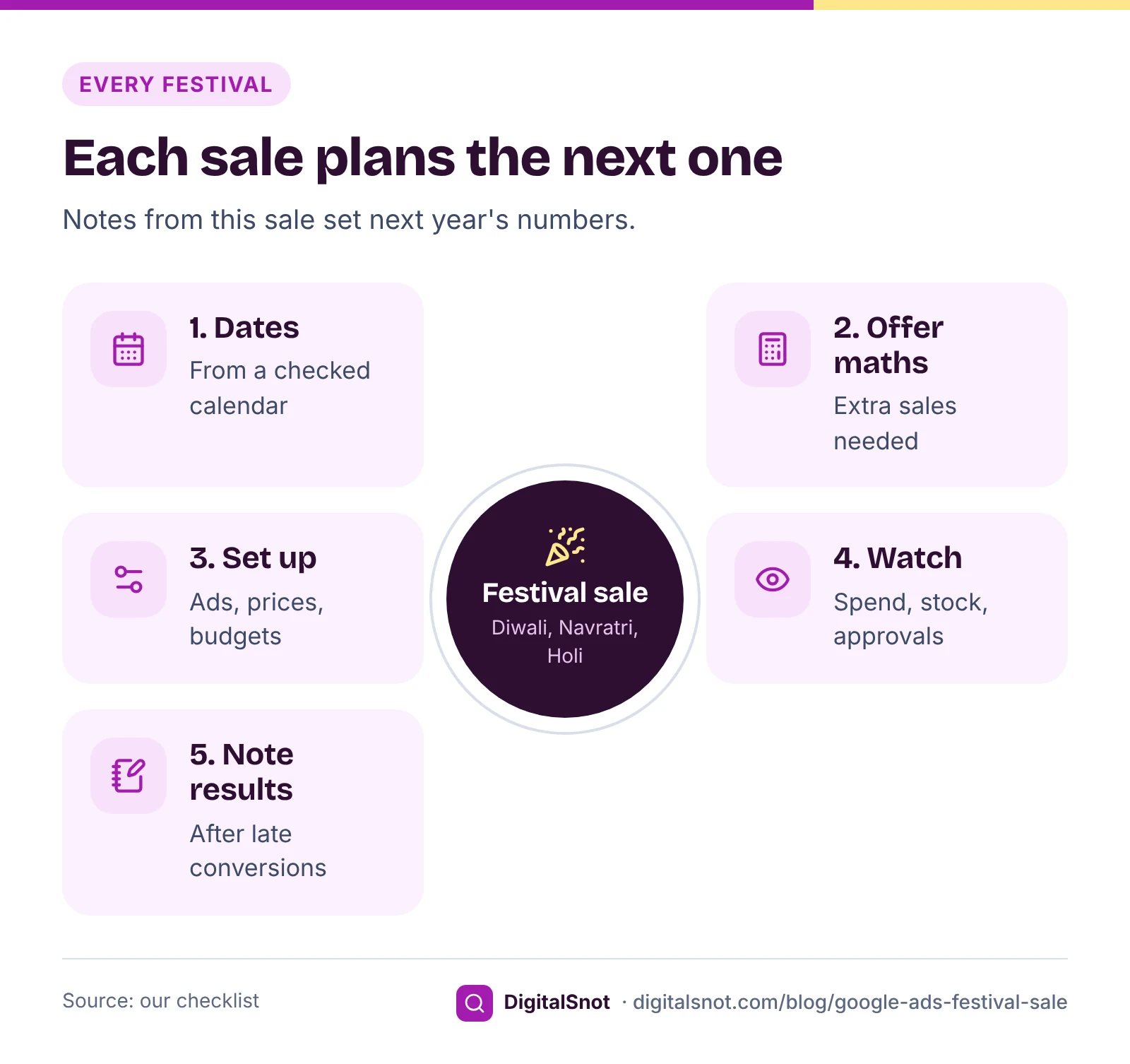
Festival dates move every year, and lunar festivals can differ by a day between calendars. Our India Seasonal Content Calendar takes its dates from the Government of India holiday lists, with Drik Panchang for festivals that are not on them. By that calendar, Diwali (Lakshmi Puja) is on 8 November in 2026, with Dhanteras on 6 November. In 2027, Navratri runs from 30 September to 8 October, Dhanteras falls on 27 October and Diwali on 29 October.
Then check the offer itself. A discount cuts your profit on every sale, so you need more sales to earn the same. If a gift box costs you ₹600 and sells for ₹1,000, a 15% discount cuts your profit on each box from ₹400 to ₹250. You need 60% more sales just to stand still, before you pay for any ads.
The Festival Campaign Builder does both. Pick your business type, city and festival, add your offer, price and cost, and it gives you a countdown with dates to prepare, announce, remind and run, the profit per sale and the extra sales the offer needs. It also writes WhatsApp messages, a Google Business Profile offer post and a day-by-day ads budget with 18% GST. The lead times it suggests are ours, so change them to suit you.
Four to six weeks before: offer, stock and pages
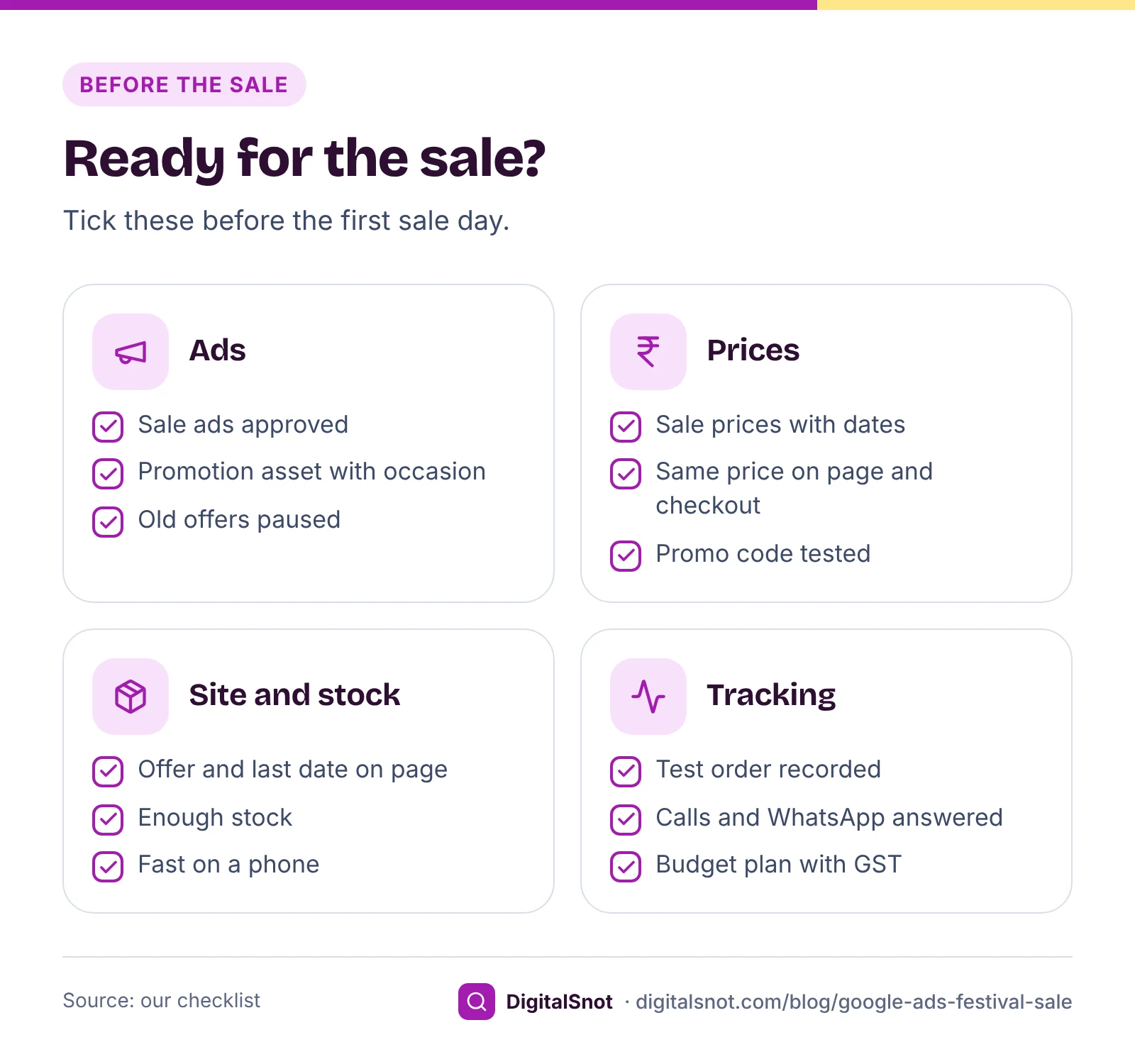
- Fix the dates and the offer, and check you have the stock for it.
- Build or update the landing page. It should show the offer, the last date and the products on sale, and load quickly on a phone.
- Test conversion tracking. A sale is the worst time to find out it is broken. Our post on conversion tracking that is not working has a checklist.
- Decide the budget for the month, with GST. Google adds 18% GST to Google Ads charges in India, as its page on taxes in your country explains.
One to two weeks before: ads, promotions and prices
Ads and assets. Google's page about the ad review process says most ads are reviewed within one business day, though some take longer. Our suggestion is to have sale ads in at least a week before, so there is time to fix a disapproval. Schedule them to run only on the sale dates.
Promotion assets. A promotion asset shows your offer under the ad, such as "15% off gift boxes". Google's page about promotion assets lets you pick an occasion, and the list includes Diwali and Navratri as well as Holi and Eid al-Fitr. Some occasions, Diwali among them, have a set date window, and your promotion dates must sit inside it.
Sale prices in Merchant Center. If you run Shopping or Performance Max with a product feed, keep the full price in price and the sale price in sale_price, with a sale date range so it starts and ends on time. Google's page on an invalid sale price explains the rules. The price must match your website, or products can be disapproved, as our post on fixing Merchant Center disapprovals explains.
The Sale Event Planner turns all of this into a dated timeline. Pick the festival or type your sale dates, tick your campaign types and bid strategy, and add your normal daily budget and your estimates for the sale. It tells you when to write ads and promotion assets, when to put sale prices in Merchant Center, when to raise budgets, whether a seasonality adjustment fits your sale, and whether your dates fit Google's occasion window. It gives checklists for before and after, and a calendar file.
A few days before: tell Smart Bidding what to expect
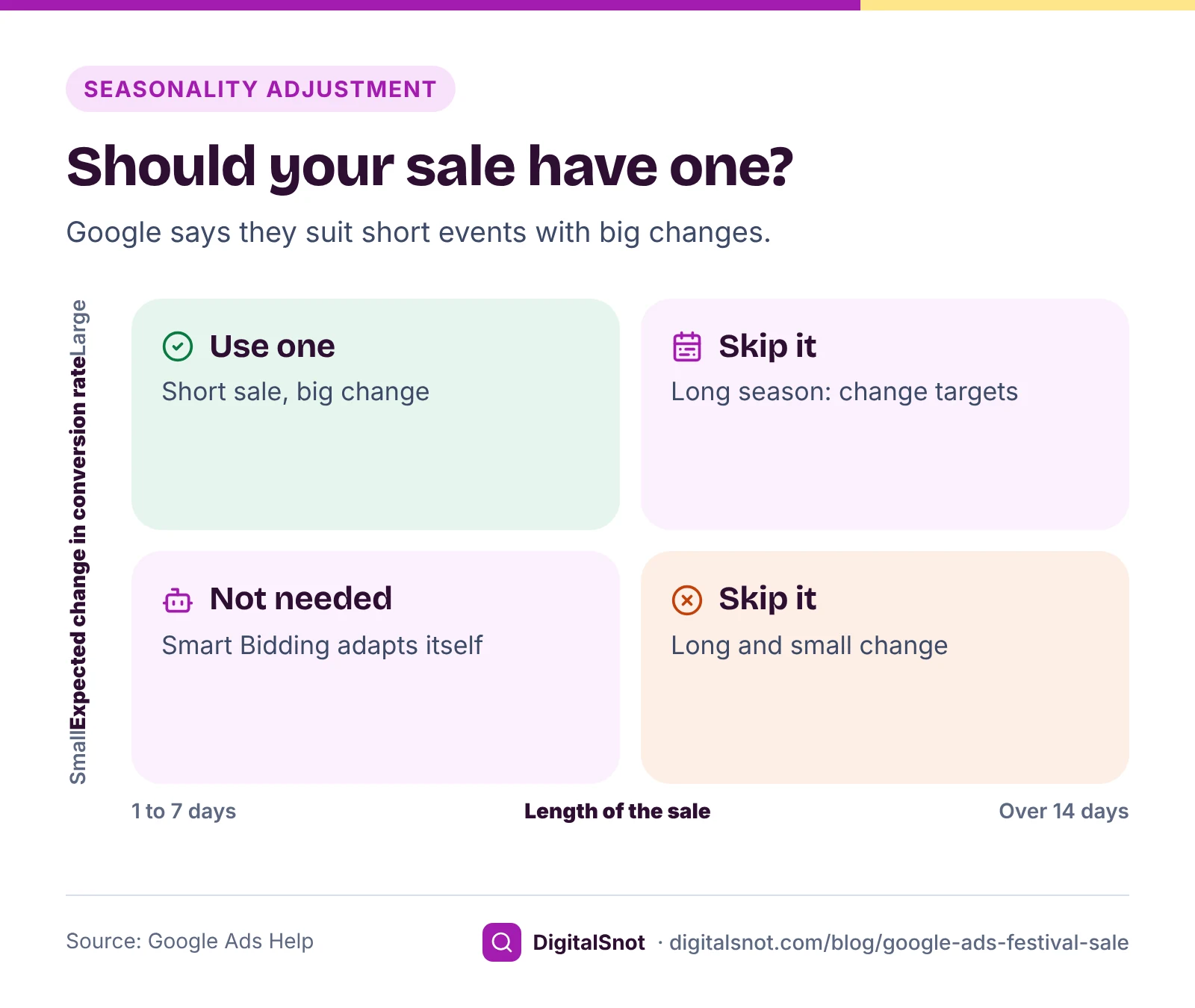
Smart Bidding learns from your recent conversion rate, and it cannot know that next Friday is the start of your sale. Google's page about seasonality adjustments describes a way to tell it. You set the dates and the change in conversion rate you expect, such as +50%, and bids return to normal by themselves after the end date.
Google is careful about when to use one:
- They are ideal for short events of 1 to 7 days, and may not work as well beyond 14 days.
- They are for major changes only. Smart Bidding already allows for normal seasonal patterns, so do not add one for the whole festive season.
- They work with Search, Shopping and Display campaigns on Target CPA or Target ROAS, and with Performance Max.
Base the change on a past sale: your conversion rate on those days compared with a normal week. Our suggestion: with no past sale to go by, skip the adjustment rather than guess.
Budgets and pacing during the sale
Google's page about average daily budgets says a campaign can spend up to twice its average daily budget on a busy day. Its page about spending limits says your monthly charges are limited to 30.4 times the average daily budget, and if you change the budget during the month, the rest of the month is limited by the new budget and the days left. So raising budgets for six days, then lowering them, changes what the month can cost.
Put your monthly target and spend so far into the Budget Pacing Calculator, or upload this month's Campaigns report. It shows whether you are ahead of or behind an even pace, where the month ends at the current rate (our estimate) and the daily budget that lands on your target, with 18% GST shown on top.
Each day of the sale, check four things: spend against your plan, any campaign marked "Limited by budget", stock of your best-sellers, and that calls and WhatsApp messages are being answered. If an item sells out, update the feed straight away so the ads stop sending people to it. Do not judge conversions day by day: Google Ads reports each conversion on the date of the ad click, so the latest days fill in later.
A worked example: a gift box shop in Indore
Utsav Gift Boxes in Indore is a made-up shop selling Diwali gift boxes online, with a Search and a Performance Max campaign on Target ROAS. Its owner plans a sale from 22 to 27 October 2027, ending two days before Diwali so boxes arrive in time. The numbers are made up.
| Dates | Daily budget | Days | Spend before GST |
|---|---|---|---|
| 1 to 21 October | ₹2,000 | 21 | ₹42,000 |
| 22 to 27 October (sale) | ₹5,000 | 6 | ₹30,000 |
| 28 to 31 October | ₹2,000 | 4 | ₹8,000 |
| October total | 31 | ₹80,000 (₹94,400 with GST) |
Last year's sale converted at 3% against a normal 2%, a rise of 50%. The sale lasts six days, inside the 1 to 7 days Google calls ideal, so the owner creates a +50% seasonality adjustment for 22 to 27 October. On a busy sale day each campaign could spend up to twice its budget, so the owner checks pacing every morning and lowers budgets on 28 October as planned.
A week before the sale, the owner had already sent the sale ads and a promotion asset with the Diwali occasion for review, put sale prices in the feed with the sale dates, and placed a test order to check tracking.
After the sale: switch off, wait, then judge
- Switch off sale ads and promotion assets, check sale prices ended in the feed, put budgets back and update the landing page.
- Wait for late conversions. Paste a Days to conversion report into the Conversion Lag Calculator to see how many days it takes for 90% of your conversions to arrive, and judge the sale only after that.
- If tracking broke during the sale, look at data exclusions, which tell Smart Bidding to ignore days with broken conversion data.
- Write down what you spent with GST, what you sold, the real change in conversion rate and what sold out. Next year's plan starts from these notes.
Mistakes to avoid
- Submitting sale ads the night before. A disapproval then costs you the first day.
- A seasonality adjustment for the whole month. It is for short events only.
- Sale prices on the site but not in the feed, or the other way round.
- Forgetting GST when you set the budget.
- Judging the sale the next morning, before late conversions arrive.
Your next step
Open the Sale Event Planner, pick your next festival and work through its timeline from the top. Check the offer's maths in the Festival Campaign Builder and keep the month on track with the Budget Pacing Calculator. If you are new to Google Ads budgets, read our post on setting a starting budget first. More tools are on our Google Ads tools page, and you can ask us to plan your next sale with you.
Free tools in this article
- India Seasonal Content Calendar Festivals, wedding season, monsoon and year-end dates for your industry and city, with publish dates.
- Festival Campaign Builder A countdown, offer maths, WhatsApp messages, a Google post, a caption and an ads plan for a festival offer.
- Sale Event Planner Plan a Diwali or end-of-season sale: dated steps, sale-day budget with GST and the seasonality adjustment.
- Budget Pacing Calculator See if this month's spend is on track and the daily budget that lands on your monthly target.
- Conversion Lag Calculator See how many days your Google Ads conversions take, so you do not judge a campaign or a change too early.
By the numbers
Frequently asked questions
When should I start planning Google Ads for Diwali?
Our suggestion is four to six weeks before, to settle the offer, stock, landing page and budget. Have sale ads and promotion assets in for review at least a week before the sale. Google says most ads are reviewed within one business day, but some take longer.
What date is Diwali in 2026 and 2027?
By our India Seasonal Content Calendar, which uses the Government of India holiday lists, Diwali (Lakshmi Puja) is on 8 November 2026 and 29 October 2027. Dhanteras is on 6 November 2026 and 27 October 2027.
Should I use a seasonality adjustment for Diwali?
Only for a short sale, ideally 1 to 7 days, when you expect a big change in conversion rate. Google says Smart Bidding already allows for normal seasonal patterns, so do not use one for the whole festive season.
Can I show a Diwali offer under my Google ad?
Yes, with a promotion asset. You can choose an occasion such as Diwali or Navratri, and the promotion dates must fall inside that occasion's date window. Add a promo code if customers need one at checkout.
How much can Google Ads spend on a busy sale day?
Up to twice the campaign's average daily budget on a single day. Over a month, charges are limited to 30.4 times the average daily budget, and changing the budget mid-month changes the limit for the days left.
When should I judge the results of a festival sale?
After most late conversions have arrived. Google Ads reports conversions on the date of the click, so the last sale days keep filling in. The Days to conversion report shows how long your customers usually take.
Sources
Every figure and claim in this article comes from the sources below. We checked each one when writing and link to the original so you can read it yourself. Credit belongs to the authors and publishers listed. How we write and check our articles.
-
1
About the ad review process
Google Ads Help · Most ads are reviewed within one business day.
-
2
About promotion assets
Google Ads Help · Promotion assets and their occasions, including Diwali and Navratri.
-
3
About seasonality adjustments
Google Ads Help · Short events of 1 to 7 days, major changes only, and the campaign types they work with.
-
4
About average daily budgets
Google Ads Help · Daily spend can reach twice the average daily budget.
-
5
About spending limits
Google Ads Help · Monthly charges limited to 30.4 times the average daily budget, and budget changes mid-month.
-
6
Taxes in your country
Google Ads Help · 18% GST on Google Ads charges in India.
-
7
How to fix: Invalid sale price
Merchant Center Help · Sale price and sale date rules in the product feed.
-
8
Understand your conversion tracking data
Google Ads Help · Conversions are reported on the date of the ad click.
-
9
About data exclusions
Google Ads Help · Telling Smart Bidding to ignore days with broken conversion data.
-
10
Holidays to be observed in Central Government offices during 2026 and 2027
Department of Personnel and Training, Government of India · OMs of 3 July 2025 and 16 July 2026: the holiday lists our India Seasonal Content Calendar takes festival dates from, with Drik Panchang for festivals not on them.