PTD webmail login: promail.ptd.net, settings and help
Sign in to PTD Webmail at promail.ptd.net with the part of your address before @ptd.net. Settings for email apps, limits, password help and support numbers.

On this page (10 sections)
- 1What is PTD Webmail?
- 2How to log in to PTD Webmail
- 3How to change or reset your PTD email password
- 4PTD email settings for email apps and phones
- 5PTD email storage and attachment limits
- 6The six-month inactivity rule
- 7PTD webmail not working? What to check
- 8How to contact PTD support
- 9Next steps: a signature, your own domain and other providers
- 10Sources
The PTD webmail login page is promail.ptd.net. Sign in there with the part of your email address before @ptd.net, so janedoe for janedoe@ptd.net, and your password. If you are locked out or have forgotten your password, call PenTeleData Customer Service on (800) 281-3564, which answers 24 hours a day, 7 days a week. This is an independent guide: DigitalSnot is not part of PenTeleData, and we never ask for your password.
This guide is for PenTeleData customers in Pennsylvania and New Jersey. It covers signing in, passwords, settings for email apps, limits, the rule that deletes unused mailboxes, and who to call. Each rule links to PTD's own help page.
What is PTD Webmail?
PTD Webmail is the email service that comes with PenTeleData internet. It runs on Zimbra, and you can use it in a browser or set up the same mailbox in an email app.
In 2025 PTD moved every mailbox to a newer version of Zimbra. Its migration notice says mailboxes moved from Zimbra X to Zimbra Daffodil, which PTD calls the Modern Web App, from 13 May 2025. PTD has since posted that the move is complete.
According to PTD's internet page, most residential internet accounts include five free mailboxes, so each person in a family or a small team can have their own address. You can add more mailboxes by calling Customer Service on (800) 281-3564.
The webmail tutorial lists the main features:
- A Spam folder, and Blocked and Allowed Senders lists.
- Forwarding, set in webmail or under "Email Forwarding" in Account Management.
- Filters, Basic or Advanced, that sort mail by subject, sender, content, date or size.
- A calendar that can import and export events.
- Light, Dark or Device themes, under "Settings and More".
How to log in to PTD Webmail
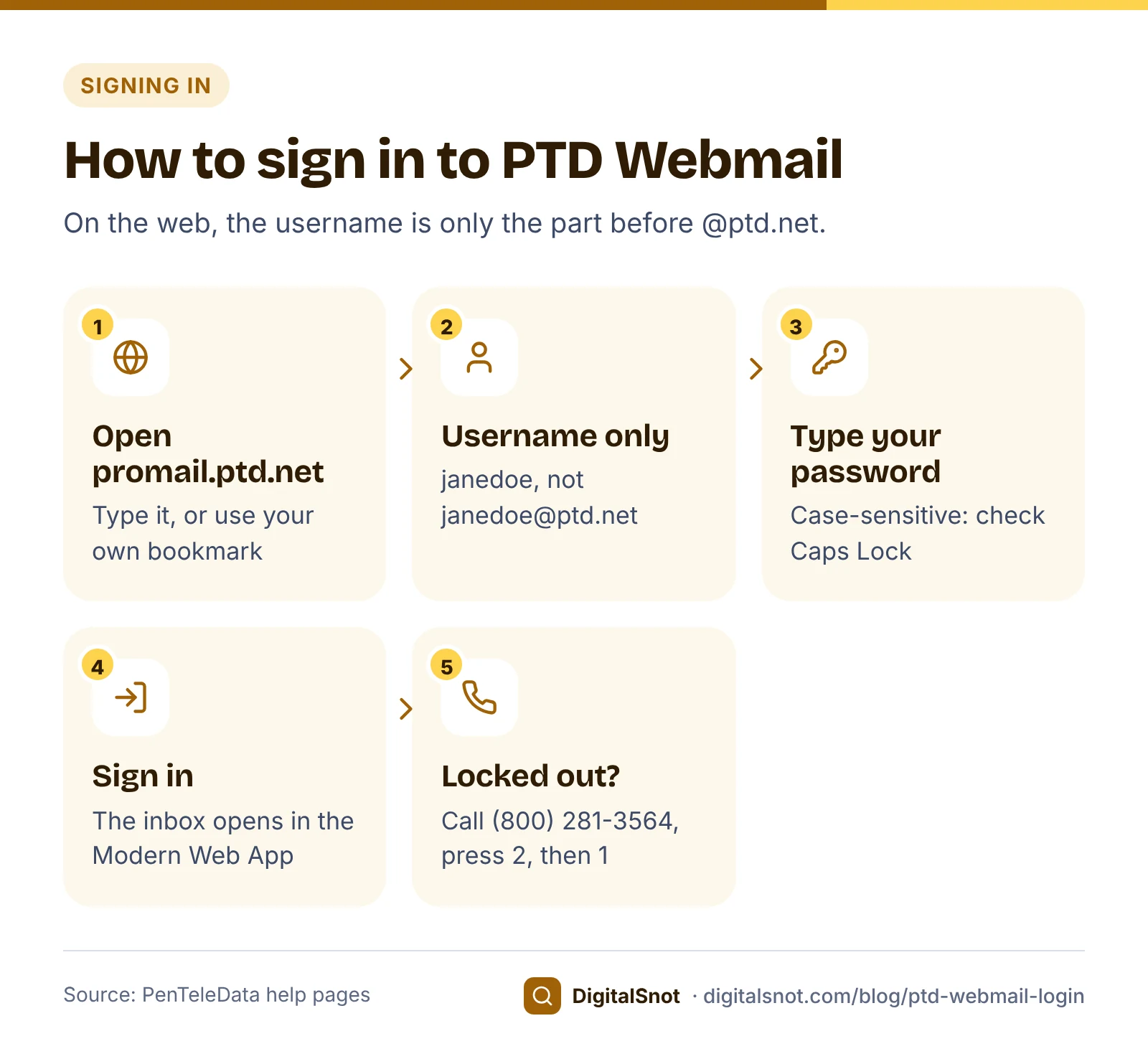
Signing in takes four steps. On the web, the username is only the first part of your address.
- Open promail.ptd.net in your browser. Type it yourself or use your own bookmark.
- In the username box, type only the part before @ptd.net. For janedoe@ptd.net, that is janedoe.
- Type your password. PTD's help says usernames and passwords are case-sensitive, so check that Caps Lock is off.
- Sign in. Your inbox opens in the Modern Web App.
During the 2025 move, the login page could send you on to promail-legacy.ptd.net or promailx.ptd.net/modern. PTD's migration guide said not to bookmark those addresses. If your bookmark points to either one, replace it with promail.ptd.net.
How to change or reset your PTD email password
You can change your password in two places, but you cannot reset a forgotten one online.
To change it, sign in to webmail and use the "Change Your Password" link at the top right, or sign in to Account Management. PTD's Account Management overview covers both. A new password must be 7 to 29 characters long and include at least one number or special character.
If you have forgotten your password, there is no reset link. PTD's email FAQ says to call Customer Service on (800) 281-3564, then press 2, then 1. The line is open 24 hours a day, and the agent verifies your identity before resetting anything.
PTD email settings for email apps and phones
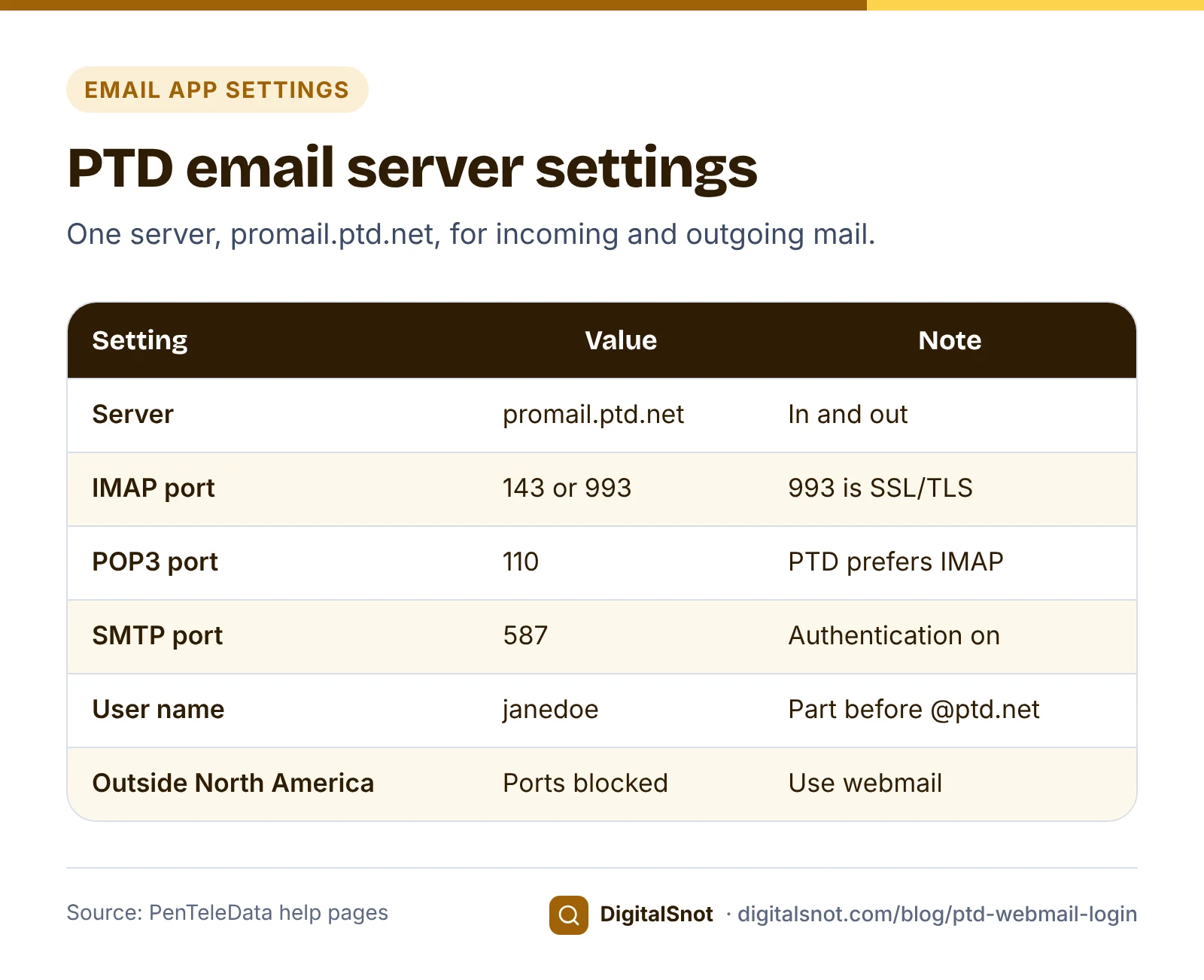
For an email app, use the settings on PTD's email server information page.
| Setting | Value |
|---|---|
| Incoming server (IMAP) | promail.ptd.net, port 143 (the default) or 993 (SSL/TLS) |
| Incoming server (POP3) | promail.ptd.net, port 110 |
| Outgoing server (SMTP) | promail.ptd.net, port 587, with SMTP authentication turned on |
| Email address field | Your full address, for example janedoe@ptd.net |
| User name field | Only the part before @ptd.net, for example janedoe |
| Password | Your email password, which is case-sensitive |
The split between the two fields comes from PTD's IMAP setup guide. Choose IMAP if you can. PTD's POP3 setup guide strongly recommends webmail or IMAP over POP3, because POP3 can leave messages on the server and fill your 5 GB. If your app is set to send on port 25, follow PTD's guide to moving to port 587.
When you travel, remember the geo block on the server information page: it limits the mail ports (25, 465, 587, 143, 993, 110 and 995) to North America, meaning the US, Canada and Mexico. Outside North America, your email app cannot connect, but webmail still works.
PTD email storage and attachment limits
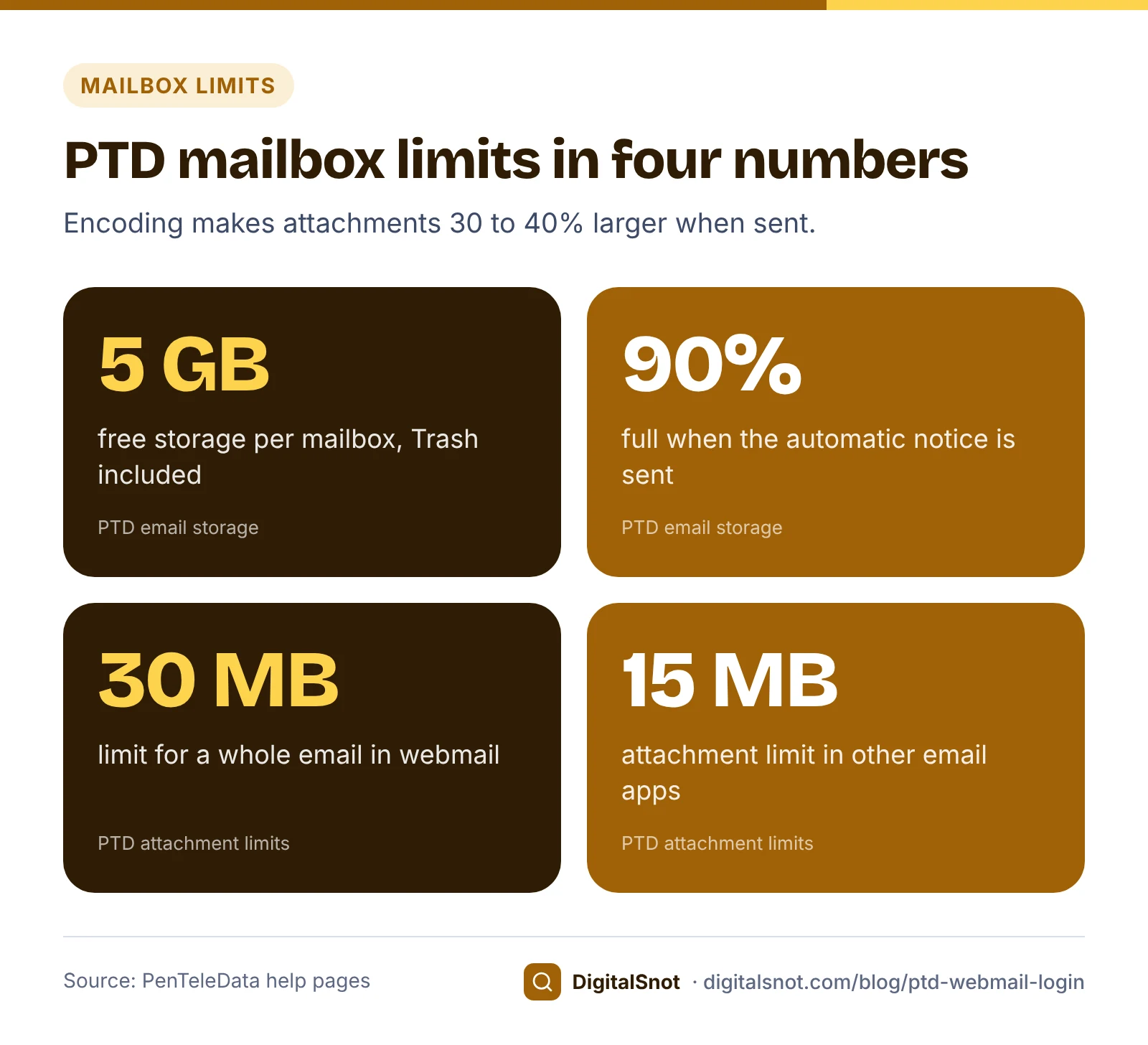
Each mailbox has 5 GB of free storage, according to PTD's email storage page, and messages in Trash count towards it.
| Limit | What PTD says |
|---|---|
| Storage per mailbox | 5 GB, free |
| Storage notice | Sent automatically at 90% of 5 GB |
| Full mailbox | All new incoming email is returned to the sender |
| Attachments in webmail | 30 MB for the whole email, including encoded attachments |
| Attachments in other email apps | 15 MB |
| Sending volume | Over 250 messages an hour, or 500 messages or recipients a day, may be delayed or rejected |
Three details from the storage page help when you tidy up. Usage is averaged over the last 30 days, so the 90% notice can keep arriving for a while after a clean-up. You can see your usage under "E-Mail Usage" in Account Management. And messages you delete with the Storage Cleanup tool cannot be restored, so save anything you need first.
The full-mailbox row comes from PTD's email FAQ, and the sending limits from its policies, which matter if you send a newsletter from a PTD address. To stop a folder growing, right-click it in webmail and choose "Set Automated Cleanup". Messages in Spam are already deleted after 30 days.
PTD's attachment limits page says the whole email, including encoded attachments, cannot exceed 30 MB in webmail, and gives 15 MB for other email apps. Encoding makes attachments 30 to 40% larger, and PTD's own example is that 20 MB of JPG photos "could easily exceed 25MB". A file that looks small enough on your computer can still be too big once it is sent.
Worked example: a florist's photos and a full mailbox
Larkspur Flowers is a made-up florist in the Lehigh Valley. The owner uses a PTD mailbox for orders, in webmail at home and in an email app on the shop computer.
She wants to send a customer 24 MB of photos of table arrangements. From the shop app it fails at once: 24 MB is over the 15 MB limit before encoding. In webmail, encoding adds 30 to 40%, so the email grows to about 31 to 34 MB, over the 30 MB limit. She splits the photos into three emails of about 8 MB each. Each grows to about 10 to 11 MB, under both limits. She could also make the photos smaller first with our Image Compressor and WebP Converter, choosing JPEG and a target file size; it runs in the browser, so the photos are not uploaded.
A week later the 90% notice arrives. The shop computer was set up with POP3 years ago and has been leaving messages on the server. She switches it to IMAP on port 993, saves what she needs, deletes the rest, empties Trash and uses "Set Automated Cleanup" on an old folder of delivery confirmations. The notice may keep arriving for a while, because usage is averaged over 30 days.
The six-month inactivity rule
This rule is easy to miss with a spare mailbox. PTD's policies say a mailbox is deleted when all three of these are true:
- It has not been checked for six months.
- It has no forward set up.
- It is not the primary login of a dial-up account.
Retrieving your mail at least once every six months keeps the mailbox active. When a mailbox is deleted, its mail is deleted and the address is released. You can ask Customer Service on (800) 281-3564 to reinstate the mailbox if the address is still free, but the old mail is gone. If one of your five mailboxes is rarely used, sign in to it every few months, or forward it to an address you check.
PTD webmail not working? What to check
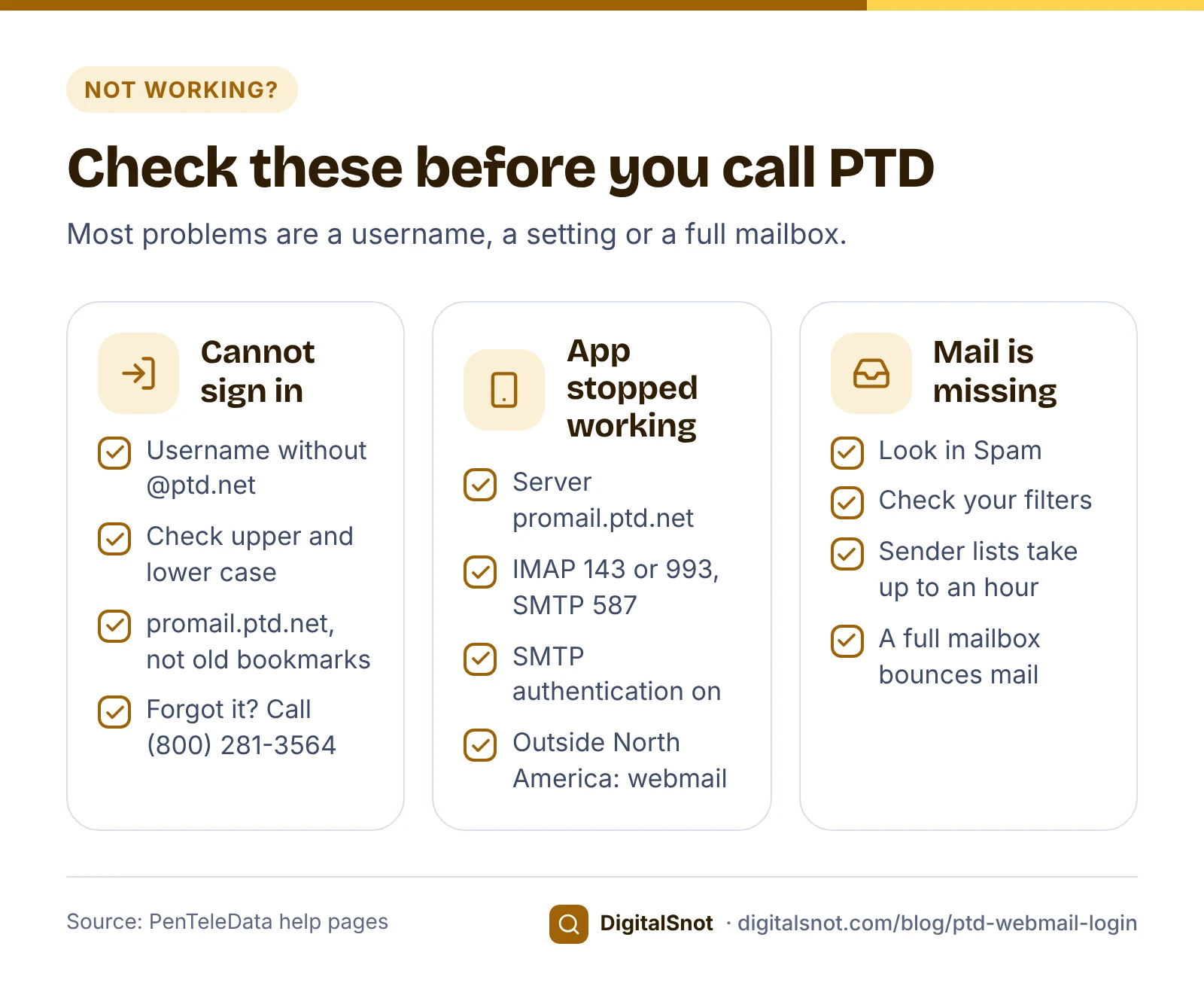
Most problems fall into three groups. Work through yours before you call.
You cannot sign in
- Type only the part before @ptd.net as the username, not the full address.
- Check upper and lower case in both the username and the password.
- Make sure you are on promail.ptd.net, not an old promail-legacy or promailx bookmark.
- If you have forgotten the password, call (800) 281-3564 and press 2, then 1.
Your email app stopped working
- Check that the server is promail.ptd.net and the user name is the part before @ptd.net.
- Check the ports: 143 or 993 for IMAP, 110 for POP3, and 587 for sending, with SMTP authentication on.
- If you are outside the US, Canada or Mexico, use webmail until you are back.
- If you changed your password in webmail, type the new one into the app as well.
Mail is missing
- Look in the Spam folder, and check that a filter is not moving the message.
- Check Blocked and Allowed Senders under Settings. PTD's spam settings help says the lists are set per mailbox and changes can take up to an hour.
- Check your storage. If the mailbox is full, new mail is returned to the sender.
If webmail will not load at all, try another browser. If it still fails, call Technical Support on (800) 281-3564, then press 2, then 3, and ask whether there is a known problem.
How to contact PTD support
PTD's contact page lists these ways to reach its team:
| Who | How to reach them | Use it for |
|---|---|---|
| Customer Service | (800) 281-3564, press 2, then 1 (24/7) | Forgotten passwords, extra mailboxes, reinstating a mailbox |
| Customer Service (other number) | 610-826-6130 | The same questions |
| Technical Support | (800) 281-3564, press 2, then 3 (24/7) | Webmail or email app problems |
| Technical support by email | support@corp.ptd.net | Questions that can wait for a written reply |
Be careful with messages that claim to come from PTD. In its security reminder, PTD says it posts every real login and migration notice on its email announcements page, and to ignore any notice that is not posted there. If a message asks you to sign in through a link, go to promail.ptd.net yourself instead.
A reminder: this guide is independent. DigitalSnot is not part of PenTeleData, cannot see your account and never asks for your password.
Next steps: a signature, your own domain and other providers
Once you are signed in, two of our free tools can help with the next jobs.
- Add a signature. Our Email Signature Generator builds one with your name, phone and links, in your browser. Paste it into the signature setting in webmail, then send yourself a test email: the tool's steps are written for Gmail, Outlook and Apple Mail, so check how it looks after pasting.
- Move a business to its own domain. If your business decides to use an address on its own domain, check that domain with our Email Deliverability Checker. It reads the domain's public DNS and shows whether SPF, DKIM and DMARC meet the sender rules of Gmail, Yahoo and Outlook.com. It cannot tell whether a given message reaches the inbox. Before you switch, export your contacts from webmail as a .csv or .vcf file, as PTD's contacts help describes, and set up a forward from the old address. A forward also keeps the old mailbox from being deleted under the six-month rule.
If you look after email for relatives or a business with another provider, we have similar guides for Arvig webmail login and Comporium webmail login. For anything to do with your PTD account itself, call PenTeleData on (800) 281-3564.
Free tools in this article
- Image Compressor and WebP Converter Make website images smaller, convert them to WebP, make responsive sizes and copy the img code.
- Email Signature Generator Build an email signature with your logo, phone and WhatsApp links, and copy it into Gmail or Outlook.
- Email Deliverability Checker Check SPF, DKIM, DMARC and MX against the Gmail, Yahoo and Outlook.com sender rules.
By the numbers
- largest email in PTD Webmail, including encoded attachments (15 MB in other email apps)
- 30 MB
- Source: PenTeleData
Frequently asked questions
What is the PTD webmail login address?
Go to promail.ptd.net and sign in with the part of your email address before @ptd.net, and your password. Usernames and passwords are case-sensitive. Replace any old promail-legacy or promailx bookmark from the 2025 move with promail.ptd.net.
How do I reset my PTD email password if I forgot it?
There is no online reset. Call PenTeleData Customer Service on (800) 281-3564 and press 2, then 1; the line is open 24/7, and they verify your identity first.
What are the PTD email settings for Outlook or my phone?
Use promail.ptd.net for incoming and outgoing mail, IMAP on port 143 or 993, and SMTP on port 587 with authentication turned on. Put your full address in the email address field and only the part before @ptd.net in the user name field.
How much storage does a PTD mailbox have?
Each mailbox has 5 GB of free storage, and Trash counts towards it. PTD sends a notice at 90%, and when the mailbox is full, new mail is returned to the sender.
Will PTD delete my email account if I do not use it?
Yes, if the mailbox has not been checked for six months, has no forward and is not the primary login of a dial-up account. Its mail is deleted and the address released; Customer Service can reinstate the mailbox if the address is still free, but not the old mail.
Why does my email app stop working when I travel outside North America?
PTD limits the mail ports to North America: the US, Canada and Mexico. Elsewhere your app cannot connect, but webmail at promail.ptd.net still works.
Sources
Every figure and claim in this article comes from the sources below. We checked each one when writing and link to the original so you can read it yourself. Credit belongs to the authors and publishers listed. How we write and check our articles.
-
1
My PenTeleData Webmail tutorial
PenTeleData · Sign in with the part before the @; webmail features, filters, forwarding, themes and "Set Automated Cleanup".
-
2
Email server information
PenTeleData · Server promail.ptd.net, IMAP 143 or 993, POP3 110, SMTP 587, and the North America port block.
-
3
Email software setup: IMAP
PenTeleData · Full address in the email address field, only the part before @ptd.net in the user name field.
-
4
Email software setup: POP3
PenTeleData · PTD strongly recommends webmail or IMAP over POP3, which can fill the 5 GB.
-
5
Email storage
PenTeleData · 5 GB per mailbox, the 90% notice, the 30-day average, Trash, Storage Cleanup and "E-Mail Usage".
-
6
Email attachment size limits
PenTeleData · 30 MB in webmail including encoded attachments, 15 MB in other apps, and 30 to 40% growth from encoding.
-
7
Email FAQ
PenTeleData · No online password reset, and a full mailbox returns new mail to the sender.
-
8
Policies
PenTeleData · The six-month inactivity rule and the hourly and daily sending limits.
-
9
Contact us
PenTeleData · Customer Service and Technical Support numbers, menu options and the support email address.
-
10
Account Management overview
PenTeleData · Changing the password in Account Management or with "Change Your Password" in webmail.
-
11
Important PenTeleData email account migration to Zimbra Daffodil
PenTeleData · The move from Zimbra X to Zimbra Daffodil, the Modern Web App, from 13 May 2025.
-
12
Email migration complete: support and security reminder
PenTeleData · The move is complete, and real notices are posted only on the email announcements page.