Stanford webmail login: SUNet ID, two-step and help
How to sign in to Stanford email at webmail.stanford.edu with your SUNet ID and two-step, what the new Microsoft login changes, and where to get help.

On this page (9 sections)
For a Stanford webmail login, open webmail.stanford.edu, sign in with your SUNet ID and password, then approve two-step authentication, as the email page of University IT (UIT) describes. If you are stuck, call the UIT Service Desk on 650-725-4357.
Stanford does not use the name "Stanford webmail" itself. People use it to mean Stanford's email on Microsoft 365, or on Google Workspace for some groups, which UIT runs. This is an independent guide: DigitalSnot is not part of Stanford, and we never ask for your password.
Below you will find who gets an account, the sign-in steps, the new Microsoft login, storage and safety features, what happens after graduation, fixes for common problems and where to get help.
Who gets Stanford email
You need a full-service SUNet ID. Registered students and regular faculty and staff get one. A sponsored affiliate needs a full sponsorship, which has a monthly fee billed to a PTA. A base-level sponsorship includes no email.
Your SUNet ID is your username, so choose it with care. Stanford admissions says it cannot be changed once chosen. UIT says it "cannot easily" be changed, and points you to email aliases instead.
Most mailboxes are on Microsoft 365. Student email has been there since 2015, but students with older Google accounts, and some schools and departments, still use Gmail. Google Mail is not approved for protected health information (PHI). Computer Science students also get an address at cs.stanford.edu, which must forward to the mailbox they read.
How to sign in to Stanford webmail
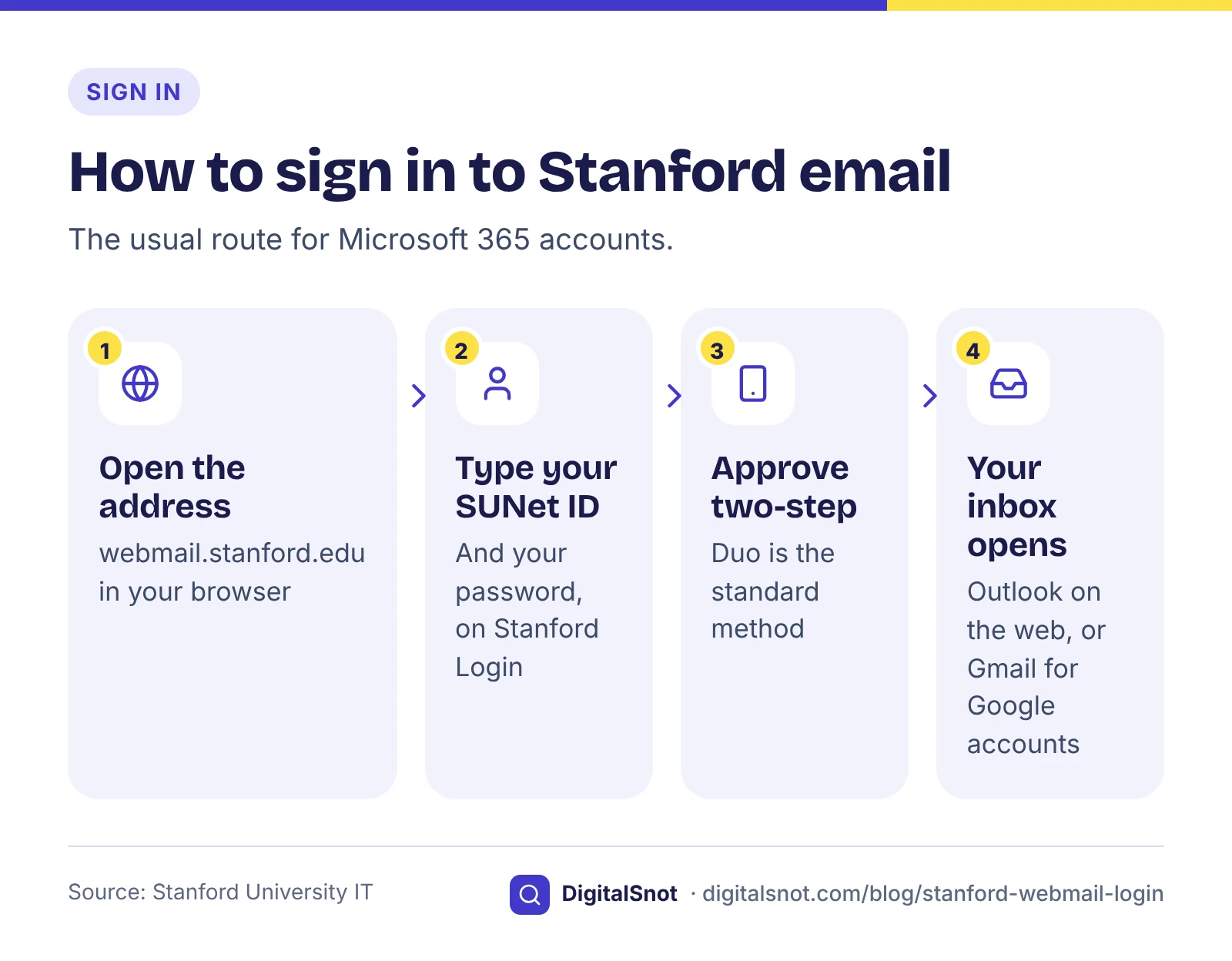
Most accounts sign in with these four steps.
- Open webmail.stanford.edu in your browser.
- On the Stanford Login page, type your SUNet ID and your password.
- Approve the two-step prompt. Two-step authentication is required for Office 365 email, and Duo is the standard method.
- Outlook on the web opens. It gives you email, calendar, address book and tasks in one place.
If your account is on Google, the same address sends you to Gmail. If your mailbox is on Microsoft 365 and you land in Gmail by mistake, UIT suggests outlook.com/stanford.edu instead. It also lists outlook.office365.com.
Bookmark the address you use, and type it yourself rather than following a sign-in link in an email.
The new Stanford Microsoft login
On 18 February 2026, UIT announced a new login for Stanford's Microsoft accounts. It covers Outlook, Teams and OneDrive, and it includes Intune device enrolment. According to the project page, the rollout started in June 2026 for the School of Medicine only, with a deadline of 20 July 2026. Other units are listed as "to be announced" and should take no action yet.
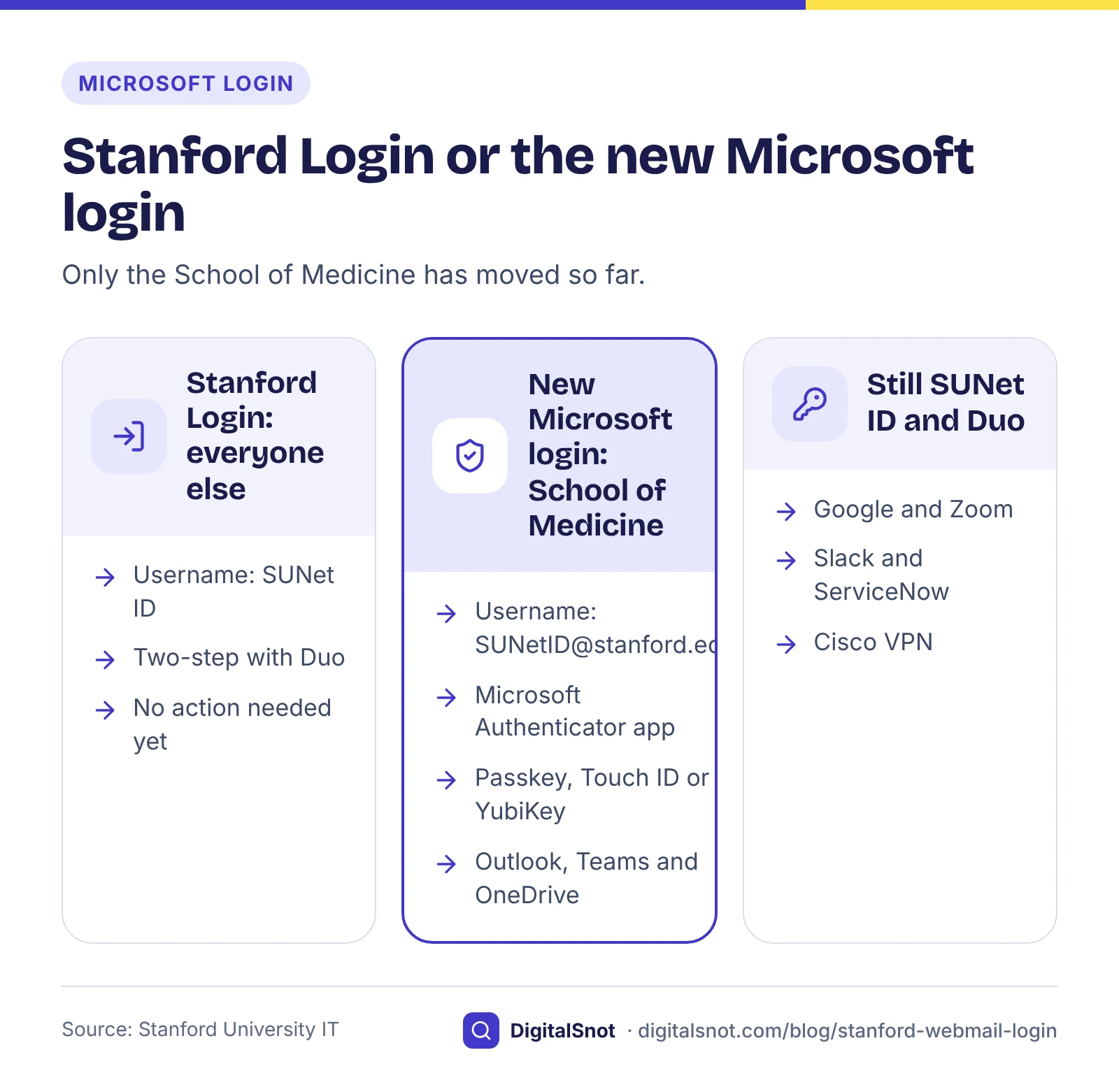
If you are on the new login, keep these points in mind:
- Your username. It becomes SUNetID@stanford.edu. Your SUNet ID alone stops working for Microsoft logins.
- Your app. Microsoft Authenticator is the only authenticator app accepted. Duo and Google Authenticator do not work for Microsoft logins. Passkeys, Touch ID on a Mac and a YubiKey also work.
- Duo stays. UIT lists Google, Zoom, Slack, ServiceNow and Cisco VPN as services that still use your SUNet ID and Duo.
Here is a worked example. A made-up lab manager in the School of Medicine opens Outlook, types her SUNet ID followed by @stanford.edu and approves the prompt in Microsoft Authenticator. Later she joins a Zoom meeting with her Stanford account. There she signs in with her SUNet ID alone and approves Duo, as before. So she keeps both apps on her phone.
If you are outside the School of Medicine, nothing changes for now. If UIT announces a date for your unit, follow the steps on UIT's own project page rather than a link in an email.
Stanford email storage and features
A Microsoft 365 mailbox at Stanford comes with the features below. Each name links to UIT's page about it.
| Feature | What it does |
|---|---|
| Storage | 100 GB per mailbox. A warning comes at about 98 GB, sending stops at about 99 GB, and at 100 GB the mailbox can neither send nor receive. |
| Global Address List | The Microsoft 365 list of Stanford addresses. It includes Stanford Health Care and Stanford Children's accounts. |
| StanfordWho | A separate web directory, not the Global Address List. Both follow your privacy settings in StanfordYou. |
| URL Defense | Rewrites links in incoming email from outside Stanford (to urldefense.com) and blocks bad ones when clicked. On by default for faculty, student and staff accounts since 28 October 2025. |
| Warning tags | A tag on mail from an outside sender you have not written to before. UIT says tags are rare, and not every outside email gets one. |
| Secure Email | Type "Secure:" at the start of the subject to send a message securely. Secure messages expire after 90 days. |
| Aliases | Up to two extra addresses for the same mailbox. You still sign in with your SUNet ID. |
A few details are worth knowing. URL Defense was available as an opt-in from July 2024. Accounts that forward mail outside Stanford are opted out, and links to stanford.edu are not rewritten. UIT says it cannot guarantee that every link is safe, so still look before you click.
Secure Email works with data loss prevention (DLP). DLP checks outgoing mail for protected health information that matches Stanford Health Care or Stanford Children's records. It blocks that mail unless you send it as Secure Email.
You create aliases in StanfordYou, under Stanford Accounts, then Email Management, then Manage Email Aliases. Since 31 October 2024, mail is delivered only to addresses set up in accounts.stanford.edu.
To add a signature, make one in our Email Signature Generator. Type your name, title, department and the links you want people to use, press "Copy signature", then paste it into the signature setting in Outlook on the web. Each email app draws signatures in its own way, so send yourself a test email and check how it looks after pasting.
Stanford email after graduation
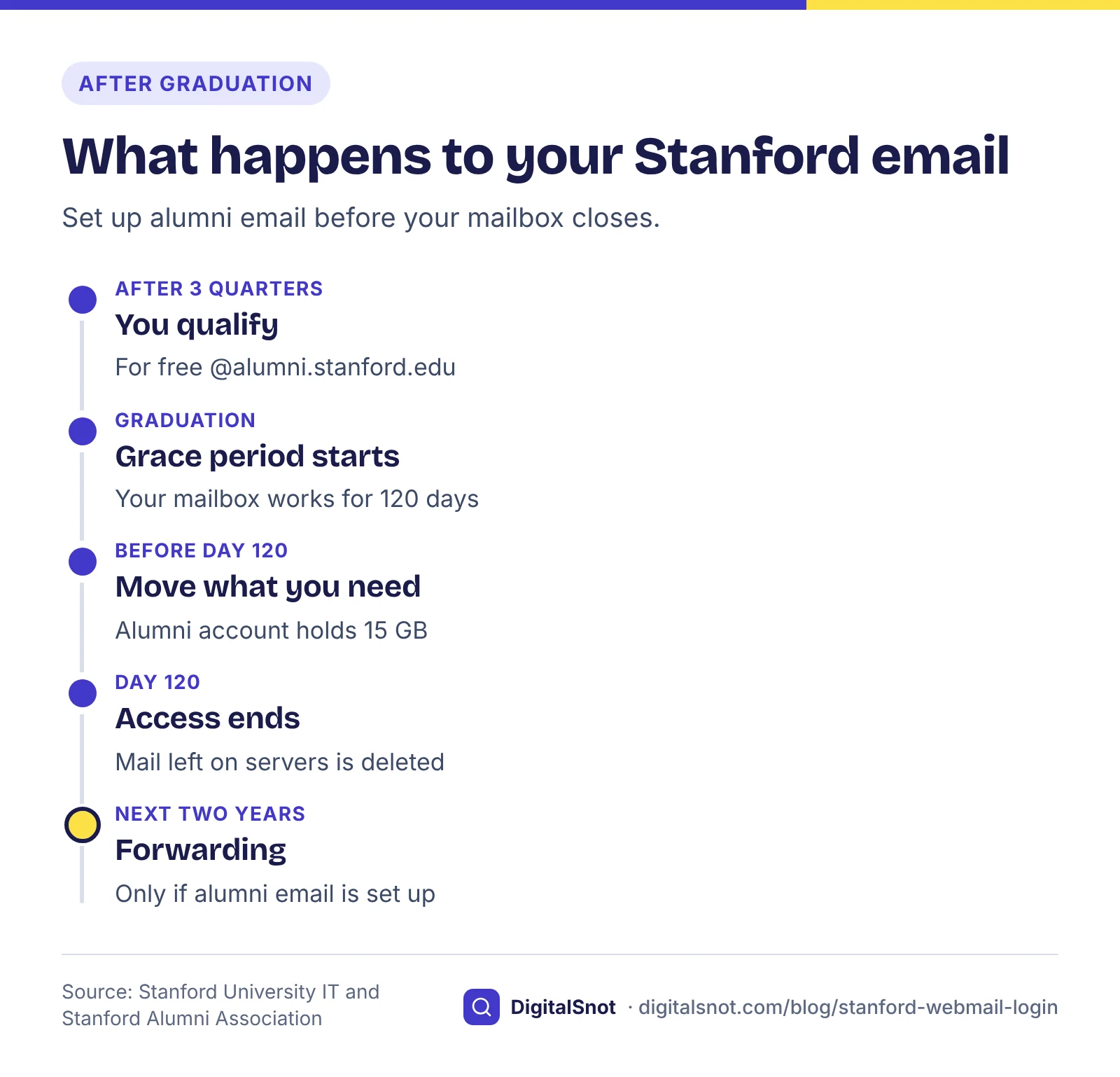
You keep your @stanford.edu mailbox for a 120-day grace period after graduation. Then email access ends, and any mail left on university servers is deleted.
To keep a Stanford address, set up alumni email. It is free and permanent, uses Google Workspace for Education Fundamentals, and is run by the Stanford Alumni Association. You qualify after three quarters in a degree programme. Addresses end in @alumni.stanford.edu, and GSB alumni use @alumni.gsb.stanford.edu.
- Forwarding. Two years of forwarding start after your @stanford.edu account closes, about four months after graduation. They start only if your alumni account is set up.
- Space. The alumni account has 15 GB, shared between Email and Drive. UIT asks that the mail you move be under 15 GB.
- Moving mail. UIT recommends VaultMe for moving mail. VaultMe is a paid service.
Take a made-up master's student who graduates in June with 40 GB of mail. The 120 days take her to around October. Before then she sets up her alumni account, deletes what she does not need, saves the rest elsewhere and moves less than 15 GB. Once her old account closes, mail sent to it is forwarded to her alumni address for two years.
If you plan to use email on your own domain after you leave, or you run a lab or student group that sends from its own domain, check that domain with our Email Deliverability Checker. Enter the domain, and it reads its public SPF, DKIM and DMARC records and explains what to fix. It reads DNS only, so it cannot tell whether a given message passes those checks. To see where the domain's email is delivered (its MX records) and its other public records, explained in plain words, use our DNS Record Checker.
Stanford webmail not working: what to try
Start with the problem that matches yours.
You forgot your password
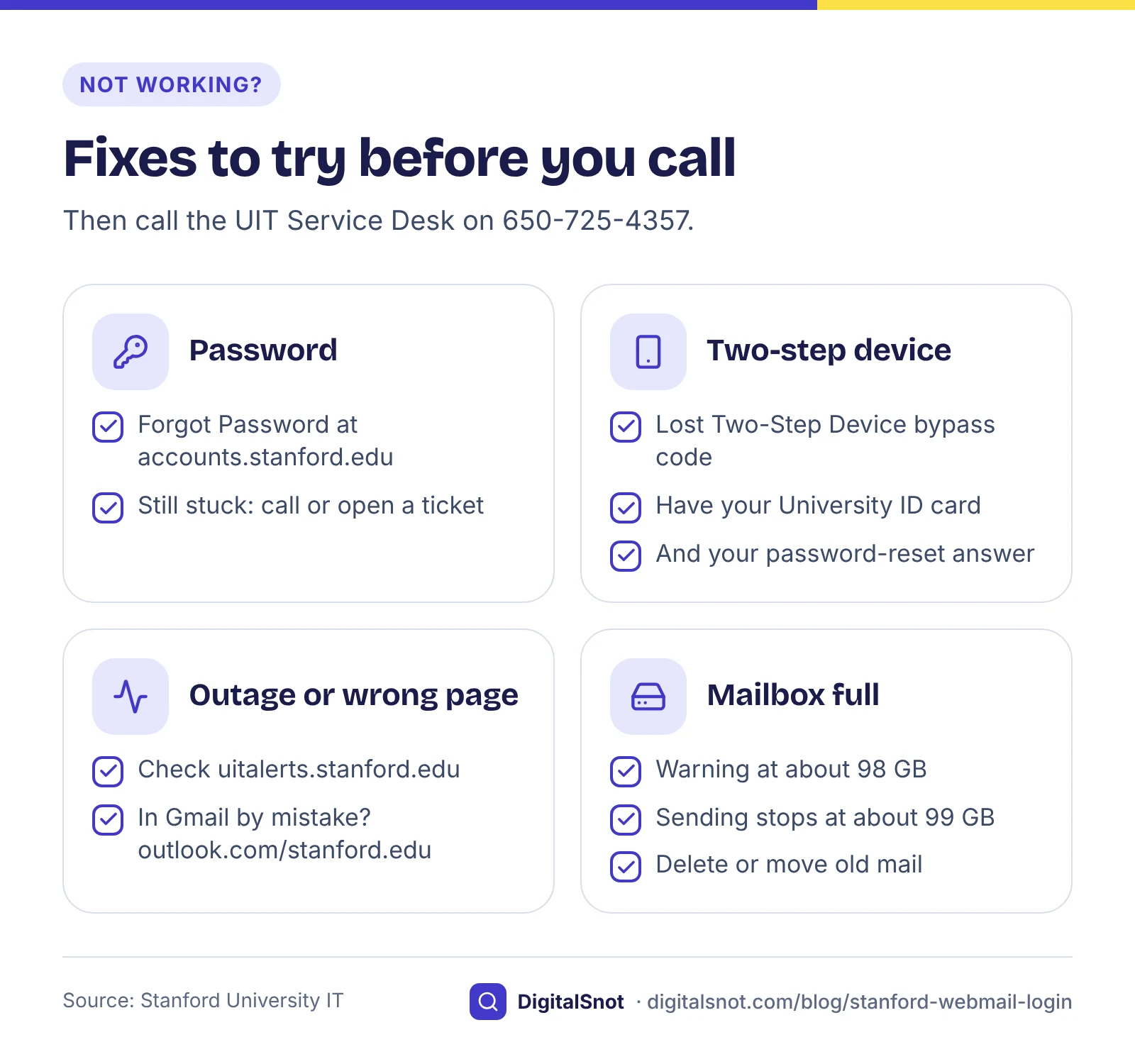
Use the Forgot Password page at accounts.stanford.edu. If that does not work, call 650-725-4357 or open a help ticket.
You lost your two-step device
Make a one-time bypass code yourself at accounts.stanford.edu, under Lost Two-Step Device. You need your University ID card and your password-reset answer. If you cannot verify who you are, call 650-725-4357 or open a ticket.
Email seems to be down
Check the UIT status page at uitalerts.stanford.edu, listed on UIT's support page, before you change settings on your computer or phone. If your mailbox is on Microsoft 365 and you keep landing in Gmail, go to outlook.com/stanford.edu.
Mail will not send or arrive
Check how full your mailbox is. Sending stops at about 99 GB, and at 100 GB nothing comes in either. Delete or move old mail with large attachments. If mail to one of your extra addresses goes missing, check that the address is set up in accounts.stanford.edu.
How to get help with Stanford email
For anything to do with your account, use Stanford's own channels. As we said above, this is an independent guide: DigitalSnot is not part of Stanford, and we never ask for your password. Do not share your password or a bypass code with anyone who contacts you.
| Where | How to reach it | Use it for |
|---|---|---|
| UIT Service Desk by phone | 650-725-4357 (5-HELP) | Passwords, two-step and email problems |
| UIT Service Desk portal | services.stanford.edu | Help tickets |
| UIT live chat | Weekdays during business hours; a virtual agent answers outside those hours | Quick questions |
| UIT status page | uitalerts.stanford.edu | Checking for an outage |
| School of Medicine TDS Service Desk | (650) 725-8000, weekdays | School of Medicine technology |
| Report phishing | The Report Phishing button in Outlook, or forward the message to phishing@stanford.edu | Suspicious email |
The TDS Service Desk sends central services, such as email and SUNet ID questions, to UIT. So for an email or SUNet ID question, start with UIT.
Your next step
Bookmark webmail.stanford.edu, check that your two-step device works, and save 650-725-4357 in your phone. If you are in the School of Medicine, keep both Microsoft Authenticator and Duo on your phone. If you graduate this year, set up alumni email well before day 120.
If you also use webmail from other providers, our guides to the Arvig webmail login and the Comporium webmail login cover them in the same way.
Free tools in this article
- Email Signature Generator Build an email signature with your logo, phone and WhatsApp links, and copy it into Gmail or Outlook.
- Email Deliverability Checker Check SPF, DKIM, DMARC and MX against the Gmail, Yahoo and Outlook.com sender rules.
- DNS Record Checker See where your domain points: A, CNAME, MX, TXT, NS, CAA and SOA records, explained in plain words.
By the numbers
- grace period after graduation before @stanford.edu email access ends
- 120 days
- Source: Stanford University IT
Frequently asked questions
What is the Stanford webmail address?
It is webmail.stanford.edu. Sign in with your SUNet ID and password on the Stanford Login page, then approve two-step authentication. If your account is on Google, the address sends you to Gmail.
Do I sign in with my SUNet ID or my full email address?
Most people type their SUNet ID on the Stanford Login page. Only accounts moved to the new Microsoft login, so far in the School of Medicine, use SUNetID@stanford.edu for Outlook, Teams and OneDrive.
What if I lost the phone I use for two-step?
Make a one-time bypass code at accounts.stanford.edu under Lost Two-Step Device, using your University ID card and your password-reset answer. If you cannot verify who you are, call the UIT Service Desk on 650-725-4357 or open a ticket.
How much storage does a Stanford mailbox have?
A Microsoft 365 mailbox holds 100 GB. You get a warning at about 98 GB, sending stops at about 99 GB, and at 100 GB the mailbox can neither send nor receive.
What happens to my Stanford email after I graduate?
You keep it for 120 days after graduation; then access ends and any mail left on university servers is deleted. Set up free alumni email at @alumni.stanford.edu before then, because forwarding from your old address starts only if that account is set up.
How do I know if Stanford email is down?
Check the UIT status page at uitalerts.stanford.edu. If nothing is listed there and you still cannot get in, call the UIT Service Desk on 650-725-4357 or use the portal at services.stanford.edu.
Sources
Every figure and claim in this article comes from the sources below. We checked each one when writing and link to the original so you can read it yourself. Credit belongs to the authors and publishers listed. How we write and check our articles.
-
1
Microsoft 365 email
Stanford University IT · Outlook on the web is at webmail.stanford.edu; sign in with your SUNet ID and password at Stanford Login, then two-step authentication.
-
2
Webmail
Stanford University IT · webmail.stanford.edu sends Google-hosted users to Gmail; Microsoft 365 users can use outlook.com/stanford.edu, and outlook.office365.com is also listed.
-
3
Microsoft 365 email and calendar
Stanford University IT · UIT runs the Microsoft 365 and Google Workspace email services; Outlook on the web gives email, calendar, address book and tasks.
-
4
Email authentication
Stanford University IT · Two-step authentication is required for Office 365 email.
-
5
Two-step authentication
Stanford University IT · Duo is the standard two-step authentication method.
-
6
Coming soon: a new login for your Stanford University Microsoft account
Stanford University IT · The new Microsoft login was announced on 18 February 2026 and covers Outlook, Teams and OneDrive.
-
7
New Microsoft login
Stanford University IT · Rollout from June 2026 for the School of Medicine only (deadline 20 July 2026), other units to be announced; services that still use SUNet ID and Duo.
-
8
School of Medicine Microsoft login FAQs
Stanford University IT · Username becomes [email protected]; Microsoft Authenticator is the only app accepted; passkeys, Touch ID and YubiKey also work; Intune enrolment.
-
9
How to log in to Microsoft using Authenticator
Stanford University IT · Signing in to Stanford Microsoft accounts with Microsoft Authenticator on the new login.
-
10
SUNet IDs
Stanford University IT · Email needs a full-service SUNet ID, given to registered students and regular faculty and staff.
-
11
Sponsored services
Stanford University IT · Sponsored affiliates need a full sponsorship, with a monthly fee billed to a PTA, for email; base-level sponsorship includes no email.
-
12
Your SUNet ID
Stanford Undergraduate Admission · A SUNet ID cannot be changed once chosen.
-
13
Can I change my SUNet ID?
Stanford University IT · A SUNet ID cannot easily be changed; UIT points to email aliases.
-
14
Google Workspace
Stanford University IT · Student email in Microsoft 365 since 2015; some students, schools and departments still use Gmail; Google Mail not approved for PHI.
-
15
Computer and email setup
Stanford Computer Science · Computer Science students get a cs.stanford.edu address that must forward to the mailbox they read.
-
16
Email storage
Stanford University IT · 100 GB mailbox; warning at about 98 GB, sending stops at about 99 GB, no sending or receiving at 100 GB.
-
17
Global Address List
Stanford University IT · The Microsoft 365 list of Stanford addresses, including Stanford Health Care and Stanford Children's, following StanfordYou privacy settings.
-
18
StanfordWho upgrade
Stanford University IT · StanfordWho is a separate web directory that follows StanfordYou privacy settings.
-
19
URL Defense
Stanford University IT · Proofpoint URL Defense rewrites and checks links in outside email, on by default since 28 October 2025.
-
20
URL Defense FAQ
Stanford University IT · Opt-in since July 2024; forwarding accounts opted out; stanford.edu links not rewritten; no guarantee every link is safe.
-
21
Email warning tags
Stanford University IT · External-sender tags are rare and not on every outside email; report phishing with the button or to [email protected].
-
22
Secure Email
Stanford University IT · Type "Secure:" at the start of the subject; secure messages expire after 90 days.
-
23
Data loss prevention
Stanford University IT · DLP blocks outgoing mail with matching patient information unless it is sent as Secure Email.
-
24
Email aliases
Stanford University IT · Up to two aliases, created in StanfordYou; you still log in with your SUNet ID.
-
25
Proofpoint update will adjust alias email flexibility
Stanford IT Community · Since 31 October 2024, mail is delivered only to addresses set up in accounts.stanford.edu.
-
26
Email for graduates
Stanford University IT · 120-day grace period after graduation; forwarding starts after the account closes.
-
27
When you graduate
Stanford TechSource · Email access ends after the grace period and remaining mail on university servers is deleted.
-
28
Alumni email FAQs
Stanford Alumni Association · Free, permanent @alumni.stanford.edu on Google Workspace for Education Fundamentals; three quarters to qualify; 15 GB shared storage.
-
29
Alumni email: moving your mail
Stanford University IT · Two years of forwarding only if the alumni account is set up; keep migrated data under 15 GB; VaultMe recommended.
-
30
Forgot password
Stanford Accounts · The Forgot Password page for SUNet ID passwords.
-
31
Passwords
Stanford University IT · If the reset fails, call 650-725-4357 or open a help ticket.
-
32
Two-step bypass code
Stanford University IT · Make a one-time bypass code under Lost Two-Step Device with your University ID card and password-reset answer.
-
33
Get support
Stanford University IT · UIT Service Desk phone 650-725-4357, portal services.stanford.edu, live chat and the uitalerts.stanford.edu status page.
-
34
UIT Service Desk launches virtual agent
Stanford University IT · Live chat on weekdays during business hours, with a virtual agent outside those hours.
-
35
TDS Service Desk
Stanford Medicine · School of Medicine TDS Service Desk on (650) 725-8000; email and SUNet ID questions go to UIT.