Guide · Keyword research and content
Zero-click keyword strategy: choose keywords that still bring visitors
Most Google searches now end without a click. Score keywords by click potential, intent and visibility value, then decide what to build for each one.

On this page (11 sections)
- 1How much search ends without a click in 2026
- 2Which query types still send clicks
- 3Score keywords by click potential
- 4Check the live results page before you commit
- 5Turn scores into decisions
- 6Content that earns clicks AI answers cannot replace
- 7Win zero-click visibility on purpose
- 8Rebalance your keyword plan
- 9Report value beyond clicks
- 10Common mistakes with zero-click keywords
- 11Sources
About two in every three Google searches in the US are now zero-click searches, ending without a click to any website. That is the finding of SparkToro's 2026 analysis of Similarweb clickstream data, and it explains why so many sites see impressions holding steady while visits fall. The answer is not to give up on search but to build a zero-click keyword strategy, choosing keywords with your eyes open: some queries still send visitors reliably, some are now answered on the results page, and a few are worth targeting even when nobody clicks.
This guide shows you how to tell them apart. It sets out what each major zero-click study actually measured, which query types still send clicks, a scoring sheet for click potential, conversion intent and visibility value, and a decision table that turns those scores into a page plan. If your traffic has already dropped and you want to know why, start with our post on diagnosing a traffic drop caused by AI Overviews. This guide is about what to target next.
Who this is for: small-business owners and in-house marketers whose informational traffic keeps shrinking. What you will be able to do:
- Quote zero-click figures correctly, with the study, year and method behind each one.
- Score any keyword for click potential in about a minute, backed by a live check of the results page.
- Decide whether a keyword deserves a page built for clicks, a page built to be cited, a section on an existing page, or nothing.
- Report the value of search visibility when the click never comes.
How much search ends without a click in 2026
Roughly two-thirds of US Google searches end without a click. SparkToro measured 68.01% for January to April 2026, and the other major studies point the same way, although their exact figures depend heavily on what each one counted.
A zero-click search is a search that ends without the searcher clicking any result: not an organic link, not an ad, not another Google property. The person either got what they needed from the results page, refined the query, or gave up. AI Overviews, featured snippets, knowledge panels, map packs and instant answers all make the first outcome more likely.
SparkToro's 2026 study puts the US zero-click rate at 68.01% for January to April 2026, up from about 60.45% in 2024 on its comparison. It attributes most of the rise to AI Overviews, which it says appear on more than 20% of searches and cut click-through rate by nearly 60% when present. Only 0.34% of searches moved into AI Mode. The panel covers searches in a browser, not in the Google app, so SparkToro expects the true rate to be higher.
What each study measured: our comparison
Zero-click figures are often quoted side by side as if they measured the same thing. They do not. To build this table, we read each study's method notes in October 2026 and recorded the same four facts for each: the data source, the period, what was counted and the headline result. You can repeat the check from the links in the sources list.
| Study (year) | Data and method | Period | What it counts | Headline result |
|---|---|---|---|---|
| SparkToro (2026) | Similarweb clickstream panel, US browser searches; excludes the Google app | Jan–Apr 2026 | Share of all searches ending with no click anywhere | 68.01% zero-click |
| Pew Research Center (2025) | Browsing data from 900 US adults | March 2025 | Visits to a Google results page that led to a click on a traditional result | 8% with an AI summary vs 15% without; 1% clicked a link inside the summary |
| Ahrefs (Dec 2025 update) | Aggregated Search Console CTR: 150,000 keywords with an AI Overview vs 150,000 informational keywords without | Dec 2023 vs Dec 2025 | Click-through rate of the top-ranking page | About 58% lower with an AI Overview |
| Seer Interactive (2026 update) | 53 brands: 5.47 million tracked queries, 2.43 billion organic impressions | 2025, plus early 2026 | Organic clicks when a brand is cited in an AI Overview vs not cited | About 120% more organic clicks per impression when cited |
| Semrush (July 2026) | 600,000+ keywords across 10 industries | Nov 2025–Apr 2026 | How often AI Overviews appear, by search intent | Up 71% on commercial results pages; down 5% on transactional |
| Ahrefs (Nov 2025) | 146 million results pages, 86 keyword traits | Snapshot published November 2025 | How often AI Overviews appear, by query type | About 21% of keywords; about 58% of question queries; 7.9% of local searches |
| Ahrefs (Sep 2026) | 232.8 million US desktop results-page crawls | Jul–Sep 2026 | AI Overviews on branded vs non-branded keywords | 73.3% of branded keywords in September 2026 |
Why the numbers differ
- Searches versus keywords. SparkToro and Pew weight by real searches, so popular queries count more. Ahrefs and Semrush count keywords in their databases, where a rare long query counts as much as a popular one. That is one reason AI Overview prevalence ranges from 18% of searches (Pew, March 2025) to over 70% of branded keywords (Ahrefs, September 2026).
- Panels versus Search Console. A clickstream panel sees everything its sample of people does, including searches that end in a refined query. A Search Console study sees only the impressions and clicks of the sites in its dataset.
- Correlation, not experiment. None of these studies randomly showed and hid AI Overviews. Ahrefs compares keyword sets over time, and Seer notes that stronger brands may simply be more likely to be cited.
- Fast change. Ahrefs' November 2025 study found AI Overviews on 13.1% of branded queries; its September 2026 tracking found them on 73.3% of branded keywords. The samples differ, but the direction is plain: treat any prevalence figure older than six months as history.
The useful lesson for keyword choice is not a single number. It is that click loss concentrates where the results page can answer the question by itself, and that pattern holds across every study in the table.
Which query types still send clicks
Searches for your own brand, local and "near me" searches, and queries where someone must buy, book or hire still send the most clicks. Definitions and quick-fact questions send the fewest, because the results page now answers them.
SparkToro's follow-up, When Google Stops Sending Clicks, What Still Works?, names branded searches, local businesses and high-intent transactional or tactical queries as the areas where search still pays. SparkToro's earlier research with Datos clickstream data found that about 44% of Google searches are for specific brands, so that share is large. The AI Overview data lines up with that:
- Questions and long queries trigger AI answers most. In Pew's March 2025 data, 60% of searches that began with who, what, when or why produced an AI summary. The share rose from 8% of one- or two-word searches to 53% of searches with 10 words or more. Ahrefs' November 2025 study found AI Overviews on about 58% of question queries, against about 21% of keywords overall.
- Local searches rarely show them. The same Ahrefs study found AI Overviews on 7.9% of local searches, well below that overall rate, and on just 0.09% of navigational keywords.
- Commercial queries are the moving front. Semrush's July 2026 study found the share of commercial-intent results pages with an AI Overview grew 71% in six months, while the share of transactional ones fell 5%. Semrush's 2025 AI Overviews study had already shown informational queries falling from about 91% of AI Overview triggers in January 2025 to 57.1% by October 2025.
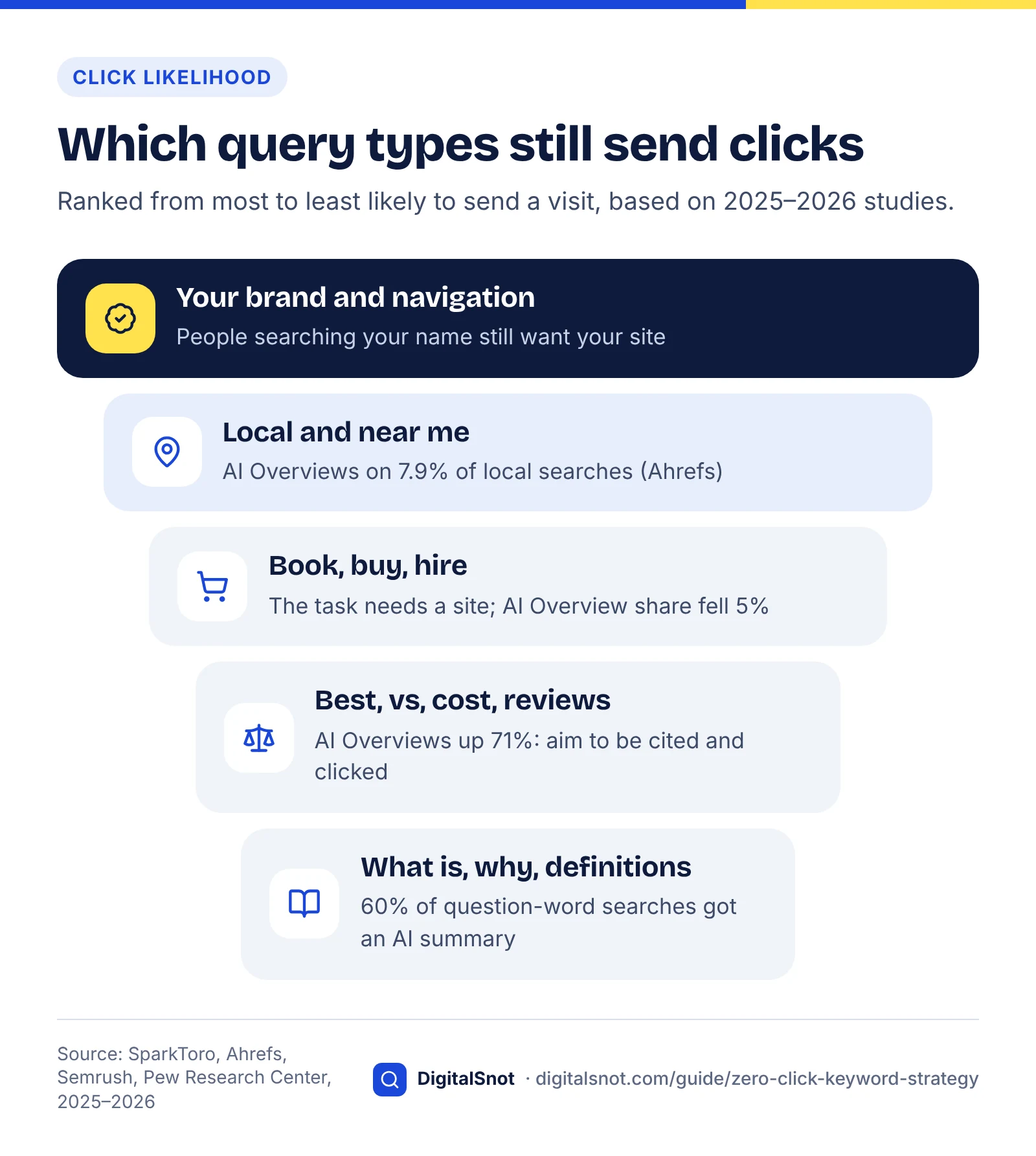
The table below turns those findings into a working guide. The examples are illustrative; the evidence column names the study behind each judgement.
| Query type | Example | AI answer on the page? | Click potential | Aim for |
|---|---|---|---|---|
| Your brand (navigational) | "[your brand] opening hours" | Increasingly yes: 73.3% of branded keywords in September 2026 (Ahrefs) | High: the searcher wants you | Clicks, plus correct facts in the answer |
| Local and "near me" | "dentist near me", "plumber in Leeds" | Rarely: 7.9% of local searches (Ahrefs, Nov 2025); a map pack instead | High, though many actions are calls and directions from your Business Profile | Calls, bookings, visits |
| Transactional | "book boiler service", "buy trail shoes size 10" | Less often: share fell 5% (Semrush, Nov 2025–Apr 2026) | High | Clicks and sales |
| Commercial investigation | "best accounting software for freelancers", "website design cost" | Rising fast: up 71% over the same period (Semrush) | Medium and falling | Be cited and clicked |
| Tactical how-to | "how to bleed a radiator", "how to file a GST return" | Often: about 58% of question queries (Ahrefs) | Medium when the task needs a tool, template or detail a summary cannot hold | Clicks, if you offer the tool |
| Definition or fact | "what is a root canal", "what does CTR mean" | Most often: 60% of who/what/when/why searches (Pew, 2025) | Low | Visibility, or fold into another page |
One caution on branded queries. AI Overviews are no longer rare on them, and an AI Overview that summarises your opening hours or reviews may answer the searcher without a visit. Brand searches are still your strongest source of clicks, but they are now also a visibility job: make sure what the answer says about you is right.
To see how much of your own traffic is branded, use the branded queries filter Google added to Search Console in November 2025. Google says the classification is AI-assisted rather than a keyword match, covers brand names in all languages, typos and unique product names, and occasionally gets a query wrong. It is not available for sites with a low number of impressions (checked October 2026).
Score keywords by click potential
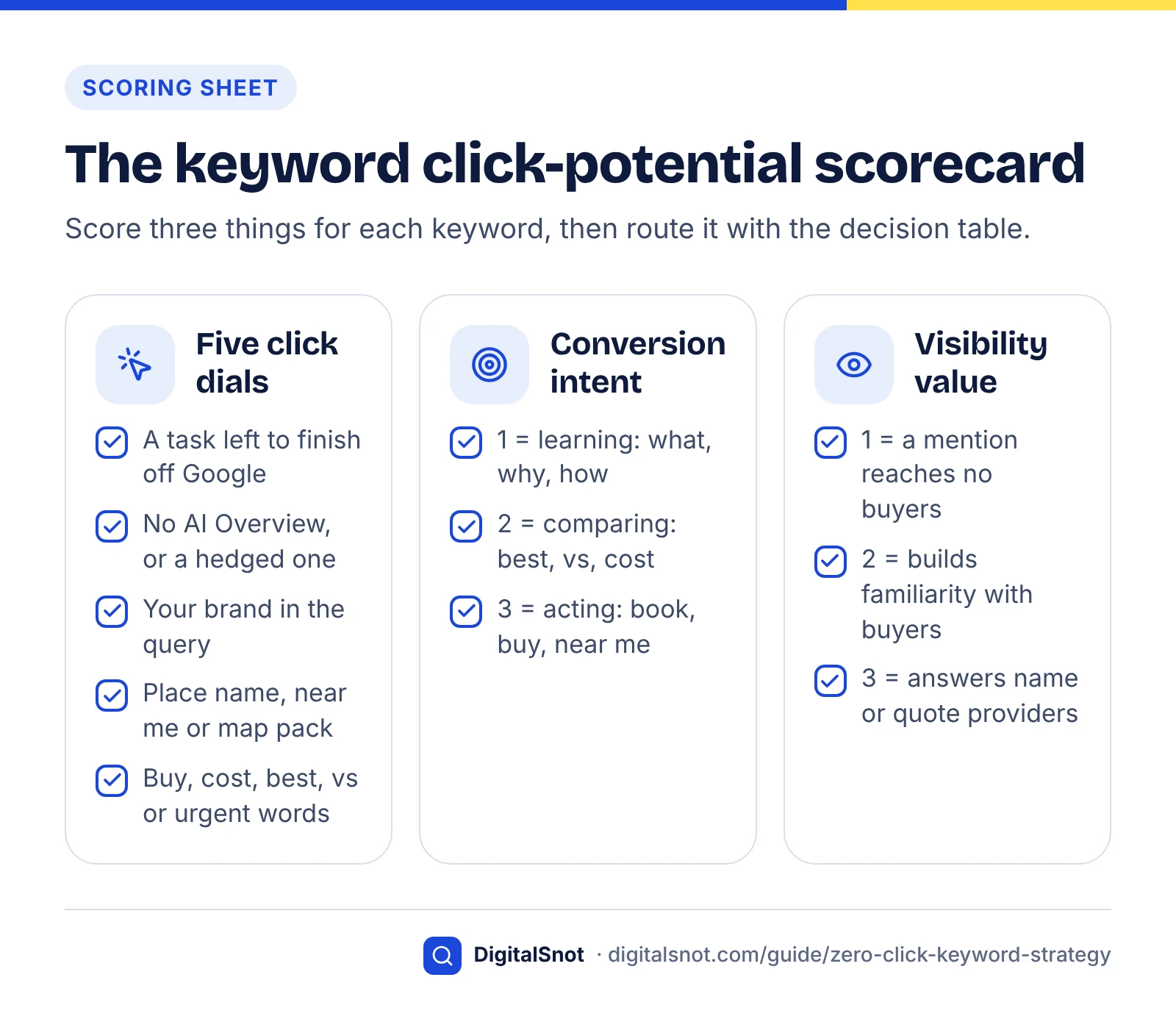
Score each keyword on three things: click potential (five yes/no dials), conversion intent (1–3) and visibility value (1–3). Click potential tells you whether a page can expect visits. The other two tell you whether those visits, or a mention without a visit, are worth having.
Method: this scoring sheet is a framework we built for this guide from the patterns in the studies above. The dials and scales are judgement, not measured data, so adjust them for your market, but keep the scales small so that two people scoring the same keyword usually agree. It sits alongside the value, intent and feasibility model in our keyword research guide: that model decides whether a keyword is worth pursuing at all, and this sheet decides what kind of page to build and what to measure.
Step 1: count the five click-potential dials
Give one point for each statement that is true. Dials 2 and 4 need a look at the live results page, which the next section covers.
- A task is left to finish. The searcher has to do something Google cannot do for them: book, buy, call, get a quote, use a calculator, download a template or follow a long process.
- The AI answer is thin or absent. No AI Overview appears, or the one that does hedges ("prices vary by provider") and points to sources rather than settling the question.
- Your brand is in the query. Your business, product or person name. Competitors' names do not count, because those clicks go to them.
- The intent is local. A place name, "near me", or a map pack on the results page.
- There is a buying or urgent modifier. Best, price, cost, quote, hire, book, review, vs, alternative, emergency, open now.
Convert the count into a score: 0–1 dials is click potential 1 (low), 2–3 dials is 2 (medium) and 4–5 dials is 3 (high). One exception: a search for your own brand name on its own scores 3, because the searcher is looking for you.
Step 2: score conversion intent and visibility value
Conversion intent is how close the searcher is to buying, booking or enquiring. Visibility value is how much it would help your business to be named or quoted in the answer, even if nobody clicks.
| Score | Conversion intent | Visibility value |
|---|---|---|
| 1 | Learning: what, why, how does it work | A mention would not reach likely buyers (trivia, or an audience you cannot serve) |
| 2 | Comparing or planning: best, vs, cost, reviews, how to choose | Builds familiarity with people who could buy later (problems in your field) |
| 3 | Ready to act: book, buy, hire, quote, near me, brand plus service | Answers for this query name, quote or compare providers, so being named shapes the shortlist |
Add the three scores for a total between 3 and 9, and use the total to sort keywords within each route. The route itself comes from the pattern of scores, using the decision table in the section after next.
Two free aids speed up the scoring. Paste up to 50 queries into the AI Prompt Intent Classifier to sort them into learning and buying intent before you score; treat its labels as a first pass and correct any that depend on how your business sells. For keywords you already rank for, Search Console's Performance report supplies evidence for dial 2: steady impressions and position with a falling click-through rate is the usual sign that the results page is answering the query.
Worked example: a dental clinic in Pune (hypothetical)
The clinic and keyword list below are invented for illustration, and the dial counts assume what a live check might plausibly show. Do your own check, because results pages differ by location and change often.
| Keyword | Dials (0–5) | Click potential | Conversion intent | Visibility value | Total | Route |
|---|---|---|---|---|---|---|
| what is a root canal | 0 | 1 | 1 | 1 | 3 | Skip a standalone page |
| does a root canal hurt | 0 | 1 | 2 | 2 | 5 | Fold into the treatment page |
| clear aligners cost in india | 1 (cost) | 1 | 2 | 3 | 6 | Visibility target |
| best dentist in koregaon park | 3 (task, local, best) | 2 | 3 | 3 | 8 | Hybrid |
| clinic name reviews | 2 (brand, review) | 2 | 3 | 3 | 8 | Hybrid |
| emergency dentist near me | 4 (task, no AI Overview, local, urgent) | 3 | 3 | 2 | 8 | Click target |
| root canal treatment cost pune | 4 (task, hedged AI Overview, local, cost) | 3 | 3 | 3 | 9 | Click target |
| clinic name | Own-brand rule | 3 | 3 | 3 | 9 | Click target (protect) |
Notice what the sheet does. "What is a root canal" is the kind of keyword an older content calendar would have led with, and here it lands at the bottom: the results page answers it, and the clinic's buyers are local. "Clear aligners cost in India" will send few clicks, but cost answers tend to quote providers' prices, so a clear, honest price page gives the clinic a chance to be named. The two branded rows are not about winning strangers; they are about making sure what Google says about the clinic is correct.
Check the live results page before you commit
Search every shortlisted keyword yourself before you build anything, and write down what the page shows. Ten minutes of looking can save months spent on a page that the results page will answer for free.
Keyword tools report whether an AI Overview appeared when they last crawled, under their own settings. Your customers see something else: results for their location, on their device, today. Ahrefs' tracking shows how fast this moves. In its US desktop data, AI Overviews appeared on 61.3% of branded keywords in July 2026, 65.1% in August and 73.3% in September (checked October 2026).
A repeatable results-page check
- Use clean conditions. A private window, signed out, on a phone, in or set to the town you serve. Note the date, because you will repeat this.
- Look above the first organic result. Record ads, an AI Overview, a map pack, shopping results, a featured snippet or videos. Each one takes attention before the blue links.
- Read the AI Overview as a customer would. Does it settle the question, or does it hedge, list options and point to sources? A complete answer means dial 2 scores zero.
- Note who is cited and who is named. Record the cited sources and any businesses the answer mentions. These are the pages you compete with for visibility, and the list feeds your visibility work later.
- Scroll the organic results. Are the ranking pages tools, service pages, forums, videos or articles? The dominant format tells you what Google thinks the searcher wants.
- Try one follow-up. If AI Mode is available to you, ask the obvious next question. If the conversation can carry on without sending anyone anywhere, expect little informational traffic from that topic.
Run the check on your top 20 to 30 keywords rather than all of them. The aim is to confirm the scores that decide where you spend money, not to audit every long-tail phrase.
Score a keyword's click potential in 15 seconds
When the click is available, earn it
If the check shows that people still click, your title and description do the persuading. Under an AI Overview, a snippet that promises something the summary cannot give, such as a price list, a calculator, local availability or a free template, has a reason to be chosen. Preview how your title and description truncate on mobile and desktop with the free Google SERP Preview tool, and look for the point where your key promise gets cut off. Our post on common title tag mistakes covers the rest.
Turn scores into decisions
Use the pattern of scores, not the total alone, to decide what to build. Read the table from the top and use the first row that matches.
| If your scores are | Then | Build | Measure |
|---|---|---|---|
| Click potential 3 and conversion intent 2–3 | Click target: build or improve first | Service, product, location, booking or comparison page with a clear next step | Clicks, calls, enquiries, sales |
| Click potential 3 and conversion intent 1 | Click target, only if it is cheap to make | Tool, calculator, template or checklist download | Clicks, return visits, sign-ups |
| Click potential 2, conversion intent 2–3 and visibility value 2–3 | Hybrid: earn the citation and the click | Guide with original figures the AI can quote and a next step it cannot do | AI impressions, clicks, assisted conversions |
| Click potential 1–2 and visibility value 3 | Visibility target: aim to be named | Answer-first page or section, Business Profile, reviews, genuine third-party mentions | AI impressions, mentions in sampled answers, branded search |
| Click potential 1–2 and visibility value 2 | Fold in | A section or short FAQ on an existing page | Impressions on that page |
| Anything else | Skip or park | Nothing for now | None |
Three rules sit around the table:
- Volume does not override the route. A high-volume definition is still a fold-in. Volume helps you sort keywords within a route, not move them between routes.
- Feasibility still applies. If national brands own the results and you cannot realistically rank or be cited, park the keyword however good its scores look.
- Re-score every quarter. AI Overview coverage by intent shifted sharply within six months in Semrush's data, so last quarter's dial 2 may be wrong today.
If a keyword lands in the first or second row but you only have a blog post for it, you probably have a page-type problem rather than a content problem. Our guide to choosing between a service page and a blog post explains how to split commercial and informational intent without the two pages competing.
Content that earns clicks AI answers cannot replace
Build pages that hold something a summary cannot carry: a tool, a live price, original data, local proof or a finished deliverable. If the whole value of your page fits in three sentences, an AI Overview will deliver those three sentences instead.
Google's own guidance points the same way. Its guide to optimising for generative AI features, published on 15 May 2026, contrasts common-knowledge pages with content that offers expert or first-hand perspective. It says this non-commodity content will likely shape a site's presence in generative AI search more than any other suggestion in the guide, and that you do not need special AI text files, extra markup or content chopped into small chunks.
| Content type | Why a summary cannot replace it | Example (hypothetical) |
|---|---|---|
| Interactive tools and calculators | The searcher has to enter their own numbers | A solar installer's payback calculator using local tariffs and roof sizes |
| Live prices, stock and availability | Summaries go stale, and buyers check the source before they pay | A clinic's price list showing what each treatment includes |
| Original data and first-hand testing | The headline gets quoted, but people click for the method and the full results | A bike shop's winter range test of the e-bikes it sells |
| Templates, checklists and downloads | The deliverable is the file, not a description of it | A printable landlord inspection checklist |
| Local proof | Photos, reviews and named areas build trust that a summary flattens | Before-and-after photos from jobs in named neighbourhoods |
| Booking and quote flows | The task can only finish on your site | Online booking with real appointment slots |
The pattern is the same in every row: the page gives the searcher something to do or check, not just something to read. That is also what makes these pages useful to cite, so they tend to serve both routes at once.
Why "what is" keywords stopped sending clicks
What not to do
- Do not write long definition posts for keywords that score 1 on click potential and hope volume will make up for it. Fold the definition into the page that sells the service.
- Do not hide the answer to force a click. A page that buries its answer under a long introduction is less useful, and an AI answer will simply cite a page that answers plainly.
- Do not build token tools. A form that wraps one formula in three fields adds little. A tool earns clicks when it uses real inputs and returns something specific.
- Do not mass-produce near-identical pages for every town or question. They add nothing a summary lacks, and they dilute the pages that do convert.
Planning pages around original data, tools and local proof is the core of our content SEO service.
Win zero-click visibility on purpose
For keywords where a click is unlikely, aim to be the source the answer quotes or the business it names. A mention without a click still puts your name in front of a buyer, and the available data suggests it may lift the clicks you do get.
Seer Interactive's 2026 update, based on 2025 data from 53 brands, found that brands cited in an AI Overview earned about 120% more organic clicks per impression than when an AI Overview appeared without citing them. Seer is careful to say that stronger brands may simply be more likely to be cited, so read it as a correlation, not proof. Google makes a related claim in its May 2025 guidance on AI experiences in Search: that clicks from results pages with AI Overviews are "higher quality", with visitors more likely to spend more time on the site. Google has not published the data behind that statement.
How to make being named more likely
- Answer the exact question in your first sentence, with your specifics. For example (hypothetical): "At our Pune clinic, a single-visit root canal on a front tooth costs ₹X to ₹Y, including the X-ray." A specific, attributable sentence is easier to quote than a generic one.
- Publish the numbers people ask about. Prices, timings, sizes and coverage areas. Keywords with visibility value 3 are usually ones where answers quote providers' figures.
- Keep your facts identical everywhere. AI answers draw on your site, your listings and other people's pages. The free AI Answer Consistency Checker flags conflicting phone numbers, addresses and figures across your pages and listings.
- Study the page cited instead of yours. Put your page and the competitor page that the answer cites into the AI Citation Gap Checker to compare them factor by factor, then fix the gaps that are real rather than cosmetic.
- Earn mentions on the third-party pages that answers already cite. Genuine reviews, industry directories and independent comparisons. Never pay for placement on lists that do not disclose it.
Local businesses have an extra lever. For "near me" and "best in [area]" searches, the map pack and your Business Profile do much of the work, and a call or a directions request is a conversion even though no website visit happens. Our guides to optimising your Google Business Profile and local SEO for AI search cover both. For everything else, our guide to getting cited in AI search walks through the full method, from crawler access to measurement.
Rebalance your keyword plan
Move effort away from keywords the results page now answers and towards keywords that still send buyers, while keeping a deliberate share for visibility. Start from your own Search Console data, not a tool's estimates.
Six steps to rebalance
- Export 16 months of queries from Search Console's Performance report, with clicks, impressions, click-through rate and position.
- Split branded from non-branded with the branded queries filter. Branded performance tells you about demand for your business; non-branded is where AI answers change the picture most.
- Flag the AI pattern. Queries where impressions and position hold steady but click-through rate falls year on year are the likely zero-click casualties.
- Score the top 50 to 100 non-branded queries and your shortlist of new keywords with the sheet above.
- Route each one with the decision table, then map it to an existing page or a new one.
- Set the mix for the next quarter and write down what you expect each page to deliver: clicks, enquiries or impressions. Without that expectation, every page gets judged on traffic.
What to do with existing informational pages
Most sites already have informational posts that have lost clicks. Use this decision table before you delete anything.
| If the page | Then |
|---|---|
| Lost clicks but still converts the visitors it gets | Keep it. Add what a summary cannot hold (a tool, prices, worked examples) and a clear next step. |
| Lost clicks and converts nothing, but appears in AI answers | Keep it as a visibility page. Judge it on impressions, and make sure your brand and facts sit in the passage that gets quoted. |
| Lost clicks, converts nothing, is not cited, and overlaps a stronger page | Merge it into the stronger page and redirect the old URL. |
| Covers a definition your service page could answer in two sentences | Fold it into the service page as a short section, then redirect. |
| Has no impressions, no links and no clear purpose | Remove it, or keep it out of the index if customers still use it. |
Keyword research table
An example mix (hypothetical)
For a small service business, a reasonable starting split of new content effort in a quarter might be 60% click targets, 25% hybrid and visibility pages, and 15% refreshing existing pages that still convert. That is a starting assumption, not a benchmark. Shift it towards visibility if your buyers research for weeks before contacting anyone, and towards click targets if most enquiries come from urgent local searches.
Report value beyond clicks
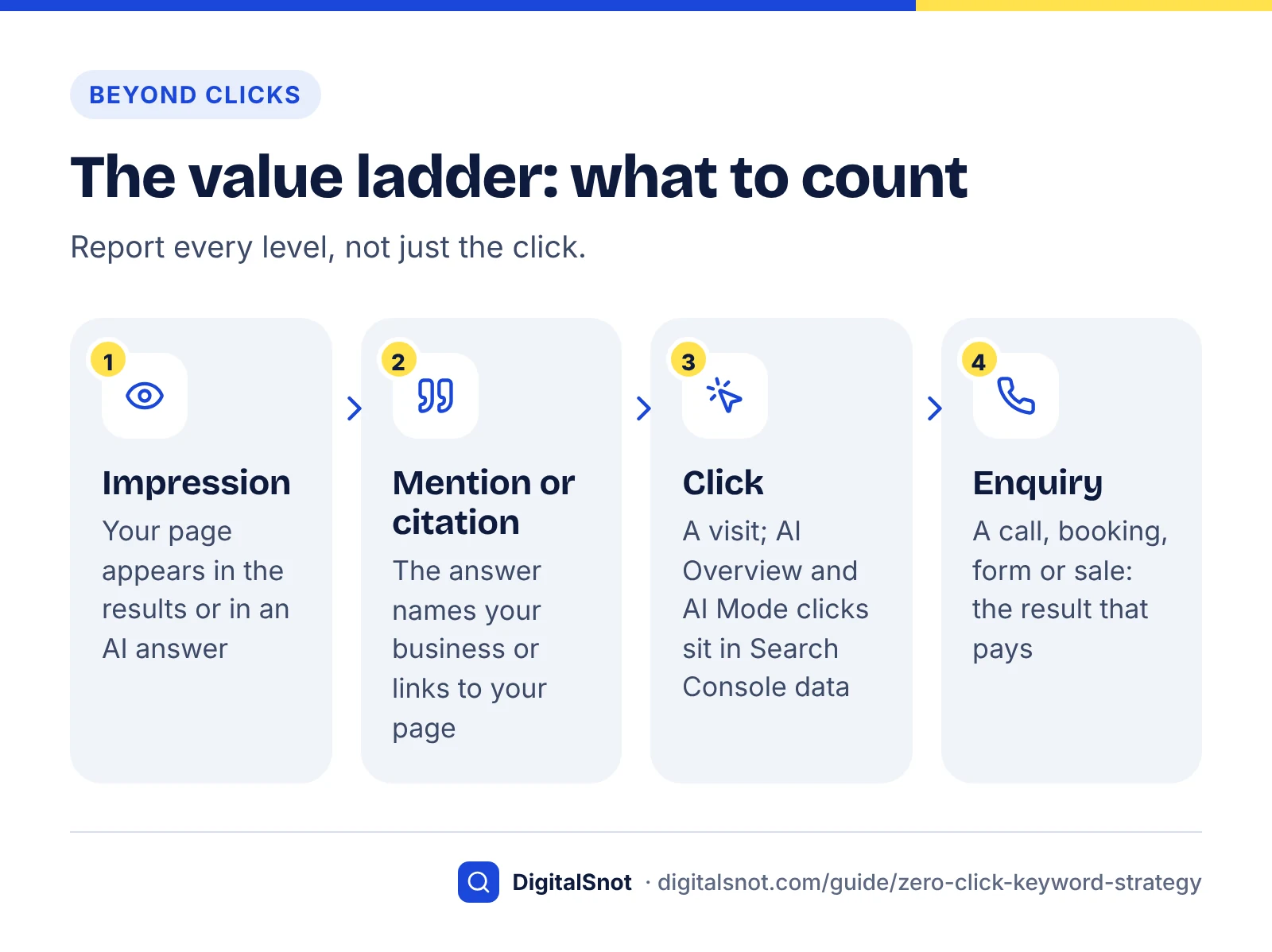
Report four levels of result: impressions, mentions, clicks and enquiries. Clicks alone will understate the value of search when most searches never produce one.
Google's generative AI performance reports in Search Console, announced on 3 June 2026 and rolled out to all websites worldwide by 31 August 2026, show how often your URLs appeared in AI features in Search and Discover, broken down by page, country, device and date. Their core metric is impressions. Clicks from AI Overviews and AI Mode are included in your overall search traffic in the regular Performance report, according to Google's AI features documentation, rather than shown separately (checked October 2026). Our guide to the Search Console generative AI report explains how to read it without overclaiming.
A one-page monthly scorecard
| Level | What to track | Where | Watch out for |
|---|---|---|---|
| Impressions | AI impressions for visibility pages; search impressions for all pages | Search Console generative AI and Performance reports | Compare page groups over months, not single days |
| Mentions | Whether answers name or cite you for your visibility keywords | A fixed list of prompts, run several times a month | Answers vary between runs, so track the share of runs that mention you |
| Branded demand | Branded query impressions and clicks | Search Console branded queries filter | A rough proxy for awareness; many things move it |
| Clicks | Organic clicks to click-target pages | Search Console and analytics | Judge pages against their route, not against old traffic |
| Enquiries | Calls, forms, bookings and sales from organic search and your Business Profile | Analytics, call tracking, Business Profile performance | This is the number that pays the bills |
Google encourages this wider view in the same May 2025 guidance, suggesting that site owners look at indicators of conversion on their site rather than focusing too much on clicks. To estimate what AI visibility could be worth, the free AI Visibility to Pipeline Estimator turns your own impression, click-through and conversion figures into estimated visits, leads and revenue. Use cautious inputs and present the output as an estimate. For what else belongs in a report, see our checklist of what to look for in a monthly SEO report.
Common mistakes with zero-click keywords
The most common mistake is to treat one headline statistic as a forecast for your own keywords. The others follow from it: scoring once, cutting everything informational, and reporting traffic alone.
- Quoting one number as the whole story. SparkToro's 68.01% covers US browser searches of every kind. Your branded and informational queries will behave very differently from that average.
- Writing off every keyword with an AI Overview. Some AI Overviews hedge and send people to sources, and Seer's data suggests cited brands earn more clicks. Read the answer first.
- Assuming branded searches are safe. In Ahrefs' September 2026 data, most branded keywords showed an AI Overview. Search your own name and read what Google says about you.
- Scoring once. A keyword list scored in spring can be wrong by autumn, given how fast coverage on commercial queries has grown.
- Cutting all informational content, or judging it on traffic alone. Use the existing-page table, and agree what each route should deliver before the work starts.
Zero-click search changes which keywords deserve a page, not whether search is worth doing. Score honestly, check the live results page, build what a summary cannot replace, and count every level of result. If you would like a second pair of eyes on your keyword list and plan, you can get in touch with us.
Free tools in this guide
- AI Prompt Intent Classifier Sort AI questions by intent and value, and see the page each needs.
- Google SERP Preview Preview titles and descriptions as they may appear in Google.
- AI Answer Consistency Checker Find brand facts that differ between your pages and listings.
- AI Citation Gap Checker Compare your page with a cited competitor and see the gaps to close.
- AI Visibility to Pipeline Estimator Estimate the visits, leads and pipeline your AI visibility can bring.
By the numbers
- of US Google searches ended without a click, January to April 2026 (Similarweb clickstream panel, browser searches)
- 68.01%
- Source: SparkToro
- of visits ended in a click on a traditional result with an AI summary vs without one (900 US adults, March 2025)
- 8% vs 15%
- Source: Pew Research Center
- lower click-through rate for the top-ranking page when an AI Overview appears (Search Console data, December 2025)
- 58%
- Source: Ahrefs
- growth in commercial-intent results pages showing an AI Overview, Nov 2025 to Apr 2026; transactional ones fell 5%
- 71%
- Source: Semrush
Frequently asked questions
What is a zero-click search?
A zero-click search is a search that ends without the searcher clicking any result, organic or paid. It happens when the results page answers the question itself, through an AI Overview, featured snippet, knowledge panel or map pack, or when the person refines the query or gives up. SparkToro's 2026 analysis of Similarweb data found 68.01% of US Google searches ended this way between January and April 2026.
How many Google searches are zero-click in 2026?
About two-thirds in the US, on the best available data. SparkToro's analysis of Similarweb clickstream data found 68.01% of US Google searches ended without a click from January to April 2026, up from about 60.45% in 2024. The panel covers browser searches and excludes the Google app, so SparkToro expects the true figure to be higher. Rates for your own keywords will vary widely by query type.
Do AI Overviews reduce clicks?
Yes, in every major study so far, though by how much depends on the method. Pew's 2025 browsing study found people clicked a traditional result on 8% of visits with an AI summary against 15% without one. Ahrefs' December 2025 Search Console data found a 58% lower click-through rate for the top-ranking page when an AI Overview appeared. Both are correlations across large samples, not forecasts for your site.
Which keywords still get clicks?
Searches for your brand, local and "near me" searches, and queries where people need to book, buy, hire or get a quote still send the most clicks. SparkToro's 2026 analysis names branded, local and high-intent transactional queries as the areas where search still pays, and Ahrefs found AI Overviews on only 7.9% of local searches in November 2025. Definitions and quick-fact questions send the fewest clicks.
Should I stop creating informational content?
No, but stop creating it for traffic alone. Informational pages still earn their place when they convert the visitors they get, when AI answers cite them and name your brand, or when they hold something a summary cannot, such as a tool, a template or original data. Fold simple definitions into service pages instead of publishing standalone posts, and judge visibility pages on impressions and mentions rather than clicks.
Do branded searches show AI Overviews?
Increasingly, yes. Ahrefs' tracking of US desktop results found AI Overviews on 73.3% of branded keywords in September 2026, up from 61.3% in July, although its November 2025 study had found them on 13.1% of branded queries. Branded searches still tend to send clicks because people want your site, but check what the AI Overview says about your business and fix any wrong facts on your own pages and listings.
How can I tell which of my keywords lost clicks to AI answers?
Look for queries in Search Console where impressions and average position hold steady but click-through rate falls, compared with the same period a year earlier. Then search those queries yourself to see whether an AI Overview or another feature now answers them. Google's generative AI performance report shows which pages appear in AI features, which helps confirm the pattern, but its core metric is impressions, not clicks.
Is being cited in an AI Overview worth it without a click?
Often, yes. A citation puts your brand in front of a buyer while they research, and Seer Interactive's 2026 update found brands cited in AI Overviews earned about 120% more organic clicks per impression than when an AI Overview did not cite them. Seer notes that stronger brands may simply be cited more often, so treat it as a correlation. Visibility matters most where answers name or compare providers.
How do I report SEO results when clicks are falling?
Report four levels: impressions, mentions in AI answers, clicks and enquiries, with branded search demand as a rough awareness signal. Use Search Console's Performance and generative AI reports for impressions, a fixed set of prompts run several times a month for mentions, and analytics, call tracking and Business Profile data for enquiries. Google's own guidance suggests looking at conversions rather than focusing too much on clicks.
How often should I re-score my keywords?
Every quarter, and after any big change to the results pages you depend on. AI Overview coverage moves quickly: Semrush found the share of commercial-intent results pages with an AI Overview grew 71% between November 2025 and April 2026, and Ahrefs saw coverage of branded keywords rise 12 points between July and September 2026. Re-check the live results page for your top keywords each time.
Sources
Every figure and claim in this guide comes from the sources below. We checked each one when writing and link to the original so you can read it yourself. Credit belongs to the authors and publishers listed. How we write and check our articles.
-
1
In 2026, Less than One Third of Google Searches Still Send a Click
SparkToro · 68.01% US zero-click (Jan–Apr 2026, Similarweb panel), 2024 comparison, AI Mode 0.34%, method limits.
-
2
Google users are less likely to click on links when an AI summary appears in the results
Pew Research Center · 900 US adults, March 2025: 8% vs 15% clicks, 1% summary links, 18% prevalence, question and length data.
-
3
Update: AI Overviews Reduce Clicks by 58%
Ahrefs · Position-one CTR about 58% lower with an AI Overview; method: 150,000 vs 150,000 keywords, Dec 2025.
-
4
AIO Impact on Google CTR: 2026 Update
Seer Interactive · 53 brands: cited brands earned about 120% more organic clicks per impression; causation caveat.
-
5
AI Overviews are expanding across commercial intent search [Study]
Semrush · AI Overviews up 71% on commercial SERPs, down 5% on transactional (600,000+ keywords, 10 industries).
-
6
What Triggers AI Overviews? 86 Factors and 146 Million SERPs Analyzed
Ahrefs · Nov 2025: prevalence by question, local, navigational and branded queries.
-
7
AI Overviews Currently Appear for 83% of Branded Searches
Ahrefs · Monthly averages of 61.3%, 65.1% and 73.3% of branded keywords, July to September 2026; the 83% in the title is one day (29 September).
-
8
When Google Stops Sending Clicks, What Still Works?
SparkToro · Branded, local and high-intent transactional queries are where search still sends clicks.
-
9
Semrush AI Overviews Study: What 2025 SEO Data Tells Us About Google's Search Shift
Semrush · Informational share of AI Overview triggers fell from about 91% to 57.1% during 2025.
-
10
Introducing the branded queries filter in Search Console
Google Search Central Blog · How the AI-assisted branded filter classifies queries, and its limits.
-
11
Optimizing your website for generative AI features on Google Search
Google Search Central · Non-commodity content; no special AI files, markup or chunking needed (May 2026).
-
12
Top ways to ensure your content performs well in Google's AI experiences on Search
Google Search Central Blog · Google's "higher quality" clicks claim and advice to look at conversions, not just clicks.
-
13
Introducing Search Generative AI performance reports in Search Console
Google Search Central Blog · AI impressions by page, country, device and date; rolled out to all sites by 31 Aug 2026.
-
14
AI features and your website
Google Search Central · AI Overviews and AI Mode traffic is included in overall Search Console search traffic.